1. บทนำ
This manual provides detailed instructions for the setup, operation, and maintenance of your Wisi OR 397 A Irdeto HDTV Satellite Receiver. This receiver is designed for digital satellite television and radio reception, supporting both DVB-S2 (HDTV) and DVB-S standards. It features an integrated Irdeto card reader for ORF cards, HDMI output for high-definition viewing, and USB recording capabilities.
เนื้อหาแพ็คเกจ:
- Wisi OR 397 A HD Irdeto Satellite Receiver
- Infrared Remote Control (with batteries)
- คู่มือการใช้งาน
คุณสมบัติหลัก:
- Integrated Irdeto card reader for ORF, ATV, Puls4, etc.
- Reception of DVB-S2 (HDTV) and DVB-S TV and radio programs
- USB Recording (PVR function) to external hard drive (requires ORF card for encrypted channels)
- Pre-programmed with Austrian channel list
- Powerful Electronic Program Guide (EPG) with multi-day preview
- USB Media Player for JPEG photos, MP3 music, and MP4 videos
- Energy-saving standby mode (0.5 W)
- Software updates via ASTRA satellite
- Parental control and Unicable function
2. สินค้าหมดview
แผงด้านหน้า

ภาพที่ 2.1: เค้าโครงแผงด้านหน้า
This image displays the front panel of the Wisi OR 397 A receiver. It shows the power button, channel up/down buttons, a USB input port, and the smartcard slot.
- เปิด/ปิดเครื่อง: Button to switch the device on or off.
- Channel Down: Button to switch to the previous channel.
- Channel Up: Button to switch to the next channel.
- ช่องต่อ USB: Port for connecting USB devices, such as external hard drives for recording or USB sticks for media playback.
- Smartcard Slot: Insert for your ORF+ Smartcard. Ensure the smartcard is inserted with the chip facing downwards.
แผงด้านหลัง
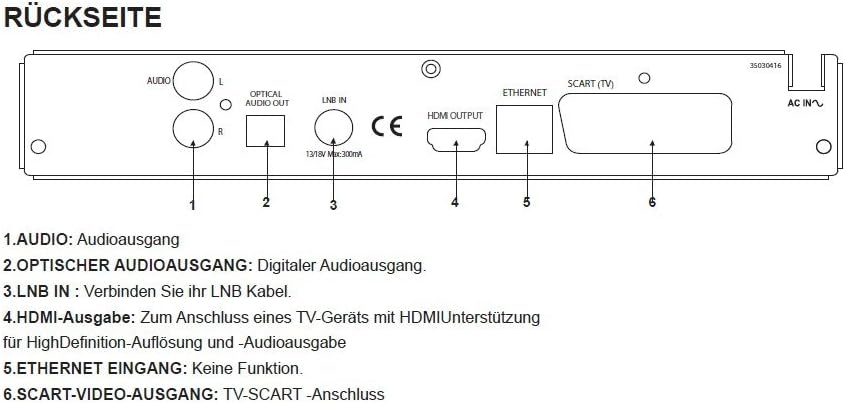
ภาพที่ 2.2: การเชื่อมต่อแผงด้านหลัง
This image illustrates the rear panel of the Wisi OR 397 A receiver, highlighting various input and output ports for audio, video, and satellite signal.
- AUDIO (L/R): Analog audio output ports (RCA) for connecting to an ampไลไฟเออร์หรือระบบสเตอริโอ
- OPTICAL AUDIO OUTPUT: Digital audio output (S/PDIF) for high-quality digital audio connection.
- LNB ใน: Connect your LNB cable from the satellite dish to this input.
- เอาท์พุต HDMI: Connects to an HDMI-enabled TV for high-definition video and audio output.
- ETHERNET INPUT: This port is present but has no active function for this model.
- SCART VIDEO OUTPUT: SCART connection for older televisions or video recorders.
3. การตั้งค่า
3.1 การเชื่อมต่อเริ่มต้น
- การเชื่อมต่อจานรับสัญญาณดาวเทียม: Connect the LNB cable from your satellite dish to the หัวต่อ LNB พอร์ตที่แผงด้านหลังของเครื่องรับสัญญาณ
- การเชื่อมต่อทีวี:
- For High Definition (HD) viewing, connect an HDMI cable from the เอาท์พุต HDMI เชื่อมต่อพอร์ต HDMI บนเครื่องรับสัญญาณเข้ากับช่อง HDMI บนโทรทัศน์ของคุณ
- Alternatively, for standard definition (SD) viewing or older TVs, connect a SCART cable from the SCART VIDEO OUTPUT เชื่อมต่อพอร์ต SCART บนตัวรับสัญญาณเข้ากับช่อง SCART บนโทรทัศน์ของคุณ
- การเชื่อมต่อระบบเสียง (ไม่บังคับ):
- For digital audio, connect an optical cable from the เอาต์พุตเสียงออปติคัล to your audio receiver or soundbar.
- For analog audio, connect RCA cables from the เสียง (ซ้าย/ขวา) ports to your audio system.
- Smartcard Insertion: Carefully insert your ORF+ Smartcard into the Smartcard Slot on the front panel, ensuring the chip faces downwards.
- การเชื่อมต่อไฟฟ้า: Connect the power cable to the receiver and then to a power outlet.
3.2 การตั้งค่าครั้งแรก
Upon powering on the receiver for the first time, it will guide you through an initial setup process. Follow the on-screen prompts to configure language, time zone, and perform a channel scan. The receiver comes pre-programmed with the current Austrian channel list, simplifying this process.
4. คู่มือการใช้งาน
4.1 ฟังก์ชั่นพื้นฐาน
- พลัง: Use the power button on the front panel or the remote control to turn the receiver on or off.
- การเลือกช่อง: Use the Channel Up/Down buttons on the front panel or the remote control to navigate through channels. You can also enter channel numbers directly using the remote.
- การควบคุมระดับเสียง: ปรับระดับเสียงโดยใช้รีโมทคอนโทรล
- การนำทางเมนู: Use the 'Menu' button on the remote to access settings and features. Navigate using arrow keys and confirm with 'OK'.
4.2 คู่มือรายการอิเล็กทรอนิกส์ (EPG)
The receiver features a powerful EPG that provides a multi-day program preview. Press the 'EPG' button on your remote control to access it. You can view program schedules, read program information, and set reminders or recordings directly from the EPG.
4.3 การบันทึกผ่าน USB (PVR)
To use the PVR function, connect an external USB hard drive to the อินพุต USB port on the front panel. Ensure the hard drive is formatted correctly (FAT32 or NTFS). You can schedule recordings via the EPG or initiate instant recordings while watching a program. Please note that USB recording of encrypted channels (e.g., ORF) is only possible with an inserted and active ORF smartcard. Program providers may impose additional restrictions on recording.
4.4 เครื่องเล่นสื่อ
The integrated USB Media Player allows you to play various media files from a connected USB storage device. Connect a USB stick or hard drive to the อินพุต USB. Navigate to the Media Player section in the main menu to browse and play JPEG photos, MP3 music, and MP4 videos.
4.5 การควบคุมโดยผู้ปกครอง
The parental control function allows you to restrict access to certain channels or programs based on age ratings. Access this feature through the main menu settings and follow the instructions to set up a PIN and configure restrictions.
5. การบำรุงรักษา
5.1 การอัปเดตซอฟต์แวร์
The Wisi OR 397 A receiver supports software updates via the ASTRA satellite. It is recommended to periodically check for and install available updates to ensure optimal performance and access to the latest features. Consult the system settings menu for options related to software updates.
5.2 การทำความสะอาด
To clean the receiver, use a soft, dry cloth. Do not use liquid or aerosol cleaners, as they may damage the device. Ensure the receiver is unplugged before cleaning.
6 การแก้ไขปัญหา
If you encounter issues with your Wisi OR 397 A receiver, please refer to the following common solutions before contacting support:
- ไม่มีภาพ/เสียง:
- Check all cable connections (HDMI, SCART, LNB, audio).
- Ensure the TV is set to the correct input source (HDMI 1, AV, etc.).
- ตรวจสอบว่าเครื่องรับสัญญาณเปิดใช้งานอยู่หรือไม่
- ไม่มีสัญญาณ:
- Check the LNB cable connection.
- Ensure the satellite dish is correctly aligned.
- Perform a channel scan from the menu.
- Encrypted Channel Issues (e.g., ORF):
- Ensure your ORF smartcard is correctly inserted (chip facing down).
- Verify your smartcard subscription is active.
- Check for any service messages on screen.
- รีโมทคอนโทรลไม่ทำงาน:
- Replace the batteries (2x AAA).
- ตรวจสอบให้แน่ใจว่าไม่มีสิ่งกีดขวางระหว่างรีโมทและเครื่องรับ
- เครื่องรับไม่ตอบสนอง:
- Perform a power cycle: unplug the receiver from the power outlet, wait 30 seconds, then plug it back in.
7. ข้อมูลจำเพาะ

Image 7.1: Technical Specifications and Remote Control
This image provides a comprehensive table of the Wisi OR 397 A's technical data, including dimensions, weight, and supported audio/video formats, alongside a visual of the remote control.
| คุณสมบัติ | คำอธิบาย |
|---|---|
| ยี่ห้อ | วิสิ |
| หมายเลขรุ่น | OR 397 A |
| สี | สีดำ |
| Reception Standards | DVB-S2 (HDTV), DVB-S |
| เครื่องอ่านการ์ด | Integrated Irdeto Secure Card Reader (for ORF, ATV, Puls4, etc.) |
| เอาท์พุตวิดีโอ | 1x HDMI 1.4, 1x SCART (TV), 1x Cinch-Video (RCA yellow) |
| เอาท์พุตเสียง | Analog (RCA L/R), Digital (Optical S/PDIF), Dolby Digital (AC3) |
| พอร์ต USB | 1x USB 2.0 (compatible with USB 1.1/2.0, 5V DC, max. 500mA) |
| สล็อตหน่วยความจำ | 5000 for TV and Radio channels |
| การใช้พลังงาน | 0.5 Watt in Standby mode |
| เล่มที่tage | 12 โวลต์ (กระแสตรง) |
| ขนาด (กxยxส) | 230 x 160 x 45 มม. |
| น้ำหนัก | 0.7 กก. |
| อุณหภูมิในการทำงาน | 0°C ถึง +45°C |
| อุณหภูมิในการจัดเก็บ | -10°C ถึง +70°C |
8. การรับประกันและการสนับสนุน
For warranty information, please refer to the documentation provided at the time of purchase or contact your retailer. For technical support or further assistance, please consult the official Wisi website or contact their customer service department. Keep your purchase receipt and product model number (OR 397 A) readily available when seeking support.


