1. บทนำ
ขอบคุณสำหรับการซื้อasing the Nobsound NS-10G Mini Bluetooth 5.0 Digital Ampเครื่องขยายเสียงขนาดกะทัดรัดนี้ amplifier is designed to provide high-fidelity audio output for various home audio setups. It features multiple input options, including Bluetooth 5.0, USB, and AUX, making it versatile for connecting to different audio sources. Please read this manual carefully to ensure proper setup and operation of your device.
2. ข้อมูลด้านความปลอดภัย
- ตรวจสอบแหล่งจ่ายไฟ voltage ตรงตามข้อกำหนดที่กำหนดไว้สำหรับ amplifier (DC 9V-24V).
- อย่าให้เครื่องสัมผัสกับน้ำ ความชื้น หรืออุณหภูมิที่สูงหรือต่ำเกินไป
- หลีกเลี่ยงการวาง ampอย่าใช้เครื่องขยายเสียงในที่ที่มีแสงแดดส่องโดยตรงหรือใกล้แหล่งความร้อน
- อย่าพยายามเปิดหรือซ่อมแซมอุปกรณ์ด้วยตนเอง แนะนำให้ส่งช่างผู้ชำนาญเข้ารับบริการทั้งหมด
- เก็บอุปกรณ์ให้ห่างจากเด็ก
- ถอดอะแดปเตอร์ไฟออกในระหว่างที่มีพายุฝนฟ้าคะนองหรือเมื่อไม่ได้ใช้งานเป็นเวลานาน
3. เนื้อหาบรรจุภัณฑ์
กรุณาตรวจสอบแพ็คเกจสำหรับรายการต่อไปนี้:
- 1x Nobsound NS-10G Ampชีวิต
- อะแดปเตอร์ไฟฟ้า 1x
- สายสัญญาณเสียง 1x 3.5mm
- สาย USB 1x
- สาย RCA 1 เส้น
- 1x คู่มือผู้ใช้
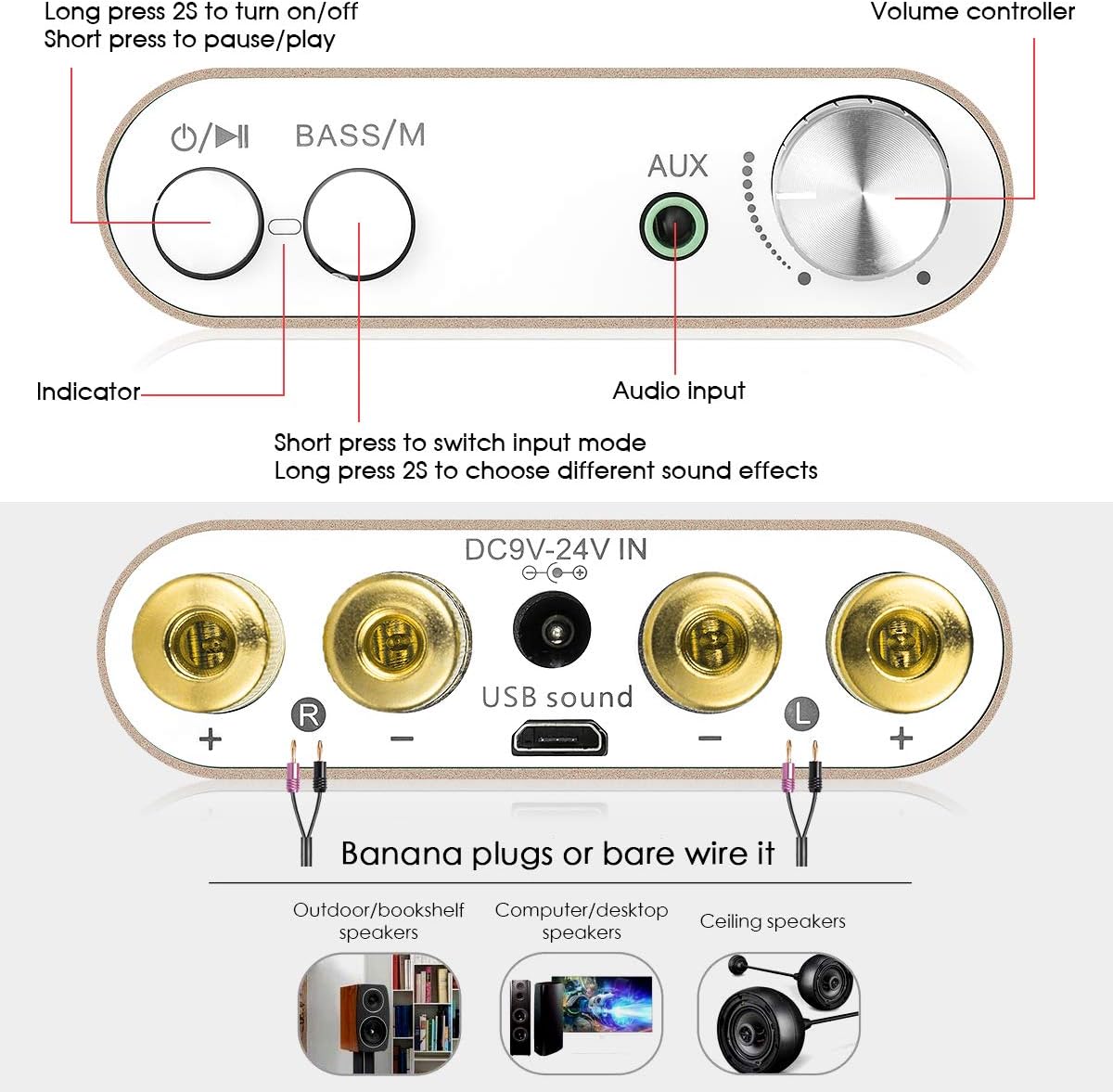
Image: Contents of the Nobsound NS-10G package, showing the amplifier, power adapter, various cables, and the user manual.
4. สินค้าหมดview
4.1 แผงด้านหน้า

Image: Labeled diagram illustrating the front and rear panels of the Nobsound NS-10G ampชีวิต.
- ปุ่มเปิด/ปิด/เล่น/หยุดชั่วคราว: Long press to turn on/off. Short press to pause/play audio.
- Bass/Mode Button: Short press to switch input mode (Bluetooth, USB, AUX). Long press to choose different sound effects (e.g., bass boost).
- ไฟแสดงสถานะ: Displays current status (e.g., power on, input mode).
- อินพุต AUX: 3.5mm audio jack for connecting external audio devices.
- Volume Controller: ปุ่มหมุนเพื่อปรับระดับเสียงเอาต์พุต
4.2 แผงด้านหลัง
- Speaker Terminals (R+, R-, L+, L-): Connect your passive speakers using banana plugs or bare speaker wire. Ensure correct polarity.
- อินพุต DC 9V-24V: Power input port. Connect the provided power adapter here.
- USB Sound Input: USB port for connecting to a computer or other USB audio source.
5. การตั้งค่า
- เชื่อมต่อลำโพง: Connect your passive speakers to the speaker terminals on the rear panel. Ensure the positive (+) terminal of the amplifier connects to the positive (+) terminal of the speaker, and the negative (-) to the negative (-). You can use banana plugs or bare speaker wire.
- เชื่อมต่อแหล่งเสียง:
- บลูทูธ: No physical connection needed initially.
- ยูเอสบี: Connect the provided USB cable from the amplifier's USB Sound input to your computer's USB port.
- ช่องเสริม: Connect an audio device (e.g., smartphone, tablet, CD player) to the 3.5mm AUX input on the front panel using the provided 3.5mm audio cable.
- เชื่อมต่อพลังงาน: Plug the provided power adapter into the DC 9V-24V IN port on the rear panel, then plug the adapter into a wall outlet.
6. คู่มือการใช้งาน
6.1 เปิด/ปิดเครื่อง
กดค้างไว้ เปิด/ปิด/เล่น/หยุดชั่วคราว button on the front panel for approximately 2 seconds to turn the amplifier on or off. The indicator light will illuminate when the device is powered on.
6.2 การเลือกอินพุต
กดสั้น ๆ Bass/Mode button on the front panel to cycle through the available input modes: Bluetooth, USB, and AUX. The indicator light may change or flash to indicate the selected mode.
6.3 การจับคู่บลูทูธ
- สลับสวิตช์ amplifier to Bluetooth input mode using the Bass/Mode button. The indicator light will typically flash, indicating it is in pairing mode.
- บนอุปกรณ์เคลื่อนที่ของคุณ (สมาร์ทโฟน แท็บเล็ต ฯลฯ) เปิดใช้งานบลูทูธและค้นหาอุปกรณ์ที่มีอยู่
- Select "Nobsound NS-10G" or a similar name from the list of devices.
- Once paired, the indicator light on the amplifier will typically become solid, and you will hear a confirmation tone.
ช่องต่อเสียง USB 6.4 ช่อง
When connected to a computer via the USB Sound input, the amplifier acts as an external sound card. Select the USB input mode on the amplifier. Your computer should automatically recognize the device without needing additional drivers. Select the amplifier as the audio output device in your computer's sound settings.
อินพุต AUX 6.5 ช่อง
Connect your audio source to the 3.5mm AUX input on the front panel. Switch the amplifier to AUX input mode. Audio will be played directly from your connected device.
6.6 Bass Adjustment
กดค้างไว้ Bass/Mode button to activate or deactivate the bass enhancement feature. This allows you to adjust the low-frequency output for a richer sound experience.

Image: The Nobsound NS-10G amplifier with the 'BASS/M' button circled, illustrating its function for bass enhancement.
6.7 การควบคุมระดับเสียง
หมุน ตัวควบคุมระดับเสียง knob on the front panel clockwise to increase the volume and counter-clockwise to decrease it.
7. การบำรุงรักษา
- ทำความสะอาด amplifier with a soft, dry cloth. Do not use liquid cleaners or aerosols.
- ตรวจสอบให้แน่ใจว่ามีการระบายอากาศที่เหมาะสมรอบๆ อุปกรณ์เพื่อป้องกันความร้อนสูงเกินไป
- จัดเก็บ ampเก็บไฟฉายไว้ในที่แห้งและเย็นเมื่อไม่ได้ใช้งาน
8 การแก้ไขปัญหา
| ปัญหา | สาเหตุที่เป็นไปได้ | สารละลาย |
|---|---|---|
| ไม่มีไฟฟ้า | อะแดปเตอร์ไฟฟ้าไม่ได้เชื่อมต่อหรือมีข้อบกพร่อง เต้ารับไฟฟ้าไม่ทำงาน | Check power connections. Try a different power outlet. Ensure the power button is long-pressed to turn on. |
| ไม่มีเสียงออก | Incorrect input mode selected; speaker wires loose or incorrectly connected; volume too low; audio source issue. | Verify input mode. Check speaker wire connections and polarity. Increase volume. Test audio source with another device. |
| บลูทูธไม่เชื่อมต่อ | Amplifier not in pairing mode; device too far; interference; incorrect device selected. | ทำให้มั่นใจ amplifier is in Bluetooth input mode and indicator is flashing. Move device closer. Restart both amplifier and Bluetooth device. Forget device on your phone and re-pair. |
| เสียงเพี้ยน | Volume too high; poor audio source quality; faulty cables; speaker impedance mismatch. | Reduce volume. Use high-quality audio files. Replace cables. Ensure speakers are compatible with ampเอาท์พุตของลิไฟเออร์ |
9. ข้อมูลจำเพาะ
- แบบอย่าง: NS-10G
- หมายเลขรุ่น: DZ027
- ยี่ห้อ: ดุ๊ก ออดิโอ
- กำลังขับ: 50W + 50W (Max 100W)
- เวอร์ชันบลูทูธ: 5.0
- อินพุต Voltage: กระแสตรง 9V-24V
- อินพุตเสียง: Bluetooth, USB Sound, 3.5mm AUX
- ความต้านทานของลำโพง: 4-8 Ohms (typical)
- ขนาด (ยาว x กว้าง x สูง): ขนาดโดยประมาณ 80 มม. x 53 มม. x 22 มม. (3.15 x 2.09 x 0.87 นิ้ว)
- น้ำหนักสินค้า: ประมาณ 105 กรัม (0.23 ปอนด์)
- ประเภทการติดตั้ง: การติดตั้งบนพื้นผิว

Image: The Nobsound NS-10G amplifier positioned between two speakers, highlighting its maximum output power of 50W+50W.
10. การรับประกันและการสนับสนุน
For warranty information and technical support, please refer to the documentation provided with your purchase or contact Douk Audio customer service directly. Keep your purchase receipt as proof of purchase.


