การแนะนำ
The IsoAcoustics Gaia I Isolation Feet are engineered to provide superior acoustic isolation for speakers and subwoofers, enhancing sound clarity, focus, and three-dimensional soundstage. This manual provides detailed instructions for proper setup, operation, and maintenance to ensure optimal performance of your audio system.

Image: A set of four IsoAcoustics Gaia I isolation feet, showcasing their sleek design and threaded top for speaker attachment.
เนื้อหาแพ็คเกจ
Your IsoAcoustics Gaia I package includes the following items:
- 4 x Gaia I Isolators
- Thread Adapters (M8-1.25, M12-1.25, 1/4"-20)
- 4 x Floor Sliders
- 4 x Felt Pads (for use with floor sliders on hard surfaces)
- 1 x Compression Washer (for specific speaker designs)
- 1 x Allen Key (for height adjustment)

Image: The complete IsoAcoustics Gaia I kit, showing the four isolators, various thread adapters, floor sliders, and tools neatly organized in their packaging.
การติดตั้งและการตั้งค่า
Proper installation is crucial for achieving the best performance from your Gaia I isolators. Follow these steps carefully:
1. ความจุน้ำหนัก
The Gaia I isolators have a weight capacity of 220 lbs (100 kg) per set of 4 units. Ensure your speaker or subwoofer's weight does not exceed this limit. For a pair of speakers, two sets are typically required.
2. Identify Correct Thread Size
Determine the correct thread size for your speaker or subwoofer. The Gaia I includes M8-1.25, M12-1.25, and 1/4"-20 thread adapters. If unsure, consult your speaker's manual or the IsoAcoustics webไซต์สำหรับความเข้ากันได้
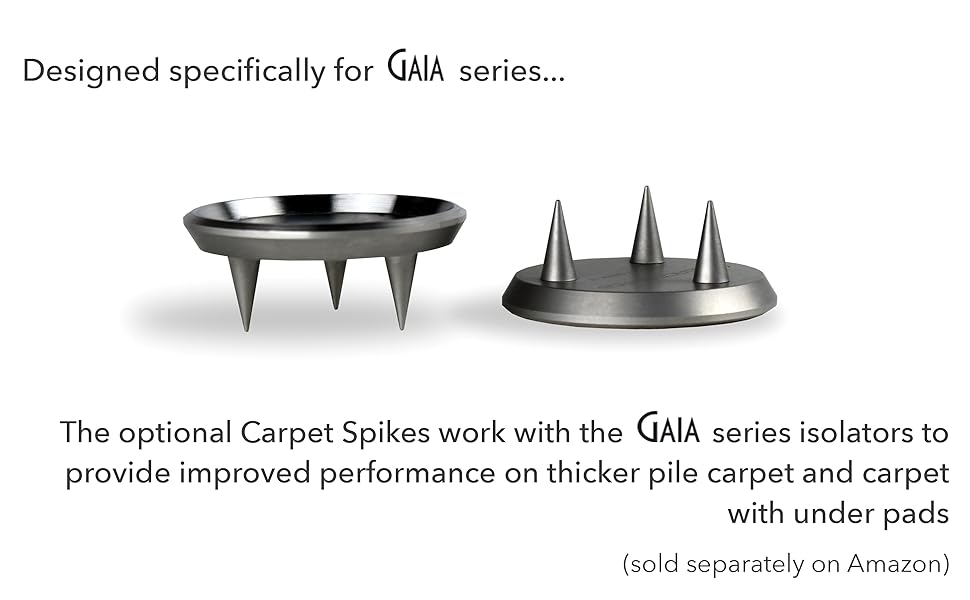
Image: A diagram illustrating how Gaia isolators thread into the base of a speaker, replacing existing feet or spikes, and showing various thread adapter sizes.
3. Attach Isolators
- Carefully tilt your speaker or subwoofer to access the bottom.
- Loosely thread the correct adapter into the mounting hole on the bottom of your speaker.
- Screw the Gaia I isolator onto the threaded adapter. Hand-tighten until the integrated O-ring makes firm contact with the speaker's bottom surface. Continue turning until the O-ring compresses, creating a secure, tensioned connection.
4. Compression Washer (If Needed)
If your speaker's bottom surface does not provide a flush contact for the O-ring (e.g., due to an uneven surface or existing hardware), use the included compression washer. Place it on top of the Gaia I isolator before screwing it onto the adapter.
5. Align Isolators
The Gaia I isolators are directional. Once tightened, rotate each isolator so the IsoAcoustics logo faces the front of the speaker. This ensures proper alignment with the speaker's motive forces for optimal performance.

Image: An IsoAcoustics Gaia I isolator installed under a speaker, showing the logo facing forward for correct orientation.
6. Floor Sliders & Felt Pads
- For hard surfaces (hardwood, tile): Apply the adhesive felt pads to the bottom of each floor slider. Place one prepared slider under each Gaia I isolator.
- For carpeted surfaces: Use the floor sliders without the felt pads. Place one slider under each Gaia I isolator.

Image: An optional carpet spike accessory, designed to work with Gaia series isolators for improved performance on thicker pile carpet.
7. การปรับความสูง
The Gaia I isolators allow for fine height adjustment to level your speaker and ensure even weight distribution. Use the included Allen key to rotate the lower ring:
- ถึง ยก the height, rotate the lower ring to the right.
- ถึง ต่ำกว่า the height, rotate the lower ring to the left.
Adjust each isolator as needed until your speaker is level and stable.
วิดีโอการติดตั้ง
Video: Official IsoAcoustics Gaia Series Installation Video. This video provides a visual guide to the installation process, including thread identification, attaching isolators, and making adjustments.
หลักการทำงาน
The IsoAcoustics Gaia I isolators utilize a patented isolation design to manage the energy of the speaker. This technology effectively decouples the speaker from the supporting surface, reducing vibrations that can resonate through the structure and cause unwanted sound coloration.
- การจัดการแรงสั่นสะเทือน: The isolators prevent vibrations from the speaker from transferring to the supporting surface, which eliminates issues associated with resonant energy.
- Reduced Internal Reflections: They attenuate internal reflections from the supporting surface, preventing them from traveling back up into the speaker cabinet. This reduces smear and improves sound clarity.
- Directional Design: The isolators are designed to be aligned with the speaker's motive forces (drivers pulsating back and forth). This directional approach resists unwanted oscillations, resulting in cleaner detail, greater focus, and a significantly improved acoustic accuracy.

Image: A visual representation of the patented 3-part isolation design, highlighting how it manages energy and attenuates reflections for improved sound clarity.
วิดีโอสาธิตผลิตภัณฑ์
Video: A demonstration challenging listeners to identify the audible difference provided by Gaia isolators, showcasing their impact on sound quality.
การซ่อมบำรุง
The IsoAcoustics Gaia I isolators require minimal maintenance. To clean, simply wipe with a soft, dry cloth. Avoid using harsh chemicals or abrasive materials, as these may damage the finish.
การแก้ไขปัญหา
If you experience less than optimal performance, consider the following:
- Incorrect Thread Size: Ensure the correct thread adapters are securely installed. An improper fit can compromise stability and isolation.
- การจัดแนวที่ไม่ถูกต้อง: Verify that the IsoAcoustics logo on each isolator faces the front of the speaker. Incorrect orientation can reduce the effectiveness of the directional isolation.
- การกระจายน้ำหนักไม่สม่ำเสมอ: Use the height adjustment feature to ensure the speaker is level and weight is evenly distributed across all isolators.
- Exceeding Weight Capacity: Confirm that the total weight of your speaker or subwoofer does not exceed 220 lbs per set of 4 Gaia I isolators.
ข้อมูลจำเพาะ
| คุณสมบัติ | รายละเอียด |
|---|---|
| ชื่อรุ่น | Gaia Series |
| ความจุน้ำหนัก | 220 lbs (100kg) per set of 4 |
| วัสดุ | โลหะ |
| ขนาดสินค้า | ขนาด 2.5 นิ้ว (ลึก) x 2.5 นิ้ว (กว้าง) x 1.9 นิ้ว (สูง) (62 มม. x 62 มม. x 49 มม.) |
| ส่วนประกอบที่รวมอยู่ | Set of 4 speaker feet with thread adaptors |
| อุปกรณ์ที่รองรับ | Floor Studio Monitors, Floor Speakers & Subwoofers |
| ยูพีซี | 810514000195 |

ภาพ: ภาพระยะใกล้ view of a single Gaia I isolator with its dimensions (2.5" width, 1.9" height) clearly indicated.
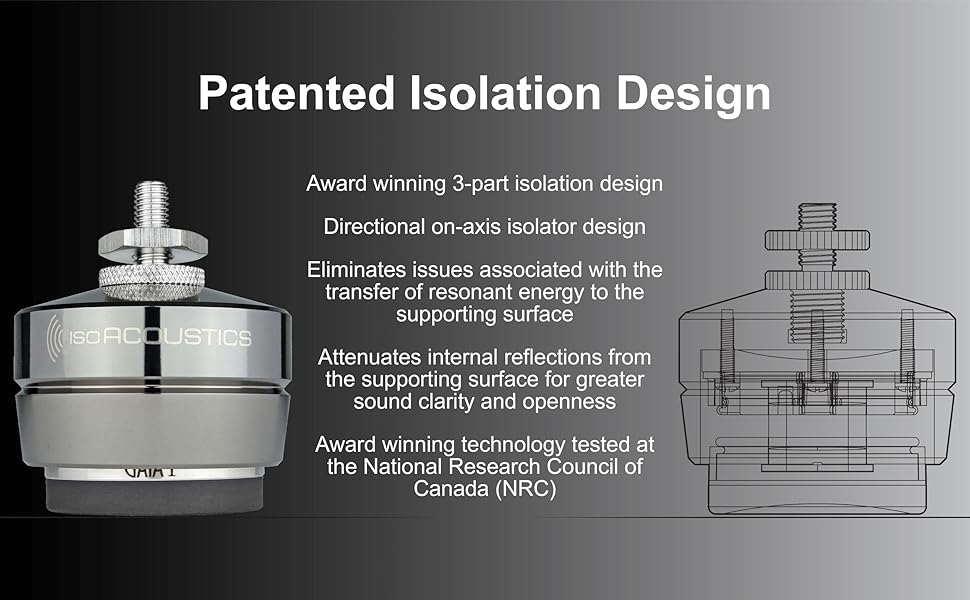
Image: A comparison of the Gaia III, Gaia II, and Gaia I models, illustrating their different sizes and corresponding weight capacities.
การรับประกันและการสนับสนุน
The IsoAcoustics Gaia I Isolation Feet come with a Limited Warranty. For detailed warranty information, product support, or to find alternative thread sizes, please visit the official IsoAcoustics webไซต์ที่ www.isoacoustics.com.


