การแนะนำ
This manual provides detailed instructions for the operation and maintenance of your Sangean All in One Portable HD AM/FM Dual Alarm Clock Radio. Please read this manual thoroughly before using the device to ensure proper functionality and to maximize your listening experience.
มีอะไรอยู่ในกล่อง
เมื่อแกะกล่องแล้ว โปรดตรวจสอบให้แน่ใจว่ามีสิ่งของทั้งหมดที่ระบุไว้ด้านล่างนี้ครบถ้วน:
- Sangean All in One Portable HD AM/FM Dual Alarm Clock Radio
- คู่มือของเจ้าของ
- สายไฟ (for corded electric operation)
คุณสมบัติผลิตภัณฑ์
Your Sangean radio includes the following key features:
- จอแสดงผลขนาดใหญ่: An easy-to-read segment-style LCD screen with backlighting for visibility in various lighting conditions.
- วิทยุ AM/FM: Built-in digital tuner with 20 station preset memory for a wide selection of programming.
- HD Radio: Access to HD Radio broadcasts without subscription fees.
- สัญญาณเตือนคู่: Set two independent wake-up times.
- รีโมทคอนโทรล: Allows for system adjustments from a distance.
- Snooze & Sleep Timer: Functions to temporarily pause alarms or set a timer for the radio to turn off.
- ลำโพงในตัว: Integrated 3-inch speaker with bass and treble tone controls.
- อินพุตเสริม: แจ็คขนาด 3.5 มม. สำหรับเชื่อมต่ออุปกรณ์เสียงภายนอก
- Mega Bass: Bass Reflex Speaker System for enhanced low tones.
- แจ็คหูฟัง: สำหรับการฟังส่วนตัว
การตั้งค่า
- การแกะกล่อง: ถอดวิทยุและอุปกรณ์เสริมทั้งหมดออกจากบรรจุภัณฑ์อย่างระมัดระวัง
- การเชื่อมต่อไฟฟ้า: Connect the power cord to the AC inlet on the back of the radio and then plug it into a standard wall outlet.
- เสาอากาศ: Extend the telescopic antenna for optimal FM and HD Radio reception. For AM reception, the radio has a built-in ferrite bar antenna; adjust the radio's position for best reception.
- เปิดเครื่องครั้งแรก: กดปุ่ม พลัง button to turn on the radio. The display will illuminate.
- การตั้งเวลา: เมื่อใช้งานครั้งแรกหรือหลังจากไฟดับtage, you may need to set the clock. Refer to the "Operating Instructions" section for detailed time setting procedures.
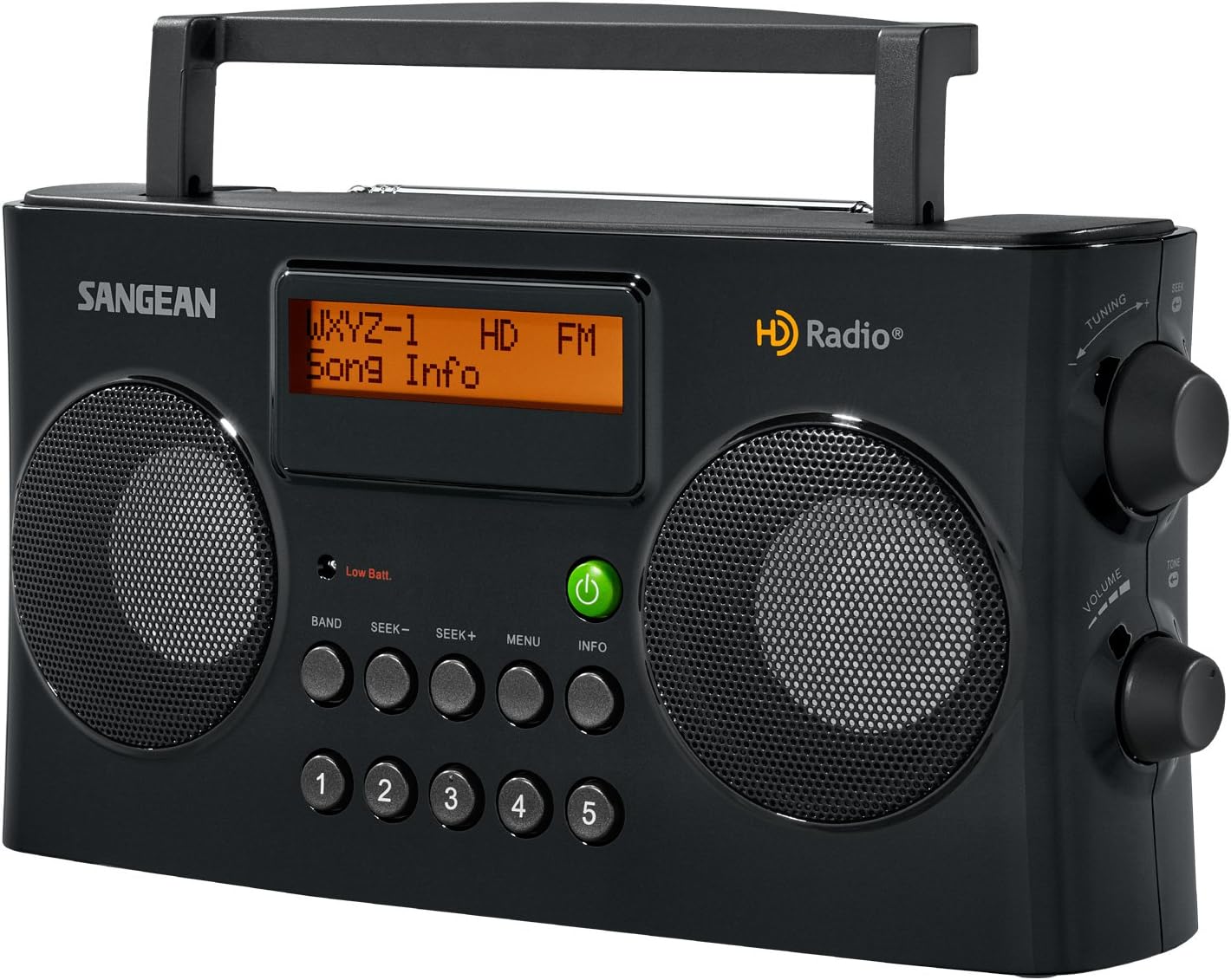
ภาพ: ด้านหน้า view of the Sangean Portable HD AM/FM Radio, showing the display, speakers, and control buttons.
คำแนะนำการใช้งาน
การควบคุมพื้นฐาน
- ปุ่มเปิด/ปิด: เปิดหรือปิดวิทยุ
- ปุ่มปรับระดับเสียง: ปรับระดับเอาต์พุตเสียง
- ปุ่มปรับ: Manually tunes to desired frequencies.
- ปุ่มวง: Switches between AM, FM, and HD Radio bands.
- Seek Buttons (SEEK- / SEEK+): ระบบจะสแกนหาสถานีที่ว่างถัดไปโดยอัตโนมัติ
- ปุ่มเมนู: เข้าถึงการตั้งค่าและตัวเลือกของระบบ
- ปุ่มข้อมูล: Displays station information (e.g., song title, artist) when available on HD Radio.
- ปุ่มตั้งค่าล่วงหน้า (1-5): Quickly recall stored radio stations.
การปรับวิทยุ
- เลือกแบนด์: กดปุ่ม วงดนตรี button to choose between AM, FM, or HD Radio.
- การปรับจูนอัตโนมัติ: กด SEEK- or SEEK+ เพื่อสแกนหาสถานีที่มีกำลังส่งสูงถัดไป
- การปรับด้วยตนเอง: หมุน การปรับแต่ง knob to fine-tune to a specific frequency.
- HD Radio Reception: When tuned to an FM HD Radio station, the display will indicate "HD" and may show additional program information.
การตั้งค่า Presets
- ปรับไปยังสถานีที่ต้องการ
- กดค้างไว้หนึ่งใน พรีเซ็ต buttons (1-5) until the display confirms the station is saved.
- หากต้องการเรียกคืนค่าที่ตั้งไว้ล่วงหน้า เพียงกดปุ่มที่เกี่ยวข้อง พรีเซ็ต ปุ่ม.
ฟังก์ชั่นนาฬิกาปลุก
- การตั้งค่าการเตือน: ใช้ เมนู button to navigate to the alarm settings. Follow the on-screen prompts to set Alarm 1 and Alarm 2, including wake-up time and alarm source (radio or buzzer).
- ปิดเสียงเตือนชั่วคราว: เมื่อสัญญาณเตือนดังขึ้น ให้กดปุ่ม งีบหลับ button (often integrated with another button, refer to specific button layout on device) to temporarily silence it. The alarm will sound again after a set interval.
- เวลานอน: To fall asleep to the radio, activate the sleep timer through the เมนู. Select the desired duration (e.g., 15, 30, 60 minutes) after which the radio will automatically turn off.
อินพุตเสริม
Connect an external audio device (e.g., MP3 player, smartphone) to the 3.5mm AUX-in jack using an audio cable. Select the AUX input source via the วงดนตรี or เมนู button to play audio from the connected device.
การใช้หูฟัง
Plug standard 3.5mm headphones into the headphone jack for private listening. The built-in speaker will automatically mute when headphones are connected.

ภาพ: มุมเอียง view of the Sangean Portable HD AM/FM Radio placed on a white surface, illustrating its compact size.
การซ่อมบำรุง
- การทำความสะอาด: Use a soft, dry cloth to clean the exterior of the radio. Do not use abrasive cleaners or solvents, as they may damage the finish.
- พื้นที่จัดเก็บ: เมื่อไม่ได้ใช้งานเป็นเวลานาน ควรเก็บวิทยุไว้ในที่แห้งและเย็น หลีกเลี่ยงแสงแดดโดยตรงและอุณหภูมิที่สูงหรือต่ำเกินไป
- สายไฟ: ตรวจสอบสายไฟอย่างสม่ำเสมอเพื่อดูว่ามีร่องรอยความเสียหายหรือไม่ หากพบความเสียหาย ให้หยุดใช้งานและติดต่อฝ่ายบริการลูกค้า
การแก้ไขปัญหา
| ปัญหา | สาเหตุที่เป็นไปได้ | สารละลาย |
|---|---|---|
| ไม่มีไฟฟ้า | สายไฟไม่ได้เชื่อมต่ออย่างถูกต้อง | Ensure the power cord is securely plugged into the radio and a working wall outlet. |
| การรับสัญญาณวิทยุไม่ดี | เสาอากาศไม่ยืดออกหรือพื้นที่สัญญาณไม่ดี | Fully extend the telescopic antenna for FM/HD Radio. For AM, rotate the radio for best reception. Try moving the radio to a different location. |
| ไม่มีเสียงออกจากลำโพง | Volume too low or headphones connected. | Increase the volume. Check if headphones are plugged in; remove them if you want sound from the speaker. |
| นาฬิกาปลุกไม่ส่งเสียง | ไม่ได้ตั้งปลุกหรือระดับเสียงเบาเกินไป | Verify alarm settings in the menu. Ensure alarm volume is set to an audible level. |
ข้อมูลจำเพาะ
| คุณสมบัติ | รายละเอียด |
|---|---|
| หมายเลขรุ่น | 5582690107 |
| ขนาดสินค้า | ยาว 10.24 นิ้ว x กว้าง 7.61 นิ้ว x สูง 5.35 นิ้ว |
| เทคโนโลยีการเชื่อมต่อ | ตัวช่วย |
| เทคโนโลยีจูนเนอร์ | เอเอ็ม,เอฟเอ็ม |
| แหล่งพลังงาน | สายไฟ |
| รองรับคลื่นวิทยุ | เอเอ็ม,เอฟเอ็ม |
| ความถี่ | 108 MHz (FM max frequency) |
| คุณสมบัติพิเศษ | พกพาได้ |
การรับประกันและการสนับสนุน
This product comes with an Owner's Manual which contains detailed warranty information. For specific warranty terms, conditions, and duration, please refer to the included Owner's Manual. For technical support or service inquiries, please contact Sangean customer service through their official website or the contact information provided in your Owner's Manual.


