1. บทนำและเรื่องอื่นๆview
The Nexxt Solutions Acrux 750-AC is a dual-band media gigabit wireless AC router designed for homes and small businesses requiring high-speed network connectivity. It supports transmission speeds up to 750Mbps, utilizing both the 5.0GHz band (433Mbps) and the 2.4GHz band (300Mbps) simultaneously. This router is equipped with a USB port for file sharing, making it suitable for media-connected environments. Key features include Wi-Fi Multimedia (WMM) technology for prioritizing bandwidth-intensive applications like HD streaming, and two detachable 5dBi omnidirectional antennas for extended coverage and reduced dead spots. The device also supports Wi-Fi Protected Setup (WPS) for easy and secure wireless connections.
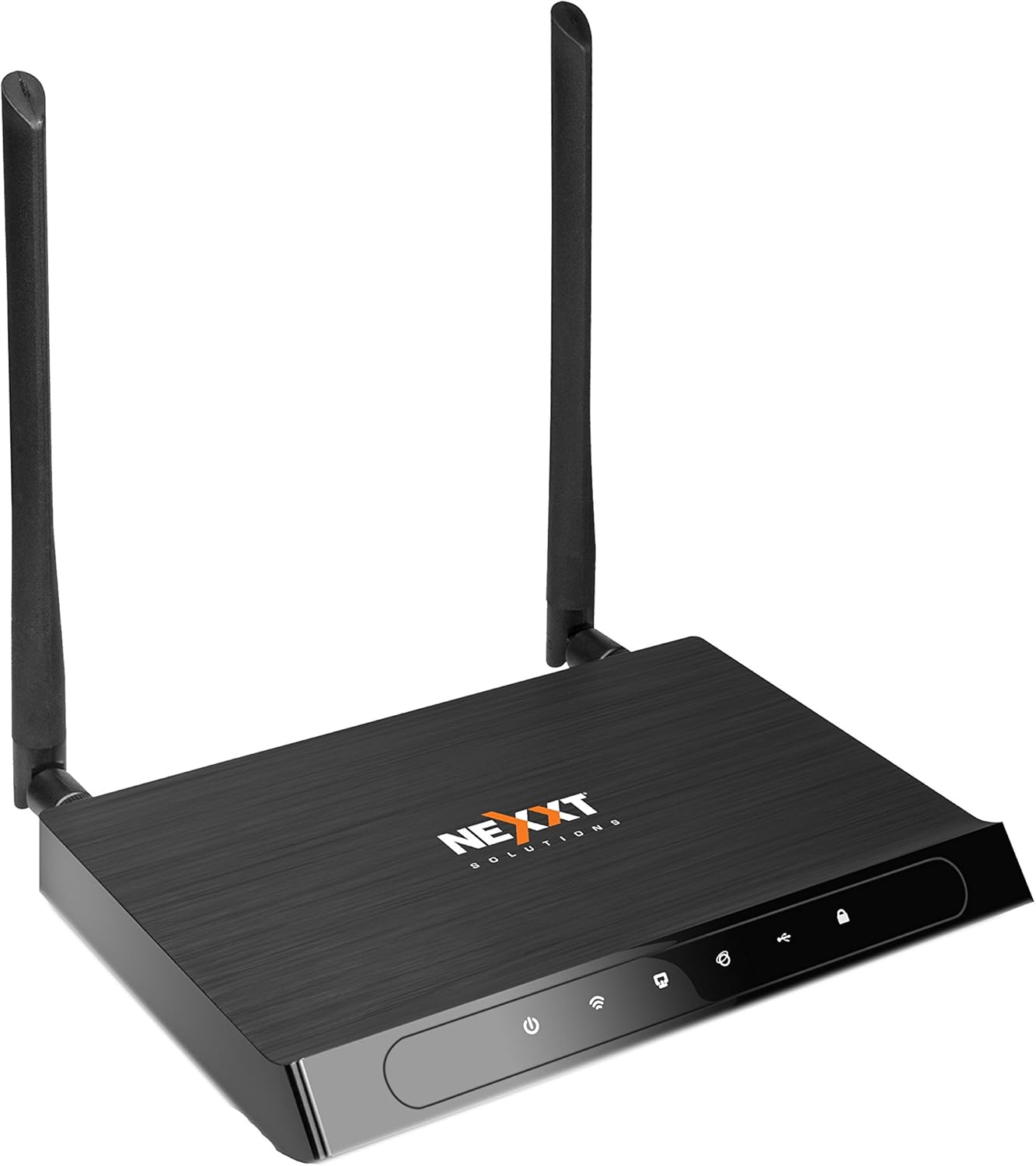
รูปที่ 1 : ด้านหน้า view of the Acrux 750-AC router, showcasing its sleek design and two external antennas.
2. คุณสมบัติของผลิตภัณฑ์
- Wireless AC Router: Supports the latest 802.11ac standard for faster wireless speeds.
- Simultaneous Dual-Band: Operates on both 2.4GHz (300Mbps) and 5.0GHz (433Mbps) bands concurrently for a combined throughput of 750Mbps.
- พอร์ต Gigabit Ethernet: Features four 10/100/1000Mbps LAN ports for high-speed wired connections.
- พอร์ต USB: Includes a USB 2.0 port for file and print sharing across the network.
- ขยายการครอบคลุม: Equipped with two detachable 5dBi omnidirectional antennas for improved signal reach and coverage.
- เทคโนโลยี Beamforming: Creates a direct link for data transmission, enhancing wireless efficiency and range.
- WMM Technology: Wi-Fi Multimedia prioritizes traffic for bandwidth-intensive applications such as HD video streaming and online gaming.
- WPS (การตั้งค่าป้องกัน Wi-Fi): Allows for easy and secure connection of WPS-supported wireless adapters with the push of a button.
- Advanced Wireless Security: Supports 64/128-bit WEP and WPA/WPA2-PSK encryption protocols.
- WDS Capability: Wireless Distribution System allows for network expansion by linking multiple devices.

Figure 2: Illustration of the router's dual-band wireless coverage, showing both 2.4GHz (max range) and 5.0GHz (performance) signals within a typical home setup.
3. ฮาร์ดแวร์โอเวอร์view
Familiarize yourself with the ports and buttons on your Acrux 750-AC router.

Figure 3: Rear panel of the Acrux 750-AC router, detailing the various ports and controls.
- 1. WPS/Reset Button: Press briefly to activate WPS for easy wireless connection. Press and hold for 10 seconds to reset the router to factory default settings.
- 2. Wi-Fi On/Off Button: เปิดหรือปิดสัญญาณไร้สาย
- 3. WAN Port (Blue): Connects to your DSL/Cable modem or Ethernet line for internet access.
- 4. LAN Ports (Yellow, LAN1-LAN4): พอร์ต Gigabit Ethernet สี่พอร์ตสำหรับเชื่อมต่ออุปกรณ์แบบมีสาย เช่น คอมพิวเตอร์ คอนโซลเกม หรือสมาร์ททีวี
- 5. พอร์ต USB 2.0: For connecting USB storage devices for file sharing or USB printers for network printing.
- 6. ปุ่มเปิด/ปิด: Powers the router on or off.
- 7. กำลังไฟฟ้าเข้าเครื่องปรับอากาศ: เชื่อมต่อกับอะแดปเตอร์ไฟฟ้าที่ให้มา
4. คู่มือการติดตั้ง
4.1 การเชื่อมต่อฮาร์ดแวร์เริ่มต้น
- การวางตำแหน่ง: Place the router in a central location to maximize wireless coverage, away from obstructions and interference sources.
- เชื่อมต่อเสาอากาศ: Screw the two detachable antennas firmly onto the connectors at the rear of the router.
- เชื่อมต่อกับโมเด็ม: Connect one end of an Ethernet cable to the WAN port (blue) on the router and the other end to the Ethernet port on your DSL/Cable modem.
- เชื่อมต่อพลังงาน: Plug the power adapter into the A/C Power Input port on the router and then into a power outlet. Press the On/Off button to power on the router.
- ตรวจสอบตัวบ่งชี้: Wait for the power, WAN, and Wi-Fi indicators on the router's front panel to stabilize, indicating a successful connection.
4.2 การเข้าถึง Web อินเตอร์เฟซการจัดการ
- เชื่อมต่ออุปกรณ์: Connect a computer to one of the LAN ports (yellow) on the router using an Ethernet cable, or connect wirelessly using the default Wi-Fi name (SSID) and password found on the router's label.
- เปิด Web เบราว์เซอร์: เปิดตัว web เบราว์เซอร์ (เช่น Chrome, Firefox, Edge)
- ป้อนที่อยู่ IP: ในแถบที่อยู่ ให้พิมพ์ที่อยู่ IP เริ่มต้นของเราเตอร์ (โดยทั่วไปคือ
192.168.0.1or192.168.1.1, refer to the label on your router for the exact address) and press Enter. - เข้าสู่ระบบ: ป้อนชื่อผู้ใช้และรหัสผ่านเริ่มต้น (โดยปกติ)
adminสำหรับทั้งสองแบบ หรือตามที่ระบุไว้บนฉลากของเราเตอร์) - เรียกใช้ตัวช่วยการตั้งค่า: Follow the on-screen setup wizard to configure your internet connection, wireless network names (SSIDs) for both 2.4GHz and 5GHz bands, and set strong passwords.
5. คู่มือการใช้งาน
5.1 การเชื่อมต่ออุปกรณ์
- อุปกรณ์แบบมีสาย: Connect devices like desktop computers, smart TVs, or gaming consoles to the yellow Gigabit LAN ports using Ethernet cables.
- อุปกรณ์ไร้สาย: On your wireless device (smartphone, tablet, laptop), search for available Wi-Fi networks. Select your router's 2.4GHz or 5GHz SSID and enter the Wi-Fi password you configured during setup.
- การใช้ WPS: For WPS-compatible devices, press the WPS button on the router, then activate WPS on your device within two minutes to establish a secure connection without entering a password.
5.2 ยูเอสบี File การแบ่งปัน
The USB 2.0 port allows you to share files from a connected USB storage device (e.g., USB flash drive, external hard drive) across your network.
- เชื่อมต่ออุปกรณ์ USB: Insert your USB storage device into the USB 2.0 port on the router.
- Configure Sharing: เข้าถึงเราเตอร์ web management interface. Navigate to the USB Sharing or Storage section to enable and configure file sharing settings, including user access permissions.
- เข้าถึง Files: On network-connected devices, you can typically access the shared USB drive through network locations (e.g., "Network" in Windows File Explorer, "Connect to Server" in macOS Finder).
คุณสมบัติขั้นสูง 5.3 ประการ
- WMM (Wi-Fi Multimedia): This feature is enabled by default and automatically prioritizes network traffic for applications requiring high bandwidth, such as video streaming and online gaming, to ensure a smoother experience.
- การสร้างลำแสง: This technology focuses the Wi-Fi signal directly towards connected devices, improving signal strength and range for those devices. It operates automatically with compatible devices.
- WDS (ระบบกระจายสัญญาณไร้สาย): Allows the router to connect wirelessly to other access points or routers to extend the wireless network coverage. Configuration for WDS is available in the router's web interface under wireless settings.
6. การบำรุงรักษา
- อัพเดตเฟิร์มแวร์: ตรวจสอบเว็บไซต์อย่างเป็นทางการของ Nexxt Solutions เป็นระยะ webเว็บไซต์สำหรับอัปเดตเฟิร์มแวร์ การอัปเดตเฟิร์มแวร์จะช่วยเพิ่มประสิทธิภาพ เพิ่มคุณสมบัติใหม่ และแก้ไขช่องโหว่ด้านความปลอดภัย โปรดปฏิบัติตามคำแนะนำที่ให้มาพร้อมกับการอัปเดตเฟิร์มแวร์อย่างระมัดระวัง
- รีบูตปกติ: Rebooting your router every few weeks can help clear its memory and resolve minor performance issues. Simply unplug the power adapter for 10-15 seconds, then plug it back in.
- การทำความสะอาดทางกายภาพ: รักษาเราเตอร์ให้สะอาดและปราศจากฝุ่น ใช้ผ้าแห้งนุ่มเช็ดทำความสะอาดภายนอก ตรวจสอบให้แน่ใจว่ารูระบายอากาศไม่ถูกอุดตันเพื่อป้องกันความร้อนสูงเกินไป
- รหัสผ่านที่ปลอดภัย: Regularly change your Wi-Fi and router login passwords to strong, unique combinations to maintain network security.
7 การแก้ไขปัญหา
ปัญหาทั่วไปและวิธีแก้ไข:
- ไม่มีอินเทอร์เน็ต:
- Check if the WAN indicator on the router is lit. If not, ensure the Ethernet cable from your modem is securely connected to the router's blue WAN port.
- Reboot your modem first, then the router. Wait for both devices to fully power on and establish connections.
- ตรวจสอบการตั้งค่าการเชื่อมต่ออินเทอร์เน็ตในเราเตอร์ของคุณ web interface. Ensure they match the settings provided by your Internet Service Provider (ISP).
- Slow Wireless Speed or Frequent Disconnections:
- Ensure the router is placed centrally and away from potential interference sources (e.g., cordless phones, microwaves, thick walls).
- Try changing the wireless channel in the router's settings to a less congested one. Use a Wi-Fi analyzer app to find optimal channels.
- Confirm your devices are connecting to the appropriate band (5GHz for closer, faster connections; 2.4GHz for longer range).
- Update the wireless drivers on your connected devices.
- ไม่สามารถเข้าถึงเราเตอร์ได้ Web อินเทอร์เฟซ:
- Ensure your device is connected to the router (either via Ethernet or Wi-Fi).
- Verify you are typing the correct IP address (e.g.,
192.168.0.1) ลงในแถบที่อยู่ของเบราว์เซอร์ - ล้างแคชและคุกกี้ของเบราว์เซอร์ของคุณหรือลองใช้เบราว์เซอร์อื่น
- ปิดใช้งานไฟร์วอลล์หรือซอฟต์แวร์ป้องกันไวรัสบนคอมพิวเตอร์ของคุณชั่วคราว
- ลืมรหัสผ่านเข้าสู่ระบบเราเตอร์:
- If you cannot recall your router's login password, you will need to perform a factory reset. Locate the WPS/Reset button on the back of the router. With the router powered on, press and hold this button for approximately 10 seconds until the lights flash. The router will then revert to its factory default settings, including the default login credentials (usually
admin/admin). บันทึก: A factory reset will erase all your custom settings, requiring you to reconfigure the router.
- If you cannot recall your router's login password, you will need to perform a factory reset. Locate the WPS/Reset button on the back of the router. With the router powered on, press and hold this button for approximately 10 seconds until the lights flash. The router will then revert to its factory default settings, including the default login credentials (usually
8. ข้อมูลจำเพาะ
| คุณสมบัติ | รายละเอียด |
|---|---|
| หมายเลขรุ่น | ARL02754U1 |
| ไร้มาตรฐาน | IEEE 802.11ac/n/b/g |
| ความถี่ไร้สาย | 2.4 GHz and 5 GHz (Simultaneous Dual-Band) |
| ความเร็วสูงสุดไร้สาย | Up to 750 Mbps (300 Mbps at 2.4GHz, 433 Mbps at 5.0GHz) |
| พอร์ตอีเทอร์เน็ต | 4 x 10/100/1000 Mbps Gigabit LAN Ports, 1 x 10/100/1000 Mbps WAN Port |
| พอร์ต USB | พอร์ต USB 1 2.0 พอร์ต |
| เสาอากาศ | 2 x Detachable 5dBi Omni-directional Antennas |
| ความปลอดภัย | 64/128-bit WEP, WPA/WPA2-PSK encryption |
| ขนาด | 27.94 x 22.86 x 6.35 ซม. (ขนาดบรรจุภัณฑ์โดยประมาณ) |
| น้ำหนักสินค้า | 726 กรัม (1.6 ปอนด์) |
| ผู้ผลิต | เน็กซ์โซลูชั่น |
9. การรับประกันและการสนับสนุน
The Nexxt Solutions Acrux 750-AC router comes with a รับประกัน 5 ปี, demonstrating the manufacturer's commitment to quality and reliability. For technical assistance, troubleshooting, or warranty claims, please contact Nexxt Solutions customer support. US-based technical support is available to assist you with installation and operational queries.
For the most up-to-date support information, FAQs, and contact details, please visit the official Nexxt Solutions website. You may also find additional resources by searching for "Nexxt Solutions" online or referring to the contact information provided with your product packaging.


