Biconic Bluetooth Tough Weatherproof Portable Wireless Speaker User Manual
รุ่น: ABC-AU-BS-103-BK
แบรนด์: บายเทค
1. สินค้าหมดview
The Biconic Bluetooth Tough Weatherproof Portable Wireless Speaker is designed for robust outdoor and indoor use, providing enhanced bass and clear audio. Its wireless capabilities allow for easy connection to various devices, and its durable, weatherproof construction ensures reliable performance in diverse environments.

รูปที่ 1.1 : ด้านหน้า view of the Biconic Bluetooth Speaker, showcasinด้วยดีไซน์ที่แข็งแรงทนทานและตะแกรงลำโพง
คุณสมบัติหลัก:
- การเชื่อมต่อไร้สาย: Seamless Bluetooth pairing with smartphones, tablets, and other compatible devices.
- การออกแบบที่ทนฝนและแดด: IPX6 water resistance protects against strong jets of water, making it suitable for outdoor use.
- เพิ่มพลังเสียงเบส: Delivers rich, deep bass for a superior audio experience.
- พกพาได้: Compact design with a durable strap for easy transport.
- เวลาเล่นนาน: Up to 4 hours of continuous audio playback on a single charge.
2. ข้อมูลด้านความปลอดภัย
Please read all safety warnings and instructions carefully before using this product to ensure safe operation and prevent damage.
- Do not expose the speaker to extreme temperatures (hot or cold).
- Do not immerse the speaker in water. While it is IPX6 water resistant, it is not designed for submersion.
- Keep the speaker away from direct heat sources, open flames, and flammable liquids.
- Use only the provided charging cable and a compatible power adapter (5V/1A recommended) to charge the device.
- Do not attempt to disassemble, repair, or modify the speaker. This will void the warranty and may cause harm.
- เก็บให้พ้นจากมือเด็ก
- ทำความสะอาดลำโพงด้วยผ้านุ่มและแห้ง ห้ามใช้น้ำยาทำความสะอาดหรือสารละลายที่มีฤทธิ์กัดกร่อน
3. เนื้อหาบรรจุภัณฑ์
ตรวจสอบให้แน่ใจว่าสินค้าทุกชิ้นอยู่ในกล่องครบถ้วนก่อนแกะกล่อง:
- Biconic Bluetooth Tough Weatherproof Portable Wireless Speaker
- สายชาร์จ USB
- คู่มือการใช้งาน (เอกสารนี้)
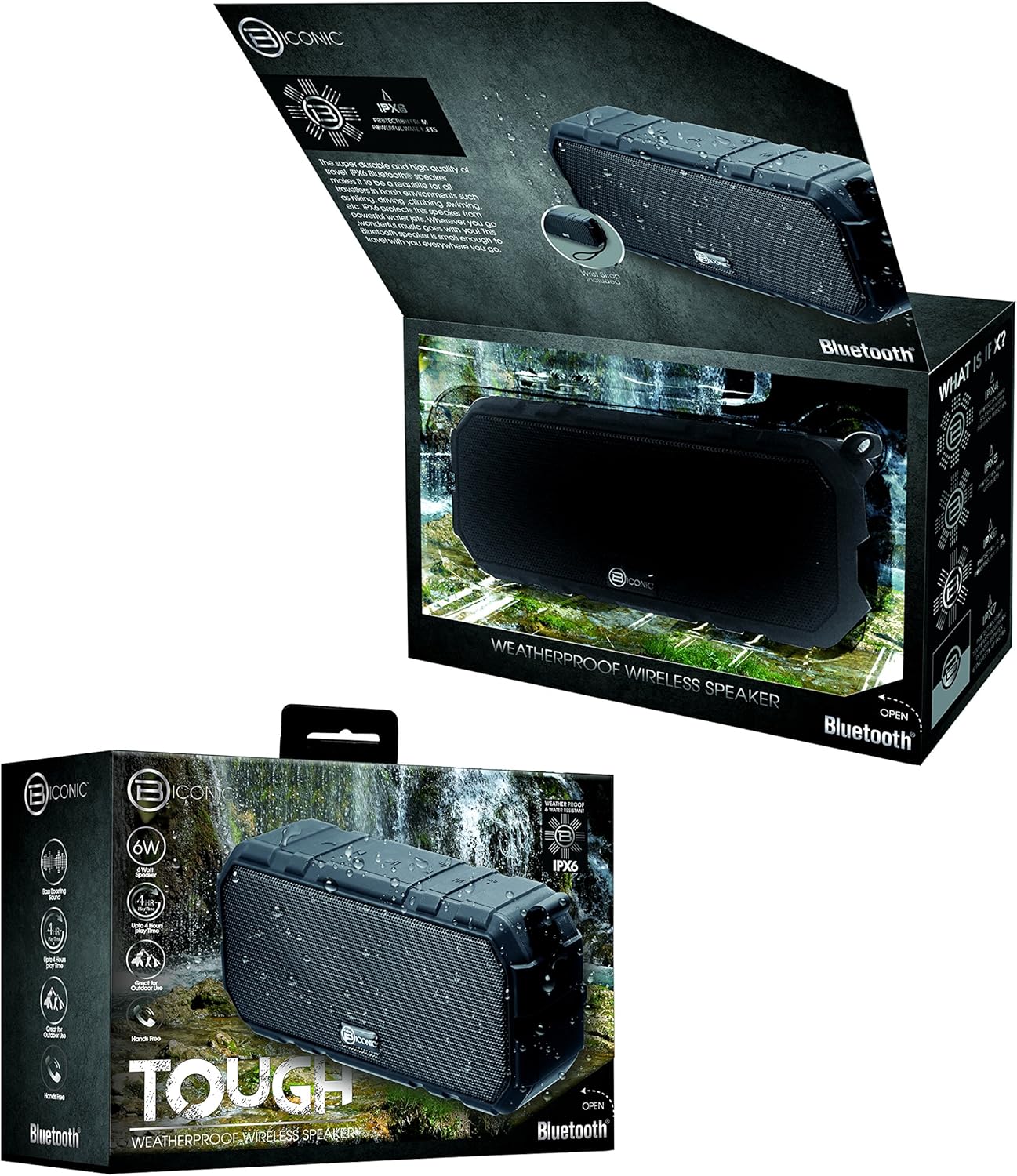
Figure 3.1: The Biconic Bluetooth Speaker shown with its retail packaging, indicating typical package contents.
4. การตั้งค่า
4.1 การชาร์จลำโพง
- Locate the charging port on the side of the speaker. This port is typically protected by a rubber flap to maintain water resistance.
- เปิดแถบยาง
- ต่อปลายด้านเล็กของสายชาร์จ USB ที่ให้มาเข้ากับพอร์ตชาร์จของลำโพง
- ต่อปลายสาย USB ด้านที่ใหญ่กว่าเข้ากับแหล่งจ่ายไฟ USB (เช่น พอร์ต USB ของคอมพิวเตอร์ อะแดปเตอร์ติดผนัง USB)
- ไฟแสดงสถานะการชาร์จจะสว่างขึ้น โดยปกติจะเป็นสีแดง เพื่อแสดงว่าลำโพงกำลังชาร์จอยู่
- Once fully charged (approximately 2-3 hours), the indicator light will change color (e.g., turn off or turn blue/green). Disconnect the charging cable and close the rubber flap securely to maintain water resistance.
4.2 การเปิด/ปิดเครื่อง
- การเปิดเครื่อง: Press and hold the Power button (usually marked with a power symbol) for a few seconds until you hear an audible tone or see an indicator light illuminate.
- วิธีปิดเครื่อง: Press and hold the Power button again for a few seconds until you hear an audible tone or the indicator light turns off.
5. คู่มือการใช้งาน
5.1 การจับคู่บลูทูธ
Before first use, you need to pair the speaker with your Bluetooth-enabled device.
- Ensure the speaker is fully charged and powered on. It will automatically enter pairing mode, indicated by a flashing blue LED light.
- On your smartphone, tablet, or other Bluetooth device, go to the Bluetooth settings menu.
- เปิดใช้งาน Bluetooth หากยังไม่ได้เปิดใช้งาน
- Scan for available devices. You should see "Biconic Speaker" or a similar name appear in the list.
- Select "Biconic Speaker" to connect. Once successfully paired, you will hear a confirmation tone, and the blue LED light on the speaker will stop flashing and remain solid.
- หากได้รับแจ้งให้ป้อนรหัสผ่าน ให้ป้อน "0000"
- ลำโพงจะเชื่อมต่อกับอุปกรณ์ที่จับคู่ไว้ล่าสุดโดยอัตโนมัติเมื่อเปิดเครื่อง หากอุปกรณ์อยู่ในระยะและเปิดใช้งาน Bluetooth ไว้
5.2 การเล่นเพลง
Once paired, you can control music playback directly from your connected device or using the speaker's controls.
- เล่น/หยุดชั่วคราว: Press the Play/Pause button (often marked with a triangle or || symbol) once to play or pause music.
- ปรับระดับเสียงขึ้น: Press the Volume Up button (+) to increase the volume.
- ลดเสียงลง: Press the Volume Down button (-) to decrease the volume.
- เพลงถัดไป: Press and hold the Volume Up button (+) for a few seconds to skip to the next track.
- แทร็กก่อนหน้า: Press and hold the Volume Down button (-) for a few seconds to go to the previous track.

รูปที่ 5.1: ด้านบน view of the Biconic Bluetooth Speaker, highlighting the control buttons for power, volume, and playback.
5.3 Answering Calls (Hands-Free Function)
The speaker supports hands-free calling when connected to a smartphone.
- รับสาย: When a call comes in, press the Play/Pause button once to answer.
- วางสาย: During a call, press the Play/Pause button once to end the call.
- ปฏิเสธสาย: กดปุ่มเล่น/หยุดชั่วคราวค้างไว้สองสามวินาทีเพื่อปฏิเสธสายเรียกเข้า
6. การบำรุงรักษา
การบำรุงรักษาอย่างถูกวิธีจะช่วยให้ลำโพงของคุณมีอายุการใช้งานยาวนานและทำงานได้อย่างมีประสิทธิภาพสูงสุด
- การทำความสะอาด: เช็ดลำโพงด้วย d . นุ่มๆamp cloth. Do not use harsh chemicals, solvents, or abrasive cleaners. Ensure the charging port flap is closed before cleaning with a damp ผ้า.
- พื้นที่จัดเก็บ: เก็บลำโพงไว้ในที่แห้งและเย็น หลีกเลี่ยงแสงแดดโดยตรงและอุณหภูมิที่สูงหรือต่ำเกินไปเมื่อไม่ได้ใช้งานเป็นเวลานาน
- การดูแลแบตเตอรี่ To preserve battery life, fully charge the speaker before storing it for long periods. Recharge every 3-6 months if not used regularly.
- ความต้านทานน้ำ: Always ensure the rubber flap covering the charging port is securely closed to maintain the IPX6 water resistance rating.

Figure 6.1: The Biconic Bluetooth Speaker demonstrating its water-resistant capabilities, highlighting the importance of proper sealing for maintenance.
7 การแก้ไขปัญหา
| ปัญหา | สาเหตุที่เป็นไปได้ | สารละลาย |
|---|---|---|
| ลำโพงไม่เปิดเครื่อง | แบตเตอรี่หมด | ชาร์จลำโพงให้เต็ม |
| ไม่สามารถจับคู่กับอุปกรณ์บลูทูธได้ | Bluetooth is off on your device; speaker is not in pairing mode; device is too far. | Ensure Bluetooth is enabled on your device. Power off and on the speaker to re-enter pairing mode. Move device closer to the speaker (within 10 meters). Forget the device on your phone and try pairing again. |
| ไม่มีเสียงหรือเสียงเบา | ระดับเสียงของลำโพงหรืออุปกรณ์ต่ำเกินไป ไม่ได้เชื่อมต่อลำโพง | Increase volume on both the speaker and your connected device. Ensure the speaker is properly paired and connected. |
| ความผิดเพี้ยนของเสียง | ระดับเสียงสูงเกินไป; สัญญาณรบกวน; แบตเตอรี่เหลือน้อย | Reduce volume. Move speaker away from other electronic devices. Charge the speaker. |
8. ข้อมูลจำเพาะ
| คุณสมบัติ | รายละเอียด |
|---|---|
| หมายเลขรุ่น | ABC-AU-BS-103-BK |
| ยี่ห้อ | บายเทค |
| เทคโนโลยีการเชื่อมต่อ | บลูทูธ |
| กำลังขับสูงสุดของลำโพง | 3 วัตต์ |
| โหมดเอาต์พุตเสียง | สเตอริโอ |
| ระดับการต้านทานน้ำ | IPX6 (Water resistant, not submersible) |
| ประเภทแบตเตอรี่ | แบตเตอรี่ลิเธียมไอออน 1 ก้อน (จำเป็น) |
| เวลาเล่น | นานถึง 4 ชั่วโมง |
| ขนาดสินค้า | 2.54 x 2.54 x 2.54 ซม. |
| น้ำหนักสินค้า | 522 กรัม |
| ประเภทการติดตั้ง | โต๊ะวางของ |
9. การรับประกันและการสนับสนุน
For warranty information and technical support, please contact Bytech customer service. Details are typically provided on the product packaging or the official Bytech webเว็บไซต์.
โปรดเก็บหลักฐานการซื้อไว้เพื่อใช้ในกรณีเรียกร้องการรับประกัน
หมายเหตุ: เงื่อนไขการรับประกันอาจแตกต่างกันไปตามแต่ละภูมิภาค


