1. บทนำและเรื่องอื่นๆview
This manual provides essential information for the safe and effective installation, operation, and maintenance of the Yaskawa CIMR-7.5G2 Variable Frequency Drive (VFD). The CIMR-7.5G2 is a robust industrial drive designed for precise speed control of three-phase AC induction motors, operating on a 200-220V, 50-60 Hz, 3-phase power supply. It is crucial to read and understand this manual completely before attempting any installation, operation, or maintenance procedures.
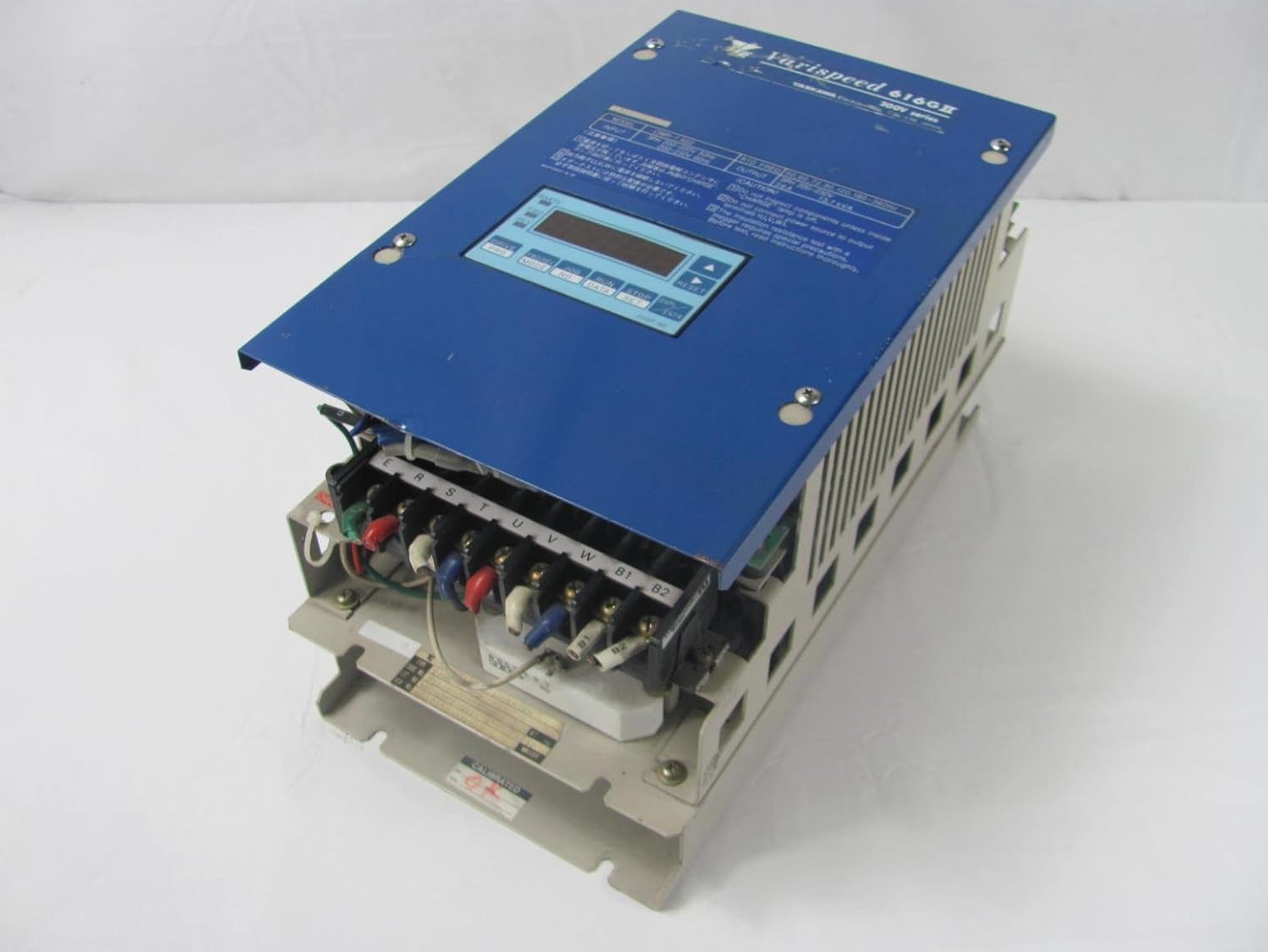
Figure 1: Yaskawa CIMR-7.5G2 Variable Frequency Drive with top cover open, revealing internal components and wiring terminals.
2. ข้อมูลด้านความปลอดภัย
คำเตือน: อันตรายจากไฟฟ้าช็อต
- Only qualified and trained personnel should install, operate, or maintain this equipment.
- Always disconnect all power sources to the drive and wait for the charge indicator to extinguish before performing any work on the drive or connected equipment. Residual voltage may be present even after power is disconnected.
- Ensure proper grounding of the drive and motor to prevent electrical shock.
- Do not operate the drive with covers removed.
- Protect the drive from moisture, dust, and corrosive gases.
ข้อควรระวัง: ความเสียหายของอุปกรณ์
- Do not connect the AC power supply to the output terminals (U, V, W).
- Ensure correct wiring and proper terminal connections.
- ตรวจสอบว่าปริมาณอินพุตtage matches the drive's specifications (200-220V, 3-phase).
3. การตั้งค่า
3.1 การแกะบรรจุภัณฑ์และการตรวจสอบ
Carefully unpack the CIMR-7.5G2 drive. Inspect the unit for any signs of physical damage that may have occurred during shipping. If any damage is found, contact your supplier immediately.
3.2 การติดตั้ง
Mount the drive vertically on a flat, stable, and non-flammable surface. Ensure adequate clearance around the drive for proper ventilation and heat dissipation. Refer to the drive's dimensions for specific spacing requirements. Avoid mounting in direct sunlight or areas with excessive vibration.
3.3 การเดินสายไฟ
All wiring must comply with local and national electrical codes. Use appropriate wire gauges for the power and motor connections.
- Grounding (E): Connect the ground terminal of the drive to a reliable earth ground. This is critical for safety.
- Input Power (R, S, T): Connect the 200-220V, 3-phase AC power supply to the R, S, and T input terminals. Ensure the phase sequence is correct.
- กำลังไฟฟ้าขาออกของมอเตอร์ (U, V, W): Connect the three-phase motor leads to the U, V, and W output terminals of the drive.
- สายไฟควบคุม: Connect any necessary control signals (e.g., start/stop commands, speed reference, fault outputs) to the designated control terminals. Refer to the terminal diagram on the drive for specific connections.

Figure 2: Yaskawa CIMR-7.5G2 wiring terminals for power and motor connections.
4. คู่มือการใช้งาน
4.1 แผงควบคุมโอเวอร์view
The CIMR-7.5G2 features a user-friendly control panel with a digital display and several function buttons for operation and parameter setting.

รูปที่ 3: ระยะใกล้ view of the Yaskawa CIMR-7.5G2 control panel.
- จอแสดงผลดิจิตอล: แสดงสถานะการทำงาน ความถี่ กระแสไฟฟ้า และระดับเสียงtage และค่าพารามิเตอร์
- MODE/DATA Button: Used to switch between display modes and enter/confirm parameter settings.
- ปุ่ม RUN: เริ่มการทำงานของมอเตอร์
- ปุ่มหยุด/รีเซ็ต: หยุดการทำงานของมอเตอร์และรีเซ็ตสภาวะผิดปกติ
- ลูกศรขึ้น/ลง: ใช้สำหรับเลื่อนดูพารามิเตอร์และปรับค่าต่างๆ
4.2 การทำงานพื้นฐาน
- เปิดเครื่อง: Apply 3-phase power to the drive. The display will illuminate.
- สตาร์ทมอเตอร์: กดปุ่ม วิ่ง button. The motor will accelerate to the set speed.
- หยุดมอเตอร์: กดปุ่ม หยุด/รีเซ็ต ปุ่ม. มอเตอร์จะชะลอความเร็วและหยุด.
- ปรับความเร็ว: ใช้ ลูกศรขึ้น/ลง to adjust the output frequency (motor speed) while the drive is running or in standby, depending on the parameter settings.
4.3 การตั้งค่าพารามิเตอร์
The CIMR-7.5G2 has various parameters that can be configured to customize its operation for specific applications. These include acceleration/deceleration times, maximum/minimum frequencies, motor data, and control modes. Refer to the detailed parameter list in the complete Yaskawa CIMR-7.5G2 technical manual for comprehensive information on each parameter and its function.
5. การบำรุงรักษา
Regular maintenance is essential to ensure the long-term reliability and performance of your Yaskawa CIMR-7.5G2 drive.
- การกำจัดฝุ่น: Periodically clean dust and debris from the drive's heatsink and ventilation openings using compressed air. Ensure power is disconnected before cleaning.
- การตรวจสอบเทอร์มินัล: Check all wiring terminals for tightness and signs of corrosion. Loose connections can lead to overheating and drive malfunction.
- พัดลมระบายความร้อน: Inspect the cooling fan for proper operation and signs of wear. Replace if necessary.
- สภาพแวดล้อม : ตรวจสอบให้แน่ใจว่าสภาพแวดล้อมการทำงานยังคงอยู่ในช่วงอุณหภูมิและความชื้นที่กำหนด
6 การแก้ไขปัญหา
This section provides general guidance for common issues. For detailed troubleshooting and error code explanations, refer to the comprehensive Yaskawa CIMR-7.5G2 technical manual.
| ปัญหา | สาเหตุที่เป็นไปได้ | สารละลาย |
|---|---|---|
| ไดรฟ์ไม่เปิดใช้งาน | ไม่มีไฟเข้า; ฟิวส์ขาด; ความผิดพลาดภายใน | Check power supply; Inspect fuses; Contact Yaskawa support. |
| มอเตอร์ไม่ทำงาน | Incorrect wiring; Drive in fault state; No run command | Verify wiring; Check display for fault codes and reset; Ensure run command is active. |
| ความผิดพลาดของกระแสไฟเกิน | Motor overload; Short circuit in motor/wiring; Rapid acceleration | Check motor load; Inspect motor/wiring; Increase acceleration time. |
| โอเวอร์โวลtagความผิดพลาด | ปริมาณอินพุตสูงtage; Rapid deceleration; Regenerative load | ตรวจสอบอินพุต voltage; Increase deceleration time; Consider braking resistor. |
If you encounter persistent issues or error codes not listed here, please contact Yaskawa technical support.
7. ข้อมูลจำเพาะ
Key technical specifications for the Yaskawa CIMR-7.5G2 Variable Frequency Drive:
- หมายเลขรุ่น: CIMR-7.5G2
- อินพุต Voltage: 200-220V AC, 3-Phase
- ความถี่อินพุต: 50-60 เฮิรตซ์
- ผู้ผลิต: ยาสกาวะ
- น้ำหนักสินค้า: 15 ปอนด์
- ASIN: B01MQ237XQ
- วันที่พร้อมใช้งานครั้งแรก: 27 ตุลาคม 2016
8. การรับประกันและการสนับสนุน
For information regarding the warranty terms and conditions for your Yaskawa CIMR-7.5G2 drive, please refer to the documentation provided at the time of purchase or visit the official Yaskawa website. For technical assistance, troubleshooting beyond this manual, or spare parts inquiries, please contact Yaskawa customer support directly. Ensure you have your model number (CIMR-7.5G2) and serial number ready when contacting support.
You can find more information and support resources on the official Yaskawa webเว็บไซต์: www.yaskawa.com


