การแนะนำ
This manual provides essential instructions for the setup, operation, maintenance, and troubleshooting of your NEC NP-M403H projector. Please read this manual thoroughly before using the projector to ensure proper and safe operation.
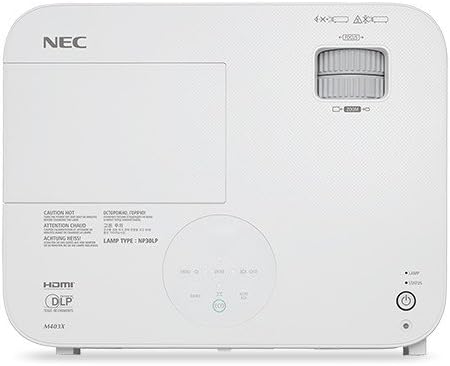
ภาพ: ด้านบน view of the NEC NP-M403H projector, showing the lens, control panel, and ventilation. This image illustrates the overall design and key external features from a top-down perspective.
การตั้งค่า
Follow these steps for initial setup of your NEC NP-M403H projector.
- การแกะกล่อง: Carefully remove the projector and all accessories from the packaging. Ensure all components are present.
- การจัดวาง: Position the projector on a stable, flat surface or mount it to the ceiling. Ensure adequate ventilation around the unit. The compact and lightweight design allows for flexible placement.
- การเชื่อมต่อไฟฟ้า: Connect the power cord to the projector and then to a suitable electrical outlet.
- การเชื่อมต่อแหล่งสัญญาณเข้า:
The projector supports various connectivity options. Use appropriate cables to connect your source devices (e.g., computer, media player) to the projector's input ports.
- ช่องต่อ HDMI: สำหรับวิดีโอและเสียงดิจิทัลความละเอียดสูง
- VGA (อินพุตคอมพิวเตอร์): สำหรับสัญญาณคอมพิวเตอร์แบบอนาล็อก
- ยูเอสบี: สำหรับข้อมูลหรือฟังก์ชันควบคุมบางอย่าง
- เสียงเข้า: สำหรับอินพุตเสียงแบบอนาล็อก

ภาพ: ด้านหลัง view of the NEC NP-M403H projector, displaying the array of input and output ports including HDMI, VGA, USB, and audio connections. This image helps users identify where to connect their source devices.
- เปิดเครื่องครั้งแรก: Press the power button on the projector or remote control. The projector will initiate its startup sequence.
คำแนะนำการใช้งาน
This section details the basic operation of your projector.
เปิด/ปิดเครื่อง
- เปิดเครื่อง: Press the power button. The projector features a quick startup function.
- หมดแรง: Press the power button again. The projector supports direct power off, allowing for quick shutdown.
การปรับแต่งภาพ
- จุดสนใจ: Rotate the focus ring on the lens to achieve a clear image.
- ซูม: ปรับวงแหวนซูมบนเลนส์เพื่อเปลี่ยนขนาดภาพ
- การแก้ไขคีย์สโตน: Use the projector's menu or dedicated buttons to correct trapezoidal distortion if the projector is not perfectly perpendicular to the screen.

ภาพ: ด้านหน้า view of the NEC NP-M403H projector, highlighting the lens assembly and front ventilation. This image assists users in locating the lens for focus and zoom adjustments.
การเลือกแหล่งที่มาของข้อมูล
The projector can automatically detect input signals (Autosense™). You can also manually select the input source using the "Input" button on the projector or remote control.
โหมด ECO
เพื่อขยายลamp life and reduce power consumption, activate ECO Mode. This feature contributes to energy savings and environmental protection. The projector offers a lamp life of up to 8,000 hours in ECO Mode.
การซ่อมบำรุง
การบำรุงรักษาอย่างสม่ำเสมอจะช่วยให้โปรเจคเตอร์ทำงานได้อย่างมีประสิทธิภาพสูงสุดและยืดอายุการใช้งาน
- Lamp การทดแทน: โปรเจ็กเตอร์ lamp has a life of up to 8,000 hours in ECO Mode. When the lamp reaches the end of its life, a warning indicator will appear. Refer to the full service manual for detailed lamp คำแนะนำในการเปลี่ยน
- การทำความสะอาด/เปลี่ยนตัวกรอง: The projector is equipped with an air filter to prevent dust accumulation. Regularly clean the filter to maintain proper airflow and cooling. Replace the filter as needed; the projector features an extended filter life.
- การทำความสะอาดเลนส์: ค่อยๆ เช็ดเลนส์โปรเจ็กเตอร์ด้วยผ้าเนื้อนุ่ม ปราศจากขน ที่ออกแบบมาสำหรับพื้นผิวเลนส์โดยเฉพาะ ห้ามใช้สารทำความสะอาดที่มีฤทธิ์กัดกร่อน
- การทำความสะอาดภายนอก: เช็ดทำความสะอาดภายนอกของโปรเจคเตอร์ด้วยผ้าแห้งเนื้อนุ่ม หลีกเลี่ยงการใช้สารเคมีรุนแรง
การแก้ไขปัญหา
This section addresses common issues you might encounter with your NEC NP-M403H projector.
| ปัญหา | สาเหตุที่เป็นไปได้ | สารละลาย |
|---|---|---|
| ไม่มีภาพแสดง |
|
|
| ภาพเบลอ |
|
|
| รูปภาพเป็นรูปสี่เหลี่ยมคางหมู |
|
|
| โปรเจ็กเตอร์ร้อนเกินไปหรือปิดเครื่อง |
|
|
ข้อมูลจำเพาะ
Key technical specifications for the NEC NP-M403H projector:
- แบบอย่าง: NP-M403H
- ยี่ห้อ: เอ็นอีซี
- เทคโนโลยีการแสดงผล: ดีแอลพี
- ความสว่าง: 4000 ลูเมน
- ความละเอียดดั้งเดิม: 1920x1080 (1080p) ความคมชัด
- ความละเอียดการแสดงผลสูงสุด: 1920 x 1080
- อัตราส่วนคอนทราสต์: สูงสุด 10,000:1
- Lamp ชีวิต: ใช้งานได้นานสูงสุด 8,000 ชั่วโมง (โหมดประหยัดพลังงาน)
- การเชื่อมต่อ: HDMI, USB, VGA
- ขนาด (กว้าง x สูง x ลึก): 14.5 x 4.3 x 11.5 นิ้ว
- น้ำหนัก: 9.8 ปอนด์
- คุณสมบัติพิเศษ: Lightweight, Portable, ECO Mode, Autosense™
การรับประกันและการสนับสนุน
For detailed warranty information, please refer to the warranty card included with your product or visit the official NEC website. Technical support contact details are typically provided in the product packaging or on the manufacturer's support pages.


