1. บทนำ
The Vivitek Qumi Q8-BK is a compact and portable DLP projector designed for both business and personal use. It offers Full HD 1080p resolution, 1000 lumens brightness, and versatile connectivity options including HDMI, USB, and wireless mirroring for Android and iOS devices. This manual provides essential information for setting up, operating, maintaining, and troubleshooting your projector to ensure optimal performance.
2. ข้อมูลด้านความปลอดภัย
โปรดอ่านคำแนะนำด้านความปลอดภัยทั้งหมดก่อนใช้งานโปรเจคเตอร์ เก็บคู่มือนี้ไว้เพื่อใช้อ้างอิงในอนาคต
- อย่าปิดกั้นช่องระบายอากาศ ตรวจสอบให้แน่ใจว่ามีอากาศถ่ายเทเพียงพอรอบๆ โปรเจ็กเตอร์
- อย่ามองตรงเข้าไปในเลนส์โปรเจ็กเตอร์เมื่อลamp เปิดอยู่ แสงจ้าอาจทำให้ดวงตาเสียหายได้
- Avoid placing the projector in direct sunlight, near heat sources, or in environments with extreme temperatures or humidity.
- ใช้เฉพาะอะแดปเตอร์ไฟฟ้าที่มาพร้อมกับโปรเจ็กเตอร์เท่านั้น
- อย่าพยายามถอดประกอบหรือซ่อมแซมโปรเจ็กเตอร์ด้วยตนเอง โปรดติดต่อช่างผู้ชำนาญเพื่อขอรับบริการ
- เก็บโปรเจ็กเตอร์ให้ห่างจากน้ำหรือของเหลวอื่นๆ
3. เนื้อหาบรรจุภัณฑ์
ตรวจสอบว่ามีรายการทั้งหมดอยู่ในแพ็คเกจของคุณ:
- Vivitek Qumi Q8-BK Projector
- อะแดปเตอร์แปลงไฟ
- รีโมทคอนโทรล
- สาย HDMI
- คู่มือเริ่มต้นอย่างรวดเร็ว
- กระเป๋าใส่อุปกรณ์
4. สินค้าหมดview
Familiarize yourself with the projector's components and connection ports.
4.1 Top Panel and Controls
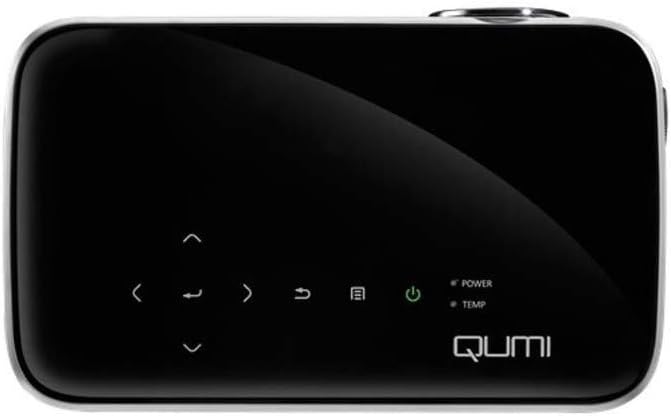
รูปที่ 1: สูงสุด view of the Vivitek Qumi Q8-BK projector, highlighting the touch-sensitive control panel. This panel includes navigation arrows, menu access, source selection, and power buttons, along with LED indicators for power and temperature.
The top panel features touch-sensitive controls for navigating menus, adjusting settings, and power management. LED indicators show the power status and temperature warnings.
4.2 Side Panel and Ports
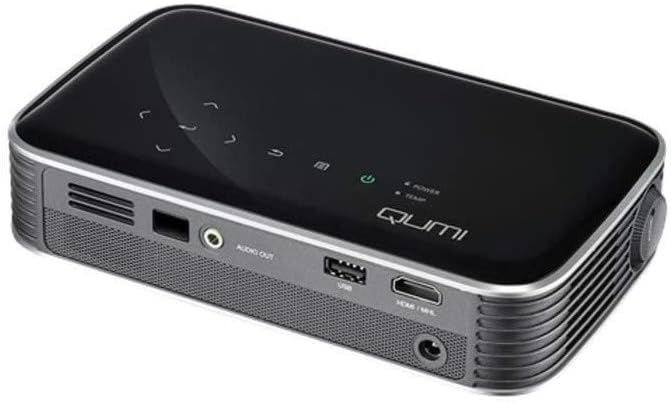
รูปที่ 2: ด้านข้าง view of the Vivitek Qumi Q8-BK projector, displaying its connectivity ports. These include an audio out jack, a USB port, and an HDMI/MHL input, along with ventilation grilles.
The side panel provides essential connectivity options:
- เสียงออก: เชื่อมต่อลำโพงภายนอกหรือหูฟัง
- ยูเอสบี: สำหรับเชื่อมต่ออุปกรณ์จัดเก็บข้อมูล USB เพื่อเล่นสื่อ fileหรือสำหรับการอัปเดตเฟิร์มแวร์
- HDMI/MHL: Connect to HDMI-enabled devices such as laptops, Blu-ray players, or MHL-compatible smartphones/tablets.
- กำลังไฟเข้า: เชื่อมต่ออะแดปเตอร์จ่ายไฟที่ให้มา
5. การตั้งค่า
Follow these steps to set up your Vivitek Qumi Q8-BK projector.
5.1 การเปิดเครื่อง
- Connect the power adapter to the projector's power input port and then to an electrical outlet.
- Press the power button on the projector's top panel or on the remote control. The power LED indicator will illuminate.
- Allow a few moments for the projector to warm up and display the initial screen.
5.2 การปรับโฟกัสและคีย์สโตน
- จุดสนใจ: Rotate the focus ring located near the lens until the projected image is sharp and clear.
- การแก้ไขคีย์สโตน: If the image appears trapezoidal (wider at the top or bottom), use the keystone correction function in the projector's menu to adjust it. This corrects the image geometry to a rectangular shape.
5.3 การเชื่อมต่อแหล่งอินพุต
The Qumi Q8-BK supports multiple input sources:
- HDMI/MHL: Connect an HDMI cable from your source device (laptop, game console, Blu-ray player) to the HDMI/MHL port on the projector. For MHL-compatible mobile devices, use an MHL cable.
- ยูเอสบี: เสียบแฟลชไดรฟ์ USB เข้ากับพอร์ต USB เพื่อเข้าถึงสื่อ fileที่เก็บไว้บนนั้น
- Wireless (Miracast/AirPlay): The projector features built-in Wi-Fi for wireless content sharing from Android and iOS devices. Refer to the "Operating" section for detailed instructions on wireless setup.
6. ปฏิบัติการ
This section covers the basic operation of your projector.
6.1 การใช้งานเมนู
Use the navigation buttons on the top panel or the remote control to browse the projector's on-screen menu. Press the "Menu" button to access settings such as image adjustments, source selection, and system configurations.
6.2 การเลือกแหล่งที่มา
Press the "Source" button on the remote or the projector to cycle through available input sources (HDMI, USB, Wireless). Select the desired source from the on-screen menu.
6.3 Wireless Content Sharing (Miracast/AirPlay)
The Qumi Q8-BK supports wireless mirroring for compatible devices:
- Ensure the projector's Wi-Fi is enabled and connected to your network (if required for your device's mirroring function).
- Select the "Wireless" input source on the projector.
- On your Android device, enable "Screen Mirroring," "Smart View," or a similar function. On iOS devices, use "AirPlay Mirroring."
- Select the Qumi Q8-BK from the list of available devices on your mobile device.
- ตอนนี้หน้าจออุปกรณ์ของคุณควรจะแสดงภาพบนโปรเจ็กเตอร์แล้ว
Note: Performance may vary depending on network conditions and device compatibility. Some streaming services may restrict mirrored content.
6.4 การเล่นสื่อจาก USB
Insert a USB flash drive into the USB port. The projector's media player interface will typically launch automatically, allowing you to browse and play supported video, audio, and image files.
6.5 ฟังก์ชันการทำงานแบบ 3 มิติ
The Qumi Q8-BK supports 3D content. To view 3D content, you will need compatible 3D glasses (sold separately) and a 3D-enabled source device playing 3D content. Refer to the projector's on-screen menu for 3D settings and modes.
7. การบำรุงรักษา
การบำรุงรักษาอย่างถูกต้องจะช่วยให้โปรเจ็กเตอร์ของคุณมีอายุการใช้งานยาวนานและมีประสิทธิภาพเหมาะสมที่สุด
- การทำความสะอาดเลนส์: เช็ดเลนส์โปรเจ็กเตอร์เบาๆ ด้วยผ้าเนื้อนุ่มปราศจากขนที่ออกแบบมาสำหรับพื้นผิวเลนส์โดยเฉพาะ ห้ามใช้สารทำความสะอาดที่มีฤทธิ์กัดกร่อนหรือออกแรงมากเกินไป
- การระบายอากาศ : Regularly check and clean the ventilation grilles to prevent dust buildup, which can lead to overheating. Use a soft brush or compressed air.
- พื้นที่จัดเก็บ: When not in use for extended periods, store the projector in its carrying case in a cool, dry, and dust-free environment.
- แอลอีดีแอลamp: The projector uses an energy-efficient LED lamp with an estimated operational life of up to 30,000 hours, requiring no replacement under normal usage.
8 การแก้ไขปัญหา
หากคุณพบปัญหาเกี่ยวกับโปรเจคเตอร์ โปรดดูปัญหาและวิธีแก้ไขที่พบบ่อยต่อไปนี้
| ปัญหา | วิธีแก้ปัญหาที่เป็นไปได้ |
|---|---|
| ไม่มีภาพแสดง |
|
| ไม่มีเสียง |
|
| ปัญหาการมิเรอร์แบบไร้สาย |
|
| โปรเจ็กเตอร์ร้อนเกินไปหรือปิดเครื่อง |
|
If the problem persists after trying these solutions, please contact Vivitek customer support.
9. ข้อมูลจำเพาะ
Key technical specifications for the Vivitek Qumi Q8-BK projector:
| คุณสมบัติ | รายละเอียด |
|---|---|
| ยี่ห้อ | วิวิทเทค |
| หมายเลขรุ่น | Qumi Q8-BK |
| ความละเอียดการแสดงผล | 1920 x 1080 (ฟูลเอชดี) |
| ความสว่าง | ถึง 1000 ลูเมนส์ |
| อัตราส่วนคอนทราสต์ | 30,000:1 น. |
| Lamp พิมพ์ | นำ |
| Lamp ชีวิต | ประมาณ 30,000 ชั่วโมง |
| เทคโนโลยีการเชื่อมต่อ | HDMI, USB, Wi-Fi (Miracast/AirPlay) |
| คุณสมบัติพิเศษ | HDMI Connectivity, Portable, USB Connectivity, Wireless, Miracast |
| ขนาดสินค้า | 1.7 x 4.4 x 7.4 นิ้ว |
| น้ำหนักสินค้า | 1.4 ปอนด์ |
10. การรับประกันและการสนับสนุน
Vivitek products are designed for reliability and performance. For warranty information, please refer to the warranty card included in your product package or visit the official Vivitek website. For technical support, troubleshooting assistance beyond this manual, or service inquiries, please contact Vivitek customer support through their official channels.
Please have your product model number (Qumi Q8-BK) and serial number ready when contacting support.


