การแนะนำ
The TechniSat TechniPlayer LP 300 is a professional DJ USB turntable designed for high-quality vinyl playback and digital conversion. This direct-drive turntable features a quartz-controlled motor, allowing for stable rotation and precise speed control. It includes advanced features such as needle illumination, adjustable tracking force, a balanced S-shaped tonearm, and an anti-skating function, catering to both professional DJs and home audio enthusiasts. Additionally, the integrated USB port enables easy digitization of your vinyl collection into MP3 files, with accompanying software provided. A switchable phono preamplifier ensures versatile connectivity to various audio systems, including phono or AUX-IN inputs.

รูปที่ 1: The TechniSat TECHNIPLAYER LP 300 turntable with its dust cover open, showcasing the platter, tonearm, and controls.
คำแนะนำการตั้งค่า
1. การแกะกล่องและการตรวจสอบส่วนประกอบ
นำส่วนประกอบทั้งหมดออกจากบรรจุภัณฑ์อย่างระมัดระวัง ตรวจสอบให้แน่ใจว่ามีส่วนประกอบต่อไปนี้:
- TECHNIPLAYER LP 300 Turntable Unit
- System holder with needle (cartridge)
- จานอลูมิเนียม
- Felt platter mat
- Palet (record weight/stabilizer)
- น้ำหนักถ่วง
- สาย USB
- ซีดีซอฟแวร์
- คู่มือการใช้งาน
2 การวาง
วางเครื่องเล่นแผ่นเสียงบนพื้นผิวที่มั่นคงและเรียบเสมอกัน ห่างจากแสงแดดโดยตรง แหล่งความร้อน และการสั่นสะเทือนรุนแรง ตรวจสอบให้แน่ใจว่ามีการระบายอากาศที่เพียงพอรอบๆ ตัวเครื่อง
3. การประกอบ
- ติดตั้งจาน: วางจานอลูมิเนียมลงบนแกนกลางของเครื่องเล่นแผ่นเสียงอย่างระมัดระวัง
- วางแผ่นรองสักหลาด: Lay the felt platter mat on top of the aluminum platter.
- ติดตั้งตลับหมึก: Mount the system holder with the needle (cartridge) to the tonearm headshell. Ensure it is securely fastened.
- ติดตั้งตุ้มถ่วงน้ำหนัก: Slide the counterweight onto the rear of the tonearm. Adjust it later for proper tracking force.
- Place the Palet: The palet can be placed on the record during playback for added stability.

รูปที่ 2: รายละเอียด view of the tonearm and cartridge assembly, crucial for proper record playback.
4. การเชื่อมต่อกับระบบเสียง
The TechniPlayer LP 300 offers both phono and AUX-IN connectivity via its switchable preampชีวิต.
- เอาต์พุตเสียง RCA (ซ้าย/ขวา): Connect the RCA cables from the turntable's audio output to your amplifier's PHONO input (if available) or AUX-IN input. Use the PHONO/LINE switch on the rear of the turntable to select the appropriate output level.
- ตั้งค่าเป็น โฟโน หากเชื่อมต่อกับ ampเครื่องขยายเสียงที่มีช่องรับสัญญาณ PHONO โดยเฉพาะ
- ตั้งค่าเป็น เส้น หากเชื่อมต่อกับ amplifier's AUX-IN or other line-level input.
- การเชื่อมต่อ USB: Connect the USB cable from the turntable to your computer for digitizing records.

รูปที่ 3: The rear panel of the turntable, illustrating the RCA audio outputs and the USB port for connecting to an amplifier or computer.
5. การเชื่อมต่อไฟฟ้า
เชื่อมต่อสายไฟเข้ากับเครื่องเล่นแผ่นเสียง จากนั้นเสียบสายไฟเข้ากับเต้ารับไฟฟ้าที่เหมาะสม
คำแนะนำการใช้งาน
1. การเปิด/ปิดเครื่อง
To power on the turntable, rotate the เริ่ม/หยุด knob clockwise. The platter will begin to rotate. To power off, rotate the knob counter-clockwise until it clicks.

รูปที่ 4: The start/stop control and speed selection buttons (33/45 RPM) located on the turntable's top panel.
2. เล่นแผ่นเสียง
- วางบันทึก: Place your vinyl record on the platter. If desired, use the palet for added stability.
- เลือกความเร็ว: กดปุ่ม 33 or 45 button to select the appropriate playback speed for your record.
- Adjust Tracking Force: Refer to your cartridge's specifications for the recommended tracking force. Adjust the counterweight by rotating it until the tonearm is balanced and then set the desired tracking force using the numbered ring.
- ตั้งค่าระบบป้องกันการลื่นไถล: Adjust the anti-skating dial to match the tracking force setting. This prevents the tonearm from drifting inwards or outwards.
- ลดแขนโทนอาร์มลง: Use the cueing lever to gently lower the tonearm onto the record's lead-in groove.
- เริ่มการเล่น: The record will begin playing.
- สิ้นสุดการเล่น: At the end of the record, use the cueing lever to lift the tonearm and return it to its rest.
3. Using the Target Light
การ แสงเป้าหมาย provides illumination for the stylus, which is useful in low-light conditions for precise cueing. Press the button next to the target light to extend and illuminate it. Press again to retract it.
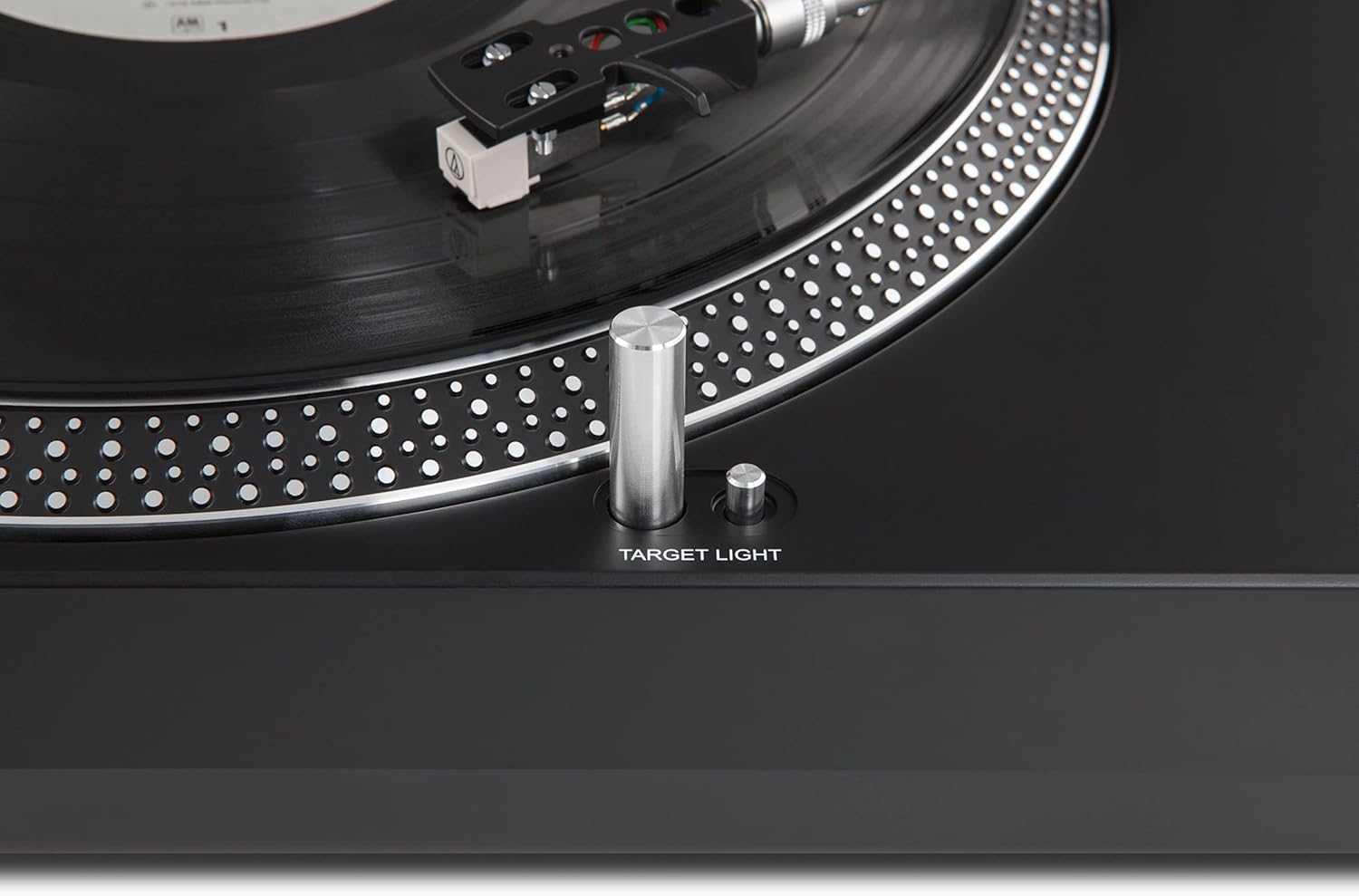
รูปที่ 5: The target light, which illuminates the stylus for accurate placement on the record.
4. Adjusting Pitch
การ การปรับระดับเสียง slider allows for fine adjustment of the playback speed. Move the slider up or down to increase or decrease the pitch, respectively. This is particularly useful for DJ applications or correcting minor speed variations.

รูปที่ 6: The pitch adjustment slider, enabling precise control over the playback speed.
5. USB Digitization
To convert your vinyl records to digital MP3 files, connect the turntable to your computer using the provided USB cable. Install the included software from the CD. Follow the software's instructions to record and save your audio. The software is compatible with both Mac and PC operating systems.
การซ่อมบำรุง
1. Cleaning the Stylus (Needle)
A clean stylus is essential for optimal sound quality and to prevent damage to your records. Use a soft brush, specifically designed for stylus cleaning, and gently brush from back to front. Never brush from side to side.
2. Cleaning the Turntable Unit
Wipe the turntable's surface with a soft, dry, lint-free cloth. For stubborn marks, a slightly damp สามารถใช้ผ้าเช็ดทำความสะอาดได้ แต่ต้องระวังอย่าให้ของเหลวเข้าไปในตัวเครื่อง หลีกเลี่ยงน้ำยาทำความสะอาดที่มีฤทธิ์กัดกร่อนหรือตัวทำละลาย
3. การดูแลรักษาผ้าคลุมกันฝุ่น
The dust cover protects your turntable from dust and debris. Clean it with a soft, damp cloth. Avoid using dry cloths as they can scratch the acrylic surface.
การแก้ไขปัญหา
| ปัญหา | สาเหตุที่เป็นไปได้ | สารละลาย |
|---|---|---|
| ไม่มีไฟฟ้า | ไม่ได้เสียบสายไฟ ปลั๊กไฟไม่ทำงาน | ตรวจสอบการเชื่อมต่อสายไฟ; ทดสอบเต้ารับกับอุปกรณ์อื่น |
| ไม่มีเสียงหรือเสียงเบา | Incorrect PHONO/LINE switch setting; amplifier input issue; damaged cartridge/stylus. | Ensure PHONO/LINE switch matches amplifier input; check amplifier connections and volume; inspect cartridge/stylus for damage. |
| เสียงเพี้ยน | Dirty stylus; incorrect tracking force or anti-skating; damaged record. | Clean stylus; re-adjust tracking force and anti-skating; try a different record. |
| ความเร็วในการเล่นไม่ถูกต้อง | Wrong speed selected (33/45 RPM); pitch adjustment off. | Select correct speed; adjust pitch slider to center or desired setting. |
หากคุณพบปัญหาที่ไม่ได้ระบุไว้ในที่นี้ หรือหากวิธีแก้ปัญหาที่แนะนำไม่สามารถแก้ไขปัญหาได้ โปรดติดต่อฝ่ายบริการลูกค้า
ข้อมูลจำเพาะ
| ยี่ห้อ | เทคนิแซท |
| ชื่อรุ่น | แผ่นเสียง LP300 |
| หมายเลขรุ่น | 0000/9413 |
| ประเภทไดรฟ์ | Direct Drive (Quartz Controlled) |
| ความเร็วในการหมุน | 33, 45 รอบต่อนาที |
| วัสดุ | อะลูมิเนียม (จาน) |
| การเชื่อมต่อ | Analog Audio Output (RCA L/R), USB 2.0 |
| คุณสมบัติพิเศษ | Balanced S-shaped tonearm, Adjustable tracking force, Anti-skating, Needle illumination, Integrated switchable phono preamplifier, PC recording software included (Mac/PC) |
| อุปกรณ์ที่รองรับ | Personal Computer, Smartphone (for digital audio output) |
| ระบบปฏิบัติการ (สำหรับซอฟต์แวร์) | Windows (and Mac for software) |
| น้ำหนัก | 5.3 กิโลกรัม |
| ขนาด (LxHxP) | ขนาด 45.00 x 13.90 x 35.00 ซม. (โดยประมาณ จากรายละเอียดสินค้า) |
ข้อมูลการรับประกัน
The TechniSat TECHNIPLAYER LP 300 comes with a การรับประกันจากผู้ผลิต 2 ปี. This warranty covers defects in materials and workmanship under normal use. Please retain your proof of purchase for warranty claims. For specific terms and conditions, refer to the warranty card included with your product or visit the official TechniSat webเว็บไซต์.
บันทึก: Spare parts availability is currently listed as "unavailable" by the manufacturer. Software updates are also listed as "information not available."
สนับสนุน
For technical assistance, product inquiries, or warranty service, please contact TechniSat customer support.
- การสนับสนุนทางออนไลน์: เยี่ยมชมเว็บไซต์อย่างเป็นทางการของ TechniSat webเว็บไซต์นี้รวบรวมคำถามที่พบบ่อย แหล่งข้อมูลสนับสนุน และแบบฟอร์มติดต่อ
- ข้อมูลติดต่อ: Refer to the contact details provided in your product packaging or on the TechniSat webไซต์สำหรับการสนับสนุนทางโทรศัพท์หรืออีเมล
Before contacting support, please have your product model (LP 300) and serial number (if applicable) ready.


