1. คำแนะนำด้านความปลอดภัยที่สำคัญ
Please read all safety instructions carefully before using the Vivitek Qumi Q3 Plus-RD projector. Failure to follow these instructions may result in electric shock, fire, or damage to the device.
- แหล่งพลังงาน: Use only the supplied AC power adapter. Ensure the voltagตรงตามข้อกำหนดของโปรเจ็กเตอร์
- การระบายอากาศ : อย่าปิดกั้นช่องระบายอากาศ เว้นระยะห่างที่เหมาะสมรอบโปรเจ็กเตอร์เพื่อให้มีการไหลเวียนของอากาศที่ดี ป้องกันความร้อนสูงเกินไป
- ความชื้น: Do not expose the projector to rain, moisture, or operate it near water.
- ความร้อน: ควรหลีกเลี่ยงการวางโปรเจ็กเตอร์ไว้ใกล้แหล่งความร้อน เช่น เครื่องทำความร้อน ช่องระบายความร้อน เตา หรืออุปกรณ์อื่นๆ ที่ก่อให้เกิดความร้อน
- การทำความสะอาด: Unplug the projector from the power outlet before cleaning. Use a dry cloth for cleaning. Do not use liquid cleaners or aerosol cleaners.
- การบริการ: อย่าพยายามให้บริการผลิตภัณฑ์นี้ด้วยตนเอง ส่งต่อการบริการทั้งหมดไปยังช่างบริการที่ผ่านการรับรอง
- ความปลอดภัยของดวงตา: อย่ามองตรงเข้าไปในเลนส์โปรเจ็กเตอร์เมื่อลamp เปิดอยู่ แสงจ้าอาจทำให้ดวงตาเสียหายได้
2. เนื้อหาบรรจุภัณฑ์
Verify that all items listed below are included in your Vivitek Qumi Q3 Plus-RD package:
- Vivitek Qumi Q3 Plus-RD Projector
- AC Power Adapter with Cable
- สาย HDMI
- Documentation Kit (Quick Start Guide, Warranty Card)

Image: The AC power adapter and cable for the Vivitek Qumi Q3 Plus-RD projector.
3. สินค้าหมดview
Familiarize yourself with the components and ports of your Vivitek Qumi Q3 Plus-RD projector.
3.1 ด้านหน้า View

ภาพ: ด้านหน้า view of the Vivitek Qumi Q3 Plus-RD projector, showing the projection lens and speaker grille.
3.2 ด้านหลัง View (Ports and Connections)

ภาพ: ด้านหลัง view of the Vivitek Qumi Q3 Plus-RD projector, displaying various input/output ports including AV IN, USB 1, USB 2, HDMI, DC IN power input, microSD card slot, and the power button.
3.3 ด้านข้าง View

ภาพ: ด้านข้าง view of the Vivitek Qumi Q3 Plus-RD projector, showing the ventilation grilles and the integrated kickstand for angle adjustment.
3.4 การควบคุมระยะไกล
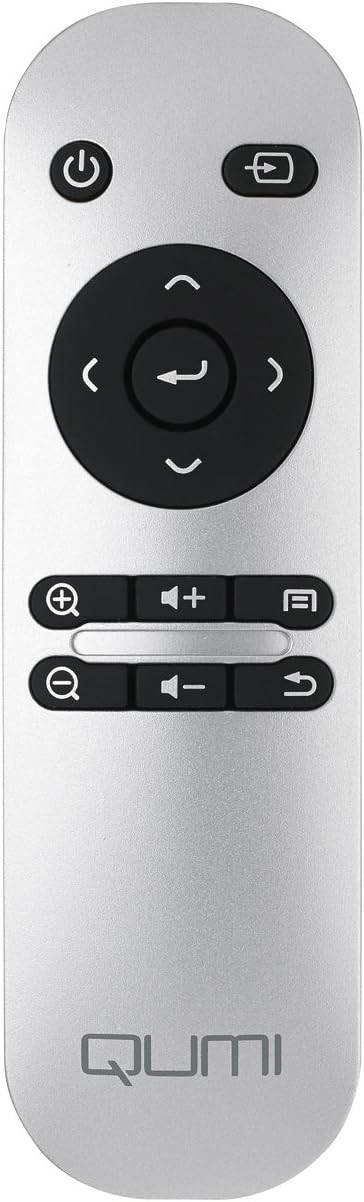
Image: The remote control for the Vivitek Qumi Q3 Plus-RD projector, featuring power, navigation, volume, and focus adjustment buttons.
4. การตั้งค่า
Follow these steps to set up your Vivitek Qumi Q3 Plus-RD projector for first use.
- การเชื่อมต่อไฟฟ้า: Connect the supplied AC power adapter to the 'DC IN' port on the projector and then plug it into a power outlet. The projector can also operate on its internal battery.
- การจัดวาง: Place the projector on a stable, flat surface. Use the integrated kickstand to adjust the projection angle if needed. Ensure there are no obstructions to the lens or ventilation openings.
- เปิดเครื่อง: Press and hold the power button on the projector or the remote control to turn on the device.
- การปรับโฟกัส: Once powered on, use the focus buttons on the remote control to adjust the image sharpness. The Qumi Q3 Plus-RD features motorized focus for precise adjustment.
- การแก้ไขคีย์สโตน: The projector features digital auto keystone correction. If the image appears trapezoidal, the projector will automatically adjust it. Manual adjustment options may be available in the settings menu.
5. คู่มือการใช้งาน
This section details how to operate your Vivitek Qumi Q3 Plus-RD projector.
5.1 การเปิด/ปิดเครื่อง
- การเปิดเครื่อง: Press and hold the power button on the projector or the remote control until the device starts.
- วิธีปิดเครื่อง: Press the power button on the projector or the remote control. A shutdown prompt will appear. Select 'Power Off' to shut down the system safely.
5.2 การใช้งานระบบปฏิบัติการ Android
The Qumi Q3 Plus-RD runs on an Android operating system. Use the remote control's navigation buttons (up, down, left, right, OK) to move through menus and select options. A Bluetooth keyboard/mouse can also be paired for easier navigation.
5.3 การเล่นสื่อ
- ยูเอสบีไดรฟ์: Insert a USB flash drive into one of the USB ports. The system will typically detect it and prompt you to open the file เบราว์เซอร์หรือเครื่องเล่นสื่อ
- การ์ด MicroSD: Insert a microSD card into the microSD slot. Similar to USB, the system will allow you to access its contents.
- พื้นที่เก็บข้อมูลภายใน: The projector has 5.1 GB of available on-board memory for storing fileและแอปพลิเคชั่น
5.4 Connecting External Devices (HDMI)
To connect an external device such as a laptop, Blu-ray player, or gaming console:
- Connect one end of an HDMI cable to the HDMI port on the projector.
- Connect the other end of the HDMI cable to the HDMI output port on your external device.
- On the projector's home screen, navigate to the input selection and choose 'HDMI'.
6. การเชื่อมต่อ
The Vivitek Qumi Q3 Plus-RD offers various connectivity options for seamless integration with your devices.
6.1 การตั้งค่า Wi-Fi
- จากหน้าจอหลัก ให้ไปที่ 'การตั้งค่า'
- เลือก 'Wi-Fi' แล้วเปิดใช้งาน
- เลือกเครือข่าย Wi-Fi ที่คุณต้องการจากรายการเครือข่ายที่มีอยู่
- หากระบบแจ้งให้ป้อนรหัสผ่านเครือข่าย ให้ป้อนรหัสผ่านแล้วเชื่อมต่อ
6.2 การจับคู่บลูทูธ
You can pair Bluetooth devices such as external speakers, headphones, or a keyboard/mouse with your projector.
- จากหน้าจอหลัก ให้ไปที่ 'การตั้งค่า'
- เลือก 'บลูทูธ' แล้วเปิดใช้งาน
- ตั้งค่าอุปกรณ์ Bluetooth ของคุณเข้าสู่โหมดจับคู่
- Select your device from the list of available devices on the projector and confirm pairing.
6.3 Wireless Content Sharing
The projector supports wireless content sharing from Android and iOS devices. Refer to the projector's specific application (e.g., HappyCast or similar pre-installed app) for detailed instructions on mirroring your device's screen.
7. การบำรุงรักษา
การบำรุงรักษาอย่างถูกต้องจะช่วยให้โปรเจ็กเตอร์ของคุณมีอายุการใช้งานยาวนานและมีประสิทธิภาพเหมาะสมที่สุด
- การทำความสะอาดเลนส์: เช็ดเลนส์โปรเจ็กเตอร์เบาๆ ด้วยผ้าเนื้อนุ่ม ปราศจากขน ที่ออกแบบมาสำหรับพื้นผิวเลนส์โดยเฉพาะ ห้ามใช้วัสดุที่มีฤทธิ์กัดกร่อนหรือสารเคมีรุนแรง
- การระบายอากาศ : Regularly check that the ventilation openings are clear of dust and debris. Use a soft brush or compressed air to clean them.
- การดูแลแบตเตอรี่ For models with an internal battery, avoid fully discharging the battery frequently. If storing the projector for an extended period, charge the battery to approximately 50% to prolong its lifespan.
- พื้นที่จัดเก็บ: เก็บโปรเจคเตอร์ไว้ในที่แห้งและเย็น หลีกเลี่ยงแสงแดดโดยตรงและอุณหภูมิที่สูงหรือต่ำเกินไป
8 การแก้ไขปัญหา
If you encounter issues with your Vivitek Qumi Q3 Plus-RD, refer to the following common problems and solutions.
- ไม่มีภาพฉาย:
- ตรวจสอบให้แน่ใจว่าโปรเจ็กเตอร์เปิดอยู่และถอดฝาครอบเลนส์ออกแล้ว
- Check the input source selection to ensure it matches the connected device (e.g., HDMI, USB).
- Verify that the external device is powered on and outputting a signal.
- ไม่มีเสียง:
- ปรับระดับเสียงบนโปรเจ็กเตอร์และอุปกรณ์แหล่งสัญญาณที่เชื่อมต่ออยู่
- Check if external speakers are connected via Bluetooth or AV IN, and ensure they are powered on and functioning.
- Ensure the audio output settings on the source device are correctly configured.
- รีโมทคอนโทรลไม่ตอบสนอง:
- Ensure there are no obstructions between the remote and the projector's IR receiver (located at the rear).
- Replace the remote control battery (typically a coin cell battery).
- ปัญหาการเชื่อมต่อ Wi-Fi/Bluetooth:
- Ensure Wi-Fi/Bluetooth is enabled in the projector's settings.
- รีสตาร์ทโปรเจ็กเตอร์และอุปกรณ์ที่คุณพยายามเชื่อมต่อ
- ตรวจสอบสัญญาณรบกวนจากอุปกรณ์ไร้สายอื่นๆ
- ภาพไม่ชัด:
- Use the remote control's focus buttons to adjust the image sharpness.
- ตรวจสอบให้แน่ใจว่าพื้นผิวที่จะฉายภาพเรียบและโปรเจคเตอร์ตั้งมั่นคง
9. ข้อมูลจำเพาะ
Key technical specifications for the Vivitek Qumi Q3 Plus-RD projector:
| คุณสมบัติ | ข้อมูลจำเพาะ |
|---|---|
| หมายเลขรุ่น | Q3 PLUS-RD |
| ประเภทจอภาพ | ดีแอลพี |
| ความละเอียดการแสดงผลดั้งเดิม | 1280 x 720 (HD 720p) |
| ความสว่าง | ถึง 500 ลูเมนส์ |
| อัตราส่วนคอนทราสต์ | 5,000:1 น. |
| เทคโนโลยีการเชื่อมต่อ | บลูทูธ, HDMI, Wi-Fi |
| คุณสมบัติพิเศษ | Bluetooth, Portable, Android OS |
| ระบบปฏิบัติการ | Android V.4.42 |
| ซีพียู | Quad-core CPU at 1.5GHz |
| การจัดเก็บข้อมูลภายใน | 5.1 GB available |
| แบตเตอรี่ | แบตเตอรี่ลิเธียมโพลิเมอร์ 1 ก้อน (รวมอยู่ด้วย) |
| ขนาดสินค้า | 6.9 x 4 x 1.1 นิ้ว |
| น้ำหนักสินค้า | 1 ปอนด์ |
10. การรับประกันและการสนับสนุน
The Vivitek Qumi Q3 Plus-RD projector comes with a standard manufacturer's warranty. For detailed warranty information, please refer to the documentation kit included with your product or visit the official Vivitek webเว็บไซต์.
For technical support, troubleshooting assistance, or service inquiries, please contact Vivitek customer support through their official channels. Keep your product's model number (Q3 PLUS-RD) and serial number handy when contacting support.


