การแนะนำ
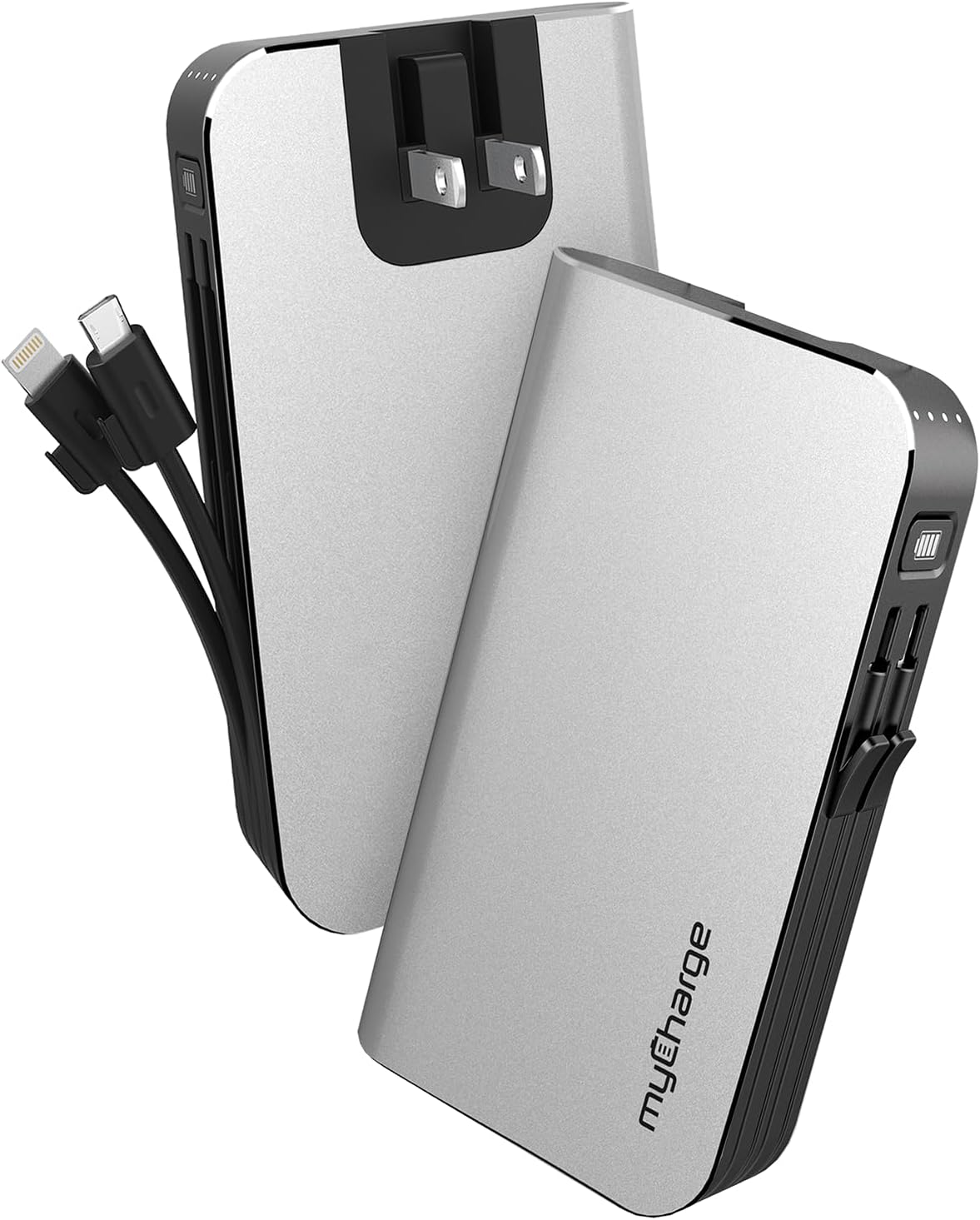
The myCharge HubMax portable charger, model HB10V, is a versatile power bank designed to provide on-the-go power for your mobile devices. It features a 10050mAh internal battery, integrated Lightning and Micro USB charging cables, and a built-in wall plug for convenient recharging of the power bank itself. This manual provides instructions for the proper use and care of your HubMax charger.
การตั้งค่า
Initial Charging of the HubMax
Before first use, fully charge your myCharge HubMax. The device features a foldable wall plug for direct connection to a standard AC outlet.
- Locate the foldable wall prongs on the side of the HubMax.
- Flip out the prongs and plug the HubMax directly into a wall outlet.
- The LED indicators on the device will illuminate to show the charging status. A full recharge typically takes approximately 4.6 hours.
- Once fully charged, unplug the device and fold the prongs back into the unit for storage.
คำแนะนำการใช้งาน
กำลังชาร์จอุปกรณ์มือถือ
The HubMax allows you to charge up to three devices simultaneously using its built-in cables and USB-A port.
- การใช้สายเคเบิลในตัว: Extend the integrated Lightning cable for Apple devices or the Micro USB cable for compatible Android and other devices. Connect the appropriate cable to your device's charging port.
- การใช้พอร์ต USB-A: For devices requiring a different cable type (e.g., USB-C), connect your device's standard USB charging cable to the USB-A output port on the HubMax.
- The HubMax will automatically begin charging your connected device(s). The LED indicators will show the remaining battery capacity of the HubMax.
- For optimal charging speed, ensure your device is compatible with Power Delivery or Quick Charge 3.0 standards, which the HubMax supports for faster charging (up to 2.4x faster than standard chargers).


การซ่อมบำรุง
Proper maintenance ensures the longevity and optimal performance of your myCharge HubMax.
- การทำความสะอาด: ใช้ผ้าแห้งเนื้อนุ่มทำความสะอาดด้านนอกของอุปกรณ์ หลีกเลี่ยงการใช้สารเคมีที่รุนแรงหรือวัสดุที่มีฤทธิ์กัดกร่อน
- พื้นที่จัดเก็บ: Store the HubMax in a cool, dry place away from direct sunlight and extreme temperatures.
- การดูแลแบตเตอรี่ เพื่อสุขภาพแบตเตอรี่ที่ดีที่สุด ควรหลีกเลี่ยงการปล่อยประจุแบตเตอรี่จนหมดบ่อยๆ และควรชาร์จเมื่อระดับแบตเตอรี่เหลือน้อย
- การดูแลสายเคเบิล: Handle the built-in cables gently. Avoid excessive bending or pulling to prevent damage.
การแก้ไขปัญหา
If you encounter issues with your myCharge HubMax, refer to the following common solutions:
- HubMax Not Charging:
- Ensure the wall plug is fully extended and securely inserted into a working AC outlet.
- ตรวจสอบว่าปลั๊กไฟใช้งานได้หรือไม่โดยลองเสียบอุปกรณ์อื่นเข้าไป
- Device Not Charging from HubMax:
- Verify that the HubMax itself has sufficient charge (check LED indicators).
- Ensure the built-in cables or your external USB cable are securely connected to both the HubMax and your device.
- ลองใช้สายเคเบิลหรืออุปกรณ์อื่นเพื่อแยกแ1ยะปัญหา
- การชาร์จช้า:
- Ensure your device is compatible with fast charging protocols supported by the HubMax.
- หลีกเลี่ยงการใช้งานอุปกรณ์เป็นเวลานานขณะชาร์จ เพราะอาจทำให้กระบวนการชาร์จช้าลงได้
ข้อมูลจำเพาะ
| คุณสมบัติ | รายละเอียด |
|---|---|
| หมายเลขรุ่น | HB10V |
| ยี่ห้อ | มายชาร์จ |
| ความจุของแบตเตอรี่ | 10050mAh (ลิเธียมโพลิเมอร์) |
| ขนาดสินค้า | 0.9 x 2.8 x 4.6 นิ้ว |
| น้ำหนักสินค้า | 3.53 ออนซ์ |
| ประเภทของขั้วต่อ | Built-in Lightning Cable, Built-in Micro USB, USB-A Output Port |
| คุณสมบัติพิเศษ | Built-in Wall Plug, Integrated Cables |
| เวลาชาร์จ | Approximately 4.6 hours (via wall plug) |
การรับประกันและการสนับสนุน
For warranty information and customer support, please refer to the official myCharge webหรือติดต่อฝ่ายบริการลูกค้าโดยตรง โปรดเก็บหลักฐานการซื้อไว้เพื่อใช้ในกรณีที่ต้องการเคลมประกัน
ผู้ผลิต: มายชาร์จ
หากต้องการความช่วยเหลือเพิ่มเติม โปรดไปที่: www.mycharge.com


