การแนะนำ
This manual provides instructions for the Transformers: The Last Knight Knight Armor Turbo Changer Bumblebee figure. This figure allows for quick conversion between robot mode and Chevrolet Camaro vehicle mode, and features a unique Knight Armor activation.
- อายุที่แนะนำ: 6 ปีขึ้นไป
- อะไรอยู่ในกล่อง: 1 Transformers: The Last Knight Knight Armor Turbo Changer Bumblebee figure.

Image: The Bumblebee figure displayed in its retail packaging, showing both robot and vehicle modes, along with the "2 Steps" conversion indicator.
การตั้งค่า
- แกะกล่อง: Carefully remove the Bumblebee figure from its packaging. Retain packaging for future reference if desired.
- การตรวจสอบเบื้องต้น: Examine the figure for any loose parts or damage. Ensure all joints move freely.
คำแนะนำการใช้งาน
Transformation: Robot Mode to Vehicle Mode
The Bumblebee figure converts from robot mode to Chevrolet Camaro vehicle mode in 2 steps.
- ขั้นตอนที่ 1: Fold the robot's legs upwards and connect them to form the rear section of the vehicle.
- ขั้นตอนที่ 2: Collapse the robot's arms and torso, aligning them to form the front and middle sections of the Chevrolet Camaro. Ensure all panels click into place for a secure vehicle mode.
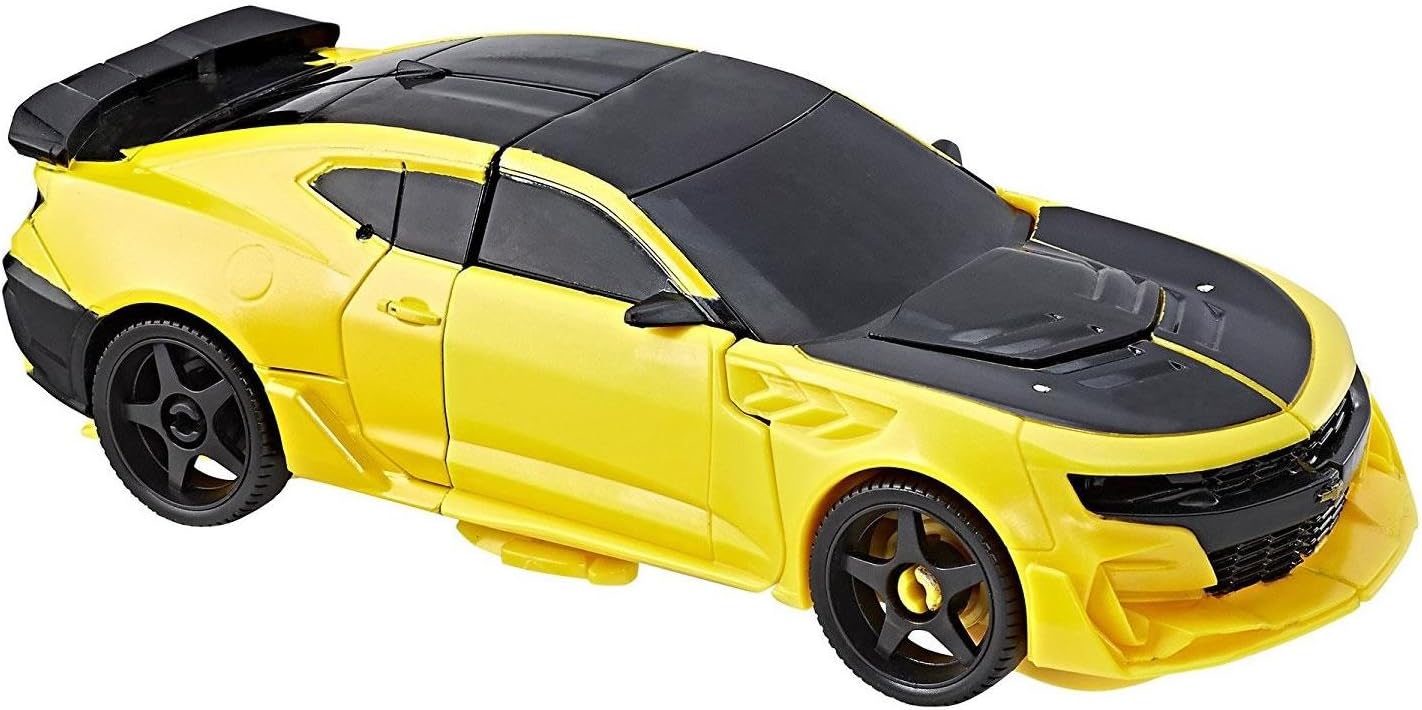
Image: Bumblebee figure in its sleek Chevrolet Camaro vehicle mode, featuring yellow body with black stripes and tinted windows.
Transformation: Vehicle Mode to Robot Mode
To convert Bumblebee back to robot mode, reverse the steps:
- ขั้นตอนที่ 1: Separate the front and rear sections of the vehicle. Extend the robot's arms and torso.
- ขั้นตอนที่ 2: Unfold the legs from the rear section and position them for robot stance. Ensure all parts are fully extended and locked into robot mode.

Image: Bumblebee figure in its robot mode, showcasing its detailed yellow and black armor with silver accents.
Activating Knight Armor
In robot mode, flip the knight's helmet over the figure's head to activate the Knight Armor feature. This reveals an armored faceplate.
การสาธิตด้วยภาพ
For a visual guide on transformation and features, please refer to the video below:
Video: A demonstration of the Transformers Knight Armor Turbo Changer figures, including Optimus Prime, Grimlock, and Bumblebee, showcasing their quick transformation and Knight Armor feature. This video provides a general overview of the product line's functionality.
การซ่อมบำรุง
- การทำความสะอาด: เช็ดรูปปั้นด้วยผ้าแห้งนุ่มๆ เพื่อกำจัดฝุ่น สำหรับคราบสกปรกที่ติดแน่น ให้ใช้ผ้าชุบน้ำหมาดๆ เช็ดเบาๆamp สามารถใช้ผ้าเช็ดทำความสะอาดได้ แล้วเช็ดให้แห้งทันที หลีกเลี่ยงสารเคมีรุนแรงหรือน้ำยาทำความสะอาดที่มีฤทธิ์กัดกร่อน
- พื้นที่จัดเก็บ: เก็บรูปปั้นไว้ในที่แห้งและเย็น หลีกเลี่ยงแสงแดดโดยตรง เพื่อป้องกันการเปลี่ยนสีหรือการเสื่อมสภาพของวัสดุ
- การจัดการ: Handle the figure with care during transformation to avoid stressing joints or breaking small parts.
การแก้ไขปัญหา
- Parts Not Aligning During Transformation: Ensure all previous steps are completed correctly. Gently manipulate parts into position without excessive force. Refer to the operating instructions and video for visual guidance.
- ข้อต่อแข็ง: If joints are stiff, gently move them back and forth to loosen. Do not force movement.
ข้อมูลจำเพาะ
| ขนาดสินค้า | 3.11 x 7.99 x 10 นิ้ว |
| น้ำหนักสินค้า | 6.3 ออนซ์ |
| หมายเลขรุ่น | ซี0886 |
| อายุที่แนะนำโดยผู้ผลิต | 6 ปีขึ้นไป |
| ผู้ผลิต | ฮาสโบร |
| วันที่วางจำหน่าย | 23 เมษายน 2017 |
การรับประกันและการสนับสนุน
For information regarding product warranty or technical support, please contact Hasbro customer service directly. Contact details can typically be found on the official Hasbro webบรรจุภัณฑ์ไซต์หรือผลิตภัณฑ์
ผู้ผลิต: ฮาสโบร


