การแนะนำ
This manual provides comprehensive instructions for the VTech Two-Line Expandable Cordless Phone with Answering System, model DS6151. It covers setup, operation, maintenance, and troubleshooting to ensure optimal performance and user experience. This system is designed for homes and small offices requiring two telephone lines and features an integrated digital answering system and expandable cordless handsets.
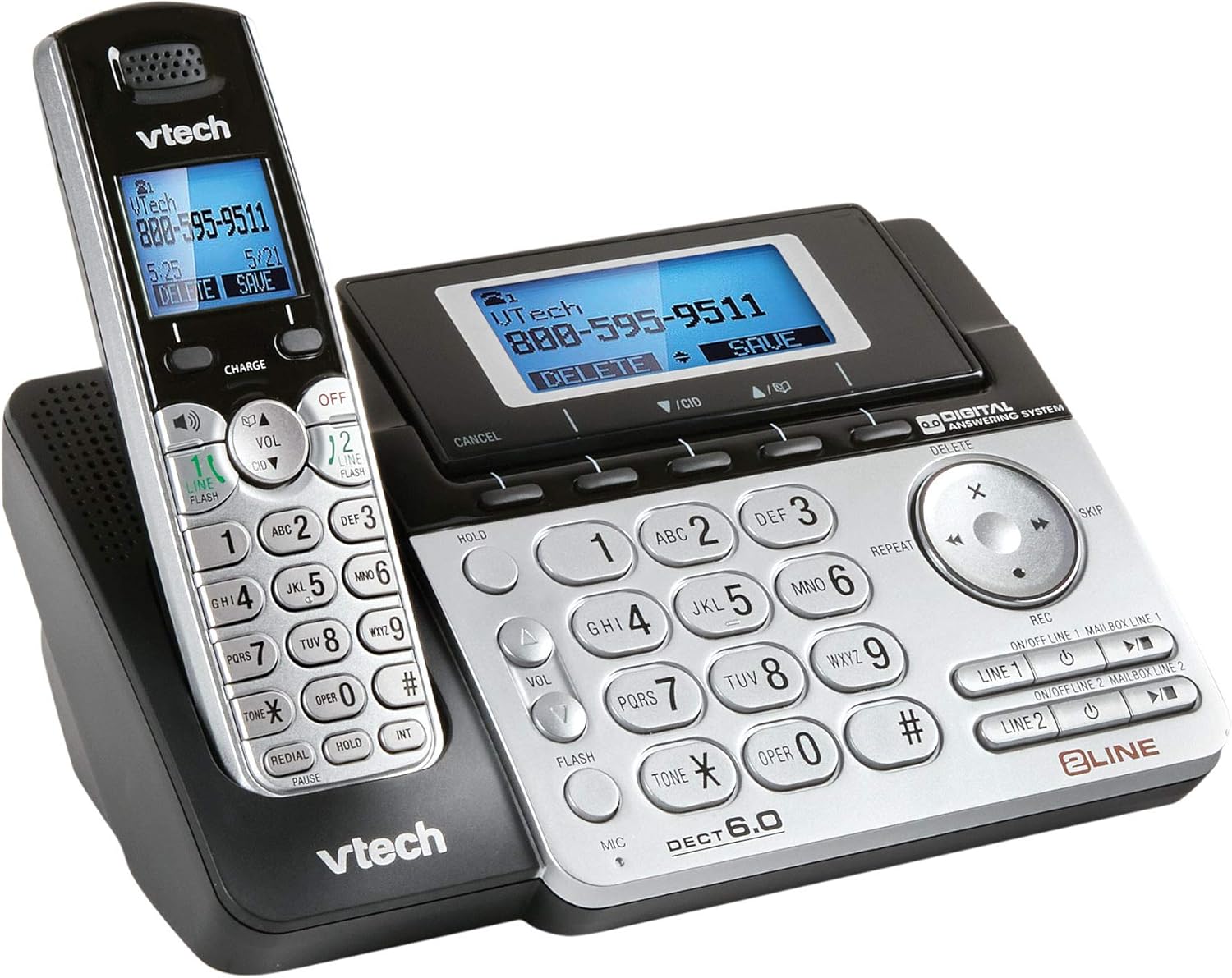
Image 1: The VTech Two-Line Expandable Cordless Phone System, showing the base unit and a cordless handset.
เนื้อหาแพ็คเกจ
ตรวจสอบว่าแพ็คเกจของคุณมีรายการต่อไปนี้:
- เครื่องไร้สาย
- หน่วยฐาน
- อะแดปเตอร์ไฟ AC สำหรับยูนิตฐาน
- Telephone Line Cords (2)
- Rechargeable Battery Pack(s) for Handset(s)
- Handset Battery Compartment Cover(s)
- ขายึดติดผนัง (อุปกรณ์เสริม)
- คู่มือผู้ใช้ (เอกสารนี้)
การตั้งค่า
1. การเชื่อมต่อหน่วยฐาน
- Connect the small end of the AC power adapter to the power jack on the back of the base unit.
- เสียบปลายด้านใหญ่ของอะแดปเตอร์แปลงไฟ AC เข้ากับเต้ารับไฟฟ้ามาตรฐาน
- Position the power cord to prevent tripping hazards.
2. การติดตั้งแบตเตอรี่โทรศัพท์มือถือ
- เปิดฝาช่องใส่แบตเตอรี่ที่ด้านหลังของโทรศัพท์ไร้สาย
- เสียบปลั๊กแบตเตอรี่เข้ากับช่องเสียบภายในช่องใส่แบตเตอรี่ให้แน่นสนิท
- Place the battery pack with the label UP, as indicated.
- Replace the battery compartment cover, sliding it into place until it clicks.

Image 2: The VTech phone system from a different angle, highlighting the handset and base unit design.
3. การชาร์จเครื่อง
Place the cordless handset in the base unit with the display facing up. The CHARGE light on the handset will illuminate, indicating proper charging. Allow the handset to charge for at least 16 hours before initial use.
4. Connecting Telephone Lines
- Plug one end of the first telephone line cord into the LINE 1 jack on the back of the base unit.
- Plug the other end of the cord into a telephone wall jack.
- Repeat for the second telephone line, connecting it to the LINE 2 jack and another telephone wall jack.
- ตรวจสอบให้แน่ใจว่าการเชื่อมต่อทั้งหมดมีความปลอดภัย
คำแนะนำการใช้งาน
ฟังก์ชันการโทรพื้นฐาน
- การโทร: กด เส้นที่ 1 or เส้นที่ 2จากนั้นกดหมายเลขดังกล่าว
- รับสาย: กด พูดคุย/แฟลช or any line button when the phone rings.
- การวางสาย: กด ปิด/ล้าง or place the handset in the base.
- สปีกเกอร์โฟน: ในระหว่างการโทร ให้กด ผู้พูด เพื่อเปิดหรือปิดใช้งานลำโพงสนทนา
- ถือ: กด ถือ to place an active call on hold. Press the corresponding line button to resume.
Two-Line Operation
The system supports two independent telephone lines. You can switch between lines or use both simultaneously for conference calls.
- Switching Lines: During an active call on one line, press the other เส้น button to answer an incoming call or make a new call on that line. The first call will be put on hold automatically.
- การประชุมทางโทรศัพท์: With two active calls (one on hold), press คอนเฟิม (if available) or follow on-screen prompts to join both calls.
ระบบตอบรับอัตโนมัติ
The integrated digital answering system records messages for both lines.
- การเปิด/ปิด: กด ANS เปิด/ปิด on the base unit or through the handset menu.
- ข้อความที่กำลังเล่น: กด เล่น/หยุด on the base unit or access through the handset menu.
- การบันทึกเสียงทักทาย: Access the "Greeting" option in the answering system menu on the handset or base.
- การลบข้อความ: กด ลบ during message playback or through the handset menu.
Directory/Phonebook
บันทึกหมายเลขที่โทรบ่อยเพื่อการโทรออกอย่างรวดเร็ว
- การเพิ่มรายการ: Navigate to the "Directory" menu, select "Add New Entry," and follow the prompts to enter a name and number.
- โทรออกผ่านสมุดรายชื่อ: กด ผกก., scroll to the desired entry, and press พูดคุย/แฟลช หรือ เส้น ปุ่ม.
การระบุหมายเลขผู้โทร
Requires subscription to Caller ID service from your telephone service provider.
- Reviewบันทึกหมายเลขผู้โทรเข้า: กด ตำรวจปราบปราม or บันทึกการโทร ถึง view การโทรล่าสุด
- โทรกลับ: Select an entry from the Caller ID log and press พูดคุย/แฟลช หรือ เส้น ปุ่ม.
การซ่อมบำรุง
การทำความสะอาดโทรศัพท์
เช็ดโทรศัพท์และฐานวางด้วยผ้าเนื้อนุ่มที่ชุบน้ำเล็กน้อยamp ใช้ผ้าเช็ดทำความสะอาดเท่านั้น ห้ามใช้สเปรย์ทำความสะอาดหรือสารเคมีรุนแรง เพราะอาจทำให้พื้นผิวหรือชิ้นส่วนอิเล็กทรอนิกส์เสียหายได้
การดูแลแบตเตอรี่
- Use only the supplied or approved replacement battery packs.
- ห้ามทิ้งแบตเตอรี่ในกองไฟ พวกมันอาจระเบิดได้
- Do not open or mutilate the battery. Released electrolyte is corrosive and may cause burns or injury.
- Remove the battery if the phone is not used for extended periods.
การแก้ไขปัญหา
| ปัญหา | สารละลาย |
|---|---|
| ไม่มีเสียงโทรออก |
|
| โทรศัพท์มือถือไม่ชาร์จ |
|
| คุณภาพเสียงไม่ดี |
|
| ระบบตอบรับอัตโนมัติไม่บันทึกข้อความ |
|
ข้อมูลจำเพาะ
- ขนาดสินค้า : 4.7 x 5.7 x 8.9 นิ้ว
- น้ำหนักสินค้า: 1.4 ปอนด์
- หมายเลขรุ่น: DS6151
- แบตเตอรี่: 2 AA batteries required (for handset)
- ประเภทโทรศัพท์: ไร้สาย
- จำนวนบรรทัด: Two-Line Operation
- ประเภทระบบตอบรับ: ดิจิตอล
- แหล่งพลังงาน: สายไฟ (สำหรับหน่วยฐาน)
- ประเภทผู้โทรออก: ปุ่มกดเดียว
- อุปกรณ์ที่รองรับ: Two phone lines, answering machines, multiple cordless handsets, computers, VoIP services, fax machines
- วันที่เข้าใช้งานครั้งแรก: 21 พฤศจิกายน 2013
การรับประกันและการสนับสนุน
สำหรับข้อมูลการรับประกันโดยละเอียด โปรดดูบัตรรับประกันที่แนบมากับผลิตภัณฑ์ของคุณ หรือเยี่ยมชมเว็บไซต์อย่างเป็นทางการของ VTech webสำหรับการขอรับการสนับสนุนทางเทคนิค การลงทะเบียนผลิตภัณฑ์ หรือการซื้ออุปกรณ์เสริม โปรดไปที่เว็บไซต์นี้ www.vtechphones.com or contact VTech customer service.
สำคัญ: This product contains chemicals known to the State of California to cause cancer and birth defects or other reproductive harm. Please handle with care and refer to safety guidelines.


