การแนะนำ
This manual provides detailed instructions for the proper use and maintenance of your ELECTRA RC7 Air Conditioner Remote Control. Please read this manual thoroughly before operating the device to ensure optimal performance and longevity. The RC7 remote control is designed for specific Airwell, Emailair, and Electra air conditioning units.
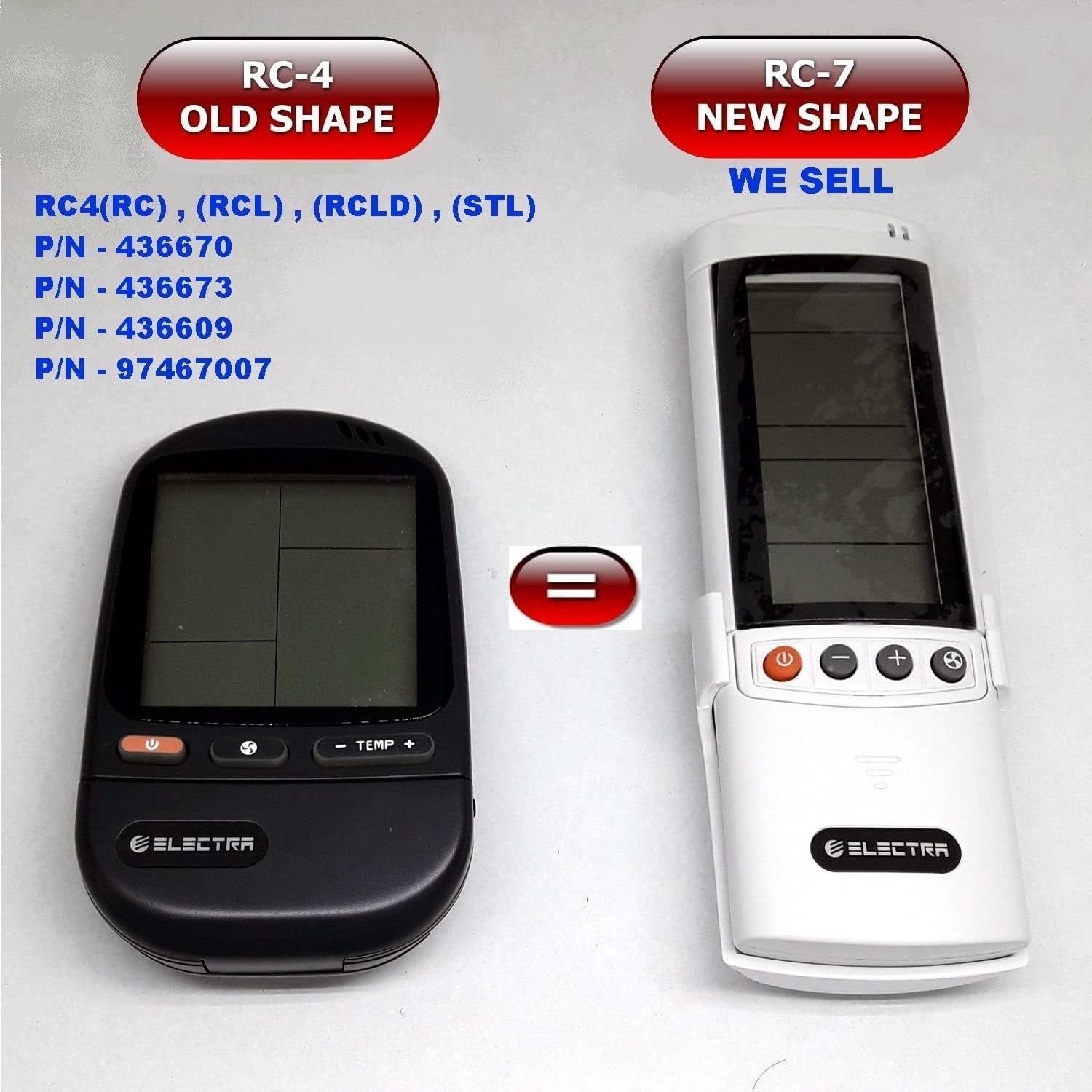
Image: Comparison of the older RC-4 model and the newer RC-7 model. This image helps users identify the correct remote control for their air conditioning unit.
เนื้อหาแพ็คเกจ
- 1 x ELECTRA RC7 Air Conditioner Remote Control
- 1 x Wall Mount Holder (optional, may vary by package)

Image: The ELECTRA RC7 remote control shown alongside its accompanying wall mount holder, illustrating the complete package contents.
สินค้าเกินview
The ELECTRA RC7 remote control features an ergonomic design with clearly labeled buttons and a digital display for easy operation. Familiarize yourself with the layout below.
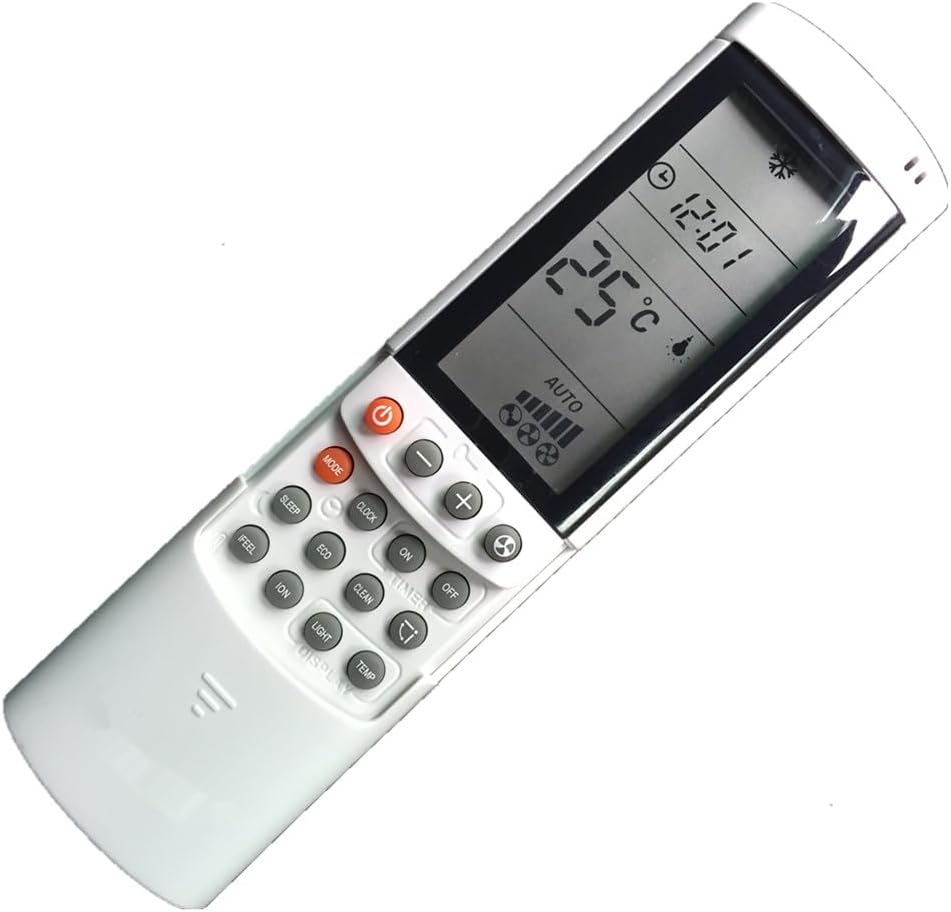
ภาพ: รายละเอียด view of the ELECTRA RC7 remote control, highlighting the digital display and various function buttons for air conditioner operation.
ปุ่มฟังก์ชั่น:
- พลัง (⏻): Turns the air conditioner unit On or Off.
- โหมด: สลับโหมดการทำงานต่างๆ (เช่น ทำความเย็น, ทำความร้อน, พัดลม, ลดความชื้น, อัตโนมัติ)
- ชุด: Used for confirming settings or entering specific menus.
- อุณหภูมิสูงขึ้น (+) / ลง (-): Adjusts the desired temperature.
- ความเร็วพัดลม (☁): ปรับความเร็วพัดลม (เช่น ต่ำ ปานกลาง สูง อัตโนมัติ)
- ตัวจับเวลา: Sets the timer for automatic On/Off operation.
- นอน: Activates or deactivates sleep mode for comfortable night operation.
- ชัดเจน: Clears current settings or cancels a function.
- รู้สึก: Activates a specific comfort mode based on ambient conditions.
- ห้อง: Displays or sets the room temperature.
- แสงสว่าง: ควบคุมไฟแสดงผลบนตัวเครื่องภายใน
- แสดง: Toggles the remote's display backlight or unit's display.
- อีโค: Activates energy-saving mode.
- ทำความสะอาด: Initiates a self-cleaning function for the indoor unit.
- ไอออน: Activates the ionizer function (if available on the AC unit).
- สวิง (⇄): Controls the louver swing direction.
การตั้งค่า
การติดตั้งแบตเตอรี่:
- ค้นหาฝาปิดช่องใส่แบตเตอรี่ที่ด้านหลังของรีโมทคอนโทรล
- เลื่อนฝาครอบลงหรือกดที่สลักเพื่อเปิด
- ใส่แบตเตอรี่ AAA สอง (2) ก้อน โดยตรวจสอบให้แน่ใจว่าขั้วบวก (+) และขั้วลบ (-) ตรงกับเครื่องหมายภายในช่องใส่แบตเตอรี่
- ใส่ฝาครอบช่องใส่แบตเตอรี่กลับเข้าไป โดยให้แน่ใจว่าล็อคเข้าที่อย่างแน่นหนา
บันทึก: ควรใช้แบตเตอรี่ใหม่เสมอ และเปลี่ยนแบตเตอรี่ทั้งสองก้อนพร้อมกัน ห้ามใช้แบตเตอรี่เก่าและใหม่ปะปนกัน หรือใช้แบตเตอรี่ต่างชนิดกัน
คำแนะนำการใช้งาน
Ensure the remote control is pointed directly at the air conditioner's receiver when sending commands.
การใช้งานพื้นฐาน:
- เปิด/ปิดเครื่อง: กดปุ่ม พลัง กดปุ่มหนึ่งครั้งเพื่อเปิดเครื่อง กดอีกครั้งเพื่อปิดเครื่อง
- การเลือกโหมด: กดปุ่ม โหมด button repeatedly to cycle through available operating modes (e.g., Auto, Cool, Dry, Fan, Heat). The selected mode will be displayed on the remote's screen.
- ปรับอุณหภูมิ: ใช้ อุณหภูมิสูงขึ้น (+) or ลง (-) ปุ่มเพื่อตั้งอุณหภูมิที่คุณต้องการ
- การปรับความเร็วพัดลม: กดปุ่ม ความเร็วพัดลม button to cycle through different fan speed settings (e.g., Auto, Low, Medium, High).
ฟังก์ชั่นขั้นสูง:
- ฟังก์ชั่นจับเวลา: กดปุ่ม ตัวจับเวลา button to set a specific time for the unit to turn on or off. Follow the on-screen prompts to adjust the time using the temperature buttons and confirm with ชุด.
- โหมดสลีป: กดปุ่ม นอน button to activate sleep mode, which typically adjusts temperature and fan speed for quiet, comfortable sleep.
- โหมด ECO: กดปุ่ม อีโค button to engage energy-saving operation, which optimizes settings to reduce power consumption.
- ฟังก์ชั่นสวิง: กดปุ่ม แกว่ง button to activate or adjust the automatic louver swing, distributing air evenly.
การซ่อมบำรุง
การทำความสะอาดรีโมทคอนโทรล:
- เช็ดพื้นผิวของรีโมทคอนโทรลด้วยผ้าแห้งและนุ่ม
- สำหรับสิ่งสกปรกที่ฝังแน่น ง. เบา ๆampเทน้ำและผงซักฟอกอ่อนๆ ลงบนผ้า แล้วเช็ดให้แห้งทันที
- Do not use abrasive cleaners, alcohol, or chemical solvents, as these can damage the remote's surface or internal components.
การเปลี่ยนแบตเตอรี่:
Replace batteries when the remote's display becomes dim or the remote fails to operate the air conditioner from a normal distance. Refer to the "Battery Installation" section under Setup for detailed instructions.
สำคัญ: ถอดแบตเตอรี่ออกหากจะไม่ได้ใช้งานรีโมทคอนโทรลเป็นเวลานาน เพื่อป้องกันการรั่วไหลและความเสียหาย
การแก้ไขปัญหา
- รีโมตไม่ตอบสนอง:
- ตรวจสอบว่าใส่แบตเตอรี่ถูกต้องและขั้วถูกหรือไม่
- เปลี่ยนแบตเตอรี่เก่าด้วยแบตเตอรี่ใหม่
- ตรวจสอบให้แน่ใจว่าไม่มีสิ่งกีดขวางระหว่างรีโมทและตัวรับสัญญาณของเครื่องปรับอากาศ
- ตรวจสอบให้แน่ใจว่ารีโมทหันไปทางเครื่องปรับอากาศโดยตรง
- จอแสดงผลมืดหรือว่างเปล่า:
- แบตเตอรี่อาจอ่อน โปรดเปลี่ยนแบตเตอรี่
- ระยะการใช้งานจำกัด:
- Batteries may be weak. Replace them.
- Ensure no strong light sources (e.g., direct sunlight) are interfering with the signal.
ข้อมูลจำเพาะ
- แบบอย่าง: RC7
- ยี่ห้อ: ELECTRA (Compatible with Airwell, Emailair, Electra)
- ประเภทตัวควบคุม: ปุ่มควบคุม
- คุณสมบัติพิเศษ: การออกแบบตามหลักสรีรศาสตร์
- สี: สีขาว
- จำนวนสูงสุดของอุปกรณ์ที่รองรับ: 1 (ต่อรีโมท 1 อัน)
- ระยะสูงสุด: ประมาณ 10 เมตร (33 ฟุต)
- แหล่งพลังงาน: 2 x แบตเตอรี่ AAA (ไม่รวม)
การรับประกันและการสนับสนุน
For warranty information or technical support, please refer to the documentation provided with your air conditioning unit or contact the original seller or manufacturer of the ELECTRA RC7 remote control. Keep your purchase receipt as proof of purchase.


