การแนะนำ
คู่มือนี้ให้คำแนะนำอย่างละเอียดเกี่ยวกับการติดตั้ง การใช้งาน และการบำรุงรักษา กล้องติดหมวกดับเพลิง Fire Cam MINI1080 ของคุณ กล้องรุ่นนี้ได้รับการออกแบบมาเพื่อความทนทานและใช้งานง่าย สามารถบันทึกวิดีโอและภาพถ่ายความละเอียดสูง ทำให้เป็นเครื่องมือสำคัญสำหรับการบันทึกช่วงเวลาสำคัญ
มีอะไรอยู่ในกล่อง
- กล้องติดหมวกกันน็อค Fire Cam MINI1080
- ฐานยึดกล้อง BlackJack Fire Cam (สำหรับหมวกดับเพลิงแบบอเมริกันหรือหมวกแบบมีปีก)
- การ์ด Micro SD U3 ขนาด 32GB พร้อมอะแดปเตอร์
- แบตเตอรี่ Li-Po แบบรีชาร์จ 3.7V จำนวน 2 ก้อน
- ฝาปิดกันน้ำ (สำหรับบันทึกเสียง)
- ฝาปิดกันน้ำ (ไม่มีเสียง สำหรับใช้งานใต้น้ำ)
- โอริงกันน้ำสำรอง
- เลนส์แก้วสำรอง 2 ชิ้น
- สาย USB พร้อมที่ชาร์จไฟบ้าน
คุณสมบัติหลัก
- ดีไซน์ระดับมืออาชีพ ทนทานต่อความร้อนและน้ำ
- สามารถใช้งานใต้น้ำได้ลึกถึง 33 ฟุต
- ดีไซน์กะทัดรัด พร้อมความละเอียดสูง 1080p ที่ 30 เฟรมต่อวินาที และ 720p ที่ 60 เฟรมต่อวินาที ในมุมมองกว้าง view.
- โหมดวิดีโอและภาพถ่าย
- การตั้งค่าที่ปรับได้: เวลา/วันที่ampปิดเครื่องอัตโนมัติ, บันทึกเสียง, บันทึกวนซ้ำ, คุณภาพวิดีโอ
- มาพร้อมการ์ด microSD U3 ขนาด 32GB สำหรับการบันทึกที่ยาวนานขึ้น
- ฐานยึดกล้อง BlackJack Fire Cam รวมอยู่ในชุดแล้ว มีตัวเลือกการติดตั้งอื่นๆ ให้เลือกใช้
การตั้งค่า
1. การติดตั้งแบตเตอรี่และการ์ด SD
ก่อนใช้งานครั้งแรก โปรดตรวจสอบให้แน่ใจว่าแบตเตอรี่ชาร์จเต็มแล้ว โดยใช้สาย USB และที่ชาร์จไฟบ้านที่ให้มา เสียบการ์ด micro SD ลงในช่องที่กำหนด กล้องรองรับการ์ด micro SD U3 ขนาดสูงสุด 32GB
2. การติดตั้งกล้อง
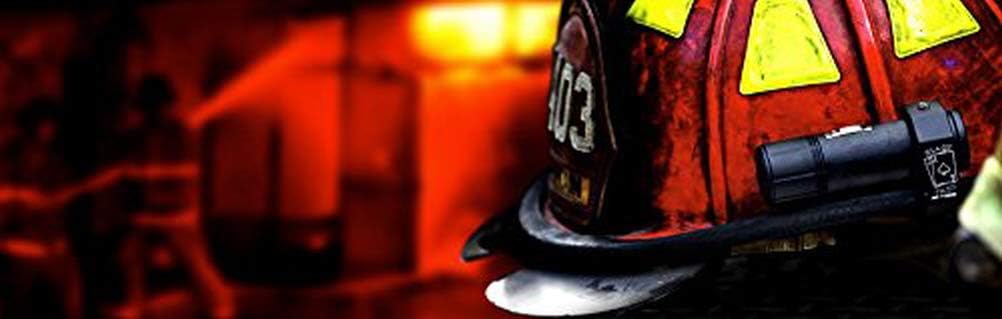
กล้อง Fire Cam MINI1080 มาพร้อมกับฐานยึด BlackJack Fire Cam Mount ฐานยึดนี้ออกแบบมาเพื่อยึดติดกับหมวกดับเพลิงแบบอเมริกันหรือหมวกที่มีปีกแบบอื่นๆ ได้อย่างมั่นคง ใช้ประแจหกเหลี่ยมที่ให้มาคลายสกรูบนฐานยึด ปรับตำแหน่งตามต้องการ แล้วขันสกรูให้แน่นเพื่อยึดกล้องให้มั่นคง
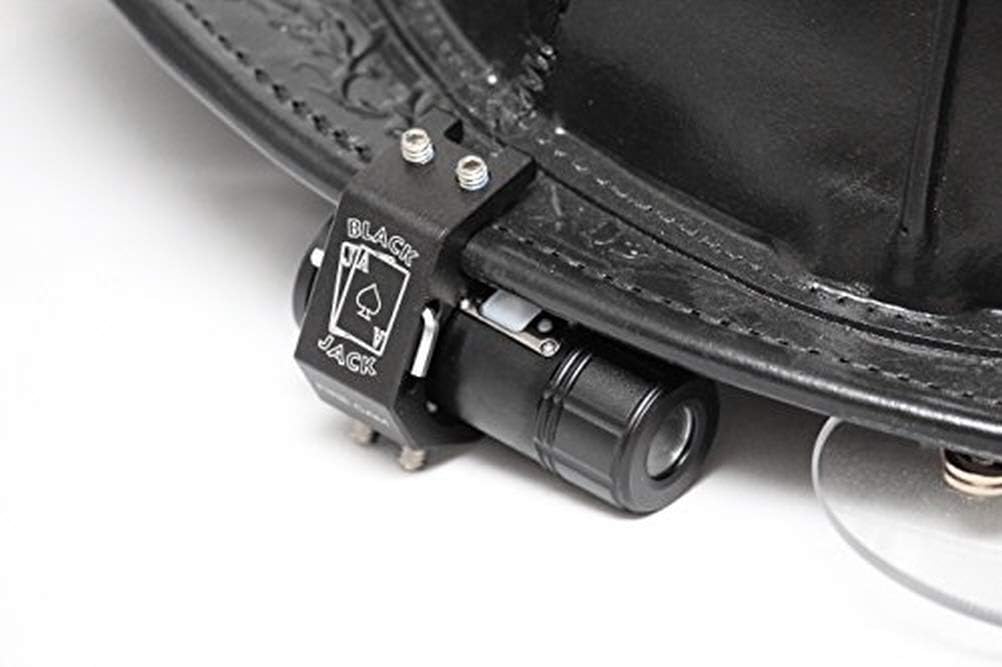
ภาพ: กล้องติดหมวกดับเพลิง Fire Cam MINI1080 ติดตั้งอย่างแน่นหนาที่ด้านข้างของหมวกดับเพลิงของนักดับเพลิง แสดงให้เห็นถึงวิธีการติดตั้งทั่วไป
ภาพ: รายละเอียด view ภาพแสดงส่วนประกอบต่างๆ ของกล้อง Fire Cam MINI1080 พร้อมกับฐานยึด BlackJack ก่อนการประกอบ
3. ความทนทานต่อน้ำ
กล้องมีฝาปิดสองชิ้น: ชิ้นหนึ่งเป็นฝาปิดกันน้ำสำหรับบันทึกเสียง และอีกชิ้นเป็นฝาปิดกันน้ำสนิทสำหรับใช้งานใต้น้ำได้ลึกถึง 30 ฟุต โปรดตรวจสอบให้แน่ใจว่าได้ติดตั้งฝาปิดที่ถูกต้องอย่างแน่นหนาสำหรับการใช้งานที่ต้องการ เพื่อป้องกันความเสียหายจากน้ำ
คำแนะนำการใช้งาน
1. การเปิด/ปิดเครื่องและการบันทึก
กล้องมีปุ่มเดียวที่ใช้งานง่ายสำหรับการทำงานทั้งหมด กดปุ่มหนึ่งครั้งเพื่อเปิดเครื่องและเริ่มบันทึก ไฟแสดงสถานะจะกะพริบ (เช่น สีม่วง/สีน้ำเงิน) เพื่อยืนยันว่ากำลังบันทึกอยู่ หากต้องการหยุดบันทึกและปิดเครื่อง ให้กดปุ่มค้างไว้จนกว่าจะได้ยินเสียงบี๊บห้าครั้ง ซึ่งแสดงว่ากล้องปิดเครื่องแล้ว
2 โหมดวิดีโอและภาพถ่าย
กล้องรองรับทั้งการบันทึกวิดีโอและภาพนิ่ง โปรดดูคำแนะนำโดยละเอียดที่มาพร้อมกับผลิตภัณฑ์ของคุณสำหรับขั้นตอนเฉพาะในการสลับระหว่างโหมดและการปรับการตั้งค่าต่างๆ เช่น คุณภาพวิดีโอ (1080p หรือ 720p) เวลา/วันที่ampปิดเครื่องอัตโนมัติ และบันทึกแบบวนซ้ำ
3. การโอนข้อมูล
เพื่อเข้าถึงไฟล์ที่บันทึกไว้tage. ถอดการ์ด micro SD ออกจากกล้องแล้วเสียบเข้ากับเครื่องอ่านการ์ดที่ใช้งานร่วมกันได้ซึ่งเชื่อมต่อกับคอมพิวเตอร์ของคุณ ซอฟต์แวร์ของกล้องได้รับการออกแบบมาเพื่อให้สามารถเล่นและถ่ายโอนข้อมูลได้อย่างง่ายดาย files.
การซ่อมบำรุง
- การทำความสะอาด: ใช้ผ้าแห้งเนื้อนุ่มเช็ดทำความสะอาดตัวกล้องและเลนส์ หลีกเลี่ยงวัสดุที่มีฤทธิ์กัดกร่อนหรือสารเคมีรุนแรง
- การดูแลแบตเตอรี่ ชาร์จแบตเตอรี่ให้เต็มก่อนเก็บรักษาเป็นเวลานาน เก็บในที่แห้งและเย็น
- การ์ด SD: ควรทำการฟอร์แมตการ์ด microSD เป็นระยะ เพื่อรักษาประสิทธิภาพการทำงานที่ดีที่สุดและป้องกันข้อมูลเสียหาย สำรองข้อมูลสำคัญทั้งหมดtagก่อนทำการจัดรูปแบบใหม่
- โอริง: ตรวจสอบโอริงกันน้ำอย่างสม่ำเสมอเพื่อดูร่องรอยการสึกหรอ หากชำรุดให้เปลี่ยนเพื่อให้มั่นใจว่ากันน้ำได้ มีโอริงสำรองแถมมาให้ด้วย
- การป้องกันเลนส์: ให้ใช้เลนส์แก้วสำรองหากเลนส์หลักเกิดรอยขีดข่วนหรือเสียหาย
การแก้ไขปัญหา
กล้องทำงานผิดปกติ
หากกล้องหยุดทำงานหรือแสดงพฤติกรรมผิดปกติ (เช่น เปิดแล้วปิดทันที) อาจจำเป็นต้องฟอร์แมตการ์ด micro SD ใหม่ ถอดการ์ดออก เสียบเข้ากับคอมพิวเตอร์ แล้วฟอร์แมตใหม่ หากปัญหายังคงอยู่ โปรดติดต่อฝ่ายบริการลูกค้าของ Fire Cam
ปัญหาคุณภาพวิดีโอ
ตรวจสอบให้แน่ใจว่าเลนส์สะอาดและไม่มีสิ่งกีดขวาง ตรวจสอบให้แน่ใจว่าได้เลือกการตั้งค่าคุณภาพวิดีโอที่ถูกต้อง (1080p หรือ 720p) ตามความต้องการของคุณแล้ว
ปัญหาเกี่ยวกับการบันทึกเสียง
ตรวจสอบให้แน่ใจว่าได้ติดตั้งฝาครอบกันน้ำ (ที่มีฟังก์ชันบันทึกเสียง) แล้ว ไม่ใช่ฝาครอบกันน้ำแบบเต็มรูปแบบ ตรวจสอบการตั้งค่ากล้องเพื่อให้แน่ใจว่าได้เปิดใช้งานการบันทึกเสียงแล้ว
ข้อมูลจำเพาะ
| ขนาดสินค้า | 3.25 x 1.13 x 1.13 นิ้ว |
| น้ำหนักสินค้า | 3 ออนซ์ |
| หมายเลขรุ่นสินค้า | เอฟซีมินิ1080 |
| แบตเตอรี่ | ต้องใช้แบตเตอรี่เฉพาะผลิตภัณฑ์ 1 ก้อน (รวมอยู่ด้วย) |
| เทคโนโลยีโฟโต้เซนเซอร์ | ซีมอส |
| ความละเอียดในการจับภาพวิดีโอ | 1080p |
| รูรับแสงสูงสุด | 2 ฟ. |
| ประเภทหน่วยความจำแฟลช | ไมโคร SD |
| รูปแบบการจับภาพวิดีโอ | เอ็มพี 4 |
| รูปแบบเสียงที่รองรับ | MP3, AAC |
| เทคโนโลยีการเชื่อมต่อ | ยูเอสบี |
| สี | สีดำ |
| ผู้ผลิต | ไฟร์แคม แอลแอลซี |
| วันที่พร้อมใช้งานครั้งแรก | 6 กรกฎาคม 2016 |
การรับประกันและการสนับสนุน
แม้ว่าจะไม่มีรายละเอียดการรับประกันเฉพาะเจาะจงระบุไว้ในข้อมูลผลิตภัณฑ์ แต่ Fire Cam ก็มีบริการสนับสนุนลูกค้าสำหรับผลิตภัณฑ์ของตน ชิ้นส่วนกล้องแต่ละชิ้นสามารถเปลี่ยนได้ ทำให้สามารถใช้งานได้ยาวนานขึ้น หากต้องการความช่วยเหลือ การแก้ไขปัญหา หรือสอบถามเกี่ยวกับชิ้นส่วนอะไหล่ โปรดติดต่อฝ่ายบริการลูกค้าของ Fire Cam โดยตรง
บริษัทผู้ผลิต Fire Cam LLC มุ่งมั่นในคุณภาพของผลิตภัณฑ์และความพึงพอใจของผู้ใช้งาน


