การแนะนำ
This manual provides detailed instructions for the setup, operation, and maintenance of your UNIC UC30 LED Mini Projector. Please read this manual thoroughly before using the projector to ensure proper functionality and to prevent damage.
ข้อมูลด้านความปลอดภัย
- อย่าปิดกั้นช่องระบายอากาศ ตรวจสอบให้แน่ใจว่ามีพื้นที่ว่างรอบโปรเจ็กเตอร์เพียงพอเพื่อให้มีการไหลเวียนของอากาศที่ดี
- อย่ามองตรงเข้าไปในเลนส์โปรเจ็กเตอร์เมื่อลamp เปิดอยู่ แสงจ้าอาจทำให้ดวงตาเสียหายได้
- Keep the projector away from water or other liquids. Do not operate in humid environments.
- ใช้เฉพาะอะแดปเตอร์ไฟฟ้าที่มาพร้อมกับโปรเจ็กเตอร์เท่านั้น
- อย่าพยายามถอดประกอบหรือซ่อมแซมโปรเจ็กเตอร์ด้วยตนเอง โปรดติดต่อช่างผู้ชำนาญเพื่อขอรับบริการ
- วางโปรเจ็กเตอร์บนพื้นผิวที่มั่นคงและระดับเพื่อป้องกันไม่ให้ตก
เนื้อหาแพ็คเกจ
กรุณาตรวจสอบสิ่งของภายในบรรจุภัณฑ์เมื่อเปิดออก หากมีสินค้าใดสูญหายหรือเสียหาย โปรดติดต่อผู้ค้าปลีกของคุณ
- UNIC UC30 LED Mini Projector
- อะแดปเตอร์แปลงไฟ
- เคเบิ้ล AV
- รีโมทคอนโทรล
- คู่มือการใช้งาน (เอกสารนี้)

Image: The UNIC UC30 projector, its power adapter, an AV cable, and the remote control, laid out to show the complete package contents.
สินค้าเกินview
Familiarize yourself with the various parts and connections of your projector.
ด้านหน้าและด้านข้าง View

ภาพ: ด้านหน้า view of the UNIC UC30 projector, highlighting the main projection lens and the ventilation grilles on the side.
- เลนส์ฉายภาพ: ปล่อยภาพออกมา
- วงแหวนโฟกัส: ปรับความคมชัดของภาพ
- แป้นหมุนปรับแก้คีย์สโตน: แก้ไขการบิดเบี้ยวของภาพรูปทรงสี่เหลี่ยมคางหมู
- ตะแกรงระบายอากาศ: Essential for heat dissipation. Do not block.
Rear and Side Ports
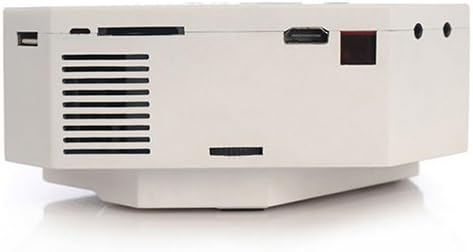
ภาพ: ด้านหนึ่ง view of the UNIC UC30 projector, clearly showing the USB port, SD card slot, HDMI port, and other audio/video input jacks.
- พอร์ต VGA: Connects to computers.
- พอร์ต HDMI: Connects to HDMI-enabled devices (laptops, gaming consoles, media players).
- พอร์ต USB: เชื่อมต่ออุปกรณ์จัดเก็บข้อมูล USB เพื่อเล่นสื่อต่างๆ
- ช่องเสียบการ์ด SD: เสียบการ์ด SD เพื่อเล่นสื่อต่างๆ
- อินพุต AV: Connects to devices using the included AV cable (RCA composite).
- แจ็คหูฟัง: สำหรับเอาต์พุตเสียงภายนอก
- กำลังไฟเข้า: เชื่อมต่ออะแดปเตอร์ไฟ
แผงควบคุมด้านบน

ภาพ: จากบนลงล่าง view of the UNIC UC30 projector, displaying the integrated control panel with navigation buttons and source selection keys.
- ปุ่มเปิด/ปิด: เปิด/ปิดโปรเจ็กเตอร์
- ปุ่มต้นทาง: Selects input source (HDMI, VGA, AV, USB, SD).
- ปุ่มเมนู: Accesses projector settings.
- ปุ่มนำทาง (ขึ้น/ลง/ซ้าย/ขวา): นำทางไปยังเมนูต่างๆ และปรับการตั้งค่า
- ปุ่มตกลง/เข้าสู่ระบบ: ยืนยันการเลือก
- Return/Exit Button: Goes back or exits menus.
การตั้งค่า
1 การวาง
Place the projector on a stable, flat surface. Ensure there is sufficient space around the projector for ventilation. The ideal projection distance is between 1 to 3.5 meters, yielding a picture size of 30 to 120 inches.
Image: The UNIC UC30 projector positioned on a flat surface, illustrating a typical setup scenario.
2. การเชื่อมต่อไฟฟ้า
- Connect the power adapter to the "Power Input" port on the projector.
- เสียบปลายอีกด้านหนึ่งของอะแดปเตอร์เข้ากับเต้ารับที่ผนัง
- ไฟแสดงสถานะการทำงานของโปรเจ็กเตอร์ควรจะสว่างขึ้น
3. อุปกรณ์เชื่อมต่อ
โปรเจ็กเตอร์รองรับแหล่งอินพุตหลายแหล่ง:
- ช่องต่อ HDMI: Connect an HDMI cable from your device (e.g., laptop, DVD player, game console) to the projector's HDMI port.
- VGA: เชื่อมต่อสาย VGA จากคอมพิวเตอร์ของคุณเข้ากับพอร์ต VGA ของโปรเจ็กเตอร์
- เอวี: Use the provided AV cable to connect to devices with RCA composite outputs (e.g., older DVD players, set-top boxes).
- ยูเอสบี: ใส่แฟลชไดรฟ์ USB เข้ากับพอร์ต USB เพื่อเล่นสื่อโดยตรง
- การ์ด SD: Insert an SD card into the SD card slot for direct media playback.
คำแนะนำการใช้งาน
1. การเปิด/ปิดเครื่อง
- การเปิดเครื่อง: Press the Power button on the projector's top panel or the remote control. The projector will start up.
- วิธีปิดเครื่อง: กดปุ่มเปิด/ปิดอีกครั้ง ยืนยันการปิดเครื่องหากมีข้อความแจ้งเตือน
2. การปรับโฟกัสและคีย์สโตน
- จุดสนใจ: Rotate the focus ring around the lens until the projected image is clear and sharp.
- การแก้ไขคีย์สโตน: หากภาพปรากฏเป็นรูปสี่เหลี่ยมคางหมู (กว้างกว่าที่ด้านบนหรือด้านล่าง) ให้ปรับแป้นหมุนแก้ไขภาพบิดเบี้ยวจนกว่าภาพจะเป็นรูปสี่เหลี่ยมผืนผ้า
3. การเลือกแหล่งข้อมูลอินพุต
กดปุ่ม แหล่งที่มา button on the projector or remote control to cycle through available input sources (HDMI, VGA, AV, USB, SD). Select the source corresponding to your connected device.
4. การเล่นสื่อ (USB/SD)
When a USB drive or SD card is inserted, the projector will typically prompt you to select the media type (Photo, Music, Movie, Text). Navigate using the arrow keys and press OK ที่จะเลือก
รองรับ File รูปแบบ:
- Encoding Formats: MPEG1/MPEG2/MPEG4/DivX/Xvid
- รูปแบบวิดีโอ: AVI/MOV/VOB/DAT/MPEG/MPG/RM/RMVB
- รูปแบบเสียง: MP3/WMA/WAV
- รูปแบบภาพ: JPEG / BMP / GIF / PNG
- E-book Format: ข้อความ
การซ่อมบำรุง
- การทำความสะอาดเลนส์: ใช้ผ้าเนื้อนุ่ม ปราศจากขน ที่ออกแบบมาสำหรับเลนส์โดยเฉพาะ เช็ดเลนส์โปรเจคเตอร์เบาๆ อย่าใช้สารทำความสะอาดที่มีฤทธิ์กัดกร่อนหรือออกแรงมากเกินไป
- การระบายอากาศ : Regularly check that the ventilation grilles are free from dust and debris. Use a soft brush or compressed air to clean them. Never block the vents during operation.
- พื้นที่จัดเก็บ: เมื่อไม่ได้ใช้งานเป็นเวลานาน ควรเก็บโปรเจ็กเตอร์ไว้ในที่แห้งและเย็น ป้องกันฝุ่นละออง
การแก้ไขปัญหา
| ปัญหา | วิธีแก้ปัญหาที่เป็นไปได้ |
|---|---|
| ไม่มีภาพที่ฉายออกมา |
|
| ภาพเบลอ |
|
| ภาพมีรูปทรงสี่เหลี่ยมคางหมู | Adjust the keystone correction dial on the projector. |
| ไม่มีเสียง. |
|
| รีโมทคอนโทรลไม่ทำงาน |
|
ข้อมูลจำเพาะ
| คุณสมบัติ | รายละเอียด |
|---|---|
| ยี่ห้อ | ไอเทค |
| ชื่อรุ่น | UC30 |
| หมายเลขรุ่น | VP02W |
| เทคโนโลยีการแสดงผล | จอแอลซีดี |
| ความละเอียดดั้งเดิม | 480 x 320 พิกเซล |
| ความสว่าง | 150 ลักซ์ |
| อัตราส่วนคอนทราสต์ | 300:1 น. |
| ขนาดรูปภาพ | 30-120 นิ้ว |
| ระยะฉายภาพ | 1-3.5 เมตร |
| Projection Model | Front/Rear projection |
| ฮาร์ดแวร์อินเตอร์เฟซ | วีจีเอ, ยูเอสบี, เอชดีเอ็มไอ |
| ลำโพง | 2.0W * 2 |
| วัดtage | 60 วัตต์ |
| คุณสมบัติพิเศษ | Portable, Keystone Correction |
| ประเภทการติดตั้ง | ที่วางบนโต๊ะ |
การรับประกันและการสนับสนุน
สำหรับข้อมูลการรับประกันและการสนับสนุนทางเทคนิค โปรดดูเอกสารที่ให้ไว้ตอนซื้อสินค้าหรือติดต่อผู้ค้าปลีกของคุณ เก็บใบเสร็จรับเงินไว้เป็นหลักฐานการซื้อ


