
1. บทนำ
ขอบคุณสำหรับการซื้อasing the DIGITNOW Wooden Retro Turntable, Model FBA_606. This unit combines a classic turntable with modern features, including built-in stereo speakers, an AM/FM stereo radio, and an audio line-in function. This manual provides detailed instructions to ensure proper setup, operation, and care of your device.
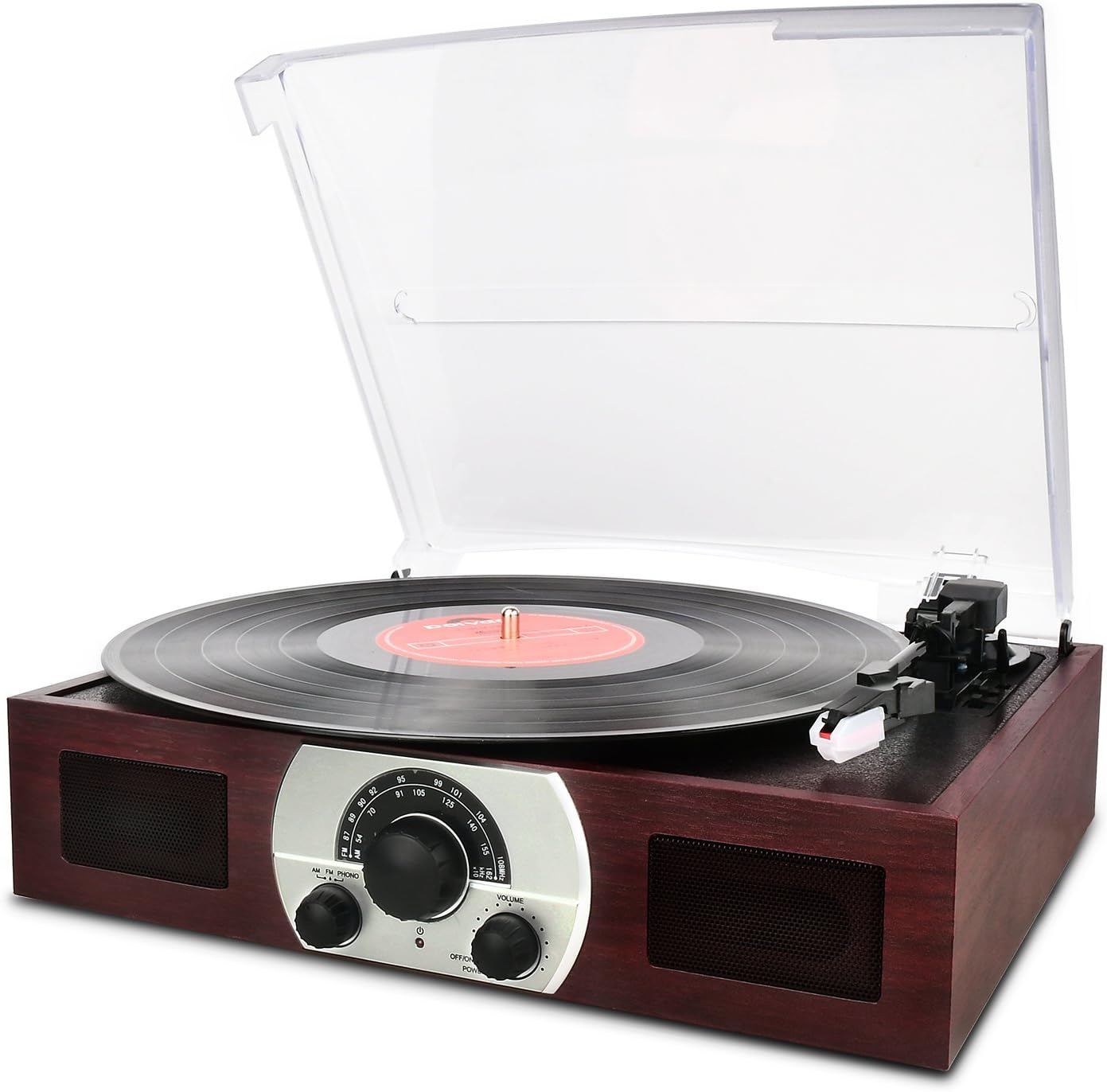
รูปที่ 1: ด้านหน้า view of the DIGITNOW Wooden Retro Turntable with a record playing.
2. คุณสมบัติของผลิตภัณฑ์
- เครื่องเล่นแผ่นเสียงแบบ 3 ความเร็ว: รองรับแผ่นเสียงความเร็ว 33 1/3, 45 และ 78 รอบต่อนาที
- Belt-Drive System: Ensures stable platter rotation.
- Semi-Automatic Tone Arm: Features a lift lever and auto/manual stop control.
- Ceramic Stereo Cartridge: Equipped with a jewel stylus for clear audio playback.
- Built-in 45 RPM Adapter: Conveniently located for playing 45 RPM singles.
- ลำโพงสเตอริโอในตัว: Full-range dynamic stereo speakers for direct audio output.
- Analog AM/FM Stereo Radio: ปรับเข้าสู่สถานีวิทยุที่คุณชื่นชอบ
- Audio Source Line-In (AUX-in): Connect external audio devices like smartphones or CD players.
- ฝาครอบกันฝุ่นแบบถอดได้: Transparent plastic cover protects the turntable from dust.
- Classic Wooden Appearance: Designed with a retro aesthetic.
3. การระบุชิ้นส่วน
Familiarize yourself with the various components of your turntable using the diagram below.
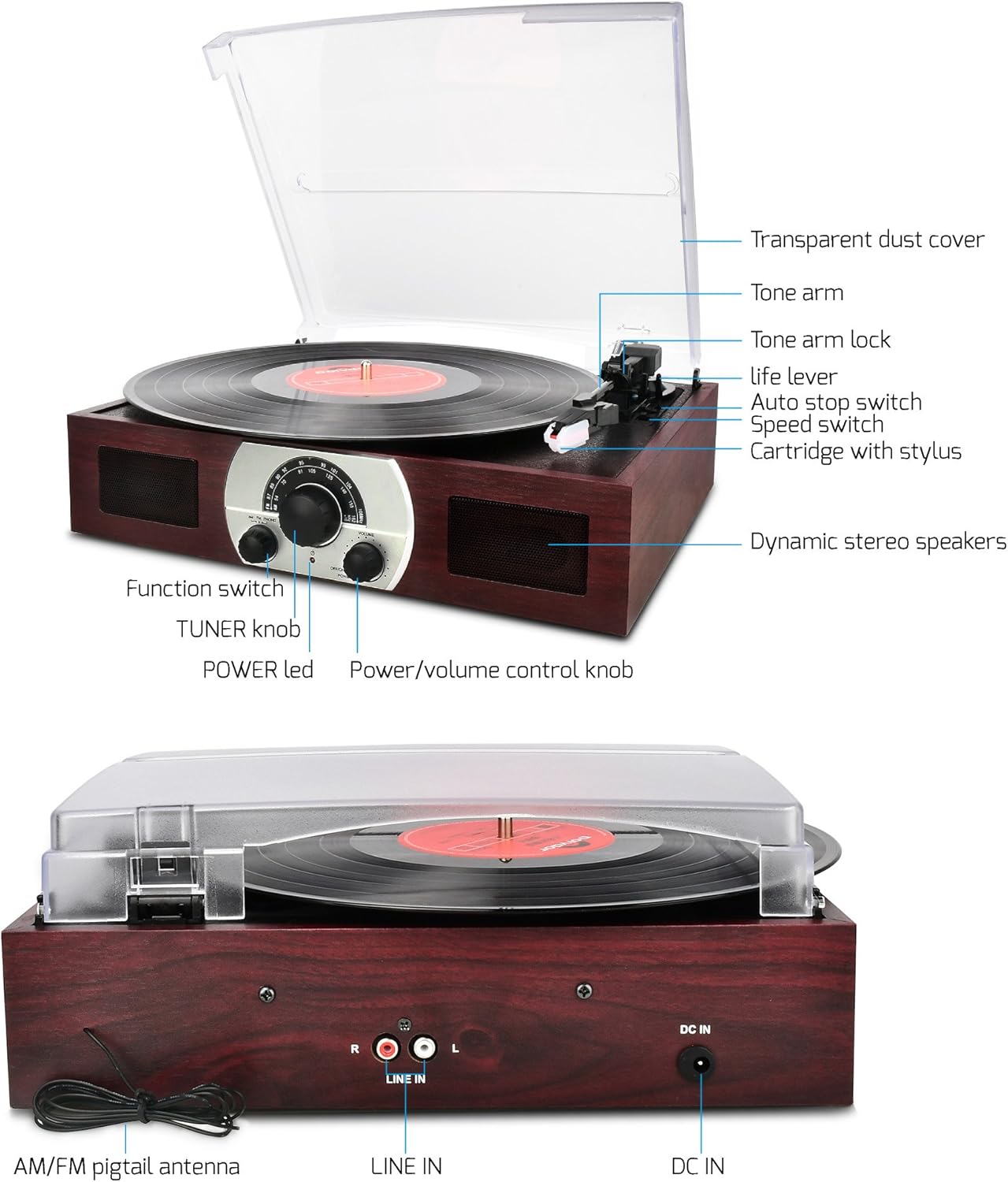
รูปที่ 2: Labeled diagram of the turntable components.
- Transparent Dust Cover: Protects the platter and tone arm.
- แขนโทนเสียง: เก็บตลับหมึกและปากกา
- Tone Arm Lock: ยึดแขนโทนอาร์มให้แน่นเมื่อไม่ได้ใช้งาน
- Life Lever: ยกและลดโทนอาร์ม
- สวิตช์หยุดอัตโนมัติ: Controls automatic platter stop at the end of a record.
- สวิตช์ความเร็ว: เลือกความเร็วในการเล่น (33, 45, 78 รอบต่อนาที)
- ตลับหมึกพร้อมสไตลัส: อ่านร่องของแผ่นเสียง
- Dynamic Stereo Speakers: ลำโพงในตัวสำหรับเอาต์พุตเสียง
- สวิตช์ฟังก์ชั่น: Selects between AM, FM, and PHONO modes.
- TUNER Knob: ปรับความถี่วิทยุ
- ไฟ LED: บ่งชี้สถานะพลังงาน
- ปุ่มควบคุมเปิด/ปิด/ปรับระดับเสียง: เปิด/ปิดเครื่องและปรับระดับเสียง

รูปที่ 3: หลัง view of the turntable showing connections.
- AM/FM Pigtail Antenna: เพื่อการรับสัญญาณวิทยุ
- อินพุตสาย (ขวา/ซ้าย): RCA input jacks for external audio sources.
- DC IN: Power input jack (12V).
4. การตั้งค่า
ทำตามขั้นตอนเหล่านี้สำหรับการตั้งค่าเริ่มต้น:
- การแกะกล่อง: Carefully remove the turntable from its packaging. Retain packaging for future transport or storage.
- การจัดวาง: วางเครื่องไว้บนพื้นผิวที่มั่นคงและเรียบ ห่างจากแสงแดดโดยตรง แหล่งความร้อน ฝุ่นละออง หรือแรงสั่นสะเทือนมากเกินไป
- ฝาปิดป้องกันฝุ่น: The transparent dust cover can be removed or kept open during operation. Ensure it is properly seated if closed.
- การเชื่อมต่อไฟฟ้า: เชื่อมต่ออะแดปเตอร์ไฟฟ้าที่ให้มาเข้ากับ DC IN 12V jack on the rear of the unit (refer to Figure 3). Plug the other end into a standard wall outlet.
- Antenna Connection (for Radio): For optimal AM/FM reception, extend the AM/FM pigtail antenna located at the back of the unit (refer to Figure 3). Position it for the best signal.
- เปิดเครื่องครั้งแรก: หมุน ปุ่มควบคุมพลังงาน/ระดับเสียง clockwise to power on the unit. The ไฟ LED จะให้แสงสว่าง
5. คู่มือการใช้งาน
5.1 การใช้งานเครื่องเล่นแผ่นเสียง (โหมด PHONO)
- เลือกโหมด PHONO: หมุน ฟังก์ชั่นสลับ to the 'PHONO' position.
- เตรียมบันทึก: Place a vinyl record on the turntable platter. If playing a 45 RPM single with a large center hole, place the included 45 RPM adapter on the center spindle first.
- เลือกความเร็ว: ตั้งค่า สวิตซ์ปรับความเร็ว to the appropriate speed (33 1/3, 45, or 78 RPM) for your record.
- ปลดล็อกแขนโทนเสียง: ปล่อยตัว ล็อคโทนอาร์ม.
- ยกแขนโทนเสียงขึ้น: ดันเบาๆ Life Lever backward to raise the tone arm.
- ตำแหน่งแขนโทนเสียง: Manually move the tone arm over the desired starting groove of the record.
- แขนโทนเสียงส่วนล่าง: ดันเบาๆ Life Lever forward to slowly lower the tone arm onto the record. Playback will begin.
- ปรับระดับเสียง: ใช้ ปุ่มควบคุมพลังงาน/ระดับเสียง เพื่อปรับระดับเสียงการฟัง
- คุณสมบัติหยุดอัตโนมัติ: การ สวิตช์หยุดอัตโนมัติ controls whether the platter stops automatically at the end of a record. For most modern records, set it to 'ON'. For some older or specific records, you may need to set it to 'OFF' to ensure the record plays to the end.
- การหยุดเล่น: At the end of the record (if auto-stop is on) or when you wish to stop, gently push the Life Lever backward to raise the tone arm. Return the tone arm to its rest and secure it with the ล็อคโทนอาร์ม.

รูปที่ 4: Detail of the tone arm and platter during operation.
การใช้งานวิทยุ AM/FM 5.2
- เปิดเครื่อง: Ensure the unit is powered on using the ปุ่มควบคุมพลังงาน/ระดับเสียง.
- เลือกโหมดวิทยุ: หมุน ฟังก์ชั่นสลับ to either 'AM' or 'FM' position.
- สถานีจูน: หมุน TUNER Knob เพื่อเลือกสถานีวิทยุที่คุณต้องการ
- ปรับระดับเสียง: ใช้ ปุ่มควบคุมพลังงาน/ระดับเสียง เพื่อปรับระดับเสียงการฟัง
- เพิ่มประสิทธิภาพการรับสัญญาณ: For best FM reception, extend and adjust the position of the AM/FM pigtail antenna at the back of the unit.
- ปิดวิทยุ: To turn off the radio, switch the ฟังก์ชั่นสลับ to any other position (e.g., 'PHONO') or turn off the unit.

รูปที่ 5: Front panel controls including the radio tuner.
5.3 Line-In (AUX-in) Operation
The Line-In function allows you to connect external audio devices and play their audio through the turntable's speakers.
- เชื่อมต่ออุปกรณ์ภายนอก: Using an RCA audio cable (not included), connect the audio output of your external device (e.g., CD player, smartphone with an adapter) to the LINE IN (R/L) jacks on the rear of the turntable (refer to Figure 3).
- เลือกโหมด PHONO: สำคัญ: When using the Line-In as a stereo speaker, the ฟังก์ชั่นสลับ must be set to the 'PHONO' position.
- เล่นเสียง: เริ่มเล่นบนอุปกรณ์เสียงภายนอกของคุณ
- ปรับระดับเสียง: ใช้ ปุ่มควบคุมพลังงาน/ระดับเสียง on the turntable to adjust the overall volume. You may also need to adjust the volume on your external device.
6. การบำรุงรักษา
Proper care will extend the life and performance of your turntable.
- การทำความสะอาดหน่วย: เช็ดภายนอกตัวเครื่องด้วยผ้านุ่มและแห้ง ห้ามใช้น้ำยาทำความสะอาดที่มีฤทธิ์กัดกร่อน แว็กซ์ หรือตัวทำละลาย
- ฝาปิดป้องกันฝุ่น: Clean the transparent dust cover with a soft, slightly damp cloth. Avoid harsh chemicals that could scratch or cloud the plastic.
- การดูแลสไตลัส: The stylus (needle) is a delicate component. Clean it periodically with a soft brush, brushing gently from back to front. Avoid touching the stylus with your fingers. A worn or damaged stylus can harm your records and degrade sound quality; replace it if necessary.
- การดูแลรักษาเอกสาร: รักษาแผ่นเสียงของคุณให้สะอาดและปราศจากฝุ่น เก็บแผ่นเสียงในแนวตั้งในซองเพื่อป้องกันการบิดเบี้ยว
- พื้นที่จัดเก็บ: If storing the unit for an extended period, ensure the tone arm is locked in place and the dust cover is closed. Disconnect the power adapter.
7 การแก้ไขปัญหา
หากคุณพบปัญหา โปรดดูปัญหาทั่วไปและวิธีแก้ไขต่อไปนี้:
| ปัญหา | สาเหตุที่เป็นไปได้ | สารละลาย |
|---|---|---|
| ไม่มีไฟฟ้า | Power adapter not connected; outlet not working; unit off. | Ensure power adapter is securely connected to unit and a working outlet. Turn the Power/Volume knob clockwise to power on. |
| ไม่มีเสียงออกจากลำโพง | Volume too low; incorrect function mode; stylus not on record. | Increase volume. Ensure Function Switch is set to 'PHONO' for records or 'AM/FM' for radio. Lower tone arm onto record. |
| Poor sound quality / Skipping record | Dusty record/stylus; worn stylus; unit not level; record damaged. | Clean record and stylus. Replace stylus if worn. Ensure unit is on a level surface. Try a different record. |
| การรับสัญญาณวิทยุไม่ดี | เสาอากาศไม่ได้ยืดออก/วางตำแหน่งอย่างถูกต้อง สัญญาณอ่อน | Extend and adjust the AM/FM pigtail antenna for better reception. Try moving the unit to a different location. |
| Line-In not working | Incorrect function mode; cable not connected; external device issue. | Ensure Function Switch is set to 'PHONO'. Check RCA cable connections. Verify external device is playing audio and its volume is up. |
8. ข้อมูลจำเพาะ
| คุณสมบัติ | รายละเอียด |
|---|---|
| ชื่อรุ่น | เอฟบีเอ_606 |
| ยี่ห้อ | ดิจิทโนว์ |
| ขนาดสินค้า | 14 x 10.7 x 2.85 นิ้ว |
| น้ำหนักสินค้า | 4.3 ปอนด์ |
| วัสดุ | Plastic (with wooden appearance) |
| สไตล์ | ย้อนยุค |
| สี | สีน้ำตาล |
| อุปกรณ์ที่รองรับ | Headphone, Speaker (via Line-In) |
| ประเภทมอเตอร์ | มอเตอร์ DC |
| รูปแบบสัญญาณ | อนาล็อก |
| เล่มที่tage | 12 โวลต์ |
9. การรับประกันและการสนับสนุน
This product is covered by a manufacturer's warranty. Please refer to the warranty card included with your purchase for specific terms and conditions. For technical support, troubleshooting assistance beyond this manual, or warranty claims, please contact DIGITNOW customer service through their official webหรือร้านค้าที่ซื้อสินค้า โปรดเก็บใบเสร็จรับเงินไว้เป็นหลักฐานการซื้อ