1. บทนำ
The mLabs HT-80A is a portable, mini digital sound level meter designed for accurate noise measurement. It features a large LCD screen for clear digital readings, and offers both Fast and Slow dynamic characteristic modes. This instrument is ideal for sound quality control in various environments including factories, offices, homes, schools, and construction sites. Its auto power-off function ensures energy saving.

รูปที่ 1 : ด้านหน้า view of the HT-80A Digital Sound Level Meter.
2. คุณสมบัติของผลิตภัณฑ์
- Large LCD screen with digital reading for clear display.
- Fast and Slow dynamic characteristic modes for versatile measurement.
- Auto power-off design for energy efficiency.
- Portable, easy to use, and handy for various applications.
- Max and Min Hold Function to capture peak and lowest readings.
- Equipped with a 1/2-inch electret condenser microphone for accurate sound capture.
- Measurement range of 35-130dB.
- Frequency range from 31.5Hz to 8kHz.
- A-frequency weighting.
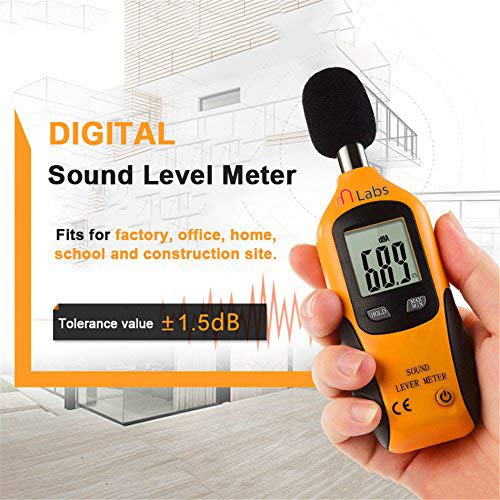
Figure 2: The HT-80A meter is suitable for various environments including factories, offices, homes, schools, and construction sites.

Figure 3: The meter features a sensitive sensor with a 0.5-second fast response time for quick and accurate measurements.
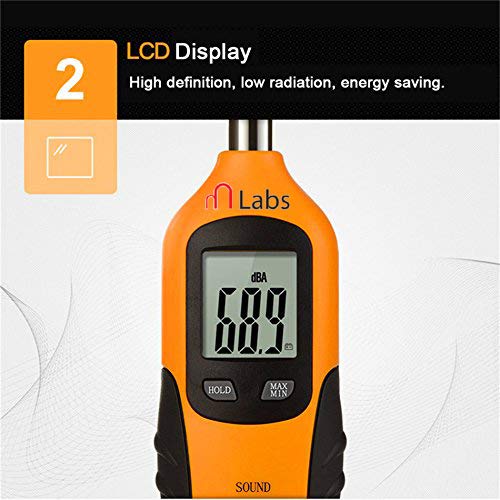
Figure 4: The high-definition LCD display provides clear readings and is designed for energy saving.
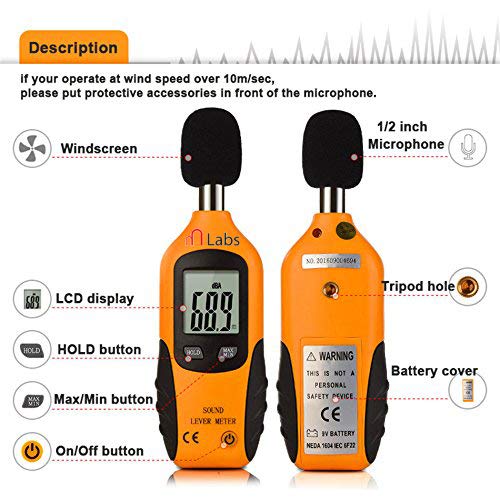
Figure 5: The meter is equipped with a 1/2-inch electret condenser microphone, featuring a metal hole design for double protection of the sound head.

Figure 6: The HT-80A offers a measurement range of 35-130dB with a tolerance value of ±0.5dB.
3. เนื้อหาบรรจุภัณฑ์
The standard package for the mLabs HT-80A includes:
- 1 x Mini Sound Level Meter (HT-80A)
- 1 x 9V แบตเตอรี่
- กล่องขายปลีกดั้งเดิม
4. การตั้งค่า
To set up your HT-80A Sound Level Meter for first use:
- ติดตั้งแบตเตอรี่: Open the battery cover located on the back of the device and install the provided 9V battery, ensuring correct polarity.
- เปิดเครื่อง: Press the power button (usually indicated by a power symbol) to turn on the meter.
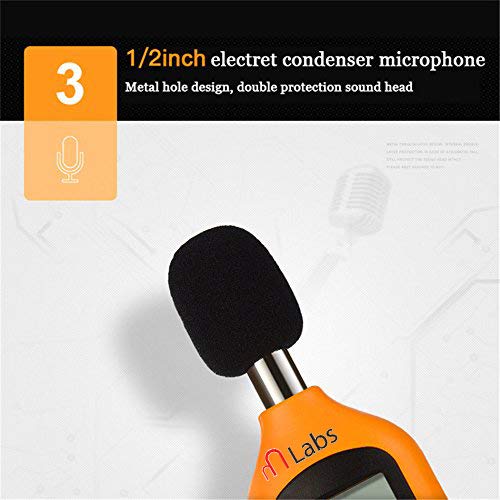
Figure 7: Diagram showing the various parts of the HT-80A, including the battery cover and buttons.
5. การดำเนินการ
Follow these steps to operate your HT-80A Sound Level Meter:
- การวางตำแหน่ง: Hold the meter comfortably in your hand or fix it on a tripod. Point the microphone directly at the suspected noise source. The sound pressure level will be displayed on the LCD screen.
- Max/Min Mode: ถึง view the maximum or minimum sound level recorded during a measurement session, press the "MAX/MIN" button. The meter will then display the highest or lowest reading.
- ฟังก์ชั่นค้างไว้: To freeze the current reading on the display, press the "HOLD" button. Press it again momentarily to deactivate the hold function and resume live readings.
- การใช้กระจกหน้ารถ: If operating in conditions where wind speed exceeds 10m/sec, attach the protective windscreen (if included) over the microphone to ensure accurate readings and prevent wind noise interference.
- ปิดเครื่องอัตโนมัติ: The meter is designed to automatically shut off after approximately 15 minutes of inactivity to conserve battery life.
- หมดแรง: When you are finished using the meter, press and hold the power button to turn it off. For long-term storage, remove the battery.
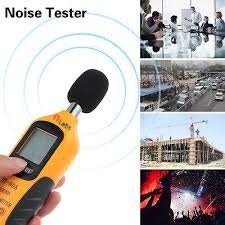
Figure 8: The HT-80A is a versatile noise tester suitable for monitoring sound levels in diverse environments such as offices, busy streets, construction sites, and events.
6. ข้อมูลจำเพาะ
| พารามิเตอร์ | ค่า |
|---|---|
| แบบอย่าง | HT-80A |
| ความแม่นยำ | ±3dB (ref 94dB @1kHz) |
| ช่วงความถี่ | 31.5Hz ถึง 8kHz |
| การถ่วงน้ำหนักความถี่ | A |
| Level Range (LoA) | 35-130เดซิเบล |
| ปณิธาน | 0.1เดซิเบล |
| จอแสดงผลแบบดิจิตอล | LCD 3 หลัก |
| เวลาตอบสนอง | 0.5วินาที |
| การถ่วงน้ำหนักตามเวลา | FAST (125mS) |
| ไมโครโฟน | 1/2 inch Electret Condenser Microphone |
| ประเภทแบตเตอรี่ | แบตเตอรี่ 9V |
| อุณหภูมิการทำงาน | 0°C - 40°C (<80% R.H.) |
| อุณหภูมิในการจัดเก็บ | -10°C ~ 60°C (<70% R.H.) |
| ปิดเครื่องอัตโนมัติ | หลังจากประมาณ ไม่มีการใช้งาน 15 นาที |
| พลังชีวิต | About 50 hours (with 9V battery) |
| ขนาด | 17 x 5.8 x 3.5 cm (Product) / 10 x 8 x 6 cm (Package) |
| น้ำหนักสินค้า | 140g (Product) / 249g (Package) |
| สี | Black and Yellow and Gray |
7. การบำรุงรักษา
- การทำความสะอาด: ใช้ผ้าแห้งเนื้อนุ่มเช็ดทำความสะอาดภายนอกมิเตอร์ ห้ามใช้สารทำความสะอาดที่มีฤทธิ์กัดกร่อนหรือตัวทำละลาย
- พื้นที่จัดเก็บ: When not in use for extended periods, remove the 9V battery to prevent leakage and store the meter in a cool, dry place, away from direct sunlight and extreme temperatures.
- การดูแลไมโครโฟน: Protect the microphone from dust, moisture, and physical impact. If a windscreen is provided, use it in windy or dusty conditions.
- การเปลี่ยนแบตเตอรี่: Replace the 9V battery when the low battery indicator appears on the display or if the meter fails to power on.
8 การแก้ไขปัญหา
| ปัญหา | สาเหตุที่เป็นไปได้ | สารละลาย |
|---|---|---|
| มิเตอร์ไม่เปิดใช้งาน | แบตเตอรี่เสียหรือติดตั้งไม่ถูกต้อง | ตรวจสอบขั้วแบตเตอรี่ หากพบปัญหาให้เปลี่ยนแบตเตอรี่ ให้ใช้แบตเตอรี่ 9V ใหม่ |
| "OL" displayed on screen. | Input sound level is out of range (Overload). | Move the meter further away from the sound source or reduce the sound level if possible. |
| การอ่านที่ไม่ถูกต้อง | Microphone obstructed, strong wind, or environmental interference. | Ensure microphone is clear. Use windscreen in windy conditions. Minimize other noise sources. |
| Display freezes or is unresponsive. | Hold function is active or temporary software glitch. | Press the "HOLD" button to deactivate. If still frozen, remove and reinsert battery to reset. |
9. การรับประกันและการสนับสนุน
Specific warranty information for the mLabs HT-80A Digital Sound Level Meter is not provided in this manual. Please refer to the product packaging or contact mLabs customer support for details regarding warranty coverage and technical assistance.
For further support, you may visit the mLabs official webหรือติดต่อฝ่ายบริการลูกค้าโดยใช้ข้อมูลการติดต่อที่ให้ไว้พร้อมกับการสั่งซื้อของคุณ


