1. บทนำและเรื่องอื่นๆview
The Logitech Wireless Mouse M275 is designed for optimal functionality, aesthetics, and comfort. Its asymmetric and curved shape is crafted to fit comfortably in your hand, enhancing your overall computing experience. The wide scroll wheel further improves line-by-line or page scrolling.
คุณสมบัติที่สำคัญ ได้แก่:
- Comfortable right-hand contoured mouse: Unique curved shape guides your hand to a natural position.
- 18-month battery life: Go longer between battery changes (Battery life may vary based on user and computing conditions).
- Logitech Advanced Optical Sensor: Smooth cursor control, precise tracking and easy text selection.
- Tiny plug-and-play wireless receiver: Just plug it into a USB port and the mouse automatically connects to your computer.
- Wide scroll wheel: More surface area for effortless line-by-line or page scrolling.
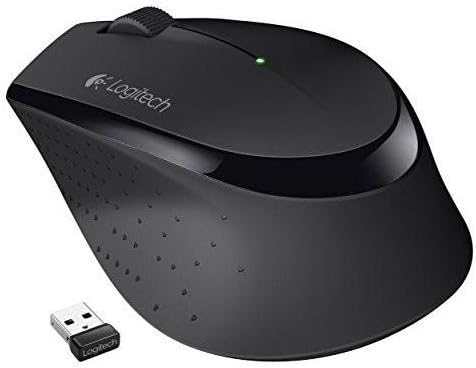
The Logitech Wireless Mouse M275, shown in black, features an ergonomic design for comfortable right-hand use. It includes a compact USB receiver for wireless connectivity.
2. การตั้งค่า
Setting up your Logitech Wireless Mouse M275 is quick and easy:
- ติดตั้งแบตเตอรี่: The mouse requires 1 AA battery (included). Open the battery compartment on the underside of the mouse and insert the battery, ensuring correct polarity.
- ค้นหาตัวรับ USB: The tiny plug-and-play USB receiver is typically provided inside or along with the mouse packaging.
- เชื่อมต่อเครื่องรับ: Plug the USB receiver into an available USB port on your computer (Windows, macOS, or Linux).
- เมาส์เปิดเครื่อง: Slide the ON/OFF switch on the underside of the mouse to the 'ON' position.
- การเชื่อมต่ออัตโนมัติ: The mouse should automatically connect to your computer. No additional software or pairing is typically required.
3. การใช้งานเมาส์
The M275 mouse offers intuitive control for daily tasks:
- การออกแบบตามหลักสรีรศาสตร์: The contoured shape is designed for comfortable right-hand use, reducing strain during extended periods.
- การติดตามที่แม่นยำ: The Logitech Advanced Optical Sensor provides smooth cursor control and precise tracking on various surfaces, making text selection and navigation effortless.
- Wide Scroll Wheel: Utilize the wide scroll wheel for efficient line-by-line or rapid page scrolling.
- สวิตช์เปิด/ปิด: To conserve battery life, remember to switch the mouse to the 'OFF' position when not in use, especially during travel.
4. การบำรุงรักษา
To ensure the longevity and optimal performance of your M275 mouse:
- การเปลี่ยนแบตเตอรี่: The mouse boasts an 18-month battery life, but this can vary. When performance degrades, replace the AA battery. Open the battery compartment on the underside, remove the old battery, and insert a new one.
- การทำความสะอาด: Use a soft, dry cloth to clean the exterior of the mouse. For the optical sensor, use a cotton swab lightly dampened with rubbing alcohol, ensuring no liquid enters the device.
- พื้นที่จัดเก็บ: When not in use for extended periods, or during transport, turn off the mouse and consider storing the USB receiver inside its dedicated slot within the battery compartment to prevent loss.
5 การแก้ไขปัญหา
If you encounter issues with your Logitech Wireless Mouse M275, consider the following:
- ห้ามขยับเคอร์เซอร์: Ensure the mouse is turned 'ON'. Check if the USB receiver is securely plugged into a working USB port on your computer. Replace the battery if it's low or depleted.
- การเชื่อมต่อไม่ต่อเนื่อง: Try plugging the USB receiver into a different USB port. Ensure there are no large metallic objects between the mouse and the receiver that could interfere with the wireless signal.
- Lag or Unresponsive: This could indicate low battery. Replace the battery. Also, ensure your computer's operating system and drivers are up to date.
For more detailed troubleshooting or technical support, please visit the official Logitech support webเว็บไซต์.
6. ข้อมูลจำเพาะ
| คุณสมบัติ | รายละเอียด |
|---|---|
| ยี่ห้อ | โลจิเทค |
| ชุด | M275 |
| หมายเลขรุ่นสินค้า | 910-004525 |
| ความเข้ากันได้ของระบบปฏิบัติการ | วินโดวส์, แมคโอเอส, ลินุกซ์ |
| น้ำหนักสินค้า | 0.32 ออนซ์ |
| ขนาดสินค้า (กxยxส) | 4.15 x 2.67 x 1.5 นิ้ว |
| สี | สีดำ |
| แหล่งพลังงาน | ใช้พลังงานจากแบตเตอรี่ |
| แบตเตอรี่ที่จำเป็น | แบตเตอรี่ AA 1 ก้อน (รวมอยู่ด้วย) |
| อายุการใช้งานแบตเตอรี่โดยเฉลี่ย | 18 เดือน |
| เทคโนโลยีการเชื่อมต่อ | ไร้สาย, USB |
| เทคโนโลยีตรวจจับการเคลื่อนไหว | ออฟติคอล |
7. อะไรอยู่ในกล่อง
Your Logitech Wireless Mouse M275 package includes:
- Logitech Wireless Mouse M275
- ตัวรับสัญญาณนาโน
- แบตเตอรี่ขนาด AA 1 ก้อน
- คู่มือเริ่มต้นอย่างรวดเร็ว
8. การรับประกันและการสนับสนุน
Logitech products are built to last and come with a limited hardware warranty. For specific warranty details, product registration, and access to comprehensive support resources, please visit the official Logitech webเว็บไซต์หรือติดต่อฝ่ายบริการลูกค้าของพวกเขา
เก็บใบเสร็จการซื้อของคุณไว้สำหรับการเรียกร้องการรับประกัน


