1. บทนำ
The Proster Handheld Digital Anemometer is a portable, professional measuring instrument designed for accurate wind speed, air volume, and temperature measurements. It features a large LCD display with backlight, multi-unit switching functions, and can be used for both handheld and fixed measurements. This device is ideal for various applications including outdoor activities, HVAC system checks, and environmental monitoring.
คุณสมบัติหลัก:
- Measures wind speed in m/s, ft/m, km/h, mile/h, and Knots.
- Measures air volume in CFM, CMM, and CMS.
- Large LCD display with backlight for clear readability in various lighting conditions.
- Data hold, maximum, and minimum value functions.
- Low battery indicator and auto power-off function.
- การออกแบบที่กะทัดรัดและพกพาสะดวก
2. การตั้งค่า
2.1. เนื้อหาบรรจุภัณฑ์
Before using your anemometer, please ensure all items are present:
- Proster Handheld Digital Anemometer
- 9V6F22 Battery
- กระเป๋าใส่อุปกรณ์
- คู่มือการใช้งาน

ภาพ: The Proster Handheld Digital Anemometer package contents, showing the device, a 9V battery, a black carrying case, and the user manual.
2.2. การติดตั้งแบตเตอรี่
- ค้นหาช่องใส่แบตเตอรี่ที่ด้านหลังของอุปกรณ์
- ใช้ไขควงขนาดเล็กงัดฝาช่องใส่แบตเตอรี่ออก
- Insert the included 9V6F22 battery, ensuring correct polarity.
- ปิดฝาช่องใส่แบตเตอรี่และขันสกรูให้แน่น
The device is now ready for use. A low battery indicator will appear on the display when the battery needs replacement.
วีดีโอ: A demonstration of the Proster Wind Speed Meter, including battery installation and basic operation.
2.3. Lanyard and Tripod Mounting
- Attach the included lanyard to the designated loop on the device for secure handheld use.
- The bottom of the anemometer features a tripod connector for fixed measurements, allowing for stable and continuous monitoring.
3. คู่มือการใช้งาน
3.1. อุปกรณ์โอเวอร์view
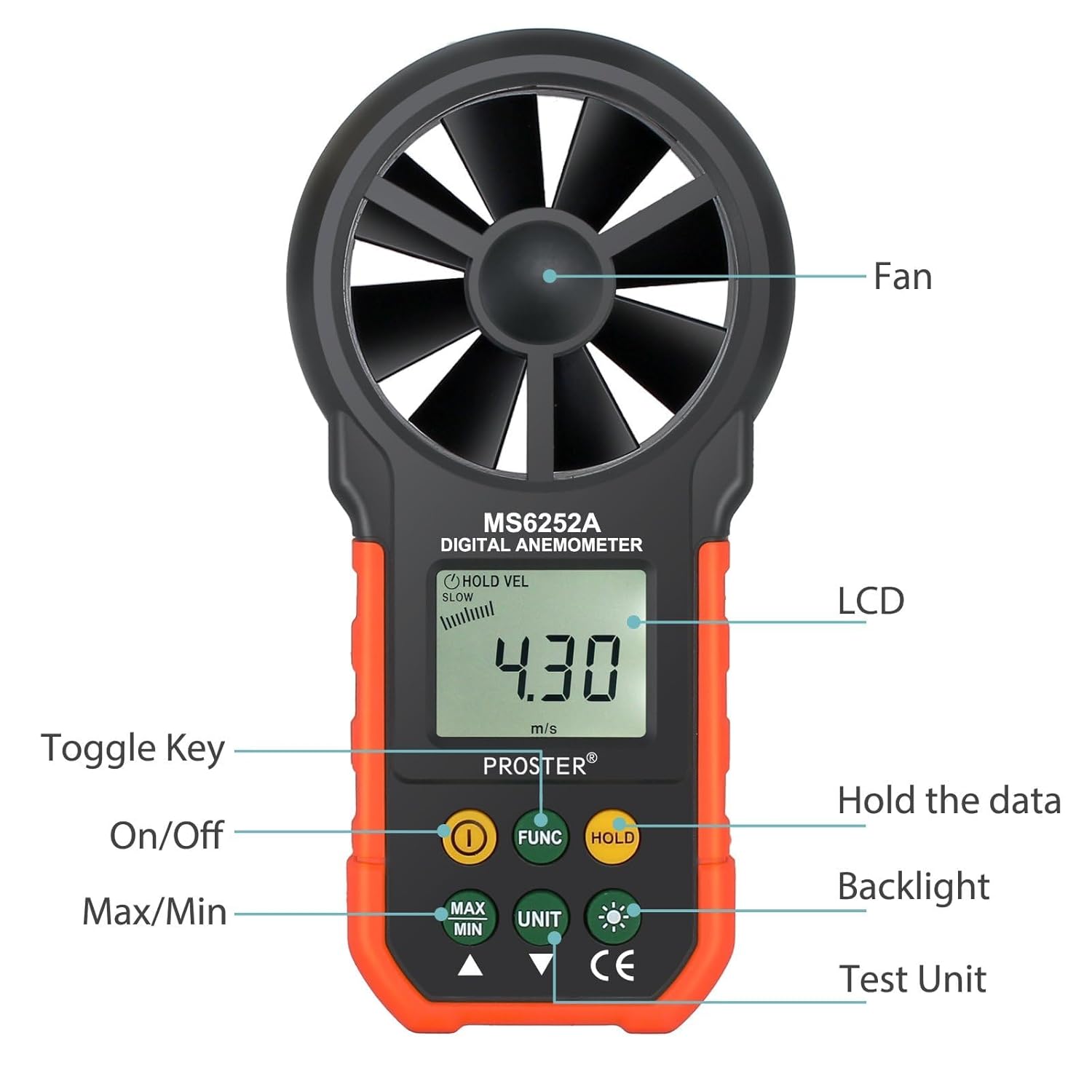
ภาพ: A detailed diagram of the Proster Digital Anemometer, highlighting its key components and button functions.
3.2. เปิด/ปิดเครื่อง
- กดปุ่ม เปิด/ปิด button (usually marked with a power symbol) to turn the device on.
- The device features an auto power-off function after 15 minutes of inactivity to conserve battery life.
3.3. การเลือกหน่วย
To switch between different wind speed units:
- กดปุ่ม หน่วย button repeatedly to cycle through the available units: m/s, ft/m, km/h, mile/h, and Knots.
To switch between temperature units:
- กดปุ่ม °ฟาเรนไฮต์/°เซลเซียส ปุ่มสำหรับสลับระหว่างหน่วยวัดอุณหภูมิฟาเรนไฮต์และเซลเซียส
3.4. Measurement Modes (MAX/MIN/AVG/HOLD)
- กดปุ่ม สูงสุด/ต่ำสุด ปุ่มที่จะ view the maximum or minimum wind speed recorded during a measurement session.
- กดปุ่ม ถือ กดปุ่มเพื่อหยุดค่าที่แสดงบนหน้าจอ กดอีกครั้งเพื่อปล่อย
- The device also supports an average (AVG) measurement mode for consistent readings over time.
3.5. ฟังก์ชั่นไฟแบ็คไลท์

ภาพ: ภาพระยะใกล้ view of the anemometer's LCD display with the backlight feature activated, showing clear digits.
- กดปุ่ม แสงไฟแบ็คไลท์ button (usually marked with a light bulb symbol) to activate or deactivate the LCD backlight. This enhances readability in low-light conditions.
3.6. Air Volume Measurement
- ใช้ ฟังค์ชั่น button to switch to air volume measurement modes (CFM, CMM, CMS).
- The device supports a wide range of air volume measurements for various applications.
วีดีโอ: A seller-provided video demonstrating the Proster Anemometer's capabilities in measuring wind speed and air volume, highlighting its multi-functional design.

ภาพ: The anemometer being used to measure airflow from an indoor air conditioning vent, demonstrating its utility for HVAC applications.
4. การบำรุงรักษา
4.1. การเปลี่ยนแบตเตอรี่
When the low battery indicator appears on the LCD, replace the 9V6F22 battery promptly to ensure accurate readings and continuous operation. Follow the battery installation steps in Section 2.2.
4.2. การทำความสะอาดและการเก็บรักษา
- เช็ดอุปกรณ์ด้วยผ้านุ่มและแห้ง ห้ามใช้น้ำยาทำความสะอาดที่มีฤทธิ์กัดกร่อนหรือตัวทำละลาย
- Keep the fan blades free from dust and debris to maintain measurement accuracy.
- Store the anemometer in its carrying case in a cool, dry place when not in use.
5 การแก้ไขปัญหา
ปัญหาทั่วไป:
- ไม่มีจอแสดงผล: ตรวจสอบว่าแบตเตอรี่ติดตั้งอย่างถูกต้องและมีประจุเพียงพอ เปลี่ยนแบตเตอรี่หากจำเป็น
- การอ่านค่าที่ไม่ถูกต้อง: Ensure the fan blades are clean and spinning freely. Verify the device is held correctly in the direction of airflow.
- Display Not Changing: Check if the HOLD function is activated. Deactivate it to resume live readings.
6. ข้อมูลจำเพาะ
| คุณสมบัติ | รายละเอียด |
|---|---|
| ยี่ห้อ | โปรสเตอร์ |
| แบบอย่าง | ลม |
| แหล่งพลังงาน | 1x 9V6F22 Battery (Included) |
| ขนาดสินค้า | ลึก 1.49 นิ้ว x กว้าง 3.35 นิ้ว x สูง 6.49 นิ้ว |
| น้ำหนักสินค้า | 11.3 ออนซ์ |
| ช่วงความเร็วลม | m/s: 0.40-30; ft/m: 80-5900; km/h: 1.4-108; mile/h: 0.9-67.0; Knots: 0.8-58.0 |
| Air Volume Range | CFM: 0-99990 (0-9.999ft²); CMM: 0-99990 (0-9.999m²); CMS: 0-9999 (0-9.999m²) |
| ประเภทจอภาพ | LCD พร้อม Backlight |
| คุณสมบัติพิเศษ | Portable, Data Hold, Max/Min/Avg Measurement, Auto Power Off |
| วัสดุ | พลาสติก |
7. การรับประกันและการสนับสนุน
Specific warranty information for the Proster Handheld Digital Anemometer (Model WIND) is not provided in this manual. Please refer to the product packaging or contact Proster customer support for detailed warranty terms and conditions.
For technical support or inquiries, please visit the official Proster webเว็บไซต์หรือติดต่อฝ่ายบริการลูกค้าของพวกเขา


