การแนะนำ
This manual provides detailed instructions for the setup, operation, and maintenance of your BIOS Weather Indoor/Outdoor Wireless Thermometer & Hygrometer. Please read this manual thoroughly before using the device to ensure proper function and longevity.
The BIOS Weather Indoor/Outdoor Wireless Thermometer & Hygrometer is designed to provide accurate readings of indoor temperature and humidity, as well as outdoor temperature. It features wireless connectivity for the outdoor sensor, a moon phase display, and the capability to connect with up to three sensors (additional sensors sold separately).
- Wireless range up to 30 meters (100 feet) from the outdoor sensor.
- Indoor monitor includes a hygrometer sensor for RH percentage readings (20% to 95%).
- Displays temperature from up to 3 sensors (Model No. 312TX, sold separately).
- Tracks relative indoor humidity and moon phase.
เนื้อหาแพ็คเกจ
เมื่อเปิดบรรจุภัณฑ์ โปรดตรวจสอบว่าอุปกรณ์ทุกชิ้นครบถ้วนและอยู่ในสภาพดี:
- 1 x Main Display Unit (Indoor Monitor)
- เซ็นเซอร์ไร้สายสำหรับใช้งานภายนอกอาคาร 1 ตัว
- 1 x คู่มือการใช้งาน (เอกสารนี้)

Image: The main display unit (left) and the wireless outdoor sensor (right). The main unit shows indoor temperature, humidity, moon phase, time, and outdoor temperature. The outdoor sensor displays its current temperature.
คู่มือการติดตั้ง
1. การติดตั้งแบตเตอรี่
Both the main display unit and the wireless outdoor sensor require batteries (not included).
- Open the battery compartment on the back of both the main display unit and the outdoor sensor.
- Insert the required batteries (e.g., AA or AAA, refer to the battery compartment markings for correct type and polarity).
- ปิดช่องใส่แบตเตอรี่อย่างแน่นหนา
บันทึก:
- It is recommended to insert batteries into the outdoor sensor first, then the main display unit, to facilitate immediate pairing.
- Use high-quality alkaline batteries for optimal performance, especially in cold weather for the outdoor sensor.
2. การวางตำแหน่งเซนเซอร์
Proper placement of both units is crucial for accurate readings and reliable wireless communication.
- หน่วยแสดงผลหลัก: Place indoors, away from direct sunlight, heat sources, or drafts that could affect temperature and humidity readings. Ensure it is within 30 meters (100 feet) of the outdoor sensor.
- ไร้สายกลางแจ้ง เซนเซอร์:
- Mount in a shaded area to avoid direct sunlight, which can cause artificially high temperature readings.
- Protect from direct rain and snow. An overhang or a weather-resistant enclosure is ideal.
- Avoid placing near large metal objects, electrical appliances, or thick walls that could interfere with the wireless signal.
- Ensure it is within the 30-meter (100-foot) wireless range of the main unit.
3. การจับคู่เบื้องต้น
The main display unit and outdoor sensor should automatically pair upon battery installation. If pairing does not occur:
- ตรวจสอบให้แน่ใจว่าทั้งสองเครื่องมีแบตเตอรี่ใหม่
- Bring the outdoor sensor closer to the main display unit.
- Press the "CH" (Channel) button on the main display unit to cycle through channels or initiate a search for the sensor.
- If issues persist, remove batteries from both units, wait a few minutes, and reinsert them, starting with the outdoor sensor.
คำแนะนำการใช้งาน
1. แสดงผลทับview
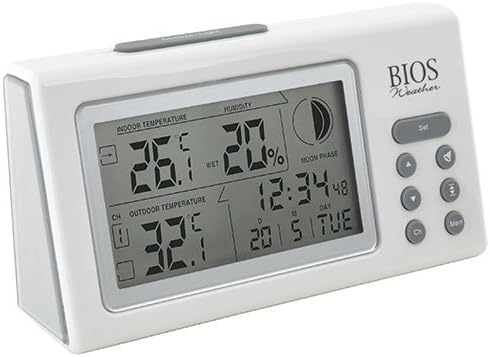
ภาพ: มุมเอียง view of the main display unit, highlighting the various segments for indoor temperature, humidity, moon phase, time, and outdoor temperature.
The main display unit provides the following information:
- อุณหภูมิในร่ม: Displays the current temperature inside the room where the main unit is located.
- ความชื้น: Shows the relative indoor humidity percentage.
- อุณหภูมิภายนอก: Displays the temperature from the connected wireless outdoor sensor.
- เวลาและวันที่: เวลาและวันที่ปัจจุบัน
- ข้างขึ้นข้างแรม: An icon indicating the current moon phase.
- ตัวบ่งชี้ช่อง: Shows which outdoor sensor channel is currently displayed (if multiple sensors are used).
2. ปุ่มฟังก์ชัน
The main display unit features several buttons for configuration and viewไอเอ็นจีข้อมูล:
| ปุ่ม | การทำงาน |
|---|---|
| ชุด | Enters setup mode for time, date, and other settings. Press to confirm settings. |
| ▲ / ▼ (Up/Down) | Adjusts values during setup. Cycles through channels for outdoor sensors. |
| ช. (ช่อง) | Switches between outdoor sensor channels (1, 2, 3) or initiates a search for sensors. |
| MEM (หน่วยความจำ) | Displays maximum and minimum temperature/humidity readings. Press again to clear. |
3. การตั้งเวลาและวันที่
- กดปุ่มค้างไว้ ชุด กดปุ่มจนกระทั่งการแสดงเวลาจะกะพริบ
- ใช้ ▲ or ▼ ปุ่มเพื่อปรับชั่วโมง
- กด ชุด to confirm and move to the next setting (minutes, year, month, day).
- Repeat steps 2 and 3 until all settings are configured.
- กด ชุด one last time to exit setup mode.
4. Viewing Max/Min Readings
กดปุ่ม เมม ปุ่มที่จะ view the maximum recorded indoor temperature, humidity, and outdoor temperature. Press เมม อีกครั้งไป view the minimum readings. To clear the memory, press and hold the เมม button while the max/min readings are displayed.
การซ่อมบำรุง
1. การทำความสะอาด
To clean the display unit and outdoor sensor, use a soft, damp cloth. Do not use abrasive cleaners, solvents, or harsh chemicals, as these may damage the plastic casinก.หรือส่วนประกอบอิเล็กทรอนิกส์
2. การเปลี่ยนแบตเตอรี่
When the battery indicator appears on the display, it is time to replace the batteries in the respective unit (main unit or outdoor sensor). Always replace all batteries in a unit at the same time with new, high-quality batteries of the correct type.
สำคัญ:
- ทิ้งแบตเตอรี่เก่าด้วยความรับผิดชอบตามข้อบังคับท้องถิ่น
- If the unit will not be used for an extended period, remove the batteries to prevent leakage and damage.
การแก้ไขปัญหา
If you experience issues with your BIOS Weather Thermometer & Hygrometer, please refer to the following common problems and solutions:
| ปัญหา | สาเหตุที่เป็นไปได้ / วิธีแก้ไข |
|---|---|
| ไม่มีการแสดงอุณหภูมิภายนอก หรือแสดง "---" |
|
| การอ่านอุณหภูมิ/ความชื้นไม่แม่นยำ |
|
| จอแสดงผลมืดหรือว่างเปล่า |
|
| เวลา/วันที่ไม่ถูกต้อง |
|
ข้อมูลจำเพาะผลิตภัณฑ์

Image: The main display unit with indicated dimensions: 21.59 cm (length), 7.62 cm (width), and 19.05 cm (height).
| คุณสมบัติ | รายละเอียด |
|---|---|
| หมายเลขรุ่น | BBYCA10300783 (312BC) |
| พิมพ์ | Indoor/Outdoor Thermometer and Hygrometer |
| วัสดุ | พลาสติก |
| สี | สีขาว |
| ขนาด (ยูนิตหลัก) | ความสูง: 19.05 ซม., ความกว้าง: 7.62 ซม., ความลึก: 21.59 ซม. |
| น้ำหนัก | 0.30 กก. |
| ช่วงสาย | สูงถึง 30 เมตร (100 ฟุต) |
| ช่วงความชื้นในร่ม | ความชื้นสัมพัทธ์ 20% ถึง 95% |
| Sensor Capability | Supports up to 3 outdoor sensors (additional sensors Model No. 312TX, sold separately) |
| คุณสมบัติพิเศษ | Wireless connectivity, Multi-Sensor support, Humidity Tracking, Moon Phase Display |
| แหล่งพลังงาน | ใช้พลังงานจากแบตเตอรี่ |
ข้อมูลการรับประกัน
This BIOS Weather product comes with a รับประกันอะไหล่ 1 ปี from the date of purchase. This warranty covers defects in materials and workmanship under normal use. It does not cover damage resulting from misuse, accident, unauthorized modification, or improper installation.
โปรดเก็บหลักฐานการซื้อของคุณไว้เพื่อเรียกร้องการรับประกัน
การสนับสนุนลูกค้า
If you have any questions, require technical assistance, or need to make a warranty claim, please contact Bios customer support. For more information and resources, you may also visit the official Bios store on Amazon:
Visit the Bios Store on Amazon
Please have your product model number (BBYCA10300783) and purchase date ready when contacting support.


