การแนะนำ
ขอบคุณสำหรับการซื้อasing the VOX VT20X Guitar Modeling Ampเครื่องฟอก นี้ amplifier combines advanced modeling technology with a Valvetronix vacuum tube preamp circuit to deliver authentic tube tone and a wide range of sounds. With 11 realistic amp models, 13 high-quality effects, and 33 preset programs, the VT20X offers versatile sonic possibilities for guitarists. This manual provides essential information for setting up, operating, maintaining, and troubleshooting your ampชีวิต.

Figure 1: VOX VT20X Amplifier and included 10-foot Planet Waves Classic Series Instrument Cable.
การตั้งค่า
Follow these steps to set up your VOX VT20X amplifier เป็นครั้งแรก
- การเปิดออกและการตรวจสอบ: นำไฟล์ amplifier and all accessories from the packaging. Inspect for any signs of damage during transit. Ensure the included 10-foot Planet Waves Classic Series Instrument Cable is present.
- การจัดวาง: วาง amplifier on a stable, flat surface. Ensure adequate ventilation around the unit to prevent overheating. Avoid placing it near heat sources or in direct sunlight.
- การเชื่อมต่อไฟฟ้า: เชื่อมต่อสายไฟ AC ที่ให้มาเข้ากับ amplifier's power input jack and then to a suitable AC outlet. Ensure the amplifier's POWER switch is in the OFF position before connecting.
- การเชื่อมต่อกีตาร์: Connect one end of the instrument cable to your guitar's output jack and the other end to the ป้อนข้อมูล แจ็คที่แผงด้านหน้าของ ampชีวิต.
- การเปิดเครื่องครั้งแรก: ก่อนเปิดเครื่อง ampเครื่องขยายเสียง ตรวจสอบให้แน่ใจว่า ปริมาณ และ ระดับพลังงาน knobs are set to their minimum positions. Flip the POWER switch to the ON position. The power indicator light will illuminate.

รูปที่ 2 : ด้านหน้า view of the VOX VT20X amplifier, showing the speaker grille and VOX Valvetronix branding.
คำแนะนำการใช้งาน
This section details the various controls and functions of your VT20X ampชีวิต.
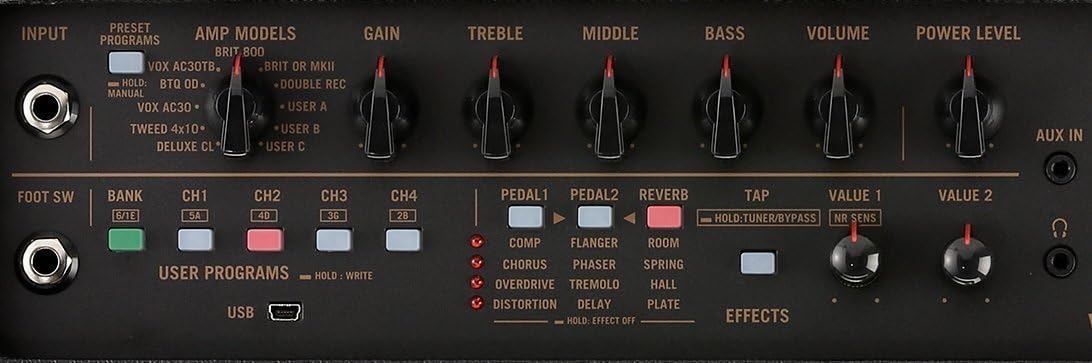
รูปที่ 3: รายละเอียด view of the VOX VT20X amplifier's top control panel, showing knobs for Gain, Treble, Middle, Bass, Volume, Power Level, and various buttons for amp models, effects, and user programs.
แผงควบคุมโอเวอร์view
- แจ็คอินพุต: เชื่อมต่อกีตาร์ของคุณที่นี่
- PRESET Programs: Buttons to select from 33 factory preset programs.
- AMP รุ่น: Select from 11 realistic amp models. Turn the knob to cycle through models like VOX AC30TB, BRIT 800, DELUXE CL, etc.
- กำไรลูกบิด: ปรับปริมาณพรีamp gain, affecting distortion and sustain.
- TREBLE, MIDDLE, BASS Knobs: Standard 3-band EQ controls to shape your tone.
- ปุ่มปรับระดับเสียง: ปรับระดับเสียงโดยรวมของเอาต์พุต ampชีวิต.
- POWER LEVEL Knob: Controls the output power of the amplifier, allowing for tube-like distortion at lower volumes.
- ส่วนเอฟเฟกต์: Buttons and knobs for selecting and adjusting 13 high-quality on-board effects including Compression, Chorus, Flanger, Phaser, Tremolo, Delay, Reverb (Spring, Hall, Plate), Overdrive, and Distortion.
- ปุ่มแตะ: Used for setting the tempo of time-based effects like Delay and Tremolo. Also functions as a tuner when held.
- USER PROGRAMS: Buttons (CH1-CH4) to save and recall your custom amplifier and effect settings. Hold a button to save, press to recall.
- แจ็ค AUX IN: Connect an external audio player (e.g., smartphone, MP3 player) to play along with your favorite tracks.
- HEADPHONES Out Jack: Connect headphones for silent practice. This mutes the internal speaker.
- พอร์ต USB: Connect to a computer for deep editing of amp models and effects using VOX Tone Room software, and for firmware updates.
- FOOT SW Jack: Connect an optional VOX VFS2 or VFS5 footswitch for hands-free control of programs and effects.
Using the Valvetronix Preamp
The VT20X features a Valvetronix preamp that utilizes a vacuum tube multi-stage amplification circuit to emulate the response and feel of a true tube ampเครื่องฟอก NS BIAS SHIFT และ ระดับ indicators on the control panel provide visual feedback on the tube's operating characteristics, which can be adjusted via the Tone Room software for fine-tuning the amplifier's response.

รูปที่ 4: ระยะใกล้ view of the Valvetronix section, showing BIAS SHIFT (GRN:COLD, RED:HOT) and CLASS (GRN:A, RED:A/B) indicators, which reflect the vacuum tube's operational state.
USB Connectivity and Software
The USB port allows you to connect your VT20X to a computer or smart device. By using the dedicated VOX Tone Room software, you can access deeper editing parameters for amp models and effects, manage your user programs, and perform firmware updates. This expands the amplifier's capabilities significantly.

Figure 5: A smartphone connected to the VOX VT20X amplifier via USB, displaying the VOX Tone Room application interface for advanced sound editing.
การซ่อมบำรุง
Proper maintenance will ensure the longevity and optimal performance of your VT20X ampชีวิต.
- การทำความสะอาด: ใช้ผ้าแห้งนุ่มๆ เช็ดบริเวณภายนอก amplifier. For stubborn dirt, a slightly damp cloth can be used, but ensure no moisture enters the vents or jacks. Do not use abrasive cleaners, waxes, or solvents.
- พื้นที่จัดเก็บ: เมื่อไม่ได้ใช้งานเป็นเวลานาน ให้เก็บ ampเก็บเครื่องขยายเสียงไว้ในที่แห้งและเย็น หลีกเลี่ยงแสงแดดโดยตรงและอุณหภูมิที่สูงหรือต่ำเกินไป
- Vacuum Tube Care: The Valvetronix preamp uses a vacuum tube. While designed for durability, tubes can be sensitive to physical shock. Avoid dropping or subjecting the amplifier to strong vibrations. If you suspect a tube issue (e.g., unusual noise, loss of volume), consult a qualified technician.
- การดูแลสายเคเบิล: The included instrument cable should be coiled loosely when not in use to prevent kinks and damage to the internal wiring. Avoid stepping on or placing heavy objects on the cable.
การแก้ไขปัญหา
If you encounter issues with your VT20X ampสำหรับเครื่องขยายเสียง โปรดดูปัญหาและวิธีแก้ไขที่พบบ่อยต่อไปนี้
| ปัญหา | สาเหตุที่เป็นไปได้ | สารละลาย |
|---|---|---|
| ไม่มีเสียงจาก ampชีวิต. |
|
|
| คุณภาพเสียงผิดเพี้ยนหรือไม่ดี |
|
|
| ไม่มีไฟฟ้า |
|
|
If the problem persists after trying these solutions, please contact VOX customer support or a qualified service technician.
ข้อมูลจำเพาะ
| ชื่อรุ่น : | VOX VT20X Guitar Modeling Ampชีวิต |
| หมายเลขรุ่น: | VT20X BUNDLE |
| เอาท์พุต วัดtage: | 20 วัตต์ |
| ผู้บรรยาย: | 1 x 8 นิ้ว |
| Amp รุ่น: | 11 (e.g., VOX AC30TB, BRIT 800, DELUXE CL) |
| เอฟเฟกต์บนตัวเครื่อง: | 13 (e.g., Compression, Chorus, Flanger, Phaser, Tremolo, Delay, Reverb, Overdrive, Distortion) |
| โปรแกรมที่ตั้งไว้ล่วงหน้า: | 33 |
| การเชื่อมต่อ: | Input, AUX In, Headphones Out, USB |
| อุปกรณ์เสริมที่เลือกได้: | VOX VFS2, VFS5 Footswitches |
| แหล่งพลังงาน: | สายไฟ |
| ขนาด (ยาว x กว้าง x สูง): | ขนาด 20 x 20 x 20 นิ้ว (โดยประมาณ) |
| น้ำหนัก: | 19.3 ปอนด์ (โดยประมาณ) |
การรับประกันและการสนับสนุน
VOX products are manufactured to high quality standards. For information regarding warranty coverage, terms, and conditions, please refer to the warranty card included with your product or visit the official VOX webเว็บไซต์.
For technical support, service, or inquiries about replacement parts, please contact VOX customer service through their official website or authorized service centers. Always provide your product model number (VT20X BUNDLE) and serial number when seeking support.


