1. บทนำ
This manual provides essential instructions for the safe and efficient operation of your JVC LT-32EM75 32-inch 720p LED TV. Please read this manual thoroughly before using the television and retain it for future reference. Proper installation, setup, and maintenance are crucial for optimal performance and longevity of your device.
ข้อมูลด้านความปลอดภัยที่สำคัญ
- อย่าปิดกั้นช่องระบายอากาศ ควรมีพื้นที่รอบทีวีเพียงพอเพื่อให้อากาศถ่ายเทได้สะดวก
- อย่าวางโทรทัศน์ไว้ใกล้แหล่งความร้อน เช่น เครื่องทำความร้อน ช่องระบายความร้อน เตา หรืออุปกรณ์อื่นๆ (รวมถึง) ampเครื่องให้ความร้อน) ที่ผลิตความร้อน
- ปกป้องสายไฟไม่ให้ถูกเหยียบหรือถูกหนีบ โดยเฉพาะที่ปลั๊ก เต้ารับไฟฟ้า และจุดที่สายไฟออกจากเครื่อง
- ใช้เฉพาะอุปกรณ์เสริม/สิ่งที่แนบตามที่ผู้ผลิตกำหนดเท่านั้น
- ถอดปลั๊กอุปกรณ์นี้ในระหว่างพายุฝนฟ้าคะนองหรือเมื่อไม่ได้ใช้งานเป็นเวลานาน
- แจ้งบริการทั้งหมดให้ช่างที่ผ่านการรับรองทราบ จำเป็นต้องให้บริการเมื่ออุปกรณ์ได้รับความเสียหายในลักษณะใดก็ตาม เช่น สายไฟหรือปลั๊กชำรุด ของเหลวหกหรือมีวัตถุตกลงไปในอุปกรณ์ อุปกรณ์โดนฝนหรือความชื้น ไม่สามารถทำงานได้ตามปกติ หรือตกหล่น
2. เนื้อหาบรรจุภัณฑ์
ก่อนดำเนินการติดตั้ง โปรดตรวจสอบให้แน่ใจว่ามีอุปกรณ์ทั้งหมดที่ระบุไว้ด้านล่างนี้อยู่ในแพ็คเกจของคุณ:
- JVC LT-32EM75 32-inch 720p LED TV
- ขาตั้งทีวี (ฐานและคอ)
- รีโมทคอนโทรล
- สายไฟ
- คู่มือการใช้งาน (เอกสารนี้)
- สกรูสำหรับชุดขาตั้ง
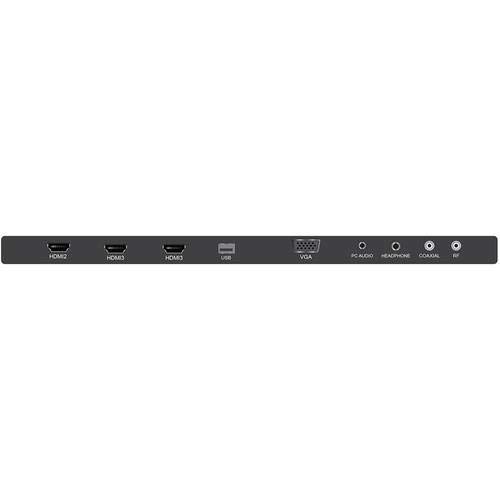
Figure 2.1: JVC LT-32EM75 32-inch 720p LED TV. This image shows the front view of the television with its stand.
3. การตั้งค่า
3.1 การติดตั้งขาตั้งทีวี
- วางหน้าจอทีวีลงบนพื้นผิวที่นุ่มและสะอาดอย่างระมัดระวังเพื่อป้องกันรอยขีดข่วน
- จัดตำแหน่งคอขาตั้งให้ตรงกับรูสำหรับติดตั้งที่ด้านล่างของทีวี
- ยึดคอขาตั้งเข้ากับทีวีโดยใช้สกรูที่ให้มา
- Attach the stand base to the stand neck, ensuring it clicks into place or is secured with screws if applicable.
- ยกทีวีขึ้นอย่างระมัดระวังแล้ววางบนพื้นผิวที่มั่นคงและระดับ
3.2 การเชื่อมต่ออุปกรณ์ภายนอก
Your JVC LT-32EM75 TV features multiple input ports for connecting various devices. Ensure the TV is powered off before making any connections.

รูปที่ 3.1: ด้านหลัง view of the JVC LT-32EM75 TV showing input ports. This image illustrates the location of HDMI, USB, and other connection ports.
- อุปกรณ์ HDMI: Connect up to three HDMI-enabled devices (e.g., Blu-ray player, game console, cable box) to the HDMI ports. Use high-quality HDMI cables for best picture and sound.
- เสาอากาศ/สายเคเบิล: Connect an antenna or cable TV coaxial cable to the "ANT/CABLE" input for over-the-air or basic cable channels.
- อุปกรณ์ยูเอสบี: Insert a USB flash drive into the USB port to view photos or play compatible media files.
- เอาต์พุตเสียง: Use the digital audio output (optical) or headphone jack to connect external audio systems or headphones.
3.3 Power Connection and Initial Scan
- Plug the power cord into the TV's power input, then into a standard electrical outlet (AC 120V, 60Hz).
- กดปุ่มเปิด/ปิดบนทีวีหรือรีโมทคอนโทรลเพื่อเปิดทีวี
- Follow the on-screen instructions to complete the initial setup, including language selection and channel scanning. This process will detect available channels from your antenna or cable connection.
4. การใช้งานทีวี
4.1 ฟังก์ชั่นการควบคุมระยะไกล
The included remote control allows you to access all TV functions. Ensure two AAA batteries are inserted with correct polarity.

Figure 4.1: JVC LT-32EM75 Remote Control. This image displays the layout of the remote control buttons, including power, volume, channel, input, and menu navigation.
- พลัง: เปิดหรือปิดทีวี
- อินพุต: Selects the input source (HDMI 1, HDMI 2, HDMI 3, TV, USB).
- ฉบับ +/-: ปรับระดับเสียง
- ช +/-: เปลี่ยนช่อง
- เมนู: เปิดเมนูหลักเพื่อปรับแต่งการตั้งค่า
- ARROW BUTTONS (Up/Down/Left/Right): นำทางผ่านตัวเลือกเมนู
- ENTER/OK: ยืนยันการเลือก
- EXIT: ปิดเมนูหรือหน้าจอแสดงผลปัจจุบัน
4.2 การดำเนินการพื้นฐาน
- การเปลี่ยนแหล่งสัญญาณเข้า: กดปุ่ม ป้อนข้อมูล button on the remote repeatedly to cycle through available input sources, or press it once to bring up the input menu and select your desired source using the arrow buttons and เข้า.
- การปรับการตั้งค่าภาพ: กด เมนู, navigate to "Picture" settings. Here you can adjust Brightness, Contrast, Color, Tint, Sharpness, and select Picture Modes (e.g., Standard, Dynamic, Movie).
- การปรับการตั้งค่าเสียง: กด เมนู, navigate to "Sound" settings. Options include Bass, Treble, Balance, and Sound Modes (e.g., Standard, Music, Movie). Note that the built-in speakers may have limitations in sound quality.
5. การบำรุงรักษา
5.1 การทำความสะอาดหน้าจอทีวี
- ควรถอดปลั๊กทีวีทุกครั้งก่อนทำความสะอาด
- ใช้ผ้าเนื้อนุ่มที่ไม่เป็นขุย (เช่น ผ้าไมโครไฟเบอร์) เช็ดหน้าจอเบาๆ
- สำหรับรอยฝังแน่น ให้เช็ดเบาๆampชุบผ้าด้วยน้ำหรือน้ำยาทำความสะอาดหน้าจอชนิดพิเศษ ห้ามฉีดน้ำยาลงบนหน้าจอโดยตรง
- Avoid using abrasive cleaners, alcohol, benzene, or thinners, as these can damage the screen coating.
5.2 การทำความสะอาดทีวีasing
- เช็ดคasinก. ด้วยผ้าแห้งนุ่มๆ
- หากจำเป็น ให้ใช้ง. เล็กน้อยamp cloth. Do not allow water to enter the TV's interior.
6 การแก้ไขปัญหา
ก่อนที่จะติดต่อฝ่ายสนับสนุนลูกค้า โปรดดูคำแนะนำในการแก้ไขปัญหาต่อไปนี้สำหรับปัญหาทั่วไป
| ปัญหา | สาเหตุที่เป็นไปได้ | สารละลาย |
|---|---|---|
| ไม่มีไฟฟ้า | Power cord not connected; Power outlet not working; TV is off. | Ensure power cord is securely plugged into TV and outlet. Test outlet with another device. Press the Power button on the TV or remote. |
| ไม่มีภาพแต่มีเสียง | เลือกแหล่งสัญญาณเข้าไม่ถูกต้อง อุปกรณ์ภายนอกไม่ได้เปิดใช้งานหรือเชื่อมต่ออย่างถูกต้อง | กดปุ่ม ป้อนข้อมูล button to select the correct source. Check connections of external devices and ensure they are powered on. |
| ไม่มีเสียงแต่มีภาพ | Volume is muted or too low; Incorrect audio output selected; External device audio issue. | กด โวล+ or unmute the TV. Check audio settings in the menu. Ensure external device audio settings are correct. |
| รีโมตคอนโทรลไม่ทำงาน | แบตเตอรี่หมดหรือใส่ไม่ถูกต้อง; มีสิ่งกีดขวางระหว่างรีโมทและทีวี; เซ็นเซอร์รับสัญญาณรีโมทบนทีวีถูกปิดกั้น | Replace batteries with new ones, ensuring correct polarity. Remove any obstructions. Ensure the TV's remote sensor is clear. |
| Poor picture quality (e.g., blurry, grainy) | Weak antenna signal; Incorrect picture settings; Low-quality source material. | Adjust antenna position or check cable connection. Reset picture settings to default or adjust manually. Ensure source device is outputting high-quality signal. |
| Sound quality is not optimal | Built-in speaker limitations; Incorrect sound settings. | Adjust sound settings (Bass, Treble, Sound Mode) in the TV menu. Consider connecting external speakers or a soundbar for improved audio experience. |
7. ข้อมูลจำเพาะ
| คุณสมบัติ | รายละเอียด |
|---|---|
| ชื่อรุ่น | LT-32EM75 |
| ขนาดหน้าจอ | 32 นิ้ว |
| เทคโนโลยีการแสดงผล | นำ |
| ปณิธาน | 720p |
| อัตราการรีเฟรช | 60 เฮิรตซ์ |
| เทคโนโลยีการเชื่อมต่อ | HDMI |
| พอร์ต HDMI | 3 |
| เล่มที่tage | 120 โวลต์ |
| วัดtage | 45 วัตต์ |
| น้ำหนักสินค้า | 10 ปอนด์ (ประมาณ 4.5 กก.) |
| ขนาดสินค้า (กว้าง x ยาว x สูง) | 40 x 10 x 25 นิ้ว (พร้อมขาตั้ง) |
| ประเภทการติดตั้ง | ติดตั้งบนโต๊ะ |
8. การรับประกันและการสนับสนุน
8.1 การรับประกันของผู้ผลิต
This JVC LT-32EM75 television typically comes with a การรับประกันจากผู้ผลิต 1 ปี from the date of purchase. This warranty covers defects in materials and workmanship under normal use. Please retain your proof of purchase for warranty claims. For specific terms and conditions, refer to the warranty card included with your product or visit the official JVC support webเว็บไซต์.
8.2 การสนับสนุนลูกค้า
If you encounter issues not covered in the troubleshooting section or require further assistance, please contact JVC customer support. You can usually find contact information (phone number, email, or support website) on the official JVC webไซต์หรือในเอกสารที่มาพร้อมกับทีวีของคุณ
Note: JVC does not sell extended warranties for this specific model.


