1. บทนำ
This manual provides essential instructions for the safe and efficient operation of your COMISO Portable Wireless Bluetooth Speaker U832. Please read this manual thoroughly before using the product and retain it for future reference.
2. สินค้าหมดview
The COMISO U832 is a compact and portable wireless Bluetooth speaker designed for high-definition audio playback and hands-free calling. It features a durable construction and versatile connectivity options.

รูปที่ 2.1 : ด้านหน้า view of the COMISO U832 Portable Wireless Bluetooth Speaker.

รูปที่ 2.2: เกินview of the COMISO U832 speaker, highlighting its compact dimensions (60.4mm x 90mm x 31.1mm) and key features such as CSR 4.0 Bluetooth, 5W driver, built-in microphone, 5-hour playing time, A2DP support, 33-feet range, IP67 waterproof rating, and dustproof design.
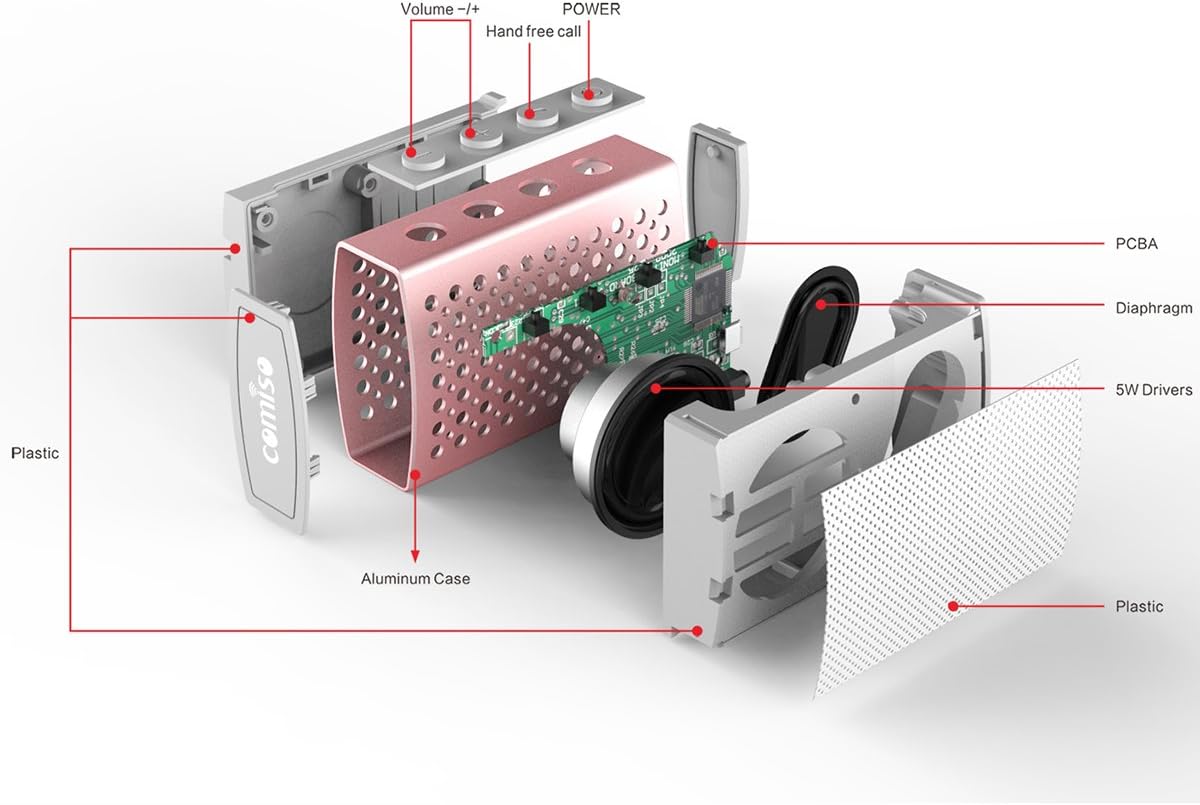
รูปที่ 2.3: ระเบิด view illustrating the internal components of the COMISO U832 speaker, including the aluminum case, PCBA (Printed Circuit Board Assembly), diaphragm, 5W drivers, and plastic housing. Control buttons for Volume -/+, Hand-free call, and Power are also visible.
3. คุณสมบัติ
- การออกแบบพกพา: กะทัดรัดและน้ำหนักเบาเพื่อการขนย้ายที่ง่ายดาย
- การเชื่อมต่อบลูทูธไร้สาย: Seamless audio streaming from compatible devices.
- ไมโครโฟนในตัว: ช่วยให้สามารถโทรออกแบบแฮนด์ฟรีได้
- ช่องต่อสัญญาณเข้า: สำหรับการเชื่อมต่อเสียงแบบใช้สาย
- HD Sound and Bass: Optimized audio performance.
- IP67 กันน้ำและกันฝุ่น: Provides protection against water immersion and dust ingress.
- กำลังขับลำโพง 5 วัตต์: ให้เสียงที่คมชัดและทรงพลัง
- อายุการใช้งานแบตเตอรี่ยาวนาน: เล่นได้นานถึง 5 ชั่วโมงต่อการชาร์จเพียงครั้งเดียว
4. การตั้งค่า
4.1 การชาร์จลำโพง
Before initial use, fully charge the speaker. Connect the provided USB charging cable to the speaker's charging port and the other end to a USB power adapter (not included) or a computer's USB port. The charging indicator light will illuminate during charging and turn off when fully charged.

Figure 4.1: The COMISO U832 speaker connected for charging and AUX audio input.
4.2 การจับคู่บลูทูธ
- ตรวจสอบให้แน่ใจว่าลำโพงชาร์จเต็มแล้ว
- Press and hold the Power button on the speaker until you hear an audible prompt and the Bluetooth indicator light begins to flash, indicating it is in pairing mode.
- On your mobile device, navigate to the Bluetooth settings and enable Bluetooth.
- ค้นหา available devices. Select "COMISO U832" from the list.
- เมื่อจับคู่สำเร็จแล้ว ลำโพงจะส่งเสียงยืนยัน และไฟแสดงสถานะบลูทูธจะหยุดกะพริบและติดสว่างค้างอยู่
The speaker will automatically attempt to reconnect to the last paired device when powered on, if the device is within range and has Bluetooth enabled.
4.3 การเชื่อมต่อ AUX
To connect a device without Bluetooth, use a 3.5mm audio cable (not included). Insert one end of the cable into the speaker's AUX input port and the other end into the audio output jack of your device. The speaker will automatically switch to AUX mode.
5. คู่มือการใช้งาน
5.1 เปิด/ปิดเครื่อง
- เปิดเครื่อง: กดปุ่มเปิด/ปิดค้างไว้ประมาณ 3 วินาที
- หมดแรง: กดปุ่มเปิด/ปิดค้างไว้ประมาณ 3 วินาที
5.2 การควบคุมระดับเสียง
- เพิ่มปริมาณ: กดปุ่ม '+'
- ลดระดับเสียง: กดปุ่ม '-'
5.3 การควบคุมการเล่น (โหมดบลูทูธ)
- เล่น/หยุดชั่วคราว: Press the Play/Pause button (often integrated with the hands-free call button).
- เพลงถัดไป: กดปุ่ม '+' ค้างไว้
- แทร็กก่อนหน้า: กดปุ่ม '-' ค้างไว้
5.4 การโทรแบบแฮนด์ฟรี
เมื่อเชื่อมต่อผ่านบลูทูธ ไมโครโฟนในตัวของลำโพงจะช่วยให้สามารถโทรแบบแฮนด์ฟรีได้
- รับสาย: Press the Hands-free Call button once.
- วางสาย: Press the Hands-free Call button once during a call.
- ปฏิเสธสาย: Press and hold the Hands-free Call button for approximately 2 seconds.
6. การบำรุงรักษา
- ทำความสะอาดลำโพงด้วยผ้านุ่มและแห้ง ห้ามใช้น้ำยาทำความสะอาดหรือสารละลายที่มีฤทธิ์กัดกร่อน
- หลีกเลี่ยงการวางลำโพงไว้ในอุณหภูมิที่สูงหรือต่ำเกินไปหรือถูกแสงแดดโดยตรงเป็นเวลานาน
- เก็บลำโพงไว้ในที่เย็นและแห้งเมื่อไม่ได้ใช้งาน
- Ensure the charging port cover is securely closed to maintain IP67 water and dust resistance.
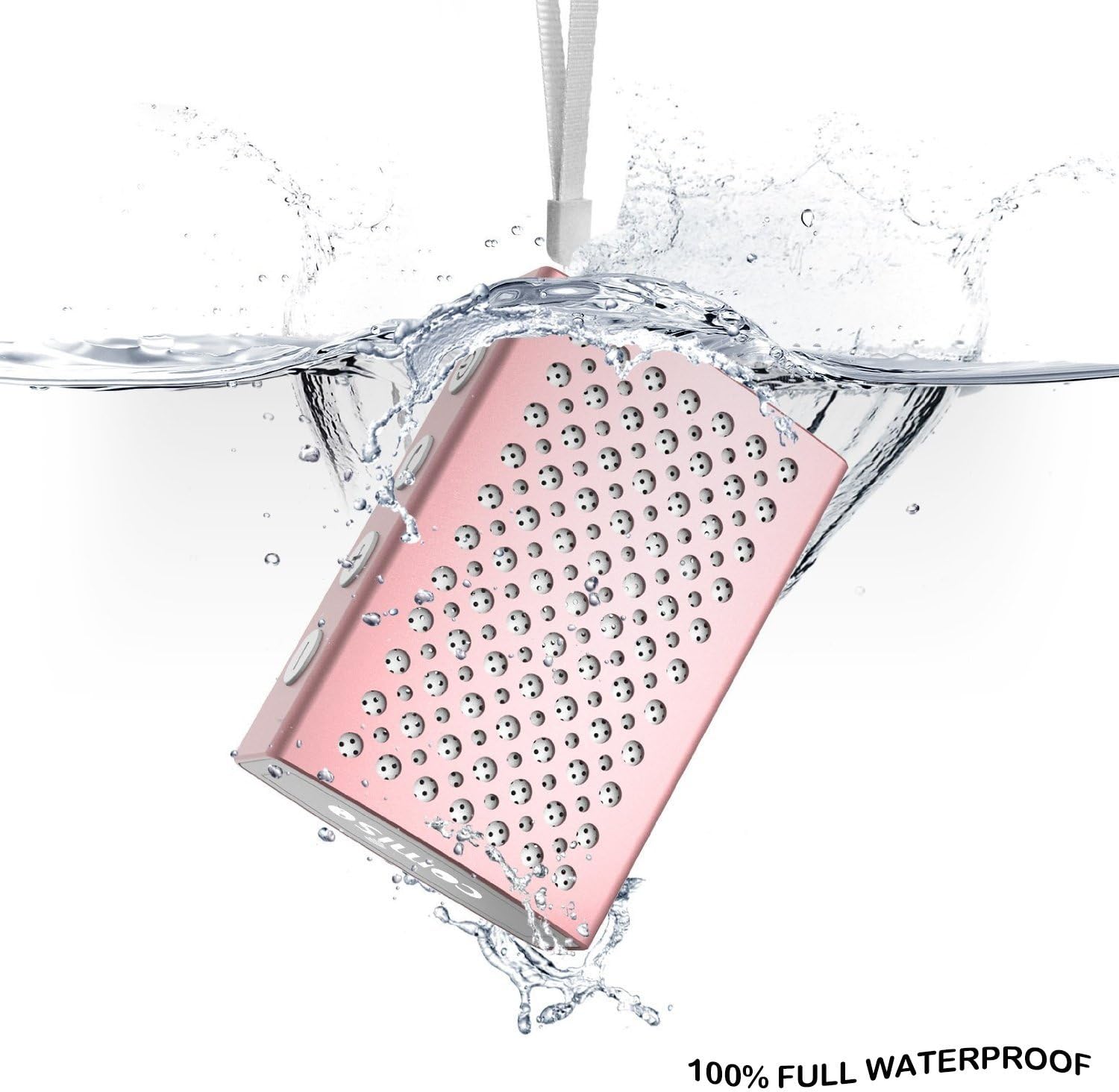
Figure 6.1: The COMISO U832 speaker demonstrating its 100% full waterproof capability, suitable for use in wet environments.
7 การแก้ไขปัญหา
| ปัญหา | สาเหตุที่เป็นไปได้ | สารละลาย |
|---|---|---|
| ลำโพงไม่เปิดเครื่อง | แบตเตอรี่อ่อน | ชาร์จลำโพงให้เต็ม |
| ไม่สามารถจับคู่ผ่านบลูทูธได้ | ลำโพงไม่ได้อยู่ในโหมดจับคู่ อุปกรณ์ Bluetooth ปิดอยู่ อยู่ไกลจากลำโพงเกินไป | Ensure speaker is in pairing mode (flashing light). Turn on Bluetooth on your device. Move device closer to speaker (within 33 feet). |
| ไม่มีเสียง. | ระดับเสียงต่ำเกินไป; โหมดอินพุตไม่ถูกต้อง; อุปกรณ์ไม่เล่นเสียง | Increase speaker and device volume. Check if speaker is in correct mode (Bluetooth/AUX). Ensure audio is playing on your device. |
| คุณภาพเสียงไม่ดีหรือขาดการเชื่อมต่อ | สัญญาณรบกวน, อุปกรณ์อยู่ไกลเกินไป, แบตเตอรี่อ่อน | ย้ายลำโพงให้เข้าใกล้อุปกรณ์มากขึ้น หลีกเลี่ยงสิ่งกีดขวาง ชาร์จลำโพง |
8. ข้อมูลจำเพาะ
| คุณสมบัติ | รายละเอียด |
|---|---|
| ยี่ห้อ | คอมิโซ |
| หมายเลขรุ่น | ยู832 |
| เทคโนโลยีการเชื่อมต่อ | บลูทูธ เสริม |
| กำลังขับสูงสุดของลำโพง | 5 วัตต์ |
| แหล่งพลังงาน | ใช้พลังงานจากแบตเตอรี่ |
| วิธีการควบคุม | สัมผัส |
| ขนาดสินค้า | 4.9 x 3.9 x 2.1 นิ้ว |
| น้ำหนักสินค้า | 0.8 ออนซ์ (ประมาณ 22.68 กรัม) |
| คุณสมบัติพิเศษ | Built-in Microphone, Portable, IP67 Waterproof |
| ยูพีซี | 742920066987 |
9. การรับประกันและการสนับสนุน
For warranty information or technical support, please refer to the documentation included with your purchase or visit the official COMISO webไซต์นี้ โปรดเก็บหลักฐานการซื้อไว้เพื่อใช้ยืนยันการรับประกัน
10. ข้อมูลด้านความปลอดภัย
- ห้ามถอดประกอบ ซ่อมแซม หรือดัดแปลงลำโพง
- Keep the speaker away from heat sources, direct sunlight, and sharp objects.
- Do not expose the speaker to fire or extreme temperatures.
- ใช้เฉพาะปริมาณการชาร์จที่ระบุเท่านั้นtagอีและปัจจุบัน
- เก็บให้พ้นจากมือเด็ก


