การแนะนำ
The PNY PRO Elite USB 3.1 Flash Drive is engineered for high-speed data transfer and expanded storage capacity. This manual provides essential information for the setup, operation, and maintenance of your 512GB flash drive, ensuring optimal performance and longevity. It is compatible with USB 3.1 Gen 1/USB 3.0 equipped PC and Mac desktop and laptop computers, and is also backwards compatible with USB 2.0 ports.
สินค้าเกินview
The PNY PRO Elite USB 3.1 Flash Drive features a premium metal design and offers exceptional performance for demanding applications. It is designed for transferring and storing large documents, high-resolution photos, and HD videos efficiently.
- ประสิทธิภาพความเร็วสูง: Read speeds up to 400MB/s and write speeds up to 250MB/s.
- ความจุขนาดใหญ่: 512GB storage for extensive data.
- การออกแบบที่ทนทาน: โลหะพรีเมียม casing เพื่อเพิ่มความทนทาน
- ความเข้ากันได้กว้าง: Compatible with USB 3.1 Gen 1/USB 3.0 and backwards compatible with USB 2.0.
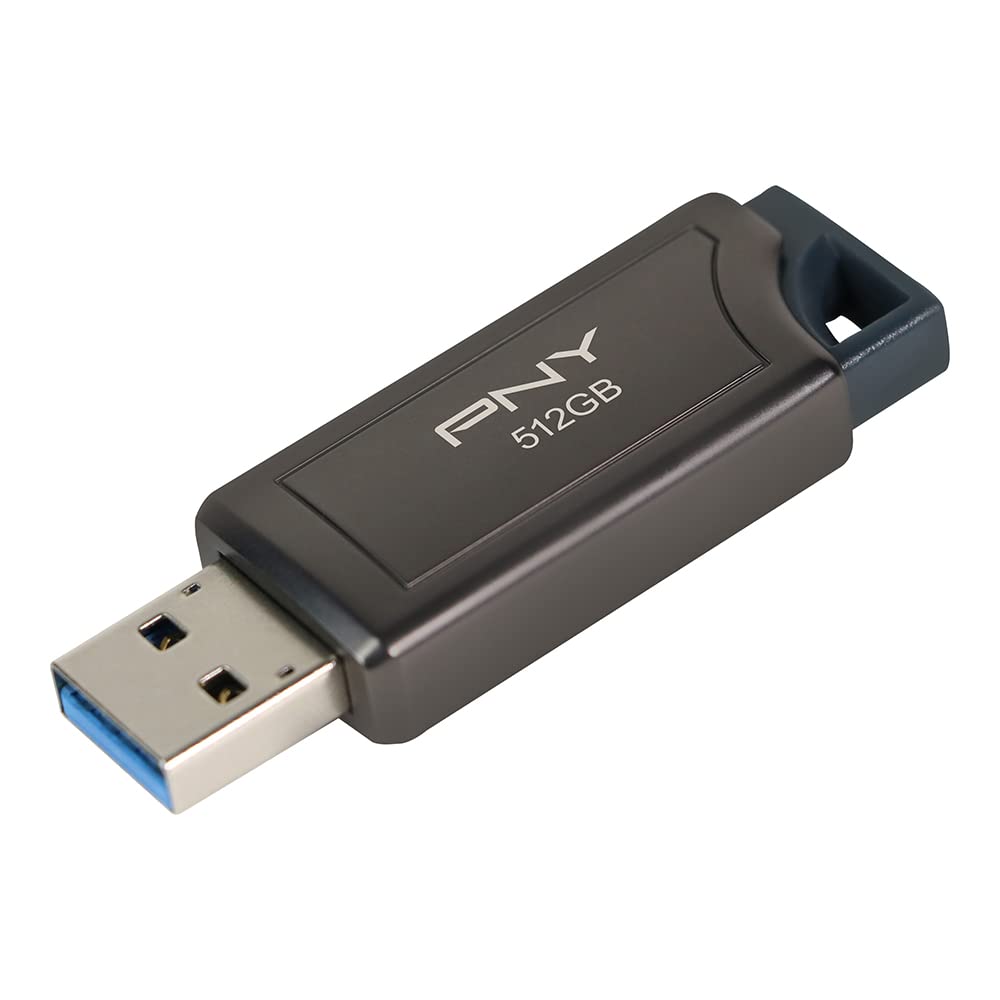
Image: The PNY PRO Elite 512GB USB 3.1 Flash Drive, showcasing its sleek metal design.
การตั้งค่า
- Insert the Flash Drive: Carefully insert the PNY PRO Elite USB 3.1 Flash Drive into an available USB port on your computer. For optimal performance, use a USB 3.0 or USB 3.1 port. The drive is designed with a retractable connector, so slide it out before insertion.
- การจดจำอัตโนมัติ: Your operating system (Windows or macOS) should automatically detect and install the necessary drivers for the flash drive. This process usually takes a few seconds.
- การเข้าถึงไดรฟ์:
- หน้าต่าง: เปิด "File Explorer" (or "My Computer") and locate the drive listed under "This PC" (or "Computer") as a removable disk.
- MacOS: The drive icon should appear on your desktop or in the Finder sidebar under "Locations."

Image: The PNY PRO Elite 512GB USB 3.1 Flash Drive connected to a laptop's USB port.
คำแนะนำการใช้งาน
- การโอนย้าย Files:
- กำลังคัดลอกไปยังไดรฟ์: ลากและวาง fileคัดลอกไฟล์หรือโฟลเดอร์จากคอมพิวเตอร์ของคุณไปยังหน้าต่างของแฟลชไดรฟ์ หรืออีกวิธีหนึ่งคือคลิกขวาที่ไฟล์ที่ต้องการ files, select "Copy," then open the flash drive's window, right-click, and select "Paste."
- กำลังคัดลอกจากไดรฟ์: ลากและวาง files or folders from the flash drive's window to a location on your computer.
- การลบ Files: เลือก files or folders you wish to remove from the flash drive and press the "Delete" key, or right-click and select "Delete." Confirm the deletion when prompted.
- Safely Ejecting the Drive: Always safely eject the flash drive before removing it from your computer to prevent data corruption.
- หน้าต่าง: Click the "Safely Remove Hardware and Eject Media" icon in the system tray (bottom-right corner), then select the PNY flash drive.
- MacOS: Drag the drive icon from your desktop to the Trash, or right-click the drive icon and select "Eject."

Image: The PNY PRO Elite 512GB USB 3.1 Flash Drive connected to a Windows laptop, ready for file การปฏิบัติการ
การซ่อมบำรุง
- การดูแลทางกายภาพ: Keep the flash drive clean and free from dust and debris. Avoid exposing it to extreme temperatures, moisture, or direct sunlight. The metal casing provides good protection, but physical impact should be avoided.
- การสำรองข้อมูล: Regularly back up important data stored on the flash drive to another storage device to prevent data loss.
- การดีดตัวออกอย่างปลอดภัย: Always follow the safe ejection procedure before removing the drive to prevent file การทุจริตของระบบ
- การจัดรูปแบบ: If the drive experiences issues or you wish to erase all data, you can reformat it using your computer's disk utility. Be aware that formatting will erase all data on the drive. The drive comes pre-formatted, typically as exFAT, for broad compatibility.
การแก้ไขปัญหา
| ปัญหา | สาเหตุที่เป็นไปได้ | สารละลาย |
|---|---|---|
| คอมพิวเตอร์ไม่รู้จักไดรฟ์ | การเชื่อมต่อหลวม, พอร์ต USB ชำรุด, มีปัญหากับไดรเวอร์ | Try a different USB port or another computer. Ensure the drive is fully inserted. Restart your computer. |
| ความเร็วในการถ่ายโอนข้อมูลช้า | การใช้พอร์ต USB 2.0 ที่แยกส่วน files, กระบวนการเบื้องหลัง | Connect to a USB 3.0 or 3.1 port. Close unnecessary applications. Defragment the drive (Windows only, not recommended for SSD-based flash drives). |
| เขียนไม่ได้ fileไปที่ไดรฟ์ | พื้นที่จัดเก็บข้อมูลเต็ม มีการป้องกันการเขียน หรือ file เกิดข้อผิดพลาดของระบบ | Check available space. Ensure the drive is not write-protected (though this model does not have a physical switch). Run disk error checking utility. |
| การทุจริตข้อมูล | Improper ejection, power loss during transfer. | Always safely eject the drive. Run disk error checking utility. If issues persist, reformat the drive (data will be lost). |
ข้อมูลจำเพาะ
| คุณสมบัติ | รายละเอียด |
|---|---|
| ชื่อรุ่น | P-FD512PRO-GE |
| ความจุของหน่วยความจำ | 512GB |
| ความเร็วในการอ่าน | สูงถึง 400 MB/วินาที |
| ความเร็วในการเขียน | สูงถึง 250 MB/วินาที |
| ฮาร์ดแวร์อินเตอร์เฟซ | พอร์ต USB 3.0 (ใช้งานร่วมกับ USB 3.1 Gen 1 ได้) |
| เทคโนโลยีการเชื่อมต่อ | ยูเอสบี |
| แพลตฟอร์มฮาร์ดแวร์ | แมค, พีซี |
| สี | สีดำ |
| น้ำหนักสินค้า | 0.634 ออนซ์ |
| ขนาดสินค้า (กxยxส) | 5.28 x 3.91 x 0.45 นิ้ว |
มีอะไรอยู่ในกล่อง
The PNY PRO Elite USB 3.1 Flash Drive package includes:
- One (1) PNY PRO Elite USB 3.1 Flash Drive (Model P-FD512PRO-GE)
วิดีโอผลิตภัณฑ์อย่างเป็นทางการ
วิดีโอ: เจ้าหน้าที่ผ่านview of the PNY PRO Elite USB 3.1 Flash Drive, highlighting its features and performance capabilities.
การรับประกันและการสนับสนุน
For warranty information and technical support, please refer to the official PNY website or contact PNY customer service directly. Keep your purchase receipt as proof of purchase for warranty claims.
ทรัพยากรสนับสนุนเพิ่มเติมอาจมีอยู่บน PNY Brand Store on Amazon.


