การแนะนำ
This manual provides detailed instructions for the setup, operation, and maintenance of your Acer R271 bid 27-inch IPS Full HD (1920 x 1080) Display. Please read this manual thoroughly before using your monitor to ensure proper functionality and to maximize your viewการสร้างประสบการณ์

ด้านหน้า view of the Acer R271 bid 27-inch IPS Full HD Display.
การตั้งค่า
เนื้อหาแพ็คเกจ
ตรวจสอบว่ามีส่วนประกอบทั้งหมดอยู่ในแพ็คเกจ:
- Acer R271 bid 27-inch Display
- ขาตั้งจอภาพ
- สายไฟ
- สาย HDMI (อาจแตกต่างกันไปตามภูมิภาค)
- VGA Cable (may vary by region)
ตรวจสอบการประกอบ
To assemble the monitor, carefully attach the stand to the back of the display panel. Ensure it clicks securely into place. Place the monitor on a stable, flat surface.
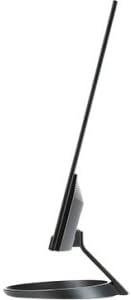
ด้านข้าง view illustrating the slim design of the Acer R271 bid monitor.
การเชื่อมต่อจอภาพ
The Acer R271 bid monitor supports multiple input options. Connect the appropriate cable from your computer or device to the corresponding port on the monitor.
- ช่องต่อ HDMI: สำหรับวิดีโอและเสียงดิจิทัลความละเอียดสูง
- DVI (w/HDCP): สำหรับการเชื่อมต่อวิดีโอดิจิทัล
- VGA: สำหรับการเชื่อมต่อวิดีโอแบบอนาล็อก
หลังจากเชื่อมต่อสายวิดีโอแล้ว ให้เชื่อมต่อสายไฟเข้ากับจอภาพ จากนั้นจึงเชื่อมต่อสายไฟเข้ากับเต้ารับไฟฟ้า
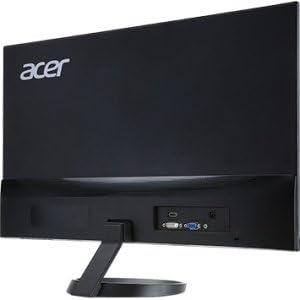
หลัง view of the Acer R271 bid monitor, highlighting the HDMI, DVI, and VGA input ports.
การเปิดเครื่อง
Press the power button, usually located on the bottom right side of the monitor, to turn on the display. The monitor will automatically detect the active input source.
คำแนะนำการใช้งาน
ฟังก์ชั่นพื้นฐาน
Use the buttons located on the bottom bezel of the monitor to navigate the On-Screen Display (OSD) menu. These buttons typically allow you to:
- Power On/Off the monitor.
- Select input source (HDMI, DVI, VGA).
- Adjust volume (if applicable).
- Access the OSD menu for advanced settings.
การตั้งค่าการแสดงผล
The OSD menu provides options to customize your display. Common adjustments include:
- ความสว่าง: ปรับความสว่างโดยรวมของหน้าจอ
- ตัดกัน: ปรับความแตกต่างระหว่างบริเวณสว่างและบริเวณมืด
- การตั้งค่าสี: ปรับแต่งอุณหภูมิสี แกมมา และระดับ RGB แต่ละค่าอย่างละเอียด
- โหมดภาพ: Select preset modes for different content types (e.g., Standard, Movie, Game).
คุณสมบัติหลัก
The Acer R271 bid monitor incorporates several features designed to enhance your viewประสบการณ์การ:
- เทคโนโลยี IPS: Provides clear and bright colors from wide viewing angles (up to 178 degrees).
- การออกแบบ ZeroFrame: An edge-to-edge display that minimizes bezels, ideal for multi-monitor setups.
- Eye Protect Technology: Includes features like Blue Light Filter, Flicker-less, and ComfyView เพื่อลดความเครียดของดวงตาเมื่อใช้งานเป็นเวลานาน
วิดีโอแสดงผลิตภัณฑ์อย่างเป็นทางการasing the Acer R1 Series monitor's features, including ZeroFrame design, Full HD resolution, IPS technology for wide viewing angles, and Eye Protect technology for user comfort.
การบำรุงรักษาและการดูแล
การทำความสะอาดจอภาพ
ในการทำความสะอาดหน้าจอ ให้เช็ดเบาๆ ด้วยผ้านุ่มที่ไม่เป็นขุย สำหรับรอยฝังแน่น ให้...ampen the cloth with a mild, non-abrasive screen cleaner. Avoid using alcohol-based cleaners or spraying liquid directly onto the screen.
การดูแลทั่วไป
Keep the monitor away from direct sunlight, excessive heat, and moisture. Do not block the ventilation openings. Avoid placing heavy objects on the monitor or its cables.
การแก้ไขปัญหา
No Display or "No Signal" Message
- ตรวจสอบให้แน่ใจว่าสายไฟเชื่อมต่อกับจอภาพและเต้าเสียบไฟอย่างแน่นหนา
- Verify that the video cable (HDMI, DVI, or VGA) is firmly connected to both the monitor and your computer.
- ตรวจสอบว่าได้เลือกแหล่งสัญญาณเข้าที่ถูกต้องบนจอภาพโดยใช้เมนู OSD แล้วหรือไม่
- โปรดตรวจสอบให้แน่ใจว่าคอมพิวเตอร์ของคุณเปิดอยู่และไม่ได้อยู่ในโหมดพักเครื่อง
คุณภาพของภาพไม่ดี
- ปรับความสว่าง ความคมชัด และการตั้งค่าสีผ่านเมนู OSD
- ตรวจสอบให้แน่ใจว่าความละเอียดหน้าจอของคอมพิวเตอร์ของคุณตั้งค่าตรงกับความละเอียดดั้งเดิมของจอภาพ (1920 x 1080)
- ตรวจสอบดูว่าสายเคเบิลวิดีโอหรือพอร์ตเชื่อมต่อเสียหายหรือไม่
ข้อมูลจำเพาะ
| คุณสมบัติ | ข้อมูลจำเพาะ |
|---|---|
| ขนาดหน้าจอ | 27 นิ้ว |
| ความละเอียดหน้าจอ | 1920 x 1080 (ฟูลเอชดี) |
| ประเภทแผง | ไอพีเอส |
| เวลาตอบสนอง | 4มิลลิวินาที |
| พิกเซลพิทช์ | 0.311มม. |
| ความสว่าง | 250 นิต |
| สัญญาณอินพุต | 1 x HDMI, 1 x DVI (w/HDCP), 1 x VGA |
| อัตราส่วนภาพ | 16:9 น. |
| น้ำหนักสินค้า | 8.05 ปอนด์ |
| ขนาดสินค้า (กxยxส) | 24.8 x 18.1 x 9.4 นิ้ว |
| สี | สีดำ |

Detailed dimensions of the Acer R271 bid monitor.
ข้อมูลการรับประกัน
The Acer R271 bid monitor typically comes with a 3-year limited warranty. Please refer to the warranty card included with your product or visit the official Acer website for specific terms and conditions, as warranty details may vary by region and retailer.
การสนับสนุนลูกค้า
For further assistance, technical support, or to download the latest drivers and software, please visit the official Acer support webเว็บไซต์:
You may also contact Acer customer service directly for personalized support.