1. บทนำ
The GAMDIAS Hermes GKB3000 is a mechanical gaming keyboard designed for enhanced durability and performance. It features GAMDIAS Certified Blue Switches with a 50 million actuation lifecycle, a 7-color spectrum backlight with 14 lighting effects, and various functional keys for an optimized gaming and typing experience. This manual provides instructions for setting up, operating, and maintaining your keyboard.
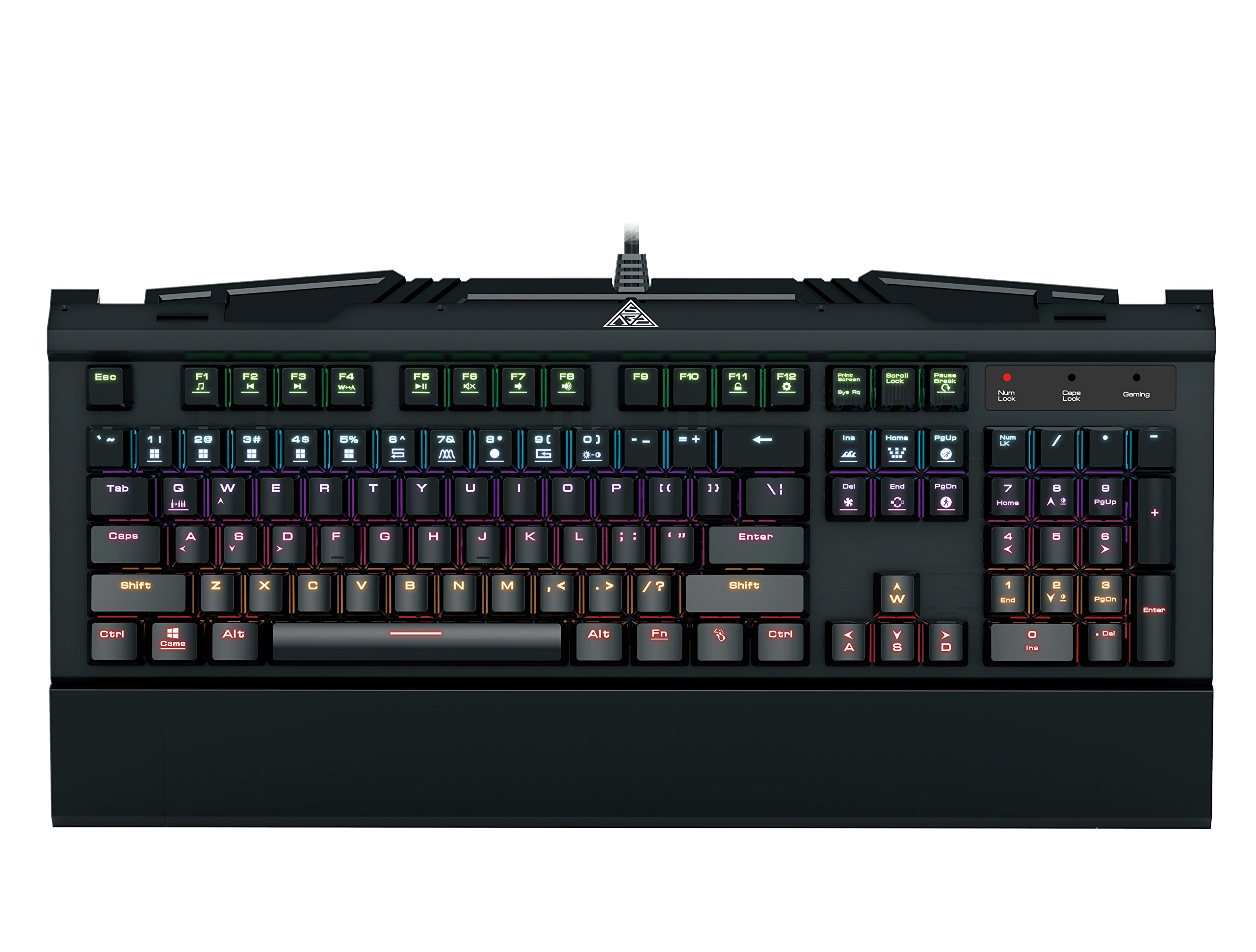
Image 1.1: The GAMDIAS Hermes GKB3000 Mechanical Gaming Keyboard. This image displays the full keyboard with its key layout and design, highlighting its compact yet robust build.
2. เนื้อหาบรรจุภัณฑ์
โปรดตรวจสอบสิ่งของภายในกล่องทันทีที่เปิด เพื่อให้แน่ใจว่าสินค้าทุกชิ้นครบถ้วนและไม่เสียหาย
- GAMDIAS Hermes GKB3000 Mechanical Gaming Keyboard
- คู่มือการใช้งาน (เอกสารนี้)
3. การตั้งค่า
Follow these steps to set up your GAMDIAS Hermes GKB3000 keyboard:
- แกะคีย์บอร์ดออก: นำคีย์บอร์ดออกจากบรรจุภัณฑ์อย่างระมัดระวัง
- เชื่อมต่อกับคอมพิวเตอร์: เสียบขั้วต่อ USB-A ของสายคีย์บอร์ดเข้ากับพอร์ต USB ที่ว่างอยู่บนคอมพิวเตอร์ของคุณ
- การติดตั้งไดร์เวอร์: The keyboard is plug-and-play. Your operating system (e.g., Windows) will automatically detect and install the necessary drivers. No additional software installation is typically required for basic functionality.
- การจัดวาง: Place the keyboard on a stable, flat surface for comfortable use.
4. คู่มือการใช้งาน
4.1. เอฟเฟกต์แสง
The Hermes GKB3000 features a 7-color spectrum backlight with 14 sets of lighting effects. These include 9 preset effects and 5 customizable patterns.
- เอฟเฟกต์การสลับ: Use the dedicated function keys (often combined with the Fn key) to cycle through the preset lighting effects. Refer to the keyboard's keycap legends for specific combinations.
- การปรับแต่งเอฟเฟกต์: The keyboard supports 5 customizable lighting patterns. Instructions for programming these patterns are typically found in the full software suite available for download from the GAMDIAS website, if applicable.
- การปรับความสว่าง: Adjust backlight brightness using designated function key combinations.
4.2. Multimedia Control Keys
Access multimedia functions quickly using the dedicated multimedia control keys, often activated by holding the Fn กดปุ่มนี้ร่วมกับปุ่ม F (F1-F12)
- การควบคุมระดับเสียง: Increase, decrease, or mute audio.
- การเล่นสื่อ: Play/pause, stop, previous track, next track.
- ฟังก์ชั่นอื่นๆ: May include opening default browser, email client, or calculator.
4.3. Special Gaming Functions
- WASD-Arrow Key Swap: This feature allows you to swap the functionality of the WASD keys with the arrow keys. This is useful for certain games or user preferences. Activate this function using a specific Fn key combination (e.g., Fn + W).
- Consecutive Attack Mode: This mode enhances rapid key input for gaming. Refer to the keyboard's specific documentation or GAMDIAS software for activation and configuration details.
- ล็อคแป้นพิมพ์: Temporarily disable the keyboard input to prevent accidental presses. Activate using a Fn การรวมกันที่สำคัญ
- Windows Key Disable: Prevent accidental presses of the Windows key during gaming, which can minimize your game. Activate using a Fn key combination (e.g., Fn + Win key).
- N-คีย์โรลโอเวอร์: The GKB3000 supports N-key rollover, meaning multiple keys can be pressed simultaneously without ghosting or missed inputs. This ensures accurate and responsive commands during intense gaming sessions.
5. การบำรุงรักษา
การบำรุงรักษาอย่างถูกต้องจะช่วยให้แป้นพิมพ์ของคุณมีอายุการใช้งานยาวนานและมีประสิทธิภาพเหมาะสมที่สุด
- การทำความสะอาด:
- ถอดแป้นพิมพ์ออกจากคอมพิวเตอร์ของคุณก่อนทำความสะอาด
- ใช้ผ้านุ่มไม่เป็นขุยเช็ดเล็กน้อยampชุบน้ำหรือน้ำยาทำความสะอาดอ่อนๆ เพื่อเช็ดพื้นผิว
- สำหรับฝุ่นละอองและเศษต่างๆ ระหว่างคีย์ ให้ใช้ลมอัด
- หลีกเลี่ยงการใช้สารเคมีรุนแรง น้ำยาทำความสะอาดที่มีฤทธิ์กัดกร่อน หรือตัวทำละลาย
- พื้นที่จัดเก็บ: เก็บแป้นพิมพ์ไว้ในที่แห้งและเย็น หลีกเลี่ยงแสงแดดโดยตรงและอุณหภูมิที่สูงหรือต่ำเกินไปเมื่อไม่ได้ใช้งานเป็นเวลานาน
- การจัดการ: Avoid dropping the keyboard or exposing it to excessive force, as this can damage the mechanical switches or internal components.
6 การแก้ไขปัญหา
If you encounter issues with your GAMDIAS Hermes GKB3000 keyboard, refer to the following common solutions:
| ปัญหา | วิธีแก้ปัญหาที่เป็นไปได้ |
|---|---|
| แป้นพิมพ์ไม่ตอบสนอง |
|
| ไฟแบ็คไลท์ไม่ทำงานหรือสว่างน้อยมาก |
|
| ปุ่มบางปุ่มใช้งานไม่ได้ |
|
| WASD keys are acting as arrow keys. |
|
If the problem persists after trying these solutions, please contact GAMDIAS customer support for further assistance.
7. ข้อมูลจำเพาะ
The following are the technical specifications for the GAMDIAS Hermes GKB3000 Mechanical Gaming Keyboard:
| คุณสมบัติ | รายละเอียด |
|---|---|
| ยี่ห้อ | แกมเดียส |
| หมายเลขรุ่น | GKB3000 |
| ประเภทสวิตซ์ | GAMDIAS Certified Mechanical Blue Switches |
| Actuation Lifecycle | การกดแป้น 50 ล้านครั้ง |
| การแบ็คไลท์ | 7-Color Spectrum, 14 Lighting Effects (9 preset, 5 customizable) |
| ป้องกันการโดนผีหลอก | การพลิกแป้น N |
| การเชื่อมต่อ | ยูเอสบี-เอ |
| ระบบปฏิบัติการ | หน้าต่าง |
| น้ำหนักสินค้า | 2.42 ปอนด์ (ประมาณ 1.1 กก.) |
| ขนาดสินค้า (กxยxส) | 18.8 x 10.5 x 2 นิ้ว (ประมาณ 47.75 x 26.67 x 5.08 ซม.) |
| วัสดุ | Plastic with Elegant Metal Plate Design |
8. การรับประกันและการสนับสนุน
GAMDIAS products are manufactured to the highest quality standards. For information regarding warranty coverage, terms, and conditions, please refer to the warranty card included with your product or visit the official GAMDIAS webเว็บไซต์.
For technical support, troubleshooting assistance, or any product-related inquiries, please contact GAMDIAS customer support through their official webไซต์หรือข้อมูลการติดต่อที่ให้ไว้ในบรรจุภัณฑ์ผลิตภัณฑ์ของคุณ
GAMDIAS อย่างเป็นทางการ Webเว็บไซต์: www.gamdias.com