การแนะนำ
This manual provides instructions for the safe and efficient operation of your Axess MS3912 Mini Entertainment System. Please read this manual thoroughly before using the device and retain it for future reference.
คุณสมบัติหลัก:
- วิทยุ AM/FM
- เครื่องเล่นเทปและเครื่องบันทึก
- เครื่องเล่นซีดี
- พอร์ต USB สำหรับเล่นไฟล์ MP3
- อินพุตเสริม
- แจ็คหูฟัง
- Portable/Detachable Speakers
- รีโมทคอนโทรล
- AC/DC Power Operation
ข้อมูลด้านความปลอดภัย
คำเตือน:
ผลิตภัณฑ์นี้ประกอบด้วยสารเคมีที่รัฐแคลิฟอร์เนียทราบว่าก่อให้เกิดมะเร็งและข้อบกพร่องทางการเกิดหรืออันตรายต่อการสืบพันธุ์อื่น ๆ
ปฏิบัติตามข้อควรระวังด้านความปลอดภัยขั้นพื้นฐานเสมอเมื่อใช้เครื่องใช้ไฟฟ้า เพื่อลดความเสี่ยงต่อการเกิดไฟไหม้ ไฟฟ้าช็อต และการบาดเจ็บส่วนบุคคล
- อย่าให้เครื่องนี้โดนฝนหรือความชื้น
- ห้ามปิดกั้นช่องระบายอากาศใดๆ
- ตรวจสอบให้แน่ใจ vol . ที่เหมาะสมtage supply (AC 120V/60Hz for US models, check local specifications).
- ห้ามเปิดฝาครอบตัวเครื่องasinง. ส่งต่อการบริการทั้งหมดให้กับบุคลากรที่มีคุณสมบัติ
- ควรวางอุปกรณ์ให้ห่างจากแหล่งความร้อน แสงแดดโดยตรง และสนามแม่เหล็กแรงสูง
- ถอดปลั๊กเครื่องในระหว่างที่เกิดพายุฝนฟ้าคะนองหรือเมื่อไม่ได้ใช้งานเป็นเวลานาน
เนื้อหาแพ็คเกจ
ตรวจสอบว่ารายการทั้งหมดที่ระบุไว้ด้านล่างนี้รวมอยู่ในแพ็คเกจของคุณ:
- Axess MS3912 Main Unit
- Detachable Speakers (2)
- รีโมทคอนโทรล
- สายไฟ AC
- คู่มือการใช้งาน (เอกสารนี้)
การควบคุมและการเชื่อมต่อ
Familiarize yourself with the various controls and connection points on your MS3912 system.
แผงควบคุมด้านหน้า
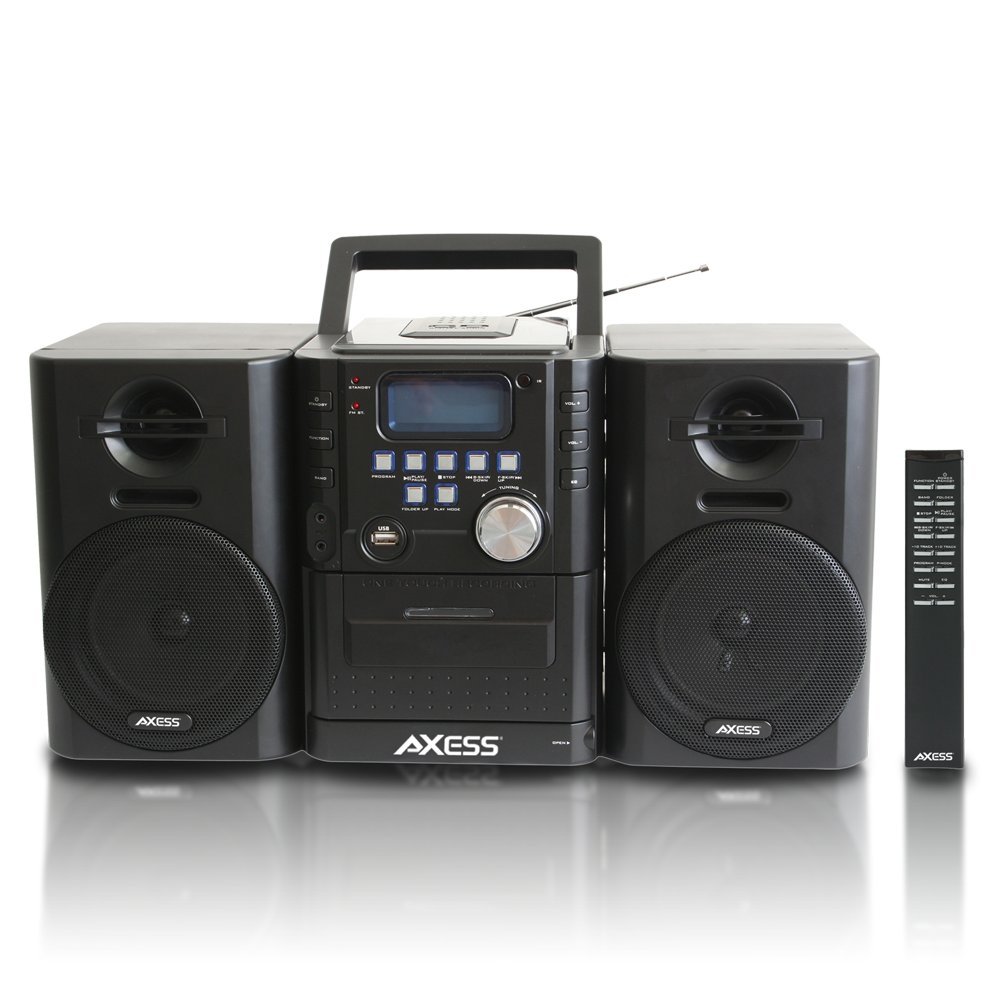
ภาพ: ด้านหน้า view of the Axess MS3912 Mini Entertainment System, showing the central unit with display, control buttons, USB port, CD tray, cassette deck, and two detachable speakers. A remote control is also visible on the right.
- ปุ่มสแตนด์บาย: เปิดหรือปิดเครื่อง
- ปุ่มฟังก์ชั่น: Selects between CD, USB, TAPE, AUX, and RADIO modes.
- ปุ่ม BAND: In Radio mode, switches between AM and FM bands.
- ปุ่มโปรแกรม: Used for programming CD/USB tracks.
- ปุ่มเล่น/หยุดชั่วคราว: Starts or pauses playback for CD, USB, or Cassette.
- ปุ่มหยุด: หยุดการเล่น
- ปุ่มข้าม/ค้นหา (<< / >>): ข้ามเพลงหรือกรอไปข้างหน้า/กรอกลับ
- FOLDER UP / PLAY MODE Buttons: Navigates folders on USB or changes play mode.
- ปุ่มปรับระดับเสียง: ปรับระดับเอาต์พุตเสียง
- พอร์ต USB: เชื่อมต่อแฟลชไดรฟ์ USB สำหรับเล่นไฟล์ MP3
- PC/AUX IN Jack: เชื่อมต่ออุปกรณ์เสียงภายนอก
- ช่องเสียบหูฟัง: เชื่อมต่อหูฟังเพื่อการฟังส่วนตัว
- ช่องใส่ซีดี: เครื่องเล่นซีดีแบบโหลดด้านบน
- ช่องใส่เทปคาสเซ็ท: Front-loading cassette player/recorder.
- แสดง: แสดงฟังก์ชันปัจจุบัน หมายเลขแทร็ก ความถี่วิทยุ ฯลฯ
การเชื่อมต่อแผงด้านหลัง

ภาพ: ด้านหลัง view of the Axess MS3912 Mini Entertainment System, showing the FM antenna, battery compartment, AC power input, and speaker connection jacks.
- เสาอากาศ FM: ยืดออกเพื่อการรับสัญญาณ FM ที่ดีที่สุด
- แจ็คลำโพง: เชื่อมต่อลำโพงด้านซ้ายและด้านขวาเข้าด้วยกัน
- อินพุตไฟ AC: เชื่อมต่อสายไฟ AC
- ช่องใส่แบตเตอรี่: Holds batteries for portable operation.
การตั้งค่า
1. การเชื่อมต่อลำโพง
Connect the speaker wires from the detachable speakers to the corresponding speaker jacks on the rear of the main unit. Ensure the polarity (+/-) matches for optimal sound quality.
2. การเปิดเครื่อง
การทำงานด้วยไฟฟ้ากระแสสลับ:
Insert the AC power cord into the AC power input jack on the rear of the unit, then plug the other end into a standard wall outlet (AC 120V/60Hz).
DC (Battery) Power Operation:
Open the battery compartment cover on the rear of the unit. Insert the required number of C-size batteries (not included), ensuring correct polarity. Close the battery compartment cover securely. The unit will automatically switch to battery power when AC power is disconnected.
3. การตั้งค่าเสาอากาศ
For FM radio reception, fully extend the telescopic FM antenna. For AM reception, the unit has a built-in AM antenna, which may require rotating the unit for best reception.
คำแนะนำการใช้งาน
1. เปิด/ปิดเครื่อง
กดปุ่ม รอ กดปุ่มบนแผงด้านหน้าหรือรีโมทคอนโทรลเพื่อเปิดหรือปิดเครื่อง
2. การเลือกฟังก์ชั่น
กดปุ่ม การทำงาน button repeatedly to cycle through the available modes: CD, USB, TAPE, AUX, and RADIO.
3. การใช้งานเครื่องเล่นซีดี
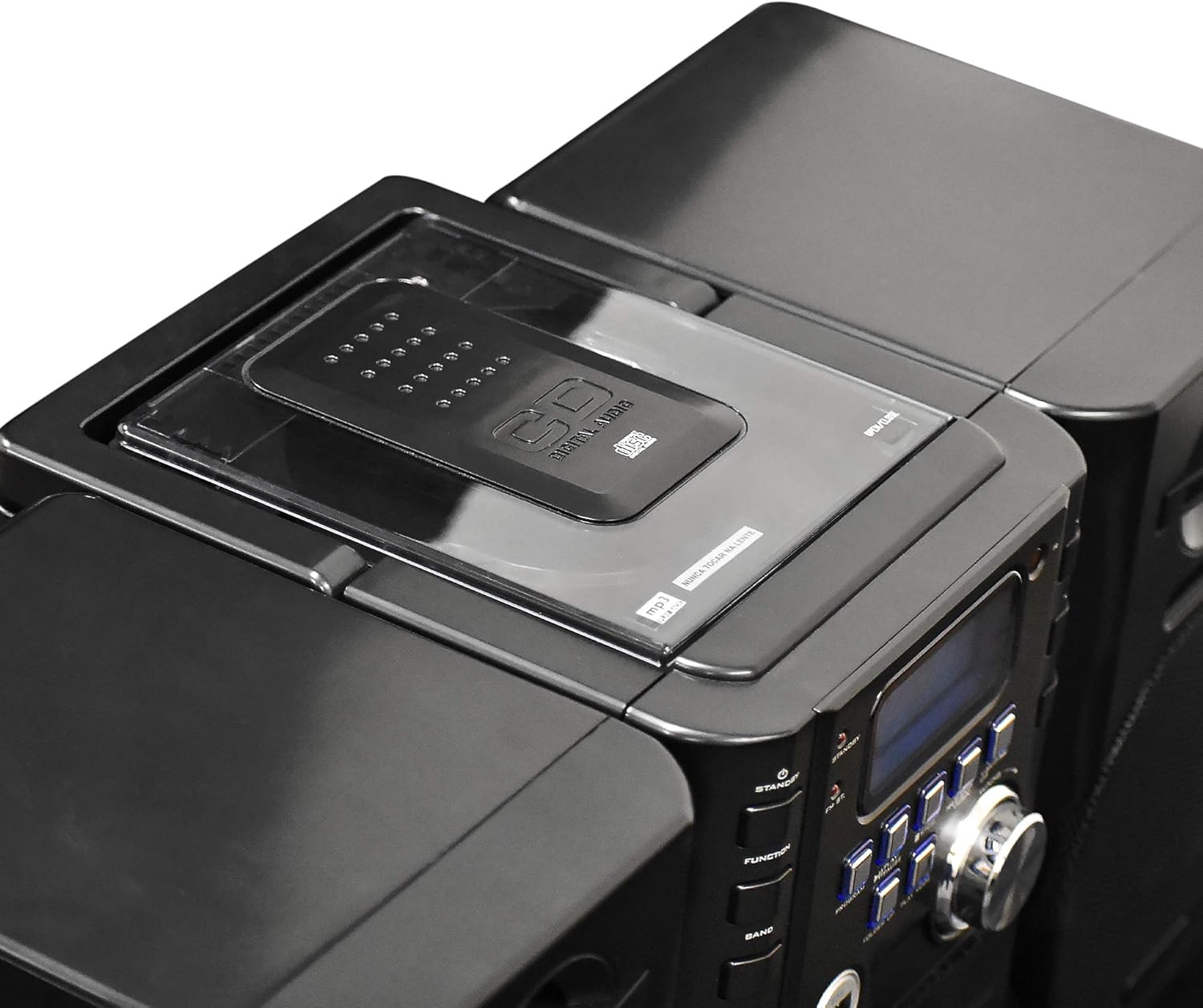
ภาพ: ด้านบน view of the Axess MS3912 Mini Entertainment System, showing the transparent lid of the top-loading CD compartment.
- กด การทำงาน to select CD mode.
- เปิดฝาช่องใส่ซีดี
- วางแผ่นซีดีโดยให้ด้านที่มีฉลากหงายขึ้น
- Close the CD compartment cover. The unit will read the disc.
- กด เล่น/หยุดชั่วคราว เพื่อเริ่มการเล่น
- ใช้ ข้าม/ค้นหา ปุ่มสำหรับการนำทางเพลง
- กด หยุด เพื่อสิ้นสุดการเล่น
4. USB/MP3 Player Operation

ภาพ: ด้านข้าง view of the Axess MS3912 Mini Entertainment System, highlighting the USB port and PC/AUX IN jack on the central unit.
- ใส่แฟลชไดรฟ์ USB เข้ากับพอร์ต USB
- กด การทำงาน เพื่อเลือกโหมด USB
- The unit will automatically begin playing MP3 fileจากไดรฟ์ USB
- ใช้ เล่น/หยุดชั่วคราว, หยุด, และ ข้าม/ค้นหา ปุ่มสำหรับควบคุม
- ใช้ โฟลเดอร์ขึ้น to navigate between folders on the USB drive.
5. การใช้งานเครื่องเล่น/บันทึกเทปคาสเซ็ต
- กด การทำงาน to select TAPE mode.
- Open the cassette deck door and insert a cassette tape.
- กด เล่น/หยุดชั่วคราว เพื่อเริ่มการเล่น
- ใช้ ก้าวไปข้างหน้าอย่างรวดเร็ว และ ย้อนกลับ buttons (often combined with SKIP/SEARCH buttons) to move through the tape.
- กด หยุด เพื่อสิ้นสุดการเล่น
- การบันทึก: To record from CD, USB, or Radio, select the desired source, then press the บันทึก button on the cassette deck (if available, or a combination of PLAY and RECORD). Ensure a blank, recordable cassette is inserted.
6. การใช้งานวิทยุ AM/FM
- กด การทำงาน เพื่อเลือกโหมด RADIO
- กด วงดนตรี to select AM or FM.
- ใช้ การปรับแต่ง ลูกบิดหรือ ข้าม/ค้นหา ปุ่มสำหรับปรับหาสถานีที่คุณต้องการ
- For FM, extend the telescopic antenna. For AM, rotate the unit for best reception.
- สถานีที่ตั้งไว้ล่วงหน้า: Tune to a station, press โปรแกรมแล้วใช้ ข้าม/ค้นหา เพื่อเลือกหมายเลขที่กำหนดไว้ล่วงหน้า แล้วกด โปรแกรม อีกครั้งเพื่อบันทึก
7. Auxiliary Input (AUX) Use
เชื่อมต่ออุปกรณ์เสียงภายนอก (เช่น สมาร์ทโฟน เครื่องเล่น MP3) เข้ากับ PC/AUX IN jack using a 3.5mm audio cable (not included). Press การทำงาน to select AUX mode. Audio from the external device will play through the MS3912 speakers.
8. การใช้หูฟัง
เสียบหูฟังขนาดมาตรฐาน 3.5 มม. เข้ากับ... หูฟัง jack for private listening. The speakers will automatically mute when headphones are connected.
9. รีโมทคอนโทรล
The included remote control allows for convenient operation of most functions from a distance. Ensure batteries are correctly inserted into the remote control.
การซ่อมบำรุง
การทำความสะอาดตัวเครื่อง
Wipe the exterior of the unit with a soft, dry cloth. Do not use abrasive cleaners, waxes, or solvents. For the CD lens, use a specialized CD lens cleaner disc. For the cassette deck, use a head cleaning cassette.
พื้นที่จัดเก็บ
If storing the unit for an extended period, remove all batteries to prevent leakage. Store in a cool, dry place away from direct sunlight and extreme temperatures.
การแก้ไขปัญหา
| ปัญหา | สาเหตุที่เป็นไปได้ | สารละลาย |
|---|---|---|
| ไม่มีไฟฟ้า | ไม่ได้เสียบสายไฟ AC; แบตเตอรี่หมดหรือใส่ไม่ถูกต้อง | ตรวจสอบการเชื่อมต่อสายไฟ AC เปลี่ยนแบตเตอรี่หรือตรวจสอบให้แน่ใจว่าขั้วถูกต้อง |
| ไม่มีเสียง | Volume too low; Headphones connected; Speakers not connected properly; Incorrect function selected. | Increase volume; Disconnect headphones; Check speaker connections; Select correct function (CD, USB, TAPE, AUX, RADIO). |
| แผ่นซีดีเล่นสะดุดหรือไม่เล่นเลย | แผ่นซีดีสกปรกหรือมีรอยขีดข่วน; ใส่แผ่นซีดีไม่ถูกต้อง; เครื่องสั่น | Clean CD with a soft cloth; Reinsert CD label side up; Place unit on a stable surface. |
| การรับสัญญาณวิทยุไม่ดี | FM antenna not extended; Unit position for AM is poor; Interference. | Fully extend FM antenna; Rotate unit for better AM reception; Move unit away from other electronic devices. |
| USB ไม่เล่น | ไดรฟ์ USB ไม่ได้รับการฟอร์แมตอย่างถูกต้อง ไม่เข้ากัน file types; USB drive not inserted fully. | ตรวจสอบให้แน่ใจว่า USB เป็นรูปแบบ FAT32 และ MP3 เท่านั้น files are supported; Reinsert USB drive. |
| Cassette recording not working | Tape is write-protected; No blank tape inserted; Incorrect source selected. | Check tape's write-protect tab; Insert a blank, recordable tape; Select the desired audio source (CD, USB, Radio, AUX). |
ข้อมูลจำเพาะ
| คุณสมบัติ | ข้อมูลจำเพาะ |
|---|---|
| หมายเลขรุ่น | MS3912 |
| ยี่ห้อ | ขวาน |
| กำลังขับ | ลำโพง 12 วัตต์ |
| แหล่งพลังงาน | AC 120V/60Hz or DC (C-size batteries, not included) |
| ความถี่วิทยุ | เอเอ็ม/เอฟเอ็ม |
| สื่อที่รองรับ | CD, MP3 (via USB), Cassette Tape |
| ข้อมูลอินพุต | USB Port, 3.5mm AUX Input |
| เอาท์พุต | แจ็คหูฟังขนาด 3.5 มม. |
| ขนาด (กว้าง x ยาว x สูง) | ขนาด 43.82 x 21.59 x 24.13 เซนติเมตร (ประมาณ 17.25 x 8.5 x 9.5 นิ้ว) |
| น้ำหนัก | 3.88 กก. (ประมาณ 8.55 ปอนด์) |


