การแนะนำ
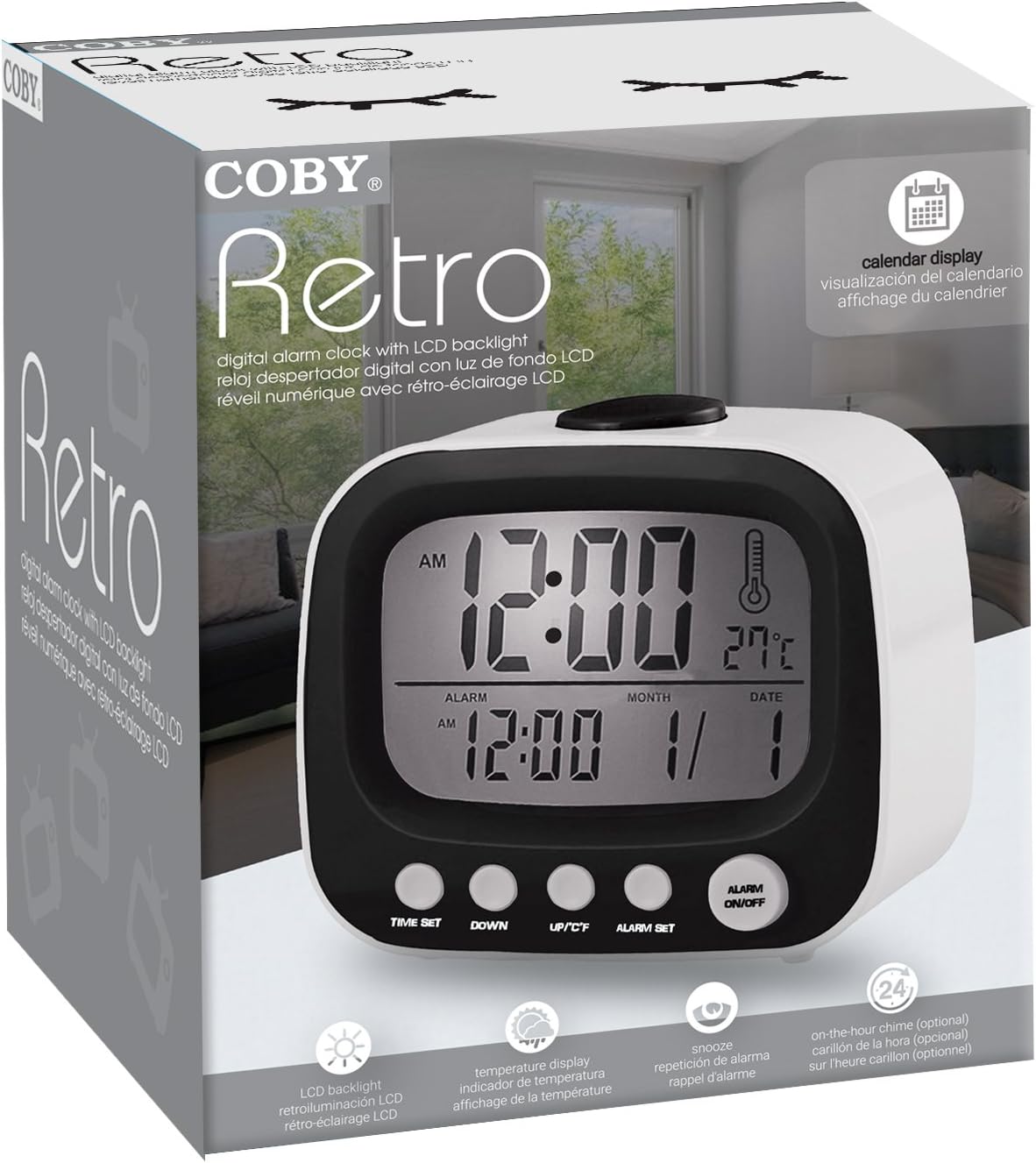
Thank you for choosing the Coby Retro LCD Alarm Clock, model CBC-52-WHT. This user manual provides essential information for setting up, operating, and maintaining your new alarm clock. Designed for clear and precise visibility, this clock features a sleek 3.5" LCD screen that displays time, date, and indoor temperature.
คุณสมบัติหลัก:
- การแสดงผลปฏิทินถาวร: Always know the current date.
- On-The-Hour Chime: Optional audible chime for every hour.
- LCD Time and Temperature Display: Clear digital readout of time and indoor temperature.
- Alarm & 10 Minute Snooze Function: Reliable alarm with a convenient snooze option.
- ใช้แบตเตอรี่: Portable design, requires 2 AAA batteries (not included).
เนื้อหาแพ็คเกจ
โปรดตรวจสอบแพ็คเกจอย่างละเอียดเพื่อให้แน่ใจว่ามีสินค้าทั้งหมดอยู่และอยู่ในสภาพดี
- 1 x Coby Retro LCD Alarm Clock (CBC-52-WHT)
- 1 x คู่มือผู้ใช้ (เอกสารนี้)
หมายเหตุ: ต้องใช้แบตเตอรี่ AAA 2 ก้อนในการใช้งาน ซึ่งไม่ได้รวมอยู่ในบรรจุภัณฑ์
สินค้าเกินview และการควบคุม

รูปที่ 1: ด้านหน้า view of the Coby Retro LCD Alarm Clock, highlighting the digital display and control buttons.
องค์ประกอบการแสดงผล:
- การแสดงเวลา: Shows current time (AM/PM indicator).
- การแสดงเวลาปลุก: แสดงเวลาปลุกที่ตั้งไว้
- การแสดงเดือน/วันที่: แสดงเดือนและวันปัจจุบัน
- แสดงอุณหภูมิ: Shows indoor temperature in Celsius or Fahrenheit.
- ไอคอนปลุก: Indicates when the alarm is active.
- Chime Icon: Indicates when the hourly chime is active.
Control Buttons (Front Panel):
- ตั้งเวลา: Used to enter time/date setting mode.
- ลง: Decreases values during setting, or navigates options.
- UP/°C/°F: Increases values during setting, navigates options, or switches temperature unit.
- ตั้งปลุก: Used to enter alarm setting mode.
- เปิด/ปิดนาฬิกาปลุก: เปิดหรือปิดฟังก์ชันเตือนภัย
ปุ่มบน:
- งีบหลับ/แสง: Activates snooze during an alarm, or temporarily illuminates the display backlight.
การตั้งค่า
1. การติดตั้งแบตเตอรี่
- หาฝาปิดช่องใส่แบตเตอรี่ที่ด้านหลังของนาฬิกาปลุก
- เลื่อนฝาครอบลงเพื่อเปิด
- Insert two (2) new AAA batteries, ensuring the correct polarity (+ and -) as indicated inside the compartment.
- Replace the battery compartment cover by sliding it back into place until it clicks.
Note: The clock will power on automatically once batteries are inserted. The display may show default values or "12:00 AM".
คำแนะนำการใช้งาน
1. การตั้งเวลาและวันที่
- กดปุ่มค้างไว้ ตั้งเวลา button for approximately 3 seconds until the hour digits begin to flash.
- ใช้ UP/°C/°F or ลง ปุ่มสำหรับปรับเวลา โปรดสังเกตตัวบ่งชี้ AM/PM
- กด ตั้งเวลา again to move to the minute setting. Use UP/°C/°F or ลง เพื่อปรับนาที
- กด ตั้งเวลา again to move to the year setting. Adjust with UP/°C/°F or ลง.
- กด ตั้งเวลา again to move to the month setting. Adjust with UP/°C/°F or ลง.
- กด ตั้งเวลา again to move to the date setting. Adjust with UP/°C/°F or ลง.
- กด ตั้งเวลา one last time to exit the setting mode. The display will stop flashing.
2. การตั้งปลุก
- กดปุ่มค้างไว้ ตั้งปลุก button for approximately 3 seconds until the alarm hour digits begin to flash.
- ใช้ UP/°C/°F or ลง buttons to adjust the alarm hour. Observe the AM/PM indicator for the alarm.
- กด ตั้งปลุก again to move to the alarm minute setting. Use UP/°C/°F or ลง เพื่อปรับนาทีปลุก
- กด ตั้งปลุก one last time to exit the alarm setting mode. The alarm time will stop flashing.
3. การเปิด/ปิดระบบเตือนภัย
- เพื่อปิดเสียงเตือน ON: กดปุ่ม เปิด / ปิดนาฬิกาปลุก button once. An alarm icon (bell symbol) will appear on the display, indicating the alarm is active.
- เพื่อปิดเสียงเตือน ปิด: กดปุ่ม เปิด / ปิดนาฬิกาปลุก button again. The alarm icon will disappear from the display.
4. ฟังก์ชั่นเลื่อนปลุก
- เมื่อเสียงสัญญาณเตือนดังขึ้น ให้กดปุ่มขนาดใหญ่ สนูซ / ไลท์ button on top of the clock. The alarm will temporarily stop and sound again after approximately 10 minutes.
- To cancel the snooze and turn off the alarm completely, press any other button on the front panel (e.g., เปิด / ปิดนาฬิกาปลุก).
5. ไฟแบ็คไลท์ของจอแสดงผล
รูปที่ 2: The Coby Retro LCD Alarm Clock with its backlight activated, providing visibility in low-light conditions.
- To temporarily illuminate the display, press the large สนูซ / ไลท์ button on top of the clock. The backlight will stay on for a few seconds.
6. Changing Temperature Unit (°C/°F)
- ในโหมดแสดงเวลาปกติ ให้กดปุ่ม UP/°C/°F button once to toggle between Celsius (°C) and Fahrenheit (°F) temperature readings.
7. On-The-Hour Chime
This model features an optional on-the-hour chime. The method to activate/deactivate this feature is typically integrated with the time setting or a dedicated button. If a chime icon is visible on the display, it indicates the chime is active. Consult the quick start guide if provided, or experiment with pressing the UP/°C/°F or ลง buttons in normal mode to see if a chime icon appears/disappears.
การซ่อมบำรุง
การทำความสะอาด:
- เช็ดพื้นผิวนาฬิกาด้วยผ้าแห้งเนื้อนุ่ม
- ห้ามใช้สารทำความสะอาดที่มีฤทธิ์กัดกร่อน ขี้ผึ้ง หรือตัวทำละลาย เพราะอาจทำให้พื้นผิวเสียหายได้
- Avoid exposing the clock to excessive moisture or submerging it in water.
การเปลี่ยนแบตเตอรี่:
- When the display becomes dim or the clock functions erratically, it's time to replace the batteries.
- Follow the "Battery Installation" steps in the Setup section to replace the two AAA batteries.
- Always use new batteries of the same type.
- ทิ้งแบตเตอรี่เก่าด้วยความรับผิดชอบตามข้อบังคับท้องถิ่น
การแก้ไขปัญหา
| ปัญหา | สาเหตุที่เป็นไปได้ | สารละลาย |
|---|---|---|
| จอแสดงผลว่างเปล่าหรือมืดลง | แบตเตอรี่หมดหรือใส่ไม่ถูกต้อง | เปลี่ยนแบตเตอรี่ใหม่โดยตรวจสอบให้แน่ใจว่าใส่ขั้วถูกต้อง |
| สัญญาณเตือนภัยไม่ดัง | Alarm function is not activated, or alarm time is incorrect. | Ensure the alarm icon is visible on the display. Re-check alarm time setting. |
| เวลา/วันที่ไม่ถูกต้อง | Time/Date was not set correctly or batteries were removed. | ทำตามคำแนะนำในหัวข้อ "การตั้งเวลาและวันที่" เพื่อรีเซ็ต |
| การอ่านอุณหภูมิดูไม่แม่นยำ | Clock is placed near a heat source or vent. | Move the clock to a location with stable ambient temperature. |
ข้อมูลจำเพาะ
| ยี่ห้อ: | โคบี้ |
| หมายเลขรุ่น: | CBC-52-WHT |
| สี: | สีขาว |
| ประเภทจอภาพ: | จอ LCD ระบบดิจิตอล |
| แหล่งพลังงาน: | 2 x แบตเตอรี่ AAA (ไม่รวม) |
| ขนาดสินค้า : | 20.32 x 7.62 x 10.16 ซม. (8 x 3 x 4 นิ้ว) |
| น้ำหนักสินค้า: | 249.47 กรัม (0.55 ปอนด์) |
| คุณสมบัติพิเศษ: | Alarm, Calendar Display, Snooze, Temperature Display, On-The-Hour Chime |
| ผู้ผลิต: | ซัมมิท อิเล็กทรอนิกส์ สหรัฐอเมริกา |
การรับประกันและการสนับสนุน
Coby products are designed for reliability and performance. For information regarding warranty coverage, technical support, or service inquiries, please refer to the warranty card included with your purchase or visit the official Coby webไซต์ โปรดเก็บหลักฐานการซื้อไว้เพื่อใช้ในการเรียกร้องการรับประกัน
For further assistance, you may contact Coby customer support through their official channels. Always provide your product model number (CBC-52-WHT) when seeking support.


