1. บทนำ
The AULA F2010 Unicorn Backlit Mechanical Gaming Keyboard is designed for an enhanced gaming and typing experience. It features a durable construction, multi-color LED illumination, and responsive mechanical switches. This manual provides detailed instructions for setting up, operating, and maintaining your keyboard.
2. เนื้อหาบรรจุภัณฑ์
- AULA F2010 Mechanical Gaming Keyboard
- คู่มือการใช้งาน
- ตัวดึงกุญแจ
3. คู่มือการติดตั้ง
3.1 ข้อกำหนดของระบบ
- Operating System: Windows Vista / 7 / 8 / 10 / Mac OS
- พอร์ต USB ที่ใช้ได้
3.2 การเชื่อมต่อคีย์บอร์ด
- ค้นหาพอร์ต USB ที่มีอยู่ในคอมพิวเตอร์ของคุณ
- Plug the USB connector of the AULA F2010 keyboard into the USB port.
- The keyboard will automatically install the necessary drivers. This may take a few moments.
- Once installation is complete, the keyboard's backlighting will illuminate, indicating it is ready for use.
4. คู่มือการใช้งาน
4.1 Backlighting Control
The AULA F2010 features multi-color LED backlighting with adjustable brightness and various lighting effects.
- การปรับความสว่าง: กด FN + PGUP เพื่อเพิ่มความสว่าง กด FN + PGDN เพื่อลดความสว่าง
- การเปลี่ยนโหมดแสงสว่าง: กด FN + อิน to cycle through different lighting effects (e.g., strobe, glow, pulse).
- การปรับแต่งแสงสว่าง: ใช้ FN + หน้าแรก to enter custom lighting mode. Specific keys can be lit according to user preference.
- Adjusting Effect Speed: ใช้ FN + ลูกศรซ้าย or FN + ลูกศรขวา เพื่อปรับความเร็วของเอฟเฟกต์แสงแบบไดนามิก
4.2 Anti-Ghosting and Key Rollover
The keyboard features 100% Anti-Ghosting with 104 Key Roll-over on USB, ensuring that every key press is registered accurately, even during rapid, simultaneous inputs common in gaming.
4.3 โหมดสลีป
To conserve energy, the keyboard will enter sleep mode and turn off all LEDs after 10 minutes of inactivity. Press any key to resume the LED backlight and normal operation.
4.4 ปุ่มลัดมัลติมีเดีย
The keyboard includes user-friendly shortcut function keys that can be activated in conjunction with the FN key for quick access to multimedia controls and other functions.
5. คุณสมบัติของผลิตภัณฑ์
- การออกแบบที่หรูหรา: Minimalist styled mechanical gaming keyboard with 6-color backlighting.
- โครงสร้างทนทาน: Features a brushed aluminum chassis for rugged, lifelong durability.
- Advanced Keycaps: AULA Armor Technology with highly durable Double-shot injection molding keycaps, suitable for all gaming circumstances.
- ความทนทานต่อสิ่งแวดล้อม: Water resistant, dust-proof, and static-free design.
- สวิตช์เชิงกล: Equipped with Blue mechanical switches for a tactile and audible typing experience.

ภาพ: จากบนลงล่าง view of the AULA F2010 keyboard, showcasing its full layout and vibrant multi-color backlighting.

ภาพ: มุมเอียง view of the AULA F2010 keyboard, displaying the multi-color LED backlighting across the keys.
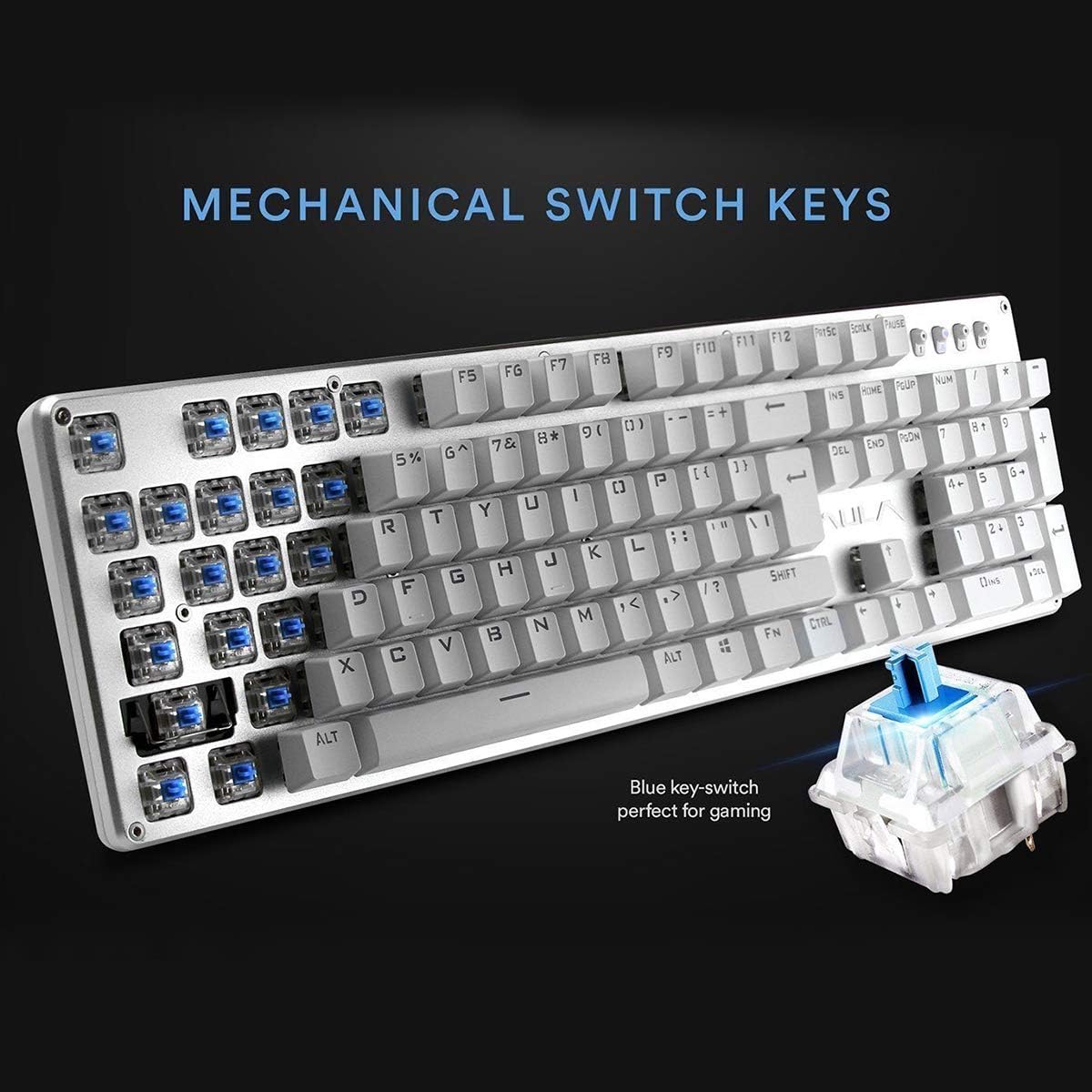
ภาพ: ภาพระยะใกล้ view highlighting the mechanical blue switches, which provide tactile feedback and a distinct click sound.
6. การบำรุงรักษาและการดูแล
Proper maintenance ensures the longevity and optimal performance of your AULA F2010 keyboard.
- การทำความสะอาด: Regularly clean the keyboard with a soft, dry cloth. For deeper cleaning, use a keycap puller to remove keycaps and clean dust and debris with compressed air or a small brush.
- การรั่วไหลของของเหลว: Due to its water-resistant design, minor spills may not cause damage. However, it is recommended to immediately unplug the keyboard, dry it thoroughly, and allow it to air dry completely before reconnecting.
- พื้นที่จัดเก็บ: เก็บแป้นพิมพ์ไว้ในที่แห้งและเย็น หลีกเลี่ยงแสงแดดโดยตรงและอุณหภูมิที่สูงหรือต่ำเกินไป
7 การแก้ไขปัญหา
หากคุณพบปัญหาเกี่ยวกับคีย์บอร์ด โปรดดูวิธีแก้ไขทั่วไปต่อไปนี้:
- แป้นพิมพ์ไม่ตอบสนอง:
- ตรวจสอบให้แน่ใจว่าสาย USB เสียบเข้ากับคีย์บอร์ดและคอมพิวเตอร์อย่างแน่นหนา
- ลองเสียบคีย์บอร์ดเข้ากับพอร์ต USB อื่น
- รีสตาร์ทเครื่องคอมพิวเตอร์ของคุณ
- Check if the keyboard is in sleep mode (press any key to wake it).
- ไฟแบ็คไลท์ไม่ทำงาน:
- Ensure the brightness is not set to the lowest level (use FN + PGUP to increase).
- Verify that the keyboard is not in sleep mode.
- Keys Not Registering or Doubling:
- Clean around and under the affected keycaps for any debris.
- If the issue persists, it may indicate a switch malfunction. Contact customer support if the product is under warranty.
8. ข้อมูลจำเพาะ
| คุณสมบัติ | รายละเอียด |
|---|---|
| ยี่ห้อ | อูล่า |
| หมายเลขรุ่น | เอฟ2010 |
| เทคโนโลยีการเชื่อมต่อ | สาย (USB) |
| จำนวนคีย์ | 104 |
| ประเภทสวิตช์กุญแจ | กลไก (สวิตช์สีฟ้า) |
| การแบ็คไลท์ | Multi-color LED (RGB) with adjustable brightness and modes |
| ป้องกันการโดนผีหลอก | 100% Anti-Ghosting with 104 Key Roll-over |
| วัสดุ | Brushed Aluminum Chassis, Double-shot Injection Molding Keycaps |
| ความเข้ากันได้ของระบบปฏิบัติการ | Windows Vista / 7 / 8 / 10 / Mac OS |
| น้ำหนักสินค้า | 2.87 ปอนด์ (1.3 กก.) |
| ขนาดสินค้า (กว้าง x ยาว x สูง) | 17.2 x 5.1 x 0.83 นิ้ว (43.7 x 13 x 2.1 ซม.) |
| คุณสมบัติพิเศษ | Water Resistant, Dust-proof, Static-free, Sleep Mode |
9. การรับประกันและการสนับสนุน
For warranty information, technical support, or service inquiries, please refer to the warranty card included with your product or visit the official AULA webไซต์ โปรดเก็บใบเสร็จรับเงินไว้เป็นหลักฐานการซื้อสำหรับการเรียกร้องการรับประกัน


