1. บทนำ
This manual provides detailed instructions for the installation, operation, and maintenance of your Pyle PLDNAND621 In-Dash GPS Navigation System. Please read this manual thoroughly before using the product to ensure proper functionality and to prevent damage.
1.1 ผลิตภัณฑ์เกินview
The Pyle PLDNAND621 is an advanced in-dash audio/video system featuring a 6-inch multi-touch capacitive display. It integrates GPS navigation with preloaded maps, Bluetooth connectivity, and multimedia playback capabilities, including CD/DVD, USB, and microSD. The system is designed to enhance your driving experience with turn-by-turn navigation and various entertainment options.
1.2 คุณสมบัติหลัก
- 6-inch Multi-Touch Capacitive Display (800 x 480 resolution)
- Integrated GPS Navigation with Preloaded Maps
- บลูทูธสำหรับการโทรแบบแฮนด์ฟรีและการสตรีมเสียง
- เครื่องเล่นซีดี/ดีวีดี
- AM/FM Tuner with 30 Station Memory
- USB and MicroSD Card Slots for Media Playback
- Support for various audio, video, and image file formats (MP3, MP4, AVI, WAV, JPEG)
- หลังview รองรับกล้องสำรอง
- Steering Wheel Button Control Support
- Anti-Shock Mechanism (ESP Function)
- Internet connectivity via Wi-Fi (tethering or hotspot)
- Access to Android applications
2. ข้อมูลด้านความปลอดภัย
Observe the following safety guidelines to prevent injury or damage to the unit:
- อย่าใช้งานระบบในลักษณะที่รบกวนสมาธิในการขับขี่ ให้ความสำคัญกับความปลอดภัยบนท้องถนนเสมอ
- Ensure proper installation by a qualified professional to avoid electrical hazards or vehicle damage.
- ห้ามถอดชิ้นส่วนหรือดัดแปลงอุปกรณ์ การกระทำดังกล่าวอาจทำให้อุปกรณ์ทำงานผิดปกติหรือเกิดไฟฟ้าช็อตได้
- รักษาระดับเสียงให้อยู่ในระดับที่คุณสามารถได้ยินเสียงการจราจรจากภายนอกได้
- Clean the screen with a soft, dry cloth. Avoid abrasive cleaners.
- Ensure the parking brake is engaged when watching videos or accessing certain features to comply with safety regulations.
3. เนื้อหาบรรจุภัณฑ์
ตรวจสอบว่ามีสิ่งของทั้งหมดอยู่ในกล่อง:

รูปที่ 3.1: Components included in the Pyle PLDNAND621 package.
This image displays the Pyle PLDNAND621 Android Stereo Receiver (rear view shown), power and wiring harness, Bluetooth microphone, two USB extension cables, mounting brackets and hardware, and a remote control.
- Pyle PLDNAND621 Android Stereo Receiver
- ชุดสายไฟและสายไฟ
- ไมโครโฟนบลูทู ธ
- (2) USB Extension Cables
- ขายึดและฮาร์ดแวร์
- รีโมทคอนโทรล
- เสาอากาศ GPS
- คู่มือการใช้งาน (เอกสารนี้)
4. การติดตั้ง
Installation of the Pyle PLDNAND621 requires technical knowledge and should ideally be performed by a professional installer. Incorrect installation can lead to damage to the unit or your vehicle.
4.1 แผนผังการเดินสายไฟ
Refer to the detailed wiring diagram provided with the unit's physical manual for specific connections. Key connections typically include:
- พลัง: สายไฟหลัก 12V (สีเหลือง), สายไฟเสริม 12V (สีแดง), สายไฟกราวด์ (สีดำ)
- วิทยากร: Connect to vehicle's speaker wires (Front Left, Front Right, Rear Left, Rear Right).
- เสาอากาศ: Connect the radio antenna and GPS antenna.
- ช่องรับ/ส่งสัญญาณเสริม: RCA connections for external audio/video devices, subwoofer output.
- อินพุตกล้องมองหลัง: Connect to a rearview camera for automatic display when reversing.
- ระบบควบคุมพวงมาลัย: Connect to vehicle's steering wheel control interface (if applicable).
- พอร์ต USB: สำหรับอุปกรณ์ USB และการชาร์จไฟ
4.2 การติดตั้ง
Use the provided mounting brackets and hardware to secure the unit into your vehicle's dashboard. Ensure the unit is firmly seated and does not obstruct any vehicle controls or airbags.
5. การตั้งค่าเริ่มต้น
After installation, power on the unit and follow the on-screen prompts for initial configuration.
5.1 การตั้งค่าภาษาและเวลา
Navigate to the system settings to select your preferred language, set the correct time zone, and adjust the date and time.
5.2 การเชื่อมต่อ Wi-Fi
To access online features and download applications, connect the unit to a Wi-Fi network. This can be done via a mobile hotspot from your smartphone or a local Wi-Fi network.
- ไปที่ การตั้งค่า.
- เลือก ไวไฟ.
- เปิดใช้งาน Wi-Fi On.
- เลือกเครือข่ายที่คุณต้องการและป้อนรหัสผ่านหากได้รับแจ้ง
5.3 การสอบเทียบ GPS
ตรวจสอบให้แน่ใจว่าติดตั้งเสาอากาศ GPS อย่างถูกต้องและมีความชัดเจน view of the sky. The system will automatically acquire satellite signals. For optimal navigation, allow the system to calibrate its position upon first use.
6. คู่มือการใช้งาน
This section details the primary functions and how to operate your Pyle PLDNAND621 system.
6.1 อินเทอร์เฟซหน้าจอสัมผัส

รูปที่ 6.1: Main interface of the Pyle PLDNAND621 with touch interaction.
This image displays the 6-inch touch screen display of the Pyle PLDNAND621, featuring various application icons such as DVR, Downloads, DVD, Email, Music, Explorer, YouTube, Bluetooth, and Video. A hand is shown interacting with the screen, demonstrating its touch functionality.
The unit features a responsive multi-touch capacitive display. Navigate through menus and applications by tapping, swiping, and pinching gestures, similar to a smartphone or tablet.
6.2 ระบบนำทาง GPS

รูปที่ 6.2: Pyle PLDNAND621 highlighting key features including GPS.
This image displays the Pyle PLDNAND621 unit with graphical icons representing its core functionalities: USB connectivity, CD/DVD playback, GPS navigation, Radio tuner, Android operating system, and Full HD 1080 video support.
The system comes with preloaded maps and supports turn-by-turn navigation. Access the navigation application from the main screen.
- แตะที่ การนำทาง ไอคอนบนหน้าจอหลัก
- ป้อนจุดหมายปลายทางของคุณโดยใช้แป้นพิมพ์บนหน้าจอ
- Select your preferred route and start navigation.
- Follow the voice prompts and on-screen directions.
6.3 การเชื่อมต่อบลูทูธ
เชื่อมต่อสมาร์ทโฟนหรืออุปกรณ์อื่นๆ ที่เปิดใช้งาน Bluetooth เพื่อโทรแบบแฮนด์ฟรีและสตรีมเสียง
- ไปที่ การตั้งค่า และเลือก บลูทูธ.
- เปิดใช้งานบลูทูธ On.
- On your mobile device, search for available Bluetooth devices and select "Pyle PLDNAND621".
- ยืนยันรหัสจับคู่บนอุปกรณ์ทั้งสอง
- Once paired, you can make/receive calls and stream audio through the unit.
6.4 Multimedia Playback (CD/DVD, USB, MicroSD)
The unit supports various media sources for audio and video playback.
- ซีดี/ดีวีดี: Insert a disc into the slot. The system will automatically switch to the CD/DVD player mode.
- ยูเอสบี: Connect a USB flash drive to one of the USB ports. Access media fileผ่านไปยัง ดนตรี or วีดีโอ การประยุกต์ใช้งาน
- ไมโครเอสดี: Insert a microSD card into the designated slot. Media files can be accessed similarly to USB.
6.5 เครื่องรับวิทยุ (AM/FM)
เข้าถึง วิทยุ application to listen to AM/FM broadcasts.
- ใช้การควบคุมบนหน้าจอเพื่อสแกนสถานี ปรับจูนด้วยตนเอง หรือเลือกจากสถานีที่ตั้งไว้ล่วงหน้าที่บันทึกไว้
- The unit has memory for up to 30 stations.
6.6 Applications and Internet Access

รูปที่ 6.3: Pyle PLDNAND621 demonstrating app download and web browsing capabilities.
This image illustrates the Pyle PLDNAND621's ability to "Surf the WEB & download Apps." It shows the unit's display with various app icons and mentions compatibility with both Apple App Store and Google Play for downloading applications.
The PLDNAND621 operates on an Android platform, allowing you to download and use various applications. Connect to Wi-Fi to access the internet and the Google Play Store.
- เปิด ร้านค้า Google Play แอป.
- Browse or search for desired applications.
- Download and install apps as you would on an Android smartphone.
6.7 Mirror Link / Air Play
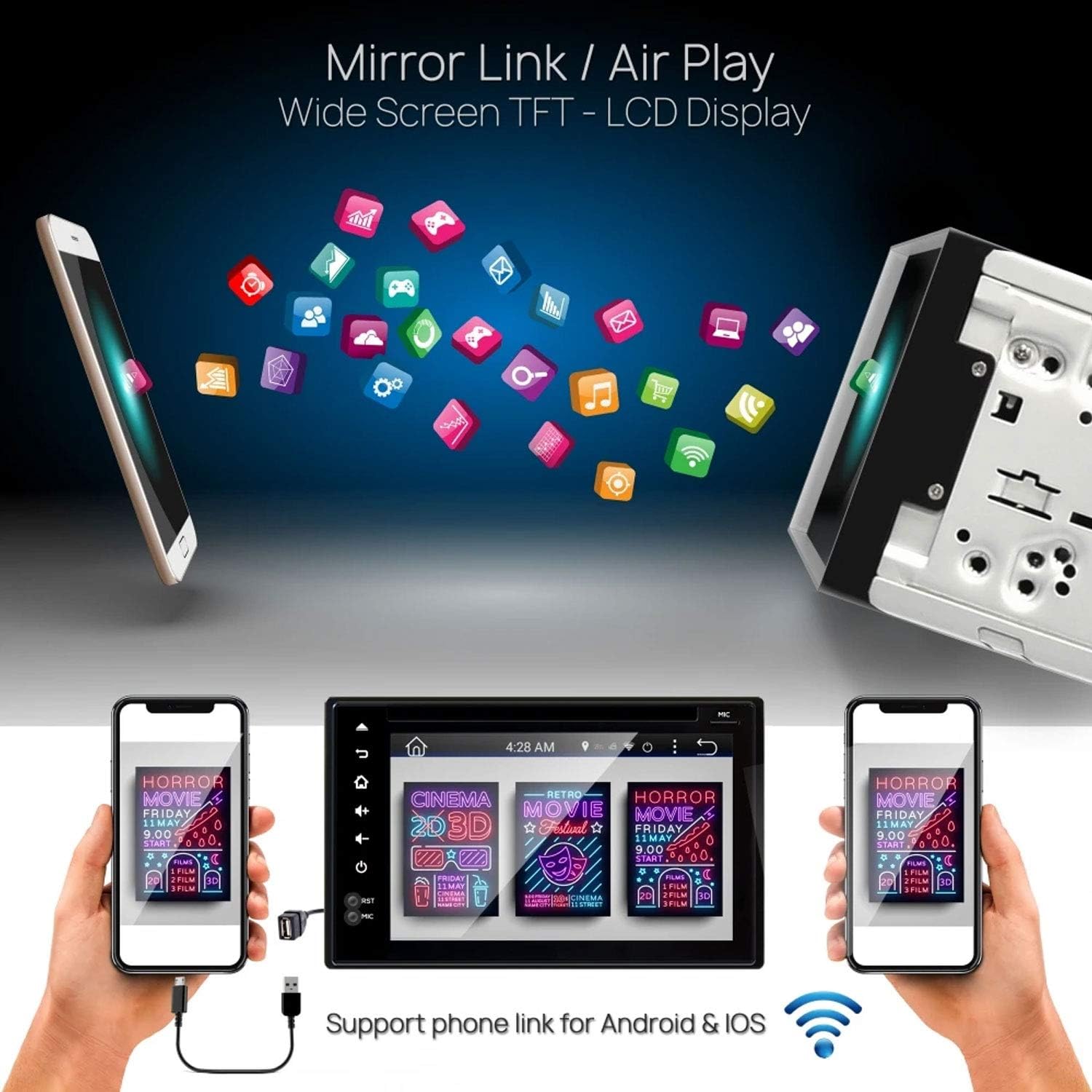
รูปที่ 6.4: Pyle PLDNAND621 supporting Mirror Link / Air Play functionality.
The image shows the Pyle PLDNAND621 unit connected to both Android and iOS smartphones, illustrating its "Mirror Link / Air Play" feature. This allows content from the phone to be displayed on the unit's wide-screen TFT-LCD display.
The unit supports Mirror Link (for Android) and Air Play (for iOS) to mirror your smartphone's screen onto the unit's display. This feature allows you to view compatible apps and content from your phone on the larger screen.
- Connect your smartphone to the unit via USB or Wi-Fi (refer to specific app instructions on your phone).
- Activate the Mirror Link or Air Play function on the unit.
- ปฏิบัติตามคำแนะนำบนหน้าจอเพื่อสร้างการเชื่อมต่อ
6.8 ด้านหลังview รองรับกล้องสำรอง

รูปที่ 6.5: Pyle PLDNAND621 with active rearview backup camera display.
This image shows the Pyle PLDNAND621 unit installed in a car dashboard, displaying a live feed from a rearview backup camera. Green and red guidelines are visible on the screen, assisting with parking and maneuvering.
หากมีด้านหลังที่เข้ากันได้view camera is connected, the display will automatically switch to the camera feed when the vehicle is put into reverse gear. This feature aids in safe parking and maneuvering.
6.9 การควบคุมปุ่มบนพวงมาลัย

รูปที่ 6.6: Pyle PLDNAND621 highlighting Steering Wheel Button Control and Anti-Shock features.
The image depicts the Pyle PLDNAND621 unit alongside an icon representing steering wheel controls, indicating compatibility. Below, an illustration shows the unit with a cracked ground effect, emphasizing its "Anti-Shock Mechanism-ESP Function" for durability.
The unit supports connection to your vehicle's existing steering wheel controls. This allows you to operate basic functions like volume, track change, and mode selection without taking your hands off the steering wheel. Configuration may be required in the system settings.
7. การบำรุงรักษา
Proper maintenance ensures the longevity and optimal performance of your Pyle PLDNAND621.
- การทำความสะอาดหน้าจอ: ใช้ผ้านุ่มไม่เป็นขุยเช็ดหน้าจอเบาๆ สำหรับรอยเปื้อนฝังแน่น ให้เช็ดเบาๆampชุบผ้าด้วยน้ำหรือน้ำยาทำความสะอาดที่ปลอดภัยต่อหน้าจอ หลีกเลี่ยงสารเคมีรุนแรงหรือวัสดุที่มีฤทธิ์กัดกร่อน
- การทำความสะอาดหน่วย: เช็ดภายนอกตัวเครื่องด้วยผ้าแห้งและนุ่ม
- การอัปเดตซอฟต์แวร์: Periodically check for software updates through the system settings or Pyle's official webไซต์เพื่อให้แน่ใจว่าคุณมีคุณลักษณะล่าสุดและการแก้ไขจุดบกพร่อง
- การดูแลรักษาแผ่นดิสก์: Handle CDs/DVDs by their edges to avoid fingerprints and scratches. Keep discs clean and store them in their cases when not in use.
8 การแก้ไขปัญหา
If you encounter issues with your Pyle PLDNAND621, refer to the following common problems and solutions:
| ปัญหา | สาเหตุที่เป็นไปได้ | สารละลาย |
|---|---|---|
| เครื่องไม่เปิด | สายไฟไม่ถูกต้อง ฟิวส์ขาด ปัญหาแบตเตอรี่รถยนต์ | Check power connections (Yellow, Red, Black wires). Inspect vehicle fuses. Ensure vehicle battery is charged. |
| ไม่มีเสียงออกจากลำโพง | การต่อสายลำโพงไม่ถูกต้อง ระดับเสียงต่ำเกินไป เปิดใช้งานโหมดปิดเสียง แหล่งสัญญาณเสียงไม่ถูกต้อง | ตรวจสอบการเชื่อมต่อลำโพง เพิ่มระดับเสียง ตรวจสอบว่าเปิดใช้งานโหมดปิดเสียงอยู่หรือไม่ เลือกแหล่งสัญญาณเสียงที่ถูกต้อง |
| สัญญาณ GPS สูญหายหรือไม่แม่นยำ | เสาอากาศ GPS ถูกกีดขวางหรือเชื่อมต่อไม่ถูกต้อง | ตรวจสอบให้แน่ใจว่าเสาอากาศ GPS มีสัญญาณที่ชัดเจน view ของท้องฟ้า ตรวจสอบการเชื่อมต่อเสาอากาศ |
| การจับคู่บลูทูธล้มเหลว | Device not in pairing mode, incorrect password, interference. | Ensure both devices are in pairing mode. Re-enter password. Move closer to the unit. Restart Bluetooth on both devices. |
| หน้าจอสัมผัสไม่ตอบสนอง | ระบบหยุดทำงาน ซอฟต์แวร์มีปัญหาชั่วคราว | Perform a soft reset (refer to manual for reset button location, often a small pinhole). If persistent, consult support. |
| DVD/CD not playing. | Disc dirty, scratched, or incompatible format. | ทำความสะอาดแผ่นดิสก์ ลองใช้แผ่นดิสก์อื่น ตรวจสอบให้แน่ใจว่ารองรับรูปแบบแผ่นดิสก์ |
9. ข้อมูลจำเพาะ
Detailed technical specifications for the Pyle PLDNAND621:
- หมายเลขรุ่น: PLDNAND621
- ประเภทจอภาพ: LCD, Multi-Touch Capacitive
- ขนาดหน้าจอ: 6 นิ้ว
- ปณิธาน: 800 x 480 พิกเซล
- เทคโนโลยีการเชื่อมต่อ: Bluetooth, USB, Wi-Fi, Micro SD, Auxiliary Input
- การเล่นสื่อ: CD, DVD, USB Flash Drive, Micro SD Card
- เครื่องรับวิทยุ: AM/FM with 30 station memory
- คุณสมบัติพิเศษ: GPS Navigation, Touchscreen, Bluetooth, Rearview Camera Support, Steering Wheel Control Support, Anti-Shock Mechanism (ESP)
- ขนาด (สินค้า): 25.4 x 18.42 x 31.12 ซม. (10 x 7.25 x 12.25 นิ้ว)
- น้ำหนัก(สินค้า): 2.27 กก. (5 ปอนด์)
- ผู้ผลิต: PYLE-CAR AUDIO/VIDEO
10. การรับประกันและการสนับสนุน
สำหรับข้อมูลการรับประกันและการสนับสนุนทางเทคนิค โปรดดูบัตรรับประกันที่แนบมากับผลิตภัณฑ์ของคุณ หรือเยี่ยมชมเว็บไซต์อย่างเป็นทางการของ Pyle webไซต์ โปรดเก็บใบเสร็จรับเงินไว้เป็นหลักฐานการซื้อ
ไพล์ ออฟฟิเชียล Webเว็บไซต์: www.pyleusa.com
Contact customer service for assistance with installation, troubleshooting, or product inquiries not covered in this manual.


