การแนะนำ
This manual provides detailed instructions for the installation, operation, and maintenance of your Barkan Long TV Wall Mount, Model 3400L.B. This mount is designed for 13-80 inch flat and curved screens, offering full motion articulation for optimal viewing flexibility. It features an exceptionally long extension, allowing a 50-inch screen to rotate 90 degrees perpendicular to the wall, while maintaining a low profile when folded. Please read these instructions carefully before installation and use to ensure safe and correct operation.

Image: The Barkan Long TV Wall Mount, Model 3400L.B, shown with its retail packaging. The mount is black, featuring an articulating arm and a VESA compatible plate for TV attachment.
เนื้อหาแพ็คเกจ
ก่อนเริ่มการติดตั้ง ตรวจสอบว่ามีส่วนประกอบทั้งหมดอยู่ในแพ็คเกจหรือไม่:
- ทีวีเมาท์
- Hardware Kit (various screws, anchors, washers, spacers)
- คู่มือการใช้งาน

ภาพ: รายละเอียด view of the Barkan Hardware Kit, including various screws (hex/phillips head, long wall screws, M8, M6, M4), wall anchors (fins, expanding), metal washers, and plastic spacers. These components are essential for wall and TV attachment.
การติดตั้งและการตั้งค่า
The Barkan Long TV Wall Mount is designed for a self, easy, and fast assembly process. Follow these steps carefully:
1. Wall Compatibility and Preparation
Ensure your wall type is suitable for mounting. The mount is compatible with:
- Drywall พร้อมกระดุมไม้
- Concrete blocks / Concrete wall
บันทึก: ฐานยึดคือ ไม่ compatible with drywall/gypsum/plaster without wood studs.
เครื่องมือที่จำเป็น:
- Drill (with 1/4" - 6mm, 3/8" - 10mm, and 5/32" - 4mm bits)
- ระดับ
- เครื่องตรวจหาโครงไม้ (หากติดตั้งกับโครงไม้)
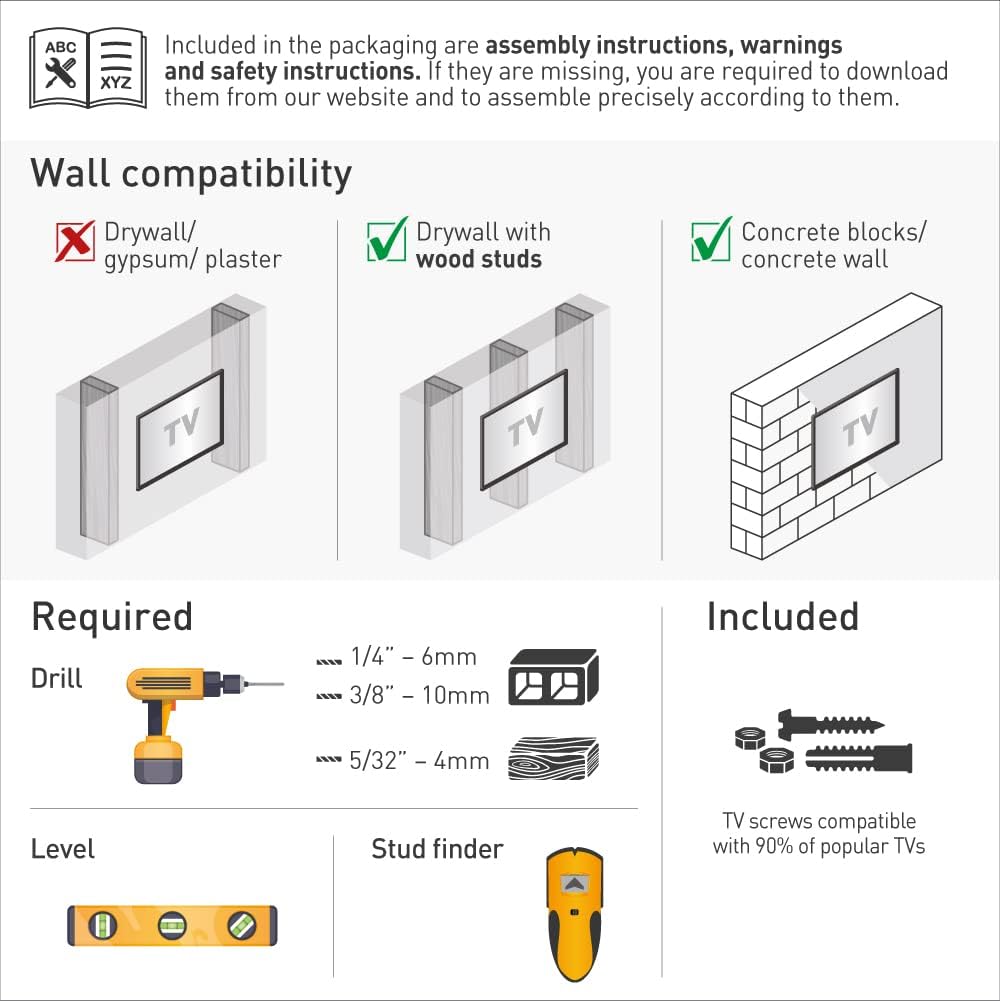
Image: A diagram illustrating suitable wall types for installation (drywall with wood studs, concrete) and incompatible types (drywall without studs). It also lists required tools like a drill, level, and stud finder, along with included TV screws.
2. Attaching Adapters to the TV
The mount is designed to fit various screen types, including flat and curved TVs, and those with special back structures. The four adapters can move in two dimensions to ensure a firm fit without additional spacers.
- ระบุรูยึด VESA ที่ด้านหลังทีวีของคุณ
- Select the appropriate screws (M4, M6, or M8) from the hardware kit that fit your TV's VESA holes.
- Connect the TV plate adapters to the rear side of the TV using the selected screws. Ensure they are securely fastened.

Image: Diagrams demonstrating how the mount's adapters accommodate different TV back designs, including flat screens, curved screens, and screens with irregular surfaces, ensuring a secure fit.
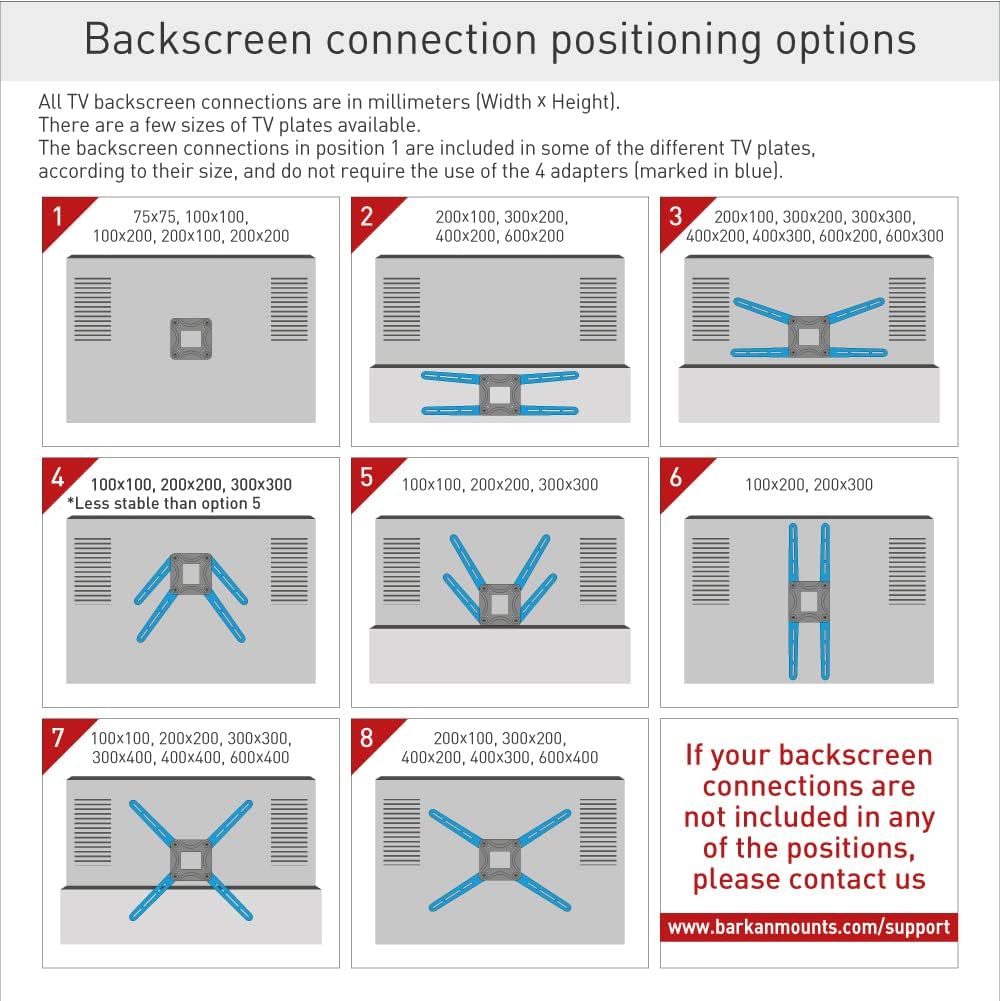
Image: A grid of eight diagrams illustrating various backscreen VESA connection positioning options (e.g., 75x75, 100x100, 200x200, 400x400, 600x400 mm) and how the four adapters can be configured to match these patterns. If your TV's pattern is not shown, contact support.
3. Installing the Bracket on the Wall
- Determine the desired height and location for your TV. Use a stud finder to locate wood studs if applicable.
- Use the included drilling template to mark the drilling points on the wall.
- Drill pilot holes according to the wall type and anchor requirements.
- Securely install the wall bracket using the appropriate wall screws and anchors from the hardware kit. Ensure the bracket is level.
4. Snapping the TV onto the Bracket
- Carefully lift the TV (with adapters attached) and align it with the wall bracket.
- Snap the TV onto the bracket, ensuring it is securely engaged.
- Engage the Fall Proof system to prevent accidental disengagement of the screen.

Image: A visual guide demonstrating the three-step assembly: 1. Connect the TV plate to the back of the TV, 2. Install the bracket on the wall, 3. Snap the TV onto the bracket. A drilling template is also shown for easy and accurate installation.

Image: This diagram highlights key safety features of the mount, including testing at 330 lbs (150 kg) for extra safety, a fall-proof mechanism to prevent the TV from detaching, and integrated cable management for a tidy appearance. It also notes the patented design.
การใช้งานภูเขา
The Barkan Long TV Wall Mount offers full motion capabilities, allowing you to adjust your TV for the optimal viewการสร้างประสบการณ์
การปรับเปลี่ยน:
- การหมุน: The double arm rotates 180° near the wall.
- พับ: The arm can fold 360°.
- หมุน: The screen connection plate swivels 180°.
- เอียง: Tool-free tilt adjustment from 0° to 10°.
- การปรับระดับ: The screen can be leveled ±5°.
To adjust, gently push or pull the TV to the desired angle. The mount is designed for smooth movement.
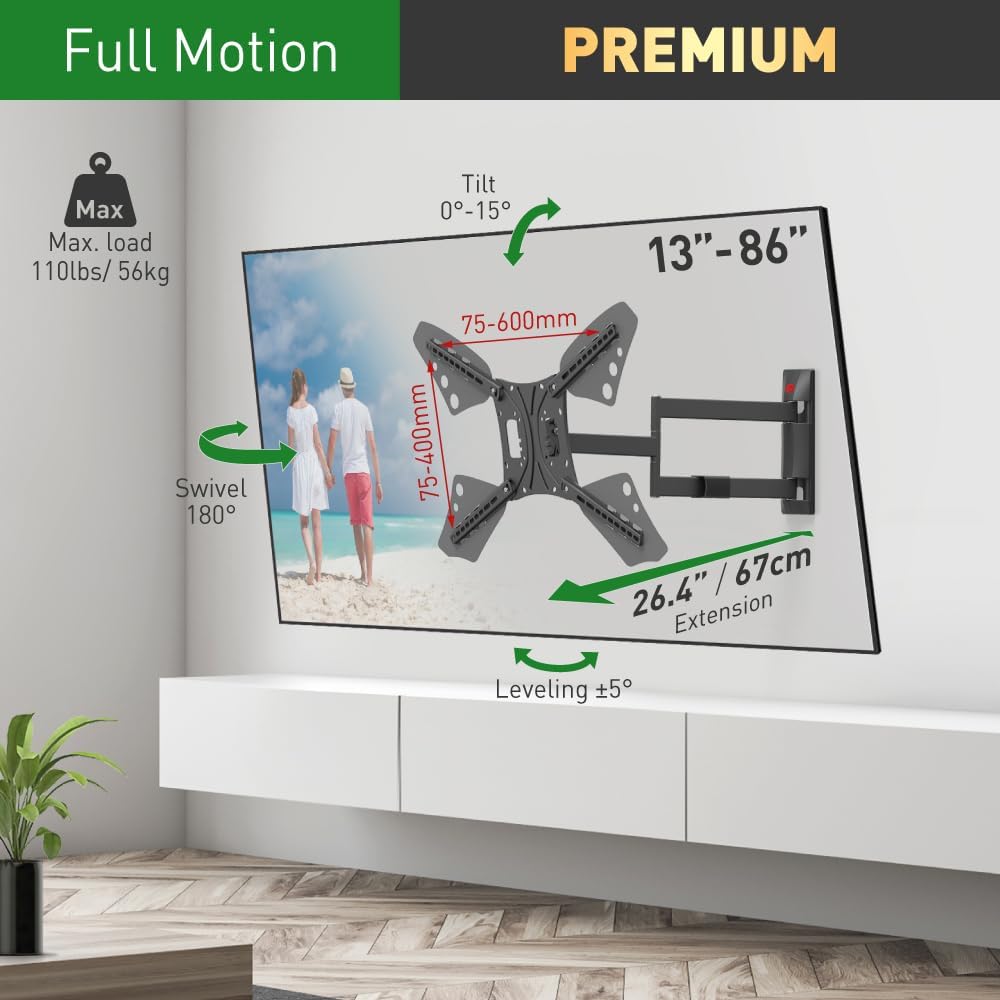
Image: A diagram illustrating the full motion capabilities of the Barkan TV mount, including a maximum load of 110 lbs (50 kg), tilt range of 0°-15°, 180° swivel, ±5° leveling, and an extension range of 26.4 inches (67 cm) from the wall. VESA compatibility from 75x75mm to 600x400mm is also indicated.
Determining Maximum Swivel Angle:
The maximum swivel angle depends on your TV's size and its distance from the wall. For optimal viewing, the 'line of sight' should be perpendicular (90°) to the screen.
- Up to 52" TVs: Can achieve a 90° swivel.
- 65" TVs: Can achieve approximately a 56° swivel.
- 86" TVs: Can achieve approximately a 39° swivel.

Image: Diagrams illustrating the maximum swivel angles achievable for different TV sizes when mounted. A 52-inch TV can swivel 90 degrees, a 65-inch TV can swivel 56 degrees, and an 86-inch TV can swivel 39 degrees, demonstrating the range of motion.
การซ่อมบำรุง
To ensure the longevity and proper function of your Barkan TV Wall Mount, follow these maintenance guidelines:
- การตรวจสอบปกติ: ตรวจสอบสกรูและการเชื่อมต่อทั้งหมดเป็นระยะๆ เพื่อให้แน่ใจว่าแน่นหนาและปลอดภัย
- การทำความสะอาด: เช็ดฐานยึดด้วยผ้าแห้งเนื้อนุ่มเพื่อกำจัดฝุ่น หลีกเลี่ยงการใช้สารทำความสะอาดที่มีฤทธิ์กัดกร่อนหรือตัวทำละลาย
- ตรวจสอบการเคลื่อนไหว: Occasionally move the TV through its full range of motion to ensure smooth articulation. If any stiffness is noted, check for obstructions or loose components.
การแก้ไขปัญหา
If you encounter issues with your Barkan TV Wall Mount, refer to the following common problems and solutions:
- TV does not fit the VESA plate: Ensure you have selected the correct VESA pattern and screws for your TV. The mount supports VESA standards from 75x75mm up to 600x400mm. If your TV has a non-standard back structure, the adjustable adapters should accommodate it. Refer to the 'Backscreen connection positioning options' diagram. If issues persist, contact Barkan support.
- Tilt mechanism does not hold position: Ensure all tilt adjustment screws are tightened sufficiently. If the tilt continues to slip, inspect the mechanism for any damage or wear.
- Mount feels unstable or makes cracking sounds: This often indicates improper installation. Verify that the wall bracket is securely fastened to a suitable wall structure (wood studs or concrete) using the correct anchors and screws. Ensure all connections are tight. ห้ามเกินขีดจำกัดน้ำหนักสูงสุดที่สามารถรองรับได้ 110 ปอนด์ (50 กก.)
- ปัญหาในการเคลื่อนย้ายทีวี: Check for any obstructions or cables that might be snagged. Ensure the mount's joints are not overly tightened.
For further assistance, please contact Barkan customer support.
ข้อมูลจำเพาะ
| คุณสมบัติ | ข้อมูลจำเพาะ |
|---|---|
| ขนาดสินค้า | 16.73 x 11.89 x 2.28 นิ้ว |
| น้ำหนักสินค้า | 10.34 ปอนด์ |
| หมายเลขรุ่นสินค้า | 3400L.B |
| ประเภทการติดตั้ง | ติดผนัง |
| ประเภทการเคลื่อนไหว | Articulating, Full Motion |
| ยี่ห้อ | บาร์คาน |
| วัสดุ | โลหะ |
| สี | สีดำ |
| อุปกรณ์ที่รองรับ | Television (13-80 inches) |
| มุมเอียงสูงสุด | 10 Degrees (0° to 10°) |
| มุมหมุน | 180° (near screen connection plate) |
| มุมการหมุน | 180° (near wall, double arm) |
| ส่วนต่อเติมจากผนัง | Min. 3" (7.5cm) / Max. 26.4" (67cm) |
| ความจุในการรับน้ำหนักสูงสุด | 110 ปอนด์ (50 กก.) |
| ความเข้ากันได้ของ VESA | 75x75, 100x100, 100x200, 200x100, 200x200, 300x300, 300x400, 400x200, 400x300, 400x400, 600x300, 600x400 mm and non VESA up to 600x400 mm |
| ยูพีซี | 818212001049 |
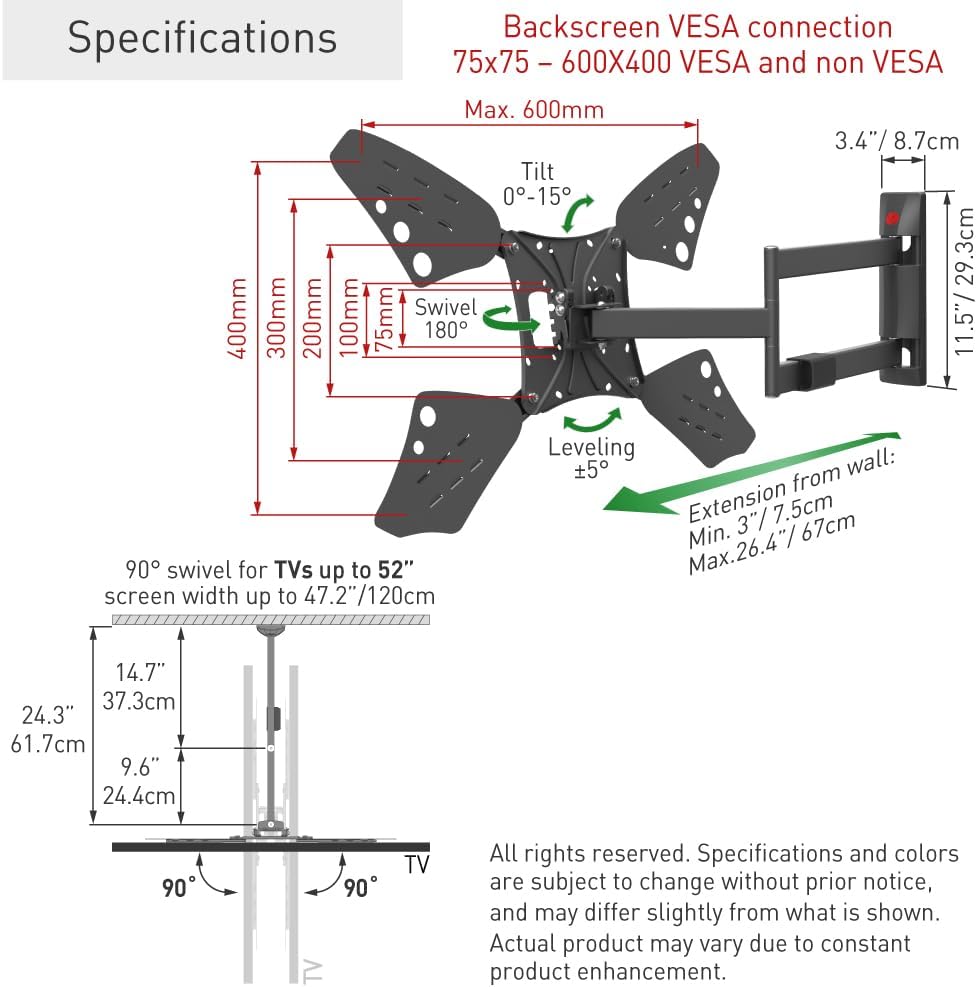
Image: A technical diagram detailing the specifications of the Barkan TV mount, including VESA connection patterns (75x75 to 600x400 mm), tilt range (0°-15°), swivel (180°), leveling (±5°), and extension from the wall (Min. 3" / 7.5cm, Max. 26.4" / 67cm). It also shows the dimensions of the mount components.
การรับประกันและการสนับสนุน
รับประกันตลอดอายุการใช้งาน
Barkan Mounts provides a Lifetime Limited Warranty for this product. This mount has been rigorously tested with three times its declared weight capacity to ensure durability and safety. All Barkan products undergo strict quality tests.
Barkan has been developing and manufacturing mounting systems since 1988, establishing a reputation for innovative, high-quality, and trustworthy products. The company's commitment to quality is reflected in its patented designs and comprehensive testing procedures.

Image: A graphic highlighting Barkan's
เอกสารที่เกี่ยวข้อง - 3400L.B
 |
คู่มือการประกอบและใช้งานขาแขวนทีวีติดผนังรุ่น Barkan BM343XL ยาวพิเศษ Comprehensive assembly instructions and user manual for the Barkan BM343XL Extra Long TV Wall Mount. This guide covers installation, safety precautions, and usage details for mounting TVs from 13" to 65". |
 |
คู่มือการประกอบขาแขวนทีวีติดผนัง Barkan BM331 | ขาแขวนปรับได้รอบทิศทาง Comprehensive assembly instructions for the Barkan BM331 Full Motion TV Wall Mount. Learn how to safely install your TV (13"-65") with this versatile, rotating, folding, and tilting mount. Includes parts list, required tools, and step-by-step guidance. |
 |
คู่มือการติดตั้งขาแขวนทีวีติดผนังแบบยาวพิเศษ Barkan คู่มือการติดตั้งขาแขวนทีวีติดผนังรุ่นยาวพิเศษ Barkan อย่างละเอียดครอบคลุมถึงข้อควรระวังด้านความปลอดภัย การระบุชิ้นส่วน เครื่องมือที่จำเป็น และขั้นตอนการประกอบทีละขั้นตอนสำหรับทีวีขนาดต่างๆ และประเภทผนังที่แตกต่างกัน |
 |
คู่มือการประกอบขายึดทีวีติดผนัง Barkan AM464L พร้อมเสาอากาศในตัว คู่มือการประกอบและติดตั้งอย่างละเอียดสำหรับขาแขวนทีวีติดผนังแบบปรับได้รอบทิศทาง Barkan AM464L พร้อมระบบปรับตำแหน่งในตัว Amplified HDTV Indoor Antenna. This document provides step-by-step instructions, safety warnings, and part lists for securely mounting your TV. |
 |
คู่มือการประกอบและคำแนะนำด้านความปลอดภัยสำหรับขาตั้งจอภาพแบบตั้งโต๊ะ Barkan WGP-BASIC-BNG-2202-Online คู่มือความปลอดภัยและวิธีการประกอบอย่างละเอียดสำหรับขาตั้งจอภาพแบบตั้งโต๊ะ Barkan WGP-BASIC-BNG-2202-Online ครอบคลุมถึงการติดตั้ง แนวทางการใช้งาน และคำเตือนที่สำคัญ |
 |
คู่มือการประกอบและการใช้งานรถเข็นทีวีเคลื่อนที่ Barkan รุ่น SW310H Comprehensive assembly instructions and user manual for the Barkan Mobile TV Cart (SW310H). Learn how to safely install and use your TV mount, including parts identification, hardware details, and step-by-step assembly guidance for TVs from 13 to 65 inches. |