1. บทนำ
The KODAK PIXPRO SP360 4K VR Camera is designed for capturing immersive 360-degree video. This manual provides essential information for setting up, operating, and maintaining your camera to ensure optimal performance.
2. อะไรอยู่ในกล่อง
The KODAK PIXPRO SP360 4K Dual Pro Pack includes the following items:
- Two (2) KODAK PIXPRO SP360 4K Cameras
- Two (2) Rechargeable Li-ion Batteries
- สาย USB
- อะแดปเตอร์ AC
- คู่มือเริ่มต้นอย่างรวดเร็ว
- บัตรรับประกัน
- บัตรบริการ
- ฝาปิดเลนส์
- ฝาครอบป้องกัน
- วงแหวนเลนส์
- เครื่องชาร์จแบตเตอรี่
- กระเป๋าใส่อุปกรณ์
- ผ้าเช็ดทำความสะอาด
- SP360 4K ขึ้นไปview การ์ด
- บัตรสมาชิกร้านค้าออนไลน์ SP360 4K
- ไม้เซลฟี่
- Dual Camera Base Mount
- ฐานยึดรีโมทคอนโทรล
- ถ้วยคัพดูด
- แบตเตอรี่รีโมทคอนโทรล
- สายรัดข้อมือไนลอน
- เครื่องมืออุปกรณ์เสริม

Image: All items included in the KODAK PIXPRO SP360 4K Dual Pro Pack, laid out on a white surface. This includes two cameras, various mounts, cables, chargers, and documentation.
3. การตั้งค่า
3.1. การชาร์จแบตเตอรี่
Before first use, fully charge the camera's battery using the provided AC adapter and USB cable. Insert the battery into the camera, connect the USB cable to the camera and the AC adapter, then plug the adapter into a power outlet. The charging indicator will show the charging status.
3.2. การใส่การ์ด MicroSD
The camera requires a Class 10 MicroSD card (up to 128GB, not included) for recording. Open the side cover, insert the MicroSD card into the slot until it clicks, and then close the cover securely.
3.3. การติดตั้งอุปกรณ์ยึด
Various mounts are included to suit different recording scenarios. For dual camera setups, use the Dual Camera Base Mount. For handheld use, attach the camera to the Selfie Stick. Ensure all mounts are securely fastened before use.

Image: A single KODAK PIXPRO SP360 4K camera mounted on a selfie stick, demonstrating a typical handheld setup.

Image: Two KODAK PIXPRO SP360 4K cameras mounted back-to-back in the Dual Camera Base Mount, ready for full 360-degree spherical video capture.
4. คู่มือการใช้งาน
4.1. การเปิด/ปิดเครื่อง
Press and hold the Power button (usually marked with a circle and a line) to turn the camera on or off. The status indicator light will illuminate when the camera is on.

ภาพ: ด้านบน view of the KODAK PIXPRO SP360 4K camera, highlighting the power, mode, and OK buttons, along with the recording indicator and Wi-Fi status.
4.2. การบันทึกวิดีโอ
With the camera powered on, press the Record button (red circle) to start recording. Press it again to stop. The recording indicator light will flash during recording.
4.3.การถ่ายภาพ
Switch to photo mode using the Mode button. Press the OK button to capture a still image.
4.4. การใช้รีโมทคอนโทรล
The RF remote control allows you to wirelessly control one or two cameras. Use the switches to select camera 1, camera 2, or both. The large red button triggers recording/photo capture. The remote can be worn as a wrist strap or attached to a mount.
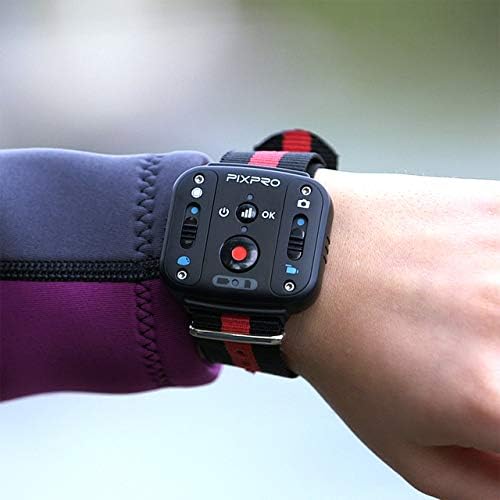
Image: The KODAK PIXPRO SP360 4K remote control, designed to be worn on the wrist, showing its control buttons for camera operation.
4.5. Connecting to a Smart Device (Wi-Fi)
Enable Wi-Fi on the camera. On your iOS/Android smart device, connect to the camera's Wi-Fi network. Download and use the KODAK PIXPRO SP360 4K app to control the camera, view อยู่ footagและโอนย้าย files.
4.6. ใช้เป็น Webลูกเบี้ยว
The KODAK PIXPRO SP360 4K camera can function as a webcam. Connect the camera to your computer via a Micro USB cable. Download and install the necessary drivers from the official KODAK PIXPRO website. Select "PIXPRO SP360 4K UVC" as the video input device in your webcam software (e.g., Skype).

Image: A screenshot illustrating the steps to configure the KODAK PIXPRO SP360 4K as a webcam, including driver download links and software settings.
ดาวน์โหลดไดร์เวอร์: Americas Support | การสนับสนุนของยุโรป
5. การบำรุงรักษา
5.1. การทำความสะอาดเลนส์
Use the provided cleaning cloth to gently wipe the lens. Avoid using abrasive materials or harsh chemicals that could scratch the lens coating.
5.2. การดูแลแบตเตอรี่
Store batteries in a cool, dry place. Avoid extreme temperatures. If the camera will not be used for an extended period, remove the battery.
5.3. การอัปเดตเฟิร์มแวร์
Periodically check the KODAK PIXPRO website for firmware updates to ensure optimal performance and access to new features. Follow the instructions provided on the webเว็บไซต์สำหรับอัพเดตเฟิร์มแวร์
6 การแก้ไขปัญหา
6.1. กล้องไม่เปิด
- ตรวจสอบให้แน่ใจว่าแบตเตอรี่ชาร์จเต็มแล้ว
- ตรวจสอบว่าใส่แบตเตอรี่ถูกต้อง
- If using external power, ensure the cable and adapter are functioning correctly.
6.2. Blurry Footage
- Clean the camera lens with the provided cleaning cloth.
- Ensure the lens cover is removed before recording.
- If the focus is consistently blurry, refer to the video tutorial on adjusting the lens focus.
Video: A detailed tutorial demonstrating how to fix the focus on the KODAK PIXPRO SP360 4K Action Camera. This involves disassembling parts of the camera to access and adjust the lens.
6.3. ปัญหาการเชื่อมต่อ Wi-Fi
- Ensure Wi-Fi is enabled on the camera and your smart device.
- รีสตาร์ททั้งกล้องและอุปกรณ์สมาร์ทของคุณ
- Ensure you are within the camera's Wi-Fi range.
6.4. Software Issues (Stitching/Editing)
- Ensure you are using the latest version of the PIXPRO 360 VR Suite.
- For Mac users, ensure security settings allow installation from unidentified developers if prompted.
- Consider using more robust third-party editing software like Adobe Premiere or Final Cut Pro for advanced editing.
วิดีโอ: หนึ่งview of the Kodak PIXPRO SP360 4K camera, discussing its features, video quality, and the accompanying software. It highlights the camera's capabilities and potential areas for improvement in the software experience.
7. ข้อมูลจำเพาะ
| ขนาดสินค้า | 2.06 x 1.88 x 1.96 นิ้ว |
| น้ำหนักสินค้า | 3.68 ออนซ์ |
| หมายเลขรุ่นสินค้า | SP360 4K-BK5 |
| แบตเตอรี่ | ต้องใช้แบตเตอรี่ลิเธียมโพลิเมอร์ 1 ก้อน (รวมอยู่ด้วย) |
| ยี่ห้อ | โคดัก |
| เทคโนโลยีโฟโต้เซนเซอร์ | ซีมอส |
| ความละเอียดในการจับภาพวิดีโอ | 4K |
| ความยาวโฟกัสสูงสุด | 8.2 มิลลิเมตร |
| รูรับแสงสูงสุด | 2.8 มิลลิเมตร |
| รูปแบบการจับภาพวิดีโอ | 2880x2880: 30fps (1:1), 2048x2048: 30fps (1:1), 1440x1440: 60fps/30fps (1:1), 1072x1072: 60fps/30fps (1:1) |
| รูปแบบเสียงที่รองรับ | เอเอซี |
| ขนาดหน้าจอ | 1 นิ้ว |
| เทคโนโลยีการเชื่อมต่อ | ไวไฟ |
7.1. Environmental Durability
- กันกระแทก: Withstands drops from up to 1.5m (5ft).
- ป้องกันการแข็งตัว: Operates in temperatures down to -10°C.
- กันฝุ่น: Resistant to dust ingress.
วิดีโอ: จบแล้วview of the KODAK PIXPRO SP360 4K Dual Pro Pack VR Camera, highlighting its features, accessories, and rugged design for various environments.
8. การรับประกันและการสนับสนุน
For warranty information, please refer to the Warranty Card included in your product packaging. For additional support, including FAQs, troubleshooting guides, and contact information, visit the official KODAK PIXPRO webเว็บไซต์.
- แผนคุ้มครอง 2 ปี: พร้อมจำหน่ายแล้ว
- แผนคุ้มครอง 3 ปี: พร้อมจำหน่ายแล้ว
- การปกป้องที่สมบูรณ์: แผนรายเดือนครอบคลุมการซื้อที่เข้าเงื่อนไขในอดีตและอนาคต


