1. บทนำ
The Muse M-192 CR is a versatile clock radio designed to provide reliable timekeeping, alarm functions, and FM radio reception. It features a large, easy-to-read digital display, dual alarms, and convenient functions such as snooze, sleep, and NAP. This manual provides detailed instructions for the proper setup, operation, and maintenance of your device.
2. คำแนะนำด้านความปลอดภัย
- อ่านคำแนะนำทั้งหมดอย่างละเอียดก่อนใช้งานอุปกรณ์
- เก็บอุปกรณ์ให้ห่างจากน้ำหรือความชื้น
- อย่าปิดกั้นช่องระบายอากาศใดๆ ควรมีพื้นที่รอบตัวเครื่องเพียงพอเพื่อให้อากาศถ่ายเทได้สะดวก
- Use only the AC adapter supplied with the unit.
- หลีกเลี่ยงการวางอุปกรณ์ไว้ในอุณหภูมิที่สูงเกินไป แสงแดดโดยตรง หรือมีความชื้นสูง
- อย่าพยายามถอดประกอบหรือดัดแปลงตัวเครื่อง แนะนำให้ช่างผู้ชำนาญเข้ารับบริการทั้งหมด
3. เนื้อหาบรรจุภัณฑ์
กรุณาตรวจสอบแพ็คเกจสำหรับรายการต่อไปนี้:
- 1 x Muse M-192 CR Clock Radio
- ฮิต x AC Adapter
- 1 x คู่มือการใช้งาน (เอกสารนี้)
4. สินค้าหมดview
Familiarize yourself with the various parts and controls of your Muse M-192 CR Clock Radio.

รูปที่ 1: มุมด้านหน้า view of the Muse M-192 CR Clock Radio, showcasing its large digital display and control buttons.
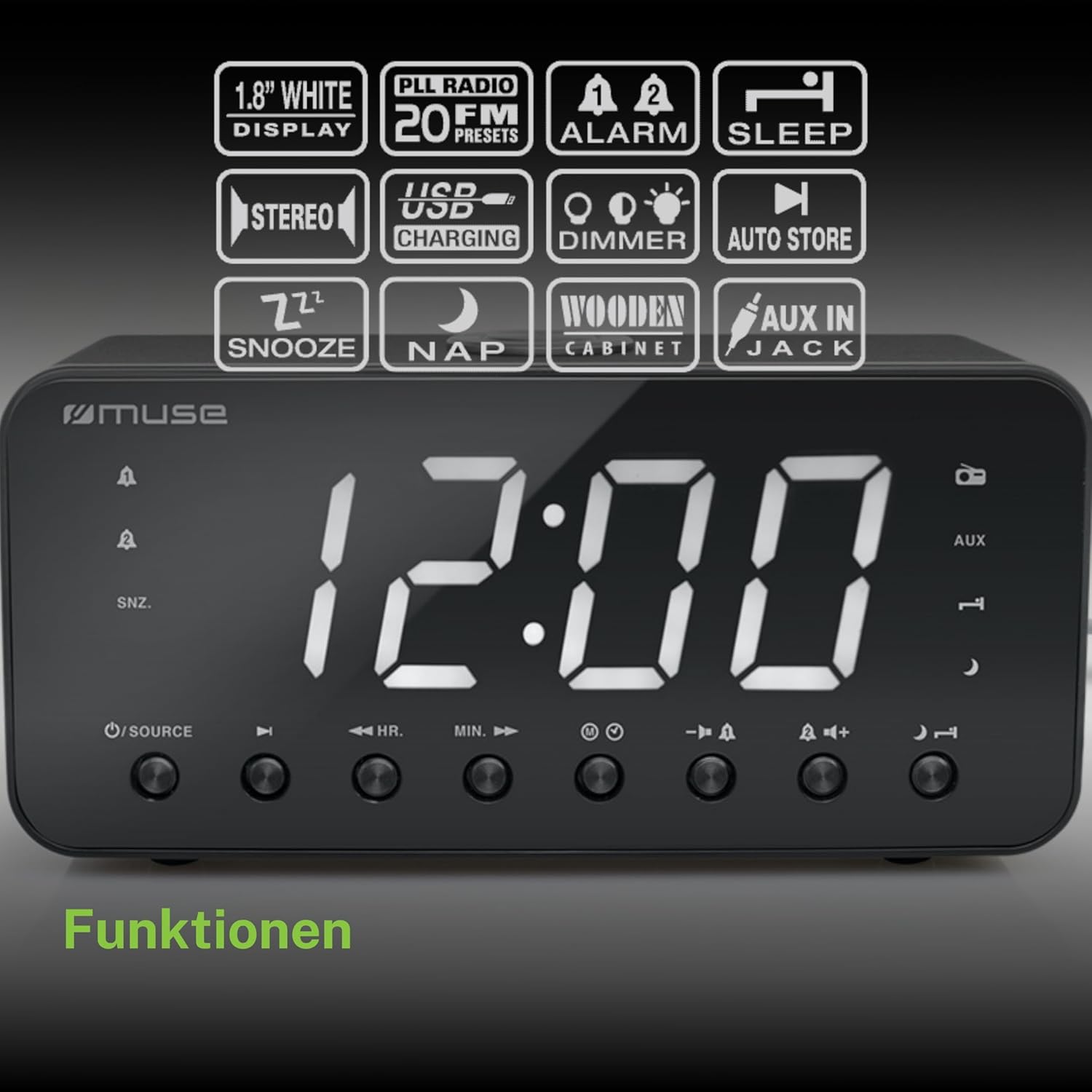
Figure 2: Diagram illustrating the key features and control buttons on the Muse M-192 CR Clock Radio, including the 1.8-inch white display, PLL FM radio with 20 presets, dual alarms, sleep, snooze, NAP functions, USB charging, dimmer, auto store, and AUX input jack.
แผงควบคุมด้านหน้า:
- แสดง: Large 1.8-inch white LED display for time and status.
- ปุ่มแหล่งที่มา: Selects between FM radio and AUX input.
- ปุ่ม HR (ชั่วโมง): Adjusts hour for time and alarm settings.
- ปุ่ม MIN (นาที): Adjusts minute for time and alarm settings.
- ALARM 1 Button: Sets and activates/deactivates Alarm 1.
- ALARM 2 Button: Sets and activates/deactivates Alarm 2.
- ปุ่มเลื่อนปลุก/หรี่ไฟ: Activates snooze during an alarm; adjusts display brightness (High/Low/Off) when not alarming.
- ปุ่มสลีป: Sets the sleep timer for radio playback.
- ปุ่มงีบหลับ: Sets a short nap alarm.
- ปุ่มปรับระดับเสียงขึ้น / ลง: ปรับระดับเสียง
การเชื่อมต่อแผงด้านหลัง:
- แจ็ค AUX IN: เชื่อมต่ออุปกรณ์เสียงภายนอก
- พอร์ตชาร์จ USB: Provides power to charge compatible devices.
- แจ็ค DC IN: Connects the AC adapter for power.
- ช่องใส่แบตเตอรี่: Holds backup batteries.
5. การตั้งค่า
5.1 การเชื่อมต่อสายไฟ
- Insert the small plug of the supplied AC adapter into the DC IN jack on the rear of the clock radio.
- Plug the AC adapter into a standard wall outlet. The display will light up.
5.2 Battery Backup Installation
The clock radio requires 2 x 1.5V AAA batteries (not included) for backup power. These batteries maintain the time and alarm settings during a power outage.
- เปิดฝาช่องใส่แบตเตอรี่ที่ด้านล่างของตัวเครื่อง
- ใส่แบตเตอรี่ AAA สองก้อน โดยสังเกตขั้วที่ถูกต้อง (+ และ -) ตามที่ระบุภายในช่องใส่
- ปิดฝาช่องใส่แบตเตอรี่ให้แน่น
Note: Battery backup only preserves settings; the display will not illuminate and alarms will not sound during a power outage if only running on battery backup.
6. คู่มือการใช้งาน
6.1 การตั้งเวลา
- In standby mode (when the radio is off), press and hold the ตั้งเวลา button (if available, otherwise use HR/MIN directly or a dedicated time set button not explicitly listed but implied by HR/MIN). If no dedicated button, proceed to step 2.
- กดปุ่ม HR ปุ่มเพื่อปรับชั่วโมง
- กดปุ่ม นาที ปุ่มเพื่อปรับนาที
- Release the buttons to confirm the time. The time will automatically set after a few seconds of inactivity.
6.2 Setting Alarms (Alarm 1 & Alarm 2)
The Muse M-192 CR features two independent alarms.
- กดปุ่มค้างไว้ นาฬิกาปลุก 1 button until the alarm time flashes on the display.
- ใช้ HR และ นาที ปุ่มสำหรับตั้งเวลาปลุกที่ต้องการ
- กดปุ่ม นาฬิกาปลุก 1 กดปุ่มอีกครั้งเพื่อเลือกแหล่งที่มาของสัญญาณเตือน: บัซเซอร์ or วิทยุ.
- กดปุ่ม นาฬิกาปลุก 1 button a third time to confirm and activate Alarm 1. An alarm icon will appear on the display.
- Repeat the process for นาฬิกาปลุก 2 การใช้ นาฬิกาปลุก 2 ปุ่ม.
หากต้องการปิดใช้งานสัญญาณเตือน ให้กดปุ่มที่เกี่ยวข้อง เตือน button until its icon disappears from the display.
6.3 ฟังก์ชั่นเลื่อนซ้ำ
เมื่อสัญญาณเตือนดังขึ้น ให้กดปุ่ม เลื่อน/หรี่ไฟ กดปุ่มเพื่อปิดเสียงเตือนชั่วคราว เสียงเตือนจะดังขึ้นอีกครั้งหลังจากประมาณ 9 นาที
6.4 ฟังก์ชั่นการนอนหลับ
ฟังก์ชันปิดเครื่องอัตโนมัติช่วยให้คุณนอนหลับไปพร้อมกับฟังวิทยุได้ โดยวิทยุจะปิดเองโดยอัตโนมัติหลังจากช่วงเวลาที่กำหนดไว้
- ขณะที่วิทยุกำลังเล่นอยู่ ให้กดปุ่ม นอน กดปุ่มซ้ำๆ เพื่อสลับระหว่างเวลาพักเครื่องที่มีอยู่ (เช่น 90, 60, 30, 15 นาที หรือปิด)
- วิทยุจะเล่นตามระยะเวลาที่เลือกไว้ แล้วจะปิดเองโดยอัตโนมัติ
6.5 NAP Function
The NAP function sets a short alarm for a specified duration.
- กดปุ่ม นอน button repeatedly to select a nap duration (e.g., 10, 20, 30, 60, 90, 120 minutes, or OFF).
- The alarm will sound after the selected duration.
6.6 Radio Operation (FM)
- กดปุ่ม แหล่งที่มา ปุ่มเพื่อเลือกโหมดวิทยุ FM
- กดปุ่มค้างไว้ HR or นาที button to automatically scan for the next available station. Briefly press to manually tune.
- ปรับระดับเสียงโดยใช้ปุ่ม เพิ่ม/ลดระดับเสียง ปุ่ม
การตั้งค่าสถานีวิทยุที่ตั้งไว้ล่วงหน้า:
The unit supports up to 20 FM radio presets.
- ปรับคลื่นวิทยุไปที่สถานีที่คุณต้องการ
- กดปุ่มค้างไว้ พรีเซ็ต button (often combined with a number or memory button, if not explicitly labeled, refer to the full manual for specific button). If no dedicated PRESET button, the HR/MIN buttons might serve this function in radio mode.
- ใช้ HR or นาที ปุ่มเพื่อเลือกหมายเลขที่ตั้งไว้ล่วงหน้า (P01-P20)
- กดปุ่ม พรีเซ็ต กดปุ่มอีกครั้งเพื่อบันทึกสถานี
- หากต้องการเรียกใช้ค่าที่ตั้งไว้ล่วงหน้า ให้กดปุ่มสั้นๆ พรีเซ็ต ปุ่มแล้วใช้ HR or นาที เพื่อเลือกหมายเลขที่ตั้งไว้ล่วงหน้าที่ต้องการ
อินพุต AUX 6.7 ช่อง
Connect an external audio device (e.g., MP3 player, smartphone) to the AUX IN jack on the rear of the unit using a 3.5mm audio cable (not included).
- Connect one end of the audio cable to your external device's headphone jack.
- Connect the other end to the AUX IN jack on the clock radio.
- กดปุ่ม แหล่งที่มา กดปุ่มเพื่อเลือกโหมด AUX หน้าจอจะแสดง "AUX"
- Play audio from your external device. Adjust volume using the clock radio's เพิ่ม/ลดระดับเสียง buttons and your external device's volume control.
6.8 การชาร์จ USB
The USB port on the rear of the unit can be used to charge compatible devices.

Figure 3: The Muse M-192 CR Clock Radio highlighting its jumbo white display and the USB charging port located on the rear of the unit.
- Connect your device's USB charging cable to the USB charging port on the clock radio.
- Ensure the clock radio is powered on.
- อุปกรณ์ของคุณควรจะเริ่มชาร์จ
Note: The USB port is for charging only and does not support data transfer or audio playback.
6.9 ตัวหรี่แสงหน้าจอ
Adjust the brightness of the display to suit your preference.
- ในโหมดสแตนด์บาย กดปุ่ม เลื่อน/หรี่ไฟ ปุ่มซ้ำๆ
- Cycle through the brightness levels: High, Low, and Off.
7. การบำรุงรักษา
- การทำความสะอาด: เช็ดตัวเครื่องด้วยผ้านุ่มและแห้ง ห้ามใช้น้ำยาทำความสะอาดที่มีฤทธิ์กัดกร่อน ขี้ผึ้ง หรือตัวทำละลาย
- การระบายอากาศ : รักษาช่องระบายอากาศให้สะอาดปราศจากฝุ่นและเศษขยะ
- พื้นที่จัดเก็บ: หากจะเก็บรักษาเครื่องไว้เป็นเวลานาน ควรตัดการเชื่อมต่อจากปลั๊กไฟและถอดแบตเตอรี่สำรองออกด้วย
8 การแก้ไขปัญหา
| ปัญหา | สาเหตุที่เป็นไปได้ | สารละลาย |
|---|---|---|
| ไม่มีไฟเลี้ยง / หน้าจอปิด | อะแดปเตอร์ AC ไม่ได้เชื่อมต่อหรืออาจชำรุด | ตรวจสอบให้แน่ใจว่าเสียบอะแดปเตอร์ AC เข้ากับตัวเครื่องและเต้ารับไฟฟ้าที่ใช้งานได้สนิทแล้ว |
| นาฬิกาปลุกไม่ส่งเสียง | สัญญาณเตือนภัยไม่ได้เปิดใช้งานหรือตั้งค่าไม่ถูกต้อง | Verify alarm time and source are set correctly and the alarm icon is visible on the display. |
| การรับสัญญาณวิทยุ FM ไม่ดี | เสาอากาศไม่ยืดออกหรือมีสิ่งกีดขวาง | Extend the FM wire antenna fully. Reposition the unit to improve reception. |
| Display too bright/dim | Dimmer setting needs adjustment. | กดปุ่ม เลื่อน/หรี่ไฟ ปุ่มสำหรับปรับระดับความสว่าง |
9. ข้อมูลจำเพาะ

Figure 4: Technical drawing illustrating the dimensions of the Muse M-192 CR Clock Radio (226mm length, 86mm width, 108mm height).
- แบบอย่าง: เอ็ม-192 ซีอาร์
- แสดง: 1.8-inch White Digital LED
- วิทยุ: FM PLL Radio with 20 Presets
- ฟังก์ชั่นปลุก: Dual Alarm, Snooze, Sleep, NAP
- แหล่งสัญญาณเตือนภัย: Radio or Buzzer
- การเชื่อมต่อ: AUX-in, USB Charging Port
- พลัง: AC Power (Adapter Included), Battery Backup (2 x 1.5V AAA batteries, not included)
- กำลังขับ: 2 วัตต์
- ขนาด (ยาว x กว้าง x สูง): 22.6 x 8.6 x 10.8 ซม.
- น้ำหนัก: 800 กรัม
10. การรับประกันและการสนับสนุน
For detailed warranty information and technical support, please refer to the documentation provided with your purchase or contact your retailer. Keep your proof of purchase for any warranty claims.


