Bluestone Automatic Wrist Blood Pressure Monitor User Manual
รุ่น: 80-5103
1. บทนำ
Thank you for choosing the Bluestone Automatic Wrist Blood Pressure Monitor. This device is designed to provide quick and accurate measurements of your systolic and diastolic blood pressure, as well as your pulse rate. Regular monitoring can help you track your heart health over time. Please read this manual thoroughly before using the device to ensure correct operation and accurate results.
2. ข้อมูลด้านความปลอดภัย
- อุปกรณ์นี้มีไว้สำหรับใช้ในบ้านของผู้ใหญ่เท่านั้น โปรดปรึกษาแพทย์เพื่อขอคำแนะนำในการตีความผลการวัดความดันโลหิต
- ห้ามใช้เครื่องมือนี้กับทารก เด็ก หรือบุคคลที่ไม่สามารถแสดงความยินยอมได้
- หลีกเลี่ยงการวัดในยานพาหนะที่กำลังเคลื่อนที่หรือในระหว่างกิจกรรมทางกาย
- Do not self-diagnose or self-medicate based on the measurement results. Always consult a healthcare professional.
- เก็บอุปกรณ์ให้ห่างจากสนามแม่เหล็กไฟฟ้าที่มีความแรง
- Do not disassemble or attempt to repair the device. Contact customer support if issues arise.
3. สินค้าหมดview
The Bluestone Automatic Wrist Blood Pressure Monitor is a compact and portable device designed for ease of use. It features a large LCD screen for clear readings and a memory function to store past measurements.
3.1 ส่วนประกอบ
- Wrist Blood Pressure Monitor with integrated cuff
- กล่องเก็บของ
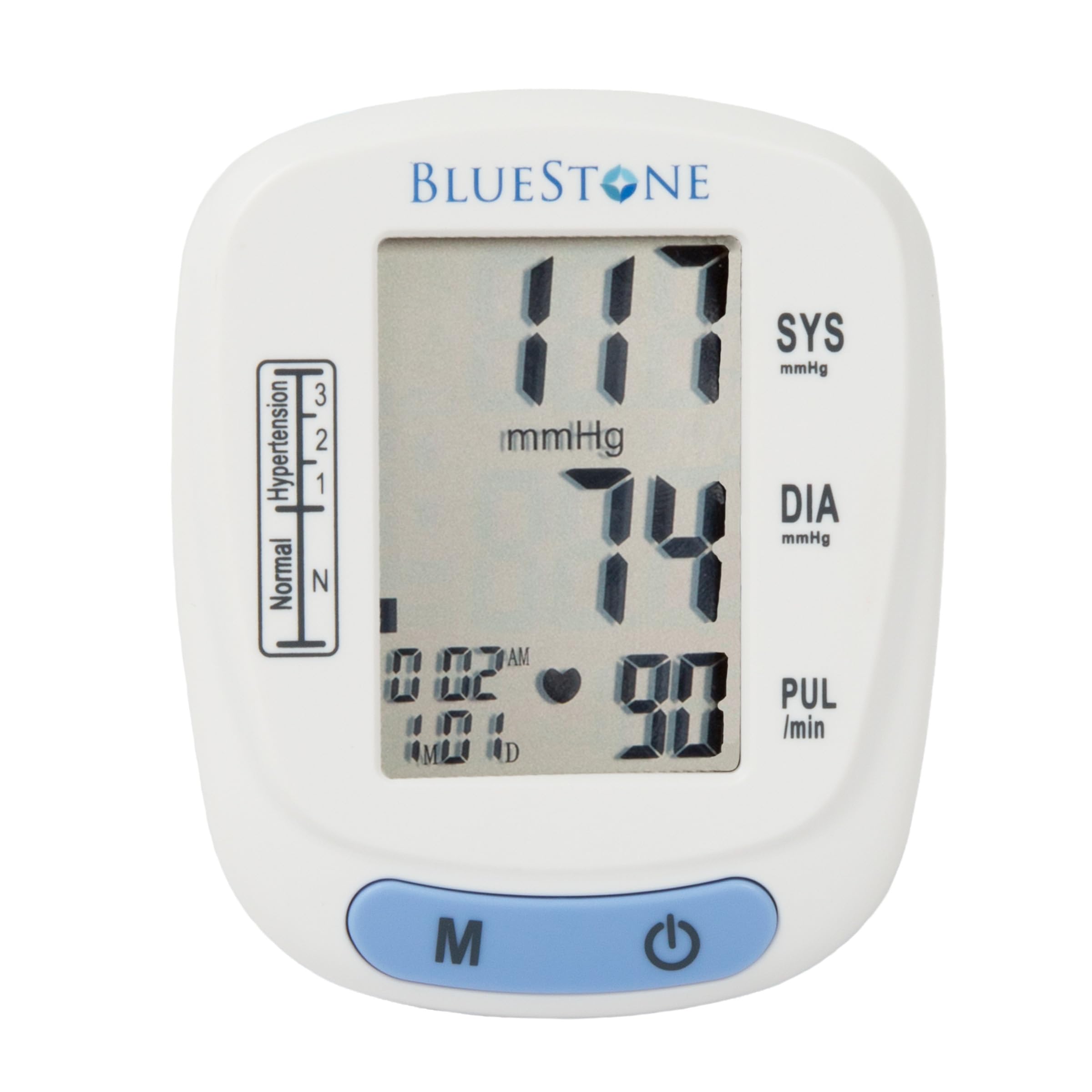
Image 3.1: Bluestone Automatic Wrist Blood Pressure Monitor on a user's wrist.
3.2 คุณสมบัติของอุปกรณ์

Image 3.2: Labeled diagram highlighting the monitor's display elements and buttons.
- หน้าจอ LCD ขนาดใหญ่: Displays systolic, diastolic, pulse, date, and time.
- Blood Pressure Level Bar: Indicates blood pressure classification (Normal, Hypertension levels 1, 2, 3).
- ปุ่มหน่วยความจำ (M): เข้าถึงข้อมูลการอ่านที่บันทึกไว้
- ปุ่มเปิด/ปิด: Powers the device on and off, and initiates measurements.
- Adjustable Cuff: Designed to fit wrists up to 10 inches in circumference.
4. การตั้งค่า
4.1 การติดตั้งแบตเตอรี่
- เปิดฝาช่องใส่แบตเตอรี่ที่ด้านหลังของจอภาพ
- ใส่แบตเตอรี่ AAA สองก้อน (ไม่ได้รวมอยู่ในชุด) โดยตรวจสอบให้แน่ใจว่าขั้วบวก/ลบถูกต้อง
- ปิดฝาช่องใส่แบตเตอรี่ให้แน่น
4.2 Cuff Placement
- Remove any tight clothing from your wrist.
- วางจอภาพไว้ที่ข้อมือซ้ายโดยให้หน้าจอหันขึ้นด้านบน ควรวางสายรัดไว้เหนือข้อต่อข้อมือประมาณ 1-2 เซนติเมตร
- Fasten the cuff snugly around your wrist. Ensure it is not too tight or too loose.
- Rest your arm on a table or flat surface so that the monitor is at the same level as your heart. Keep your palm open and relaxed.
5. คู่มือการใช้งาน
5.1 การวัดผล
- Ensure the cuff is correctly placed on your wrist and your arm is positioned at heart level.
- Press the On/Off button to power on the device. The display will show all symbols briefly, then '00'.
- ปลอกแขนจะพองตัวโดยอัตโนมัติ และการวัดจะเริ่มต้นขึ้น โปรดอยู่นิ่งและเงียบในระหว่างการวัด
- Once the measurement is complete, the systolic pressure, diastolic pressure, and pulse rate will be displayed on the screen. The device will automatically store this reading.
- Press the On/Off button again to turn off the device, or it will automatically shut off after approximately one minute of inactivity.
5.2 การตีความผลลัพธ์
The monitor displays your systolic (SYS) and diastolic (DIA) blood pressure in mmHg, and your pulse (PUL) in beats per minute. The blood pressure level bar on the left side of the display indicates your reading's classification according to World Health Organization (WHO) guidelines:
- ปกติ: Optimal blood pressure.
- Hypertension (Levels 1, 2, 3): Indicates elevated blood pressure. Consult a healthcare professional for advice.

Image 5.1: Monitor displaying a sample reading and highlighting key features.
6. ฟังก์ชั่นหน่วยความจำ
The monitor can store up to 120 measurements with date and time stamps, allowing you to track your blood pressure trends.
6.1 Storing Readings
Each successful measurement is automatically stored in the device's memory.
6.2 Recalling Readings
- ขณะที่อุปกรณ์ปิดอยู่ ให้กดปุ่ม 'M' (หน่วยความจำ)
- ค่าการอ่านล่าสุดจะแสดงขึ้นก่อน
- Press the 'M' button repeatedly to scroll through previous measurements.
- To exit memory mode, press the On/Off button or wait for the device to automatically shut off.
7. การบำรุงรักษา
7.1 การทำความสะอาด
- เช็ดจอภาพและข้อมือด้วยผ้าแห้งนุ่มๆ
- ห้ามใช้สารทำความสะอาดที่มีฤทธิ์กัดกร่อน หรือแช่อุปกรณ์ในน้ำ
7.2 พื้นที่จัดเก็บ
- Store the monitor in its included protective case when not in use.
- เก็บอุปกรณ์ไว้ในที่แห้งและเย็น หลีกเลี่ยงแสงแดดโดยตรงและอุณหภูมิที่สูงหรือต่ำเกินไป
- หากจะไม่ใช้อุปกรณ์เป็นเวลานาน ควรถอดแบตเตอรี่ออกเพื่อป้องกันการรั่วไหล

Image 7.1: Monitor stored in its protective case.
8 การแก้ไขปัญหา
| ปัญหา | สาเหตุที่เป็นไปได้ | สารละลาย |
|---|---|---|
| ไม่มีจอแสดงผลเมื่อเปิดเครื่อง | แบตเตอรี่หมดหรือใส่ไม่ถูกต้อง | เปลี่ยนแบตเตอรี่ด้วยแบตเตอรี่ AAA ใหม่ โดยตรวจสอบให้แน่ใจว่าใส่ขั้วถูกต้อง |
| Error message (e.g., 'Err') | Movement during measurement, improper cuff placement, or device malfunction. | Remain still and silent. Re-apply cuff correctly. If error persists, contact support. |
| การอ่านที่ไม่สอดคล้องกัน | Improper posture, talking during measurement, or recent physical activity. | Ensure proper technique (see Section 5.1). Take measurements at the same time each day. |
9. ข้อมูลจำเพาะ

Image 9.1: Dimensions of the Bluestone Blood Pressure Monitor.
| คุณสมบัติ | รายละเอียด |
|---|---|
| หมายเลขรุ่น | 80-5103 |
| ขนาดสินค้า | ขนาด 3 นิ้ว ยาว x 2.5 นิ้ว กว้าง x 2.5 นิ้ว หนา |
| น้ำหนักสินค้า | 8.3 ออนซ์ |
| เส้นรอบวงข้อมือ | Fits up to 10" wrists |
| แหล่งพลังงาน | 2 x แบตเตอรี่ AAA (ไม่รวม) |
| ประเภทจอภาพ | จอ LCD ระบบดิจิตอล |
| ความจุหน่วยความจำ | Up to 120 readings with date/time stamp |
10. การรับประกันและการสนับสนุน
Bluestone products are manufactured with quality and care. For warranty information or technical support, please refer to the contact details provided with your purchase documentation or visit the official Bluestone webไซต์ โปรดเก็บหลักฐานการซื้อไว้เพื่อใช้ในกรณีเรียกร้องการรับประกันใดๆ