การแนะนำ
This manual provides detailed instructions for setting up, operating, and maintaining your Logitech M275 Wireless USB Mouse. Please read this guide thoroughly to ensure optimal performance and longevity of your device. The Logitech M275 mouse is designed for comfortable use with its contoured shape and offers reliable wireless connectivity.

ภาพ: จากบนลงล่าง view of the Logitech M275 Wireless Mouse, showcasing its black finish and central scroll wheel.
การตั้งค่า
Follow these steps to set up your Logitech M275 Wireless USB Mouse:
- ติดตั้งแบตเตอรี่:
- ค้นหาช่องใส่แบตเตอรี่ที่ด้านล่างของเมาส์
- เปิดฝาช่องใส่แบตเตอรี่
- Insert one AA battery, ensuring correct polarity (+/-). The mouse includes one AA battery.
- ปิดฝาช่องใส่แบตเตอรี่ให้แน่น
ภาพ: ด้านล่าง view of the Logitech M275 Wireless Mouse, showing the ON/OFF switch, battery compartment, and optical sensor.
- เชื่อมต่อตัวรับสัญญาณ USB:
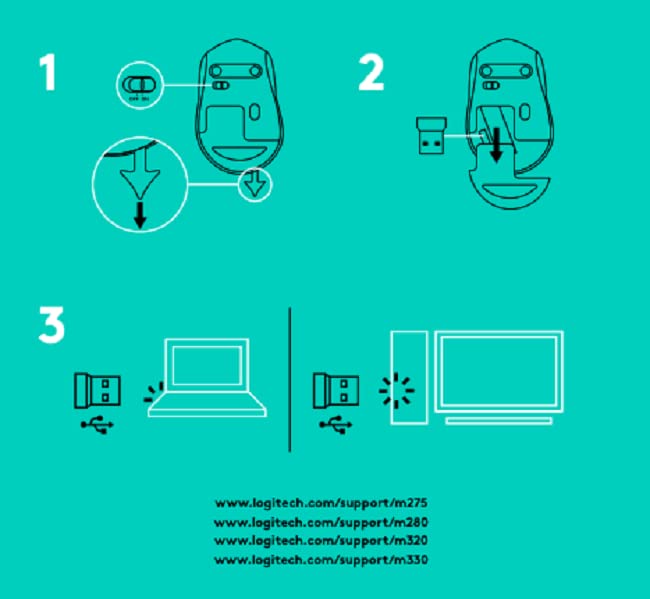
- Locate the tiny USB Nano Receiver, typically stored inside the battery compartment or packaged separately.
- เสียบตัวรับสัญญาณ USB Nano เข้ากับพอร์ต USB ที่ว่างอยู่บนคอมพิวเตอร์ของคุณ
- คอมพิวเตอร์ของคุณควรตรวจจับและติดตั้งไดรเวอร์ที่จำเป็นโดยอัตโนมัติ

Image: Close-up of the Logitech Nano Receiver plugged into a laptop's USB port, indicating successful connection.
- เปิดเครื่องเมาส์:
- Slide the ON/OFF switch on the underside of the mouse to the 'ON' position.
- ตอนนี้เมาส์พร้อมใช้งานแล้ว

Image: A diagram showing the three steps for setting up the mouse: 1) Insert battery, 2) Insert receiver into mouse for storage, 3) Plug receiver into computer's USB port.
คำแนะนำการใช้งาน
The Logitech M275 Wireless USB Mouse offers intuitive control for your computer:
- ฟังก์ชั่นพื้นฐาน:
- คลิกซ้าย: ปุ่มหลักสำหรับเลือกรายการ เปิดลิงก์ ฯลฯ
- คลิกขวา: ปุ่มรองสำหรับเมนูบริบทและตัวเลือกเพิ่มเติม
- ล้อเลื่อน: Roll up or down to navigate documents and web pages. The scroll wheel also functions as a clickable middle button.
- ออปติคัลเซนเซอร์ขั้นสูง: The mouse utilizes a Logitech Advanced Optical Sensor for smooth and precise cursor control on various surfaces.
- ไฟแสดงสถานะแบตเตอรี่: A small LED light on the mouse indicates battery status. It typically glows green briefly when powered on if the battery is good. A red light indicates that the battery is low and needs replacement. The mouse is designed for an 18-month battery life, which may vary based on usage.

ภาพ: ด้านบน view of the Logitech M275 Wireless Mouse, highlighting its ergonomic design and indicating an 18-month battery life.
การซ่อมบำรุง
การบำรุงรักษาอย่างถูกวิธีจะช่วยให้เมาส์ของคุณมีอายุการใช้งานยาวนานและทำงานได้อย่างมีประสิทธิภาพ:
- การเปลี่ยนแบตเตอรี่: When the battery indicator light turns red, replace the AA battery. Follow the steps outlined in the 'Install the Battery' section under Setup.
- การทำความสะอาดเมาส์:
- ปิดเมาส์ก่อนทำความสะอาด
- ใช้ผ้านุ่มไม่เป็นขุยเช็ดเล็กน้อยampชุบน้ำหรือน้ำยาทำความสะอาดอ่อนๆ เพื่อเช็ดพื้นผิวของเมาส์
- หลีกเลี่ยงการใช้สารเคมีรุนแรงหรือวัสดุที่มีฤทธิ์กัดกร่อน
- ห้ามให้ของเหลวเข้าไปในส่วนประกอบภายในของเมาส์
การแก้ไขปัญหา
If you encounter issues with your Logitech M275 mouse, refer to the following common solutions:
- No Cursor Movement or Intermittent Connection:
- ตรวจสอบให้แน่ใจว่าเมาส์เปิดอยู่
- Check the battery. Replace it if the indicator light is red or if the mouse is unresponsive.
- Ensure the USB Nano Receiver is securely plugged into a working USB port on your computer. Try a different USB port.
- ขยับเมาส์ให้ใกล้กับตัวรับสัญญาณ USB มากขึ้นเพื่อตรวจสอบว่ามีปัญหาเรื่องระยะการใช้งานหรือไม่
- Avoid using the mouse on highly reflective or transparent surfaces. A mouse pad is recommended for optimal tracking.
- Lagging or Unresponsive Cursor:
- Interference from other wireless devices can affect performance. Try moving other wireless devices away from the mouse and receiver.
- ตรวจสอบให้แน่ใจว่าระบบปฏิบัติการของคอมพิวเตอร์ของคุณได้รับการอัปเดตแล้ว
- Mouse Not Detected by Computer:
- รีสตาร์ทเครื่องคอมพิวเตอร์ของคุณ
- Try plugging the USB Nano Receiver into a different USB port.
- If you have other Logitech devices, ensure the M275 receiver is the correct one for this mouse, as it is not a Unifying receiver.
ข้อมูลจำเพาะ
| คุณสมบัติ | รายละเอียด |
|---|---|
| ยี่ห้อ | โลจิเทค |
| หมายเลขรุ่น | M275 |
| เทคโนโลยีการเชื่อมต่อ | USB ไร้สาย |
| เทคโนโลยีตรวจจับการเคลื่อนไหว | ออฟติคอล |
| สี | สีดำ |
| แหล่งพลังงาน | ใช้พลังงานจากแบตเตอรี่ (แบตเตอรี่ AA 1 ก้อน) |
| อายุการใช้งานแบตเตอรี่โดยเฉลี่ย | 18 เดือน |
| แพลตฟอร์มฮาร์ดแวร์ | PC |
| ความเข้ากันได้ของระบบปฏิบัติการ | ลินุกซ์, วินโดวส์ 7, วินโดวส์ XP |
| น้ำหนักสินค้า | 100 กรัม |
| ขนาดสินค้า | 21 x 7.6 x 15.2 ซม. |
| ส่วนประกอบที่รวมอยู่ | Wireless Mouse, Nano Receiver, 1 AA battery, User Documentation |
การรับประกันและการสนับสนุน
- การรับประกัน: The Logitech M275 Wireless USB Mouse comes with a 1-year warranty. Please retain your proof of purchase for warranty claims.
- การสนับสนุนลูกค้า: For technical assistance or warranty inquiries, please contact Logitech Customer Care.
- ฝ่ายบริการลูกค้าของ Logitech ประเทศอินเดีย:
- หมายเลขโทรฟรี: 1800 572 4730
- Opening Time: 9:00 AM to 6:00 PM (Monday to Friday)
- Note: Weekends & National Holidays closed.


