
1. บทนำ
The Lutron Grafik Eye QSGR-3PJA is a sophisticated 3-zone control unit designed for advanced lighting management in both residential and commercial environments. This system integrates an annual timer and offers versatile control over various lighting fixtures from different manufacturers. Users can easily recall pre-set lighting scenes with a single touch or via remote control. The unit supports a wide range of light sources, including LEDs, incandescent lamps, โวลุ่มต่ำtage fixtures with electronic transformers, and fluorescent lamps, when used with a dedicated interface.
Key features include an easy-to-read LCD "Infoscreen" for displaying system status and energy-saving guidelines, built-in weekly and annual timers for automated lighting patterns, and automatic calculation of sunrise/sunset times for major cities to synchronize timer control. The QSGR-3PJA also supports integration with PICO remotes and wireless sensors, enabling both traditional scene control and zone-specific control. Lutron's patented Real Time Illumination Stability System (RTISSTM) ensures consistent dimming levels even under unstable power conditions.
2. ข้อมูลด้านความปลอดภัย
Please read and understand all safety instructions before installing or operating the Lutron Grafik Eye QSGR-3PJA. Failure to follow these instructions may result in electric shock, fire, or property damage.
- ความปลอดภัยทางไฟฟ้า: Always ensure the main power supply to the circuit breaker is OFF before performing any installation, wiring, or maintenance.
- การต่อลงดิน: Always connect the ground wire before installation to prevent malfunctions due to noise and for safety.
- การเดินสายไฟ: Do not bend, twist, or place main power wires near heat sources. Follow load manufacturer instructions for transformers. Do not attach outlets or receptacles to the output side.
- การเชื่อมต่อไฟฟ้า: Do not connect 100V power directly to the unit if not specified. Do not connect to power solely for ON/OFF control of loads.
- การกระจายความร้อน: All Lutron Grafik Eye QS modules generate heat during use. Ensure adequate ventilation and maintain specified clearances (at least 12mm left/right, 11mm top/bottom) when installing in an existing box.
- การจัดวาง: Avoid installing near electronic devices such as copiers, printers, dryers, microwave ovens, or medical equipment, as noise from these devices may cause malfunctions.
- การติดตั้งโดยมืออาชีพ: การติดตั้งควรดำเนินการโดยช่างไฟฟ้าที่มีคุณสมบัติตามมาตรฐานไฟฟ้าท้องถิ่นและระดับชาติทั้งหมด
3. สินค้าหมดview
The Lutron Grafik Eye QSGR-3PJA is a central control unit for managing up to three independent lighting zones. It features a user-friendly interface with dedicated buttons for scene selection, dimming, and timer functions, complemented by an informative LCD display.
3.1. คุณสมบัติแผงด้านหน้า

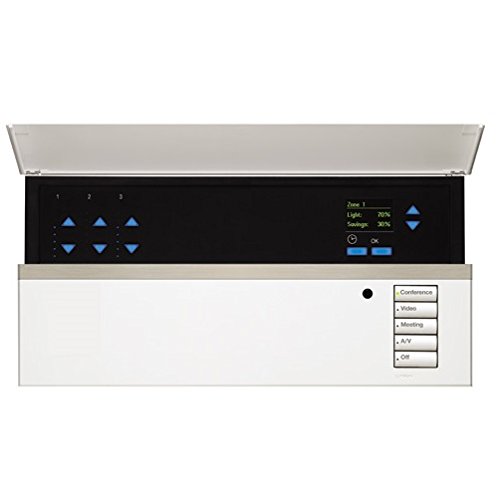
Figure 3.1: Front Panel of the QSGR-3PJA Unit
This image displays the front of the Lutron Grafik Eye QSGR-3PJA. Visible components include the central Infoscreen LCD, individual dimming buttons for each of the three zones, scene selection buttons, and dedicated buttons for timer functions and confirmation (OK). A mini USB terminal and an external receiver are also indicated.
- Infoscreen LCD: Displays system status, energy-saving guidelines, and various information.
- Zone Dimming Buttons: Individual controls for adjusting brightness in each of the three lighting zones.
- ปุ่มเลือกฉาก: Allows for one-touch recall of pre-programmed lighting scenes.
- ปุ่มตั้งเวลา: Accesses weekly and annual timer settings.
- ปุ่มตกลง: ยืนยันการเลือกและการตั้งค่า
- Mini USB Terminal: For configuration and data transfer (usage details in advanced manual).
- External Receiver: สำหรับสัญญาณควบคุมระยะไกล
3.2. คุณสมบัติหลัก
- 3-zone lighting control with individual brightness adjustment.
- Preset scene recall with adjustable fade times.
- Integrated weekly and annual timers with automatic sunrise/sunset calculation.
- Compatibility with various light sources (LED, incandescent, fluorescent, low-voltage) via dedicated interfaces.
- Supports PICO remotes and wireless sensors for enhanced control.
- Lutron's RTISSTM technology for stable dimming performance.
4. การตั้งค่าและการติดตั้ง
Proper installation is crucial for the safe and effective operation of the Grafik Eye QSGR-3PJA. Refer to the diagrams and instructions below carefully.
4.1. ขนาดและการติดตั้ง
รูปที่ 4.1: ขนาดหน่วย
This diagram illustrates the physical dimensions of the QSGR-3PJA unit, including front, side, and top measurements, essential for planning installation space.

Figure 4.2: Installation Diagram and Precautions
ภาพนี้ให้รายละเอียด view of the unit with its cover open, highlighting internal wiring connections and mounting points. It also includes important precautions for installation, such as ensuring proper grounding and avoiding heat sources.
วิธีการติดตั้ง:
- Turn off the circuit breaker for the dimmer's power supply.
- Strip approximately 10mm from the power wiring.
- Use VVF1.6mm or VVF2.0mm wire to connect the power circuit.
- Secure the unit to the wall.
- Attach the unit's cover.
- Turn on the unit's power.
- เชื่อมต่อโหลด
ข้อควรระวังในการติดตั้ง:
- Always connect ground before installation.
- Main power wires should not be bent, twisted, or placed near heat sources. Follow load manufacturer instructions. Do not attach outlets to the output.
- Do not connect 100V power directly.
- Do not connect to power for ON/OFF control of loads.
- Do not overtighten the knob screw.
- Never connect the fixed main unit to power before completing all wiring.
- Turn off all power sources connectable to 100V before working on this device.
- When connecting NGRX-P5, NGRX-P6, use dedicated detectors and combine with wireless sensors and PICO remotes.
- Install the unit at eye level, on the right side when viewเอ็ดจากด้านหน้า
- When installing in an existing box, leave a gap of 12mm or more on the left and right, and 11mm or more on the top and bottom for heat dissipation.
- Avoid installing near electronic devices (copiers, printers, dryers, microwaves, medical equipment) to prevent malfunctions from noise.
4.2. แผนภาพการเดินสายไฟ

รูปที่ 4.3: แผนผังการเดินสายภายใน
This diagram illustrates the internal wiring connections for the QSGR-3PJA, including power input (AC100V 50/60Hz), zone output terminals, occupancy sensor input, and 1-pole signal input. It also details the maximum capacities and compatible load types.

Figure 4.4: External Signal Control Wiring
This diagram shows how to connect the QSGR-3PJA for external signal control, including RS232 and other data communication lines. It emphasizes the importance of proper grounding and using dedicated cables for external control functions.

Figure 4.5: Multiple Unit Wiring Example
This diagram provides an example of wiring two QS control units and their auxiliary controls, connected to one QSGR-3PJA. It specifies signal line lengths, dedicated cable usage, and power adapter requirements (QSGR-3PJA-1-50 power adapter sold separately).
แนวทางการเดินสายไฟทั่วไป:
- To prevent noise-induced malfunctions, always connect the ground.
- When connecting QS control units and QSGR-3PJA, use dedicated cables and connect the power circuit.
- The main control unit can be connected up to 150m.
- Occupancy sensors are only compatible with Lutron (LCS-CDT-300R-WH/JA) models.
- For external signal control, use the dedicated cable for QSGR-3PJA.
- Terminal block voltage is DC24V power circuit; the white wire is the signal wire. Set to OFF/DC0-5V.
- When using power modules or interfaces for zone output, refer to the wiring diagrams of those specific devices.
- Do not connect this device when using NGRX-P5 or transformers with circuit breakers.
- Connect control wires to signal wires.
- Lutron power lines should not be installed in the same conduit as control installation locations, other management devices, relays, or other power/signal lines.
- Do not supply control power from other device power sources.
- When connecting two Grafik Eye QS control units, connect only the auxiliary control of that group, and do not connect to the control unit of another group.
- The QSGR-3PJA requires a QSGR-3PJA-1-50 power adapter (sold separately).
5. คู่มือการใช้งาน
The Lutron Grafik Eye QSGR-3PJA offers intuitive control over your lighting environment. Here are the basic operating procedures:
5.1. Scene Recall
- Selecting a Scene: กดหนึ่งใน of Scene Selection Buttons on the front panel to instantly recall a pre-programmed lighting scene.
- Adjusting Fade Time: The system allows you to set a fade time for scenes, enabling lights to change brightness gradually. Refer to the advanced programming guide for detailed instructions on setting fade times.
5.2. Zone Dimming
- การควบคุมโซนส่วนบุคคล: ใช้แบบเฉพาะ Zone Dimming Buttons for each of the three zones to manually adjust the brightness level.
5.3. ฟังก์ชั่นจับเวลา
- Accessing Timer Settings: กดปุ่ม ปุ่มจับเวลา to access the weekly and annual timer programming menus.
- การกำหนดตารางเวลา: Program specific lighting patterns to activate automatically based on your schedule. The unit can also automatically adjust to sunrise and sunset times for major cities.
5.4. Infoscreen Display
- การ Infoscreen LCD provides real-time information on system status, current scene, dimming levels, and energy-saving indicators.
5.5. รีโมทคอนโทรล
- The unit is compatible with Lutron PICO remotes and wireless sensors for convenient remote operation. Refer to the PICO remote manual for pairing and usage instructions.
6. การบำรุงรักษา
The Lutron Grafik Eye QSGR-3PJA is designed for long-term reliability with minimal maintenance. Follow these guidelines to ensure optimal performance:
- การทำความสะอาด: Gently wipe the unit's surface with a soft, dry cloth. Do not use abrasive cleaners, solvents, or excessive moisture, as these can damage the finish or internal components.
- การระบายอากาศ : ตรวจสอบให้แน่ใจว่าช่องระบายอากาศไม่มีสิ่งกีดขวาง เพื่อให้ความร้อนระบายออกได้อย่างเหมาะสม
- การตรวจสอบปกติ: Periodically check all wiring connections to ensure they are secure. If any loose connections are found, turn off the main power before tightening.
- การตรวจสอบอย่างมืออาชีพ: For any internal issues or complex maintenance, contact a qualified Lutron service technician.
7 การแก้ไขปัญหา
If you encounter issues with your Lutron Grafik Eye QSGR-3PJA, refer to the following common problems and solutions:
| ปัญหา | สาเหตุที่เป็นไปได้ | สารละลาย |
|---|---|---|
| เครื่องไม่เปิด | ไม่มีไฟเลี้ยง; เบรกเกอร์ตัดวงจร; การเดินสายไฟไม่ถูกต้อง | Check main power supply and circuit breaker. Verify wiring connections. |
| Lights do not dim or respond. | Incorrect load type; wiring issue; scene not properly programmed. | Ensure compatible load types are connected. Check wiring. Reprogram the scene. |
| รีโมทคอนโทรลไม่ทำงาน | PICO remote not paired; battery low; obstruction. | Ensure PICO remote is paired. Replace battery. Remove obstructions between remote and unit. |
| Infoscreen is blank or displays error. | ปัญหาเกี่ยวกับระบบไฟ; ความผิดพลาดภายใน | Cycle power to the unit. If error persists, contact support. |
| Unit is hot to the touch. | Insufficient ventilation; overloaded circuit. | Ensure proper clearances for ventilation. Check total load capacity. |
If the problem persists after attempting these solutions, please contact Lutron customer support or a qualified electrician.
8. ข้อมูลจำเพาะ
Detailed technical specifications for the Lutron Grafik Eye QSGR-3PJA control unit:
| คุณสมบัติ | รายละเอียด |
|---|---|
| ยี่ห้อ | ลูตรอน |
| หมายเลขรุ่นผลิตภัณฑ์ | QSGR-3PJA |
| แหล่งจ่ายไฟที่ได้รับการจัดอันดับ | AC100V (±10V) 50/60Hz |
| การใช้พลังงาน | 10W (Unit only) |
| Load Capacity (per zone) | 600วัตต์/เวอร์จิเนีย |
| Load Capacity (total for all zones) | 1600วัตต์/เวอร์จิเนีย |
| จำนวนโซน | 3 |
| แสดง | Infoscreen LCD |
| ประเภทโหลดที่เข้ากันได้ | หลอดไส้ lamps, electromagnetic transformer low-voltage fixtures. With separate interface: LED, fluorescent lamps, electronic transformer low-voltage fixtures, DMX, ON/OFF fixtures. |
| อุณหภูมิแวดล้อมในการทำงาน | 0°C ถึง 40°C (32°F ถึง 104°F) |
| ความชื้นแวดล้อมในการทำงาน | 90% หรือน้อยกว่า ไม่ควบแน่น |
| สายไฟที่แนะนำ | 1.6mm or 2.0mm solid wire |
| Max Wiring Length | Up to 5m for VVT-1.6mm solid wire |
| Max Connected Units (System) | Up to 100 main control units and QS units combined |
| Max Occupancy Sensors | Up to 180 per main control unit |
| ฟังก์ชั่นจับเวลา | Weekly/Annual Timer |
| รีโมทคอนโทรลไร้สาย | PICO Remote compatible |
| ขนาดบรรจุภัณฑ์ | 45 x 35 x 20 ซม. |
| น้ำหนักสินค้า | 1 กิโลกรัม |
| อุปกรณ์เสริมที่รวมอยู่ด้วย | หน่วยหลัก |
| วันที่พร้อมใช้งานครั้งแรก | 2015/10/16 |
9. การรับประกันและการสนับสนุน
For warranty information, technical support, or service inquiries regarding your Lutron Grafik Eye QSGR-3PJA, please refer to the official Lutron website or contact your local Lutron distributor.
- การรับประกัน: Specific warranty terms and conditions may vary by region. Please consult your purchase documentation or the official Lutron webเว็บไซต์สำหรับรายละเอียด
- การสนับสนุนด้านเทคนิค: For assistance with installation, programming, or troubleshooting, contact Lutron customer support. Have your model number (QSGR-3PJA) and purchase date ready.
- แหล่งข้อมูลออนไลน์: เยี่ยมชมเว็บไซต์อย่างเป็นทางการของ Lutron website for additional product documentation, FAQs, and software updates.


