1. บทนำ
This manual provides essential instructions for the safe and efficient use of your ZTE Axon A1G123 unlocked smartphone. Please read this guide thoroughly before operating your device to ensure optimal performance and longevity. Keep this manual for future reference.
2. เนื้อหาบรรจุภัณฑ์
ตรวจสอบว่าแพ็คเกจของคุณมีรายการต่อไปนี้:
- ZTE Axon A1G123 Smartphone
- หูฟัง
- สาย USB (สำหรับชาร์จและถ่ายโอนข้อมูล)
- อะแดปเตอร์แปลงไฟ
- คู่มือเริ่มต้นอย่างรวดเร็ว
3. อุปกรณ์โอเวอร์view
Familiarize yourself with the physical components of your ZTE Axon A1G123.

รูปที่ 3.1 : ด้านหน้า View of ZTE Axon A1G123
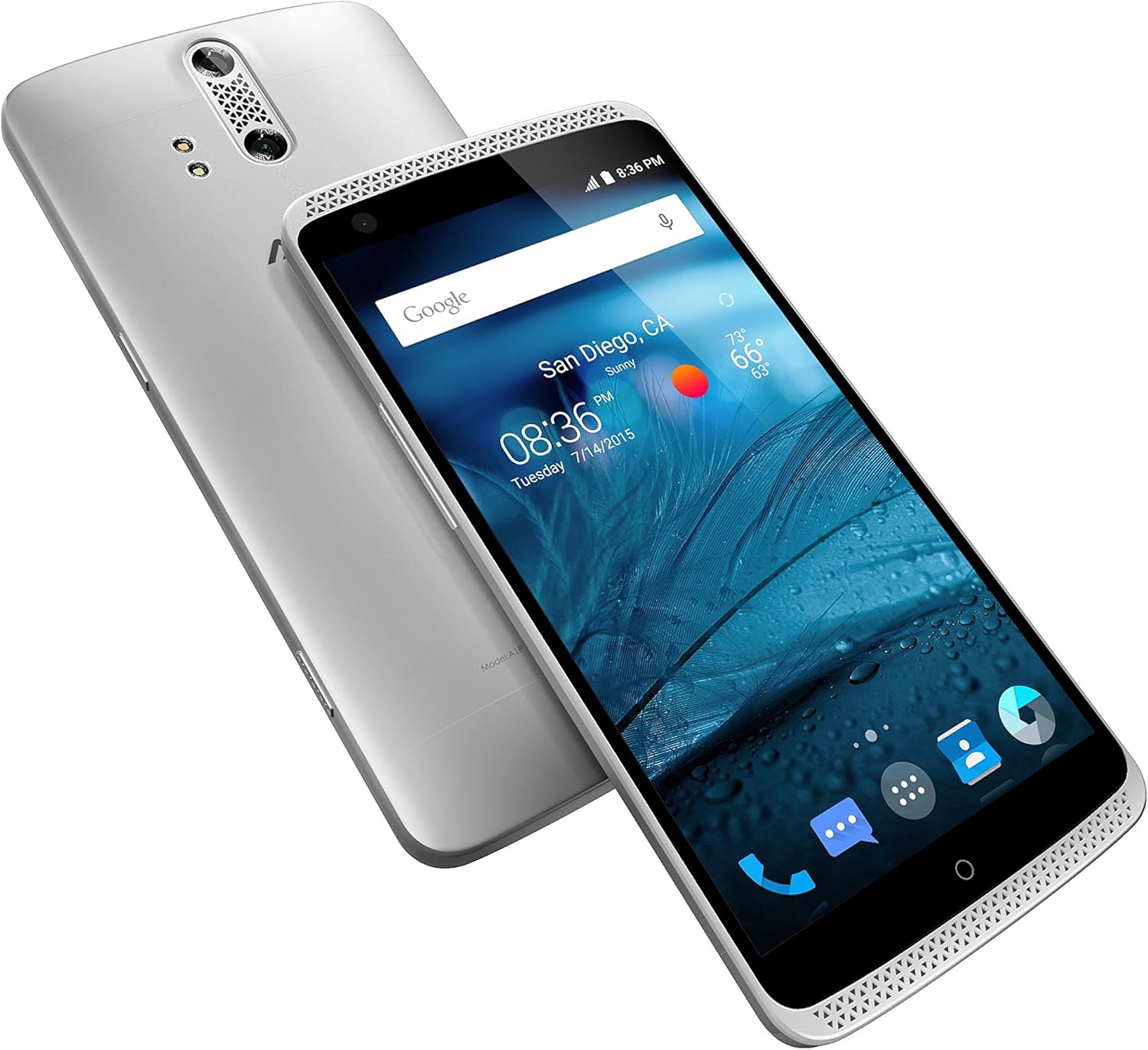
รูปที่ 3.2: มุม View of ZTE Axon A1G123 (Front and Back)
ส่วนประกอบหลัก:
- กล้องหน้า: สำหรับการเซลฟี่และวิดีโอคอล
- หูฟัง: สำหรับการฟังระหว่างการสนทนา
- แสดง: 5.5-inch TFT-LCD touchscreen.
- ปุ่มปรับระดับเสียง: ปรับระดับเสียงสื่อและการโทร
- ปุ่มเปิด/ปิด: เปิด/ปิดเครื่อง ล็อค/ปลดล็อคหน้าจอ
- กล้องหลังคู่: เพื่อภาพถ่ายและวิดีโอคุณภาพสูง
- เซ็นเซอร์ลายนิ้วมือ: For secure unlocking and authentication (if applicable).
- พอร์ต USB: สำหรับชาร์จไฟและเชื่อมต่อกับคอมพิวเตอร์
- แจ็คหูฟัง: For connecting the included headphones or other audio devices.
- ตะแกรงลำโพง: สำหรับเอาต์พุตเสียง
4. การตั้งค่า
4.1. การใส่ซิมการ์ด
- ตรวจสอบให้แน่ใจว่าโทรศัพท์ปิดอยู่
- ค้นหาถาดใส่การ์ด SIM ที่ด้านข้างของอุปกรณ์
- Use the provided SIM ejector tool (or a small paperclip) to open the tray.
- วางการ์ด nano-SIM ของคุณลงในถาดโดยให้หน้าสัมผัสสีทองคว่ำลง
- ค่อยๆ ดันถาดกลับเข้าไปในช่องจนกระทั่งชิดกับอุปกรณ์
4.2. การชาร์จแบตเตอรี่
Before first use, fully charge the device battery. Connect the USB cable to the phone's USB port and the power adapter, then plug the adapter into a wall outlet. The charging indicator will appear on the screen.
4.3. การเปิด/ปิดเครื่อง
- การเปิดเครื่อง: กดปุ่มเปิด/ปิดค้างไว้จนกว่าโลโก้ ZTE จะปรากฏขึ้น
- วิธีปิดเครื่อง: กดปุ่มเปิด/ปิดค้างไว้จนกว่าเมนูตัวเลือกพลังงานจะปรากฏขึ้น จากนั้นเลือก "ปิดเครื่อง"
4.4. ตัวช่วยการตั้งค่าเริ่มต้น
Upon first power-on, follow the on-screen instructions to configure basic settings such as language, Wi-Fi network, Google account, and security options.
5. คู่มือการใช้งาน
5.1. การนำทางพื้นฐาน
- ท่าทางการสัมผัสหน้าจอ: Tap, double-tap, swipe, pinch-to-zoom.
- หน้าจอหลัก: เข้าถึงแอป วิดเจ็ต และการแจ้งเตือน
- แผงการแจ้งเตือน: ปัดลงจากด้านบนของหน้าจอไปที่ view การแจ้งเตือนและการตั้งค่าด่วน
5.2. การโทรออกและรับสาย
- ในการโทรออก: เปิดแอปโทรศัพท์ ป้อนหมายเลข และแตะไอคอนโทร
- เพื่อรับสาย: Swipe the answer icon when the phone rings.
- วิธีวางสาย: Tap the end call icon.
5.3. การส่งข้อความ
Use the Messaging app to send and receive text (SMS) and multimedia (MMS) messages. Tap the "+" icon to compose a new message.
5.4. การใช้กล้อง
The ZTE Axon A1G123 features a dual-lens rear camera for enhanced photography. Open the Camera app to access various modes and settings.
- ถ่ายรูป: แตะปุ่มชัตเตอร์
- การบันทึกวิดีโอ: Switch to video mode and tap the record button.
- กล้องหน้า: Tap the camera switch icon for selfies.
5.5. คุณสมบัติด้านเสียง
The device supports high-fidelity audio output. Connect the included headphones for an optimized listening experience. Adjust audio settings in the Settings menu under "Sound & notification."
5.6. การเชื่อมต่อ
- ไวไฟ : ไปที่การตั้งค่า > Wi-Fi เพื่อเชื่อมต่อกับเครือข่ายไร้สายที่มีอยู่
- บลูทูธ: Go to Settings > Bluetooth to pair with other Bluetooth devices like headsets or speakers.
- NFC: Near Field Communication allows for quick data exchange with compatible devices. Enable it in Settings > More.
6. การบำรุงรักษา
6.1. การดูแลแบตเตอรี่
- หลีกเลี่ยงอุณหภูมิที่สูงหรือต่ำเกินไป
- อย่าปล่อยให้อุปกรณ์ชาร์จเป็นเวลานานหลังจากชาร์จเต็มแล้ว
- เพื่ออายุการใช้งานแบตเตอรี่ที่ดีที่สุด ควรหลีกเลี่ยงการระบายแบตเตอรี่จนหมดบ่อยครั้ง
6.2. การอัปเดตซอฟต์แวร์
Periodically check for software updates to ensure your device has the latest features and security enhancements. Go to Settings > About phone > System updates. Updates may improve device performance and address known issues.
6.3. การทำความสะอาดอุปกรณ์ของคุณ
ใช้ผ้าเนื้อนุ่มที่ไม่เป็นขุยเช็ดทำความสะอาดหน้าจอและตัวเครื่องโทรศัพท์ หลีกเลี่ยงการใช้สารเคมีรุนแรงหรือวัสดุที่มีฤทธิ์กัดกร่อน เพราะอาจทำให้พื้นผิวของอุปกรณ์เสียหายได้
7 การแก้ไขปัญหา
If you encounter issues with your ZTE Axon A1G123, refer to the following common solutions:
- อุปกรณ์ไม่ตอบสนอง: กดปุ่มเปิด/ปิดค้างไว้ประมาณ 10-15 วินาทีเพื่อบังคับให้รีสตาร์ท
- หน้าจอไม่ตอบสนอง: ตรวจสอบให้แน่ใจว่าหน้าจอสะอาดและแห้ง หากปัญหายังคงอยู่ ให้ลองรีสตาร์ทอุปกรณ์
- ความร้อนสูงเกินไป: If the device feels excessively warm, close background applications, reduce screen brightness, and avoid using it while charging. Prolonged heavy usage, especially with demanding applications, can cause temporary heating.
- คุณภาพการโทรไม่ดี/สายหลุด: Check your network signal strength. Move to an area with better reception. Ensure your SIM card is properly inserted.
- แบตเตอรี่หมดเร็ว: Reduce screen brightness, disable unused connectivity features (Wi-Fi, Bluetooth, GPS), and close unnecessary background apps.
- ประสิทธิภาพการทำงานที่ล่าช้า: Clear cache data from apps, uninstall unused applications, and ensure sufficient free storage space. A factory reset (see below) can also resolve persistent performance issues.
- ปัญหาเกี่ยวกับกล้อง: Ensure the camera lens is clean. Restart the camera app or the device.
7.1. รีเซ็ตเป็นค่าโรงงาน
การรีเซ็ตเป็นค่าเริ่มต้นจากโรงงานจะลบข้อมูลทั้งหมดในโทรศัพท์ของคุณและคืนค่ากลับไปเป็นการตั้งค่าจากโรงงานดั้งเดิม โปรดสำรองข้อมูลสำคัญก่อนดำเนินการ
- Go to Settings > Backup & reset.
- Select "Factory data reset."
- Confirm your decision. The device will restart and begin the reset process.
8. ข้อมูลจำเพาะ
| คุณสมบัติ | ข้อมูลจำเพาะ |
|---|---|
| ชื่อรุ่น | แอกซอน |
| หมายเลขรุ่นสินค้า | A1G123 |
| ยี่ห้อ | แซดทีอี |
| สี | Chromium Silver |
| ระบบปฏิบัติการ | Google Android (initial release) |
| ความเร็วซีพียู | ควอดคอร์ 2.4 GHz |
| ขนาดหน้าจอ | 5.5 นิ้ว |
| เทคโนโลยีการแสดงผล | จอแสดงผล TFT-LCD |
| ความจุของหน่วยความจำ | 32GB |
| คุณสมบัติกล้อง | Dual Rear, Front |
| เทคโนโลยีการเชื่อมต่อ | ไวไฟ, บลูทูธ, เอ็นเอฟซี |
| เทคโนโลยีเครือข่ายไร้สาย | CDMA, GSM, LTE |
| แบตเตอรี่ | แบตเตอรี่ลิเธียมไอออน 1 ก้อน (รวมอยู่ด้วย) |
| ขนาดสินค้า | 6.09 x 0.38 x 2.96 นิ้ว |
| น้ำหนักสินค้า | 1.1 ปอนด์ |
| ผู้ผลิต | ZTE(USA) Wireless |
9. การรับประกันและการสนับสนุน
สำหรับข้อมูลการรับประกันและการสนับสนุนทางเทคนิค โปรดดูบัตรรับประกันที่แนบมากับผลิตภัณฑ์ของคุณ หรือเยี่ยมชมเว็บไซต์อย่างเป็นทางการของ ZTE webไซต์นี้ โปรดเก็บหลักฐานการซื้อไว้เพื่อใช้ยืนยันการรับประกัน


