1. บทนำ
This manual provides essential information for the safe and efficient operation of your NEC X555UNS 55-inch 1080p LED TV. Please read these instructions thoroughly before installation and use, and retain them for future reference.
The NEC X555UNS is designed for professional signage applications, particularly for building video walls, offering superior off-angle viewing and minimal color shift due to its S-IPS panel technology. It supports 24/7 operation with advanced heat management and localized dimming for improved brightness uniformity.

Image: The NEC X555UNS 55-inch LED TV displaying vibrant, colorful content, showcasing its high-quality visual output.
2. ข้อมูลด้านความปลอดภัย
โปรดปฏิบัติตามข้อควรระวังด้านความปลอดภัยต่อไปนี้เสมอ เพื่อป้องกันความเสียหายต่อผลิตภัณฑ์และเพื่อความปลอดภัยของผู้ใช้งาน:
- Ensure the product is installed by qualified personnel.
- อย่าปิดกั้นช่องระบายอากาศ
- หลีกเลี่ยงการให้ตัวเครื่องโดนฝนหรือความชื้น
- ใช้เฉพาะสายไฟที่ให้มาพร้อมกับเครื่องหรือสายไฟทดแทนที่เหมาะสมเท่านั้น
- ถอดสายไฟก่อนทำความสะอาดหรือซ่อมบำรุง
- อย่าพยายามซ่อมแซมเครื่องด้วยตนเอง แนะนำให้ส่งช่างผู้ชำนาญเข้ารับบริการทุกครั้ง
3. เนื้อหาบรรจุภัณฑ์
ตรวจสอบว่ามีรายการทั้งหมดอยู่ในแพ็คเกจ:
- NEC X555UNS 55-inch LED TV Unit
- ยืน
- สายไฟ
- รีโมทคอนโทรล
- คู่มือการใช้งาน (เอกสารนี้)

ภาพ: ด้านหน้า view of the NEC X555UNS 55-inch LED TV, showing its sleek, dark display panel when powered off.
4. การตั้งค่าและการติดตั้ง
4.1 การติดตั้งทางกายภาพ
The NEC X555UNS is designed for video wall applications. Ensure proper mounting hardware is used for secure installation. The unit weighs approximately 81 pounds (36.7 kg).
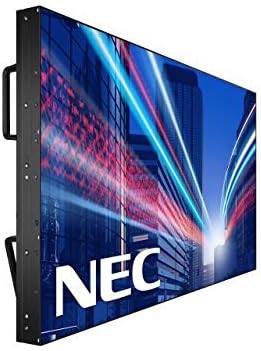
ภาพ: ด้านข้าง view of the NEC X555UNS 55-inch LED TV, highlighting its robust construction and integrated handles for easier installation in video wall configurations.
4.2 การเชื่อมต่อ
Connect your video sources and network cables to the appropriate ports on the display. The X555UNS offers various connectivity options:
- ช่องต่อ HDMI: สำหรับการรับสัญญาณวิดีโอและเสียงความละเอียดสูง
- DVI-D: For digital video input.
- LAN: For network control and content distribution.
- ดิสเพลย์พอร์ต: Supports UHD pass-through for daisy-chaining multiple displays in a video wall setup.
- ช่องปฏิบัติการ: Allows for integration of single board computers.
For video wall configurations, utilize the DisplayPort for UHD daisy-chaining to achieve a high-resolution display across the entire wall.
4.3 การเปิดเครื่องครั้งแรก
- Connect the power cord to the display and a suitable power outlet.
- Press the power button on the display or remote control.
- The display will power on and show the NEC logo.
- Use the on-screen menu to configure initial settings such as language, input source, and display mode.
การ Auto ID feature can simplify installation time, especially in multi-display setups, by reducing configuration steps to a single button press.
5. คู่มือการใช้งาน
5.1 การทำงานพื้นฐาน
Use the remote control or the buttons on the display to navigate the on-screen menu (OSD). Adjust settings such as brightness, contrast, color temperature, and input source.
5.2 คุณสมบัติการแสดงผล
- S-IPS Panel Technology: Provides excellent off-angle viewing and minimizes color shift, making it ideal for public viewing and video walls.
- Direct LED Backlighting with Localized Dimming: Enhances brightness uniformity and achieves a higher dynamic contrast ratio.
- การดำเนินงาน 24/7: Designed for continuous use with advanced thermal protection, internal temperature sensors, and fan-based cooling.
- ความสว่าง 700 cd/m² Ensures clear visibility even in brightly lit environments.
6. การบำรุงรักษา
6.1 การทำความสะอาดจอแสดงผล
ในการทำความสะอาดหน้าจอ ให้เช็ดเบาๆ ด้วยผ้านุ่มที่ไม่เป็นขุย สำหรับรอยฝังแน่น ให้...ampen the cloth slightly with water or a mild, non-abrasive screen cleaner. Do not spray liquid directly onto the screen.
6.2 การดูแลทั่วไป
- เก็บจอแสดงผลในบริเวณที่มีการระบายอากาศได้ดีเพื่อป้องกันความร้อนสูงเกินไป
- หลีกเลี่ยงการวางวัตถุหนักบนจอแสดงผล
- ตรวจสอบการเชื่อมต่อสายเคเบิลเป็นประจำเพื่อให้แน่ใจว่ามีความปลอดภัย
7 การแก้ไขปัญหา
If you encounter issues with your NEC X555UNS, refer to the following common problems and solutions:
| ปัญหา | สาเหตุที่เป็นไปได้ | สารละลาย |
|---|---|---|
| ไม่มีไฟฟ้า | สายไฟหลุด; เต้าเสียบไฟฟ้าชำรุด | ตรวจสอบการเชื่อมต่อสายไฟ; ทดสอบปลั๊กไฟด้วยอุปกรณ์อื่น |
| ไม่มีรูปภาพ | เลือกแหล่งสัญญาณอินพุตไม่ถูกต้อง สายวิดีโอหลวมหรือชำรุด | Select correct input source; Check video cable connections. |
| คุณภาพของภาพไม่ดี | Resolution mismatch; Display settings incorrect. | Adjust resolution on source device; Calibrate display settings (brightness, contrast). |
If the problem persists, contact NEC customer support.
8. ข้อมูลจำเพาะ
| คุณสมบัติ | รายละเอียด |
|---|---|
| ชื่อรุ่น | X555UNS |
| ขนาดหน้าจอ | 55 นิ้ว |
| เทคโนโลยีการแสดงผล | LED, S-IPS Panel |
| ปณิธาน | 1080p (ฟูลเอชดี) |
| อัตราส่วนภาพ | 16:9 น. |
| อัตราการรีเฟรช | 60 เฮิรตซ์ |
| ความสว่าง | 700 cd/m² (nits) |
| การเชื่อมต่อ | HDMI, DVI-D, LAN, DisplayPort |
| คุณสมบัติพิเศษ | Flat, S-IPS Panel, Auto ID, UHD Daisy Chain, OPS Slot, 24/7 Operation, Advanced Thermal Protection |
| ขนาดสินค้า | 54 x 12 x 34 นิ้ว (โดยประมาณ) |
| น้ำหนักสินค้า | 81 ปอนด์ (ประมาณ) |
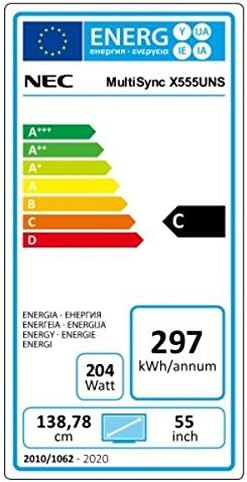
Image: Energy efficiency label for the NEC MultiSync X555UNS, showing energy consumption details and efficiency class.
9. การรับประกันและการสนับสนุน
For warranty information and technical support, please refer to the official NEC website or contact your local NEC representative. Keep your purchase receipt as proof of purchase.
แหล่งข้อมูลออนไลน์: เยี่ยม www.necdisplay.com for product documentation, drivers, and support contact information.
การสนับสนุนลูกค้า: For direct assistance, please contact NEC customer service.


