
การแนะนำ
Thank you for choosing the Calypso K5684/6 Digital Watch. This manual provides essential information for the proper setup, operation, and maintenance of your watch. Please read it carefully to ensure optimal performance and longevity of your device.
The Calypso K5684/6 is a sporty and fashionable digital multifunction watch featuring a clear LCD display, 10 ATM (100 meters) water resistance, a durable plastic strap, chronograph, alarm, and dual time zone functions.
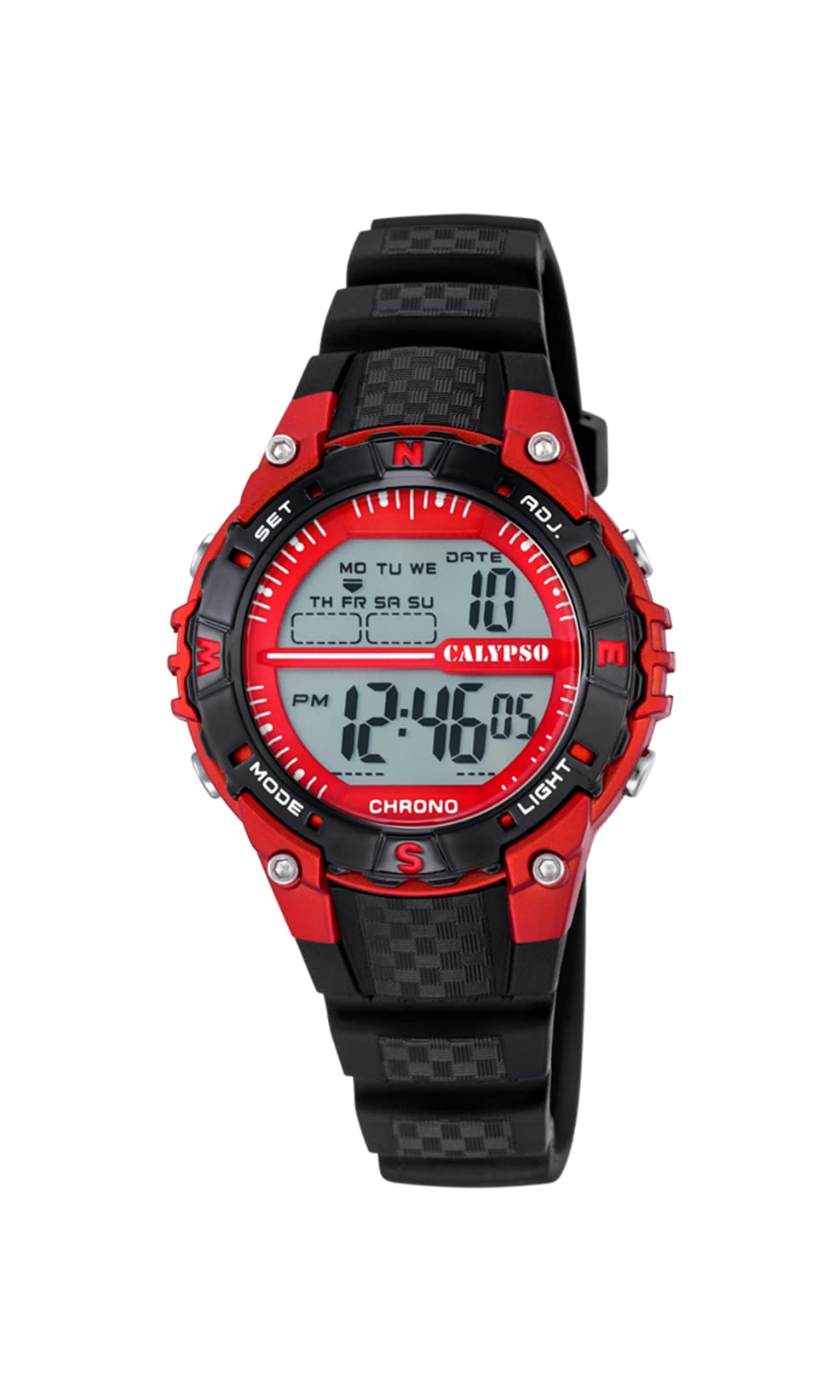
ด้านหน้า view of the Calypso K5684/6 digital watch, showcasing its LCD display, black plastic case, and strap. The display shows time, date, and mode indicators.
การตั้งค่าเริ่มต้น
ฟังก์ชั่นปุ่มโอเวอร์view
Your Calypso K5684/6 watch features four primary control buttons:
- เส้นทาง: Cycles through different display modes (Time, Alarm, Chronograph, Dual Time).
- SET: ใช้สำหรับป้อนและยืนยันการตั้งค่าในโหมดต่างๆ
- ADJ (Adjust): Used to adjust values (increment/decrement) during setting. Also functions as Start/Stop for Chronograph.
- แสงสว่าง: เปิดไฟแบ็คไลท์เพื่อให้มองเห็นได้ชัดเจนในสภาพแสงน้อย

ภาพระยะใกล้ view of a Calypso digital watch, highlighting the 'MODE', 'SET', 'ADJ', and 'LIGHT' buttons on the sides of the watch case. The display shows 'MON 12:44 8-17 06'.
คำแนะนำการใช้งาน
1. การตั้งเวลาและวันที่
- จากหน้าจอแสดงเวลาปกติ ให้กดปุ่ม โหมด กดปุ่มซ้ำๆ จนกว่าเข็มวินาทีจะเริ่มกะพริบ แสดงว่าคุณอยู่ในโหมดตั้งเวลาแล้ว
- กดปุ่ม ชุด ปุ่มสำหรับสลับดูการตั้งค่า: วินาที → ชั่วโมง → นาที → ปี → เดือน → วัน
- ขณะที่ค่ากำลังกะพริบ ให้ใช้ ก. button to increase or decrease the value. Hold ก. เพื่อการปรับแต่งที่รวดเร็วยิ่งขึ้น
- เมื่อการตั้งค่าทั้งหมดถูกต้องแล้ว ให้กดปุ่ม โหมด กดปุ่มเพื่อออกจากโหมดการตั้งค่าและกลับสู่การแสดงเวลาปกติ
2. ฟังก์ชั่นปลุก
- กดปุ่ม โหมด button until the alarm time is displayed (usually indicated by 'AL' or a bell icon).
- กดปุ่มค้างไว้ ชุด กดปุ่มค้างไว้จนกว่าเวลาปลุกจะเริ่มกระพริบ
- ใช้ ก. ปุ่มสำหรับตั้งเวลาปลุกที่ต้องการ
- กด ชุด again to move to the alarm minutes, then use ก. เพื่อตั้งนาที
- กด ชุด เพื่อยืนยันและออกจากระบบการตั้งค่าสัญญาณเตือน
- To activate/deactivate the alarm, in alarm mode, press the ก. กดปุ่ม ไอคอนแจ้งเตือนจะปรากฏ/หายไปบนหน้าจอ
3. นาฬิกาจับเวลา (Chronograph)
- กดปุ่ม โหมด button until 'CHRONO' or 'STW' is displayed. The display will show '00:00:00'.
- กดปุ่ม ก. กดปุ่มเพื่อเริ่มจับเวลา
- กด ก. อีกครั้งเพื่อหยุดโครโนกราฟ
- หากต้องการรีเซ็ตนาฬิกาจับเวลาเป็นศูนย์ ให้กดปุ่ม ชุด button while the chronograph is stopped.
4. Dual Time Zone
- กดปุ่ม โหมด button until 'DT' or 'DUAL TIME' is displayed.
- กดปุ่มค้างไว้ ชุด กดปุ่มจนกระทั่งนาฬิกาเริ่มกะพริบ
- ใช้ ก. ปุ่มสำหรับตั้งเวลาที่ต้องการสำหรับเขตเวลาที่สอง
- กด ชุด again to move to the minutes, then use ก. to set the minutes (minutes are usually synchronized with the main time zone).
- กด ชุด to confirm and exit the dual time setting.
5. ไฟแบ็คไลท์
กดปุ่ม แสงสว่าง ปุ่มสำหรับเปิดไฟหน้าจอเป็นเวลาไม่กี่วินาที คุณสมบัตินี้มีประโยชน์ในสภาพแวดล้อมที่มืด
การดูแลรักษา
1. การทำความสะอาด
- ควรเช็ดตัวเรือนนาฬิกาและสายนาฬิกาเป็นประจำด้วยผ้าแห้งเนื้อนุ่ม เพื่อขจัดสิ่งสกปรกและความชื้น
- สำหรับสิ่งสกปรกที่ฝังแน่น ให้ใช้ d เล็กน้อยamp ใช้ผ้าชุบสบู่เหลวอ่อนๆ เช็ด แล้วเช็ดให้แห้งทันที
- หลีกเลี่ยงการใช้น้ำยาทำความสะอาดเคมี ตัวทำละลาย หรือวัสดุที่มีฤทธิ์กัดกร่อน เนื่องจากอาจทำให้พื้นผิวและซีลของนาฬิกาเสียหายได้
2. ข้อควรระวังเกี่ยวกับการกันน้ำ
Your Calypso K5684/6 watch is water-resistant up to 10 ATM (100 meters), making it suitable for swimming and snorkeling. However, please observe the following:
- ห้ามกดปุ่มใดๆ ขณะที่นาฬิกาจุ่มอยู่ในน้ำ This can compromise the water resistance.
- Avoid exposing the watch to hot water, steam, or extreme temperature changes, as this can affect the seals.
- หลังจากสัมผัสกับน้ำเกลือ ให้ล้างนาฬิกาด้วยน้ำสะอาดและเช็ดให้แห้งสนิท
3. การเปลี่ยนแบตเตอรี่
When the display becomes dim or the watch stops functioning, the battery may need replacement. It is recommended to have the battery replaced by a qualified watch technician to ensure the water resistance is maintained.
การแก้ไขปัญหา
| ปัญหา | สาเหตุที่เป็นไปได้ | สารละลาย |
|---|---|---|
| จอแสดงผลว่างเปล่าหรือมืดลง | แบตเตอรี่ต่ำหรือหมด | เปลี่ยนแบตเตอรี่ ปรึกษาช่างซ่อมนาฬิกาผู้เชี่ยวชาญ |
| ปุ่มต่างๆ ไม่ตอบสนอง | นาฬิกาอาจอยู่ในโหมดล็อกหรือแบตเตอรี่เหลือน้อย | Try pressing the MODE button to cycle through modes. If unresponsive, consider battery replacement. |
| เวลาไม่ถูกต้อง | อาจตั้งเวลาไม่ถูกต้อง หรือนาฬิกาอาจสัมผัสกับสนามแม่เหล็กแรงสูง | โปรดดูส่วน "การตั้งเวลาและวันที่" เพื่อตั้งเวลาใหม่ |
| มีน้ำอยู่ภายในนาฬิกา | Water resistance compromised (e.g., buttons pressed underwater, damaged seals). | ควรนำนาฬิกาไปซ่อมที่ร้านซ่อมนาฬิกาผู้เชี่ยวชาญโดยทันที เพื่อป้องกันความเสียหายเพิ่มเติม |
ข้อมูลจำเพาะผลิตภัณฑ์
| คุณสมบัติ | รายละเอียด |
|---|---|
| หมายเลขรุ่น | K5684/6 |
| ยี่ห้อ | คาลิปโซ |
| ประเภทจอภาพ | จอ LCD ระบบดิจิตอล |
| วัสดุตัวเรือน | Polycarbonate with Stainless Steel Back |
| วัสดุสายรัด | พลาสติก |
| ความต้านทานต่อน้ำ | 10 ATM (100 เมตร) |
| ฟังก์ชั่น | Time, Date, Day, Alarm, Chronograph, Dual Time Zone, Backlight |
| ขนาดสินค้า (กว้าง x ยาว x สูง) | 17.4 x 8.99 x 8.2 ซม. |
| น้ำหนักสินค้า | 50 กรัม |
| ประเทศต้นกำเนิด | สเปน |
ข้อมูลการรับประกัน
Calypso watches typically come with a manufacturer's warranty covering defects in materials and workmanship. The specific terms and duration of your warranty are usually provided with your purchase documentation. Please retain your proof of purchase for any warranty claims.
The warranty does not cover damage resulting from improper use, accidents, unauthorized repairs, or normal wear and tear.
การสนับสนุนลูกค้า
For further assistance, technical support, or service inquiries regarding your Calypso K5684/6 Digital Watch, please contact your retailer or the official Calypso customer service in your region. Contact details can often be found on the Calypso official webไซต์หรือในวัสดุบรรจุภัณฑ์


