1. บทนำ
This manual provides detailed instructions for the installation, programming, and operation of your Kanlux 18721 JVT3 16 AS Digital Programmable Time Switch. Please read this manual thoroughly before installation and use to ensure proper function and safety. Keep this manual for future reference.
2. สินค้าหมดview
The Kanlux JVT3 16 AS is a digital programmable time switch designed for controlling electrical circuits based on a set schedule. It features a digital display, control buttons, and terminal connections for power and load. This device also includes an astronomical function for advanced scheduling.
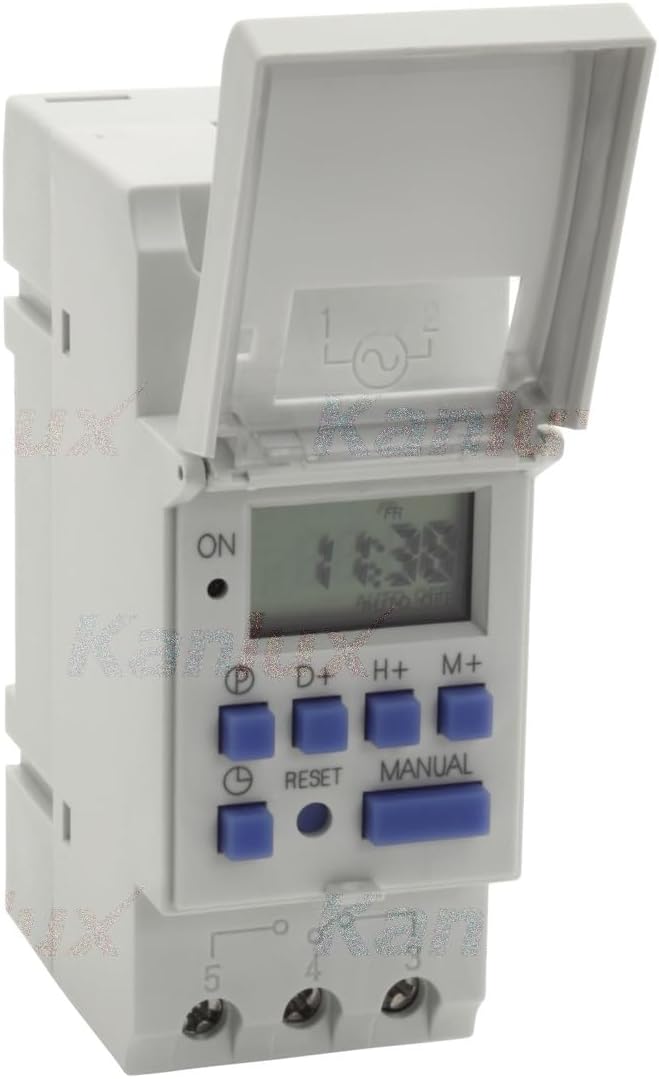
รูปที่ 2.1: ด้านหน้า view of the Kanlux JVT3 16 AS Digital Programmable Time Switch. This image shows the device with its protective cover open, revealing the digital display, the 'ON' indicator, and control buttons labeled 'P', 'D+', 'H+', 'M+', 'RESET', and 'MANUAL'. Below the buttons are the terminal connections.

รูปที่ 2.2: ด้านหน้า view of the Kanlux JVT3 16 AS. This image displays the device with its protective cover closed, clearly showing the "Kanlux JVT3-16AS" branding and the CE mark.
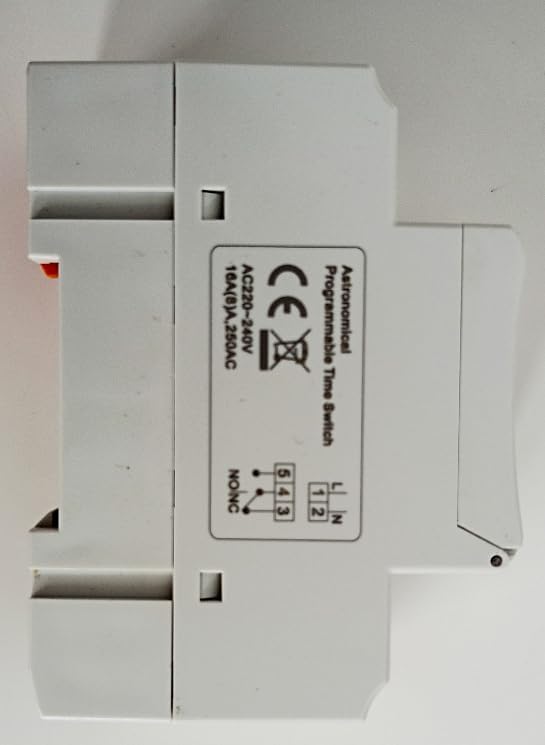
รูปที่ 2.3: ด้านข้าง view of the Kanlux JVT3 16 AS. This image shows the side of the timer with a label indicating "Astronomical Programmable Time Switch" and a wiring diagram for AC 220-240V, 16A (8)A, 250VAC connections (L, N, 1, 2, 3, 4, 5).
3. ข้อมูลด้านความปลอดภัย
- Installation and maintenance should only be performed by a qualified electrician.
- โปรดตรวจสอบให้แน่ใจว่าได้ตัดกระแสไฟแล้วก่อนทำการติดตั้งหรือเดินสายไฟใดๆ
- อย่าเกินระดับการรับน้ำหนักสูงสุดที่กำหนดไว้สำหรับอุปกรณ์
- อุปกรณ์นี้ออกแบบมาสำหรับใช้ภายในอาคารในสภาพแวดล้อมที่แห้ง หลีกเลี่ยงการสัมผัสกับความชื้นหรืออุณหภูมิที่สูงหรือต่ำเกินไป
- Verify all connections are secure to prevent electrical hazards.
4. การตั้งค่าและการติดตั้ง
4.1 การติดตั้ง
The Kanlux JVT3 16 AS is designed for DIN rail mounting. Securely attach the device to a standard DIN rail within an appropriate electrical enclosure.
4.2 การเดินสายไฟ
Refer to the wiring diagram on the side of the device (Figure 2.3) and the following instructions:
- Connect the Live (L) and Neutral (N) power supply wires to the corresponding input terminals (typically labeled 1 and 2).
- Connect the load (e.g., light fixture, appliance) to the output terminals. The common terminal is usually 3, with normally open (NO) and normally closed (NC) contacts labeled 4 and 5 respectively. Consult the specific diagram on your device for exact terminal assignments.
- ตรวจสอบให้แน่ใจว่าการเชื่อมต่อทั้งหมดแน่นหนาและหุ้มฉนวนอย่างถูกต้อง
4.3 การเปิดเครื่องครั้งแรกและการตั้งเวลา
- After wiring, restore power to the circuit. The display should illuminate.
- If the display is blank, check power connections.
- กดปุ่ม รีเซ็ต button (small recessed button) using a pointed object (e.g., pen tip) to clear any previous settings and initialize the device.
- Set the current time and day:
- กดปุ่ม P button repeatedly to cycle through day settings (e.g., MO, TU, WE...).
- ใช้ H+ ปุ่มเพื่อตั้งชั่วโมง
- ใช้ M+ ปุ่มสำหรับตั้งนาที
5. คู่มือการใช้งาน
5.1 การตั้งโปรแกรมรอบการเปิด/ปิด
The timer allows for multiple ON/OFF programs. Follow these steps to set a program:
- กดปุ่ม P กดปุ่มหนึ่งครั้งเพื่อเข้าสู่โหมดการตั้งค่าโปรแกรม หน้าจอจะแสดง "1 ON"
- ใช้ D+ button to select the day(s) for this program (e.g., individual days, weekdays, weekends, all days).
- ใช้ H+ ปุ่มสำหรับตั้งเวลาเปิดใช้งานที่ต้องการ
- ใช้ M+ ปุ่มสำหรับตั้งเวลาเปิดใช้งานตามต้องการ
- กด P อีกครั้ง หน้าจอจะแสดง "1 OFF"
- ทำซ้ำขั้นตอนที่ 2-4 เพื่อตั้งเวลาปิดที่ต้องการสำหรับโปรแกรมแรก
- กดต่อไป P to set additional ON/OFF programs (e.g., "2 ON", "2 OFF", etc.).
- หากต้องการออกจากโหมดการตั้งค่าโปรแกรมและกลับไปยังหน้าจอแสดงเวลาปัจจุบัน ให้กดปุ่ม คู่มือ ปุ่ม.
5.2 การแทนที่ด้วยตนเอง
การ คู่มือ ปุ่มนี้ช่วยให้คุณสามารถเปลี่ยนแปลงการตั้งค่าที่ตั้งโปรแกรมไว้ได้ชั่วคราวหรือถาวร:
- กด คู่มือ repeatedly to cycle through modes:
- เปิดอัตโนมัติ: The timer is currently ON and will follow the next programmed OFF event.
- ปิดอัตโนมัติ: The timer is currently OFF and will follow the next programmed ON event.
- บน: ตัวจับเวลาถูกเปิดใช้งานโดยไม่สนใจโปรแกรมใดๆ
- ปิด: ตัวจับเวลาถูกปิดใช้งานโดยสมบูรณ์ โดยไม่สนใจโปรแกรมใดๆ
- เลือก เปิดอัตโนมัติ or ปิดอัตโนมัติ to resume automatic operation based on your programs.
5.3 Astronomical Function
The JVT3 16 AS includes an astronomical function, which can automatically adjust ON/OFF times based on sunrise and sunset times for your geographical location. Refer to the device's specific programming menu for setting up the astronomical function, which typically involves inputting your latitude and longitude or selecting a predefined region. This feature allows for energy-efficient control of lighting or other applications.
6. การบำรุงรักษา
- การทำความสะอาด: เช็ดอุปกรณ์ด้วยผ้านุ่มและแห้ง ห้ามใช้น้ำยาทำความสะอาดที่มีฤทธิ์กัดกร่อนหรือตัวทำละลาย
- แบตเตอรี่: The device typically contains an internal battery to maintain settings during power outages. This battery is usually non-replaceable by the user and has a long lifespan. If the display frequently resets or loses time during power interruptions, the internal battery may need servicing by a qualified technician.
- การตรวจสอบ: ตรวจสอบความแน่นของการเชื่อมต่อสายไฟและร่องรอยการสึกหรอเป็นระยะ
7 การแก้ไขปัญหา
- อุปกรณ์ไม่เปิดเครื่อง:
- ตรวจสอบแหล่งจ่ายไฟหลักของวงจร
- Verify that the Live (L) and Neutral (N) wires are correctly connected to the input terminals.
- Load not switching ON/OFF as programmed:
- Ensure the device is in "AUTO ON" or "AUTO OFF" mode (not forced ON/OFF).
- Review your programmed ON/OFF times for accuracy.
- Check the current time and day setting on the timer.
- Verify the load wiring (terminals 3, 4, 5) is correct and secure.
- Confirm the load is not exceeding the maximum current rating of the timer.
- จอแสดงผลว่างเปล่าหรือกะพริบ:
- ตรวจสอบแหล่งจ่ายไฟ
- If power is stable, the internal battery may be low or faulty. Contact a qualified technician.
8. ข้อมูลจำเพาะ
| คุณสมบัติ | ข้อมูลจำเพาะ |
|---|---|
| ยี่ห้อ | กันลักซ์ |
| หมายเลขรุ่น | 18721 (JVT3 16 AS) |
| สี | สีขาว |
| เล่มที่tage | 230 Volts (AC 220-240V) |
| คะแนนปัจจุบัน | 16A (8)A, 250VAC |
| น้ำหนักสินค้า | 120 กรัม |
| ขนาดแพ็คเกจ | 30 x 20 x 20 ซม. |
| ผู้ผลิต | กันลักซ์ |
| การทำงาน | Digital Programmable Time Switch with Astronomical Function |
9. การรับประกันและการสนับสนุน
Information regarding specific warranty terms and customer support contacts for the Kanlux 18721 JVT3 16 AS Digital Programmable Time Switch is not available in the provided product data. Please refer to the product packaging or the official Kanlux webเข้าชมเว็บไซต์เพื่อดูรายละเอียดการรับประกันและข้อมูลติดต่อฝ่ายสนับสนุน


