การแนะนำ
The Master Lock No. X055ML large digital combination safe is designed for protecting valuable items such as laptops, jewelry, documents, money, and other electronics within a home environment. Its internal dimensions are suitable for A4-sized documents. This safe features a programmable electronic lock, allowing users to set their own combination, and includes an override key for access in case of a forgotten code. The interior is carpeted to prevent scratching of stored items. For enhanced security, the safe can be bolted down using the included hardware, preventing unauthorized removal. The robust steel construction and pry-resistant door with two live-locking bolts provide a high level of security for your belongings.
ข้อมูลด้านความปลอดภัย
- Always keep the override keys in a secure location away from the safe. Do not store them inside the safe.
- Ensure the safe is securely bolted down to a floor or wall to prevent unauthorized removal, if applicable.
- ห้ามเก็บวัสดุไวไฟหรือภาชนะบรรจุของเหลวที่เปิดแล้วไว้ในตู้เซฟ
- Keep the keypad clean and dry to ensure proper operation.
- เปลี่ยนแบตเตอรี่ทันทีเมื่อไฟแสดงสถานะแบตเตอรี่อ่อนปรากฏขึ้น เพื่อหลีกเลี่ยงการถูกล็อค
เนื้อหาแพ็คเกจ
- 1 x Master Lock Security Safe (Model X055ML)
- 2 x ปุ่มโอเวอร์ไรด์
- 1 x Bolt Down Kit (for securing the safe)
- คู่มือการใช้งาน (เอกสารนี้)
การตั้งค่า
1. การติดตั้งแบตเตอรี่
The safe requires 4 AA batteries (not included) for the electronic lock to function. The battery compartment is located on the inside of the safe door. Open the safe using the override key if it is currently locked.
- Locate the battery compartment cover on the inside of the safe door.
- Remove the cover by sliding it or unscrewing it, depending on the design.
- ใส่แบตเตอรี่ AA ใหม่ 4 ก้อน โดยตรวจสอบให้แน่ใจว่าขั้วถูกต้อง (+/-)
- ใส่ฝาปิดช่องใส่แบตเตอรี่กลับเข้าที่อย่างแน่นหนา
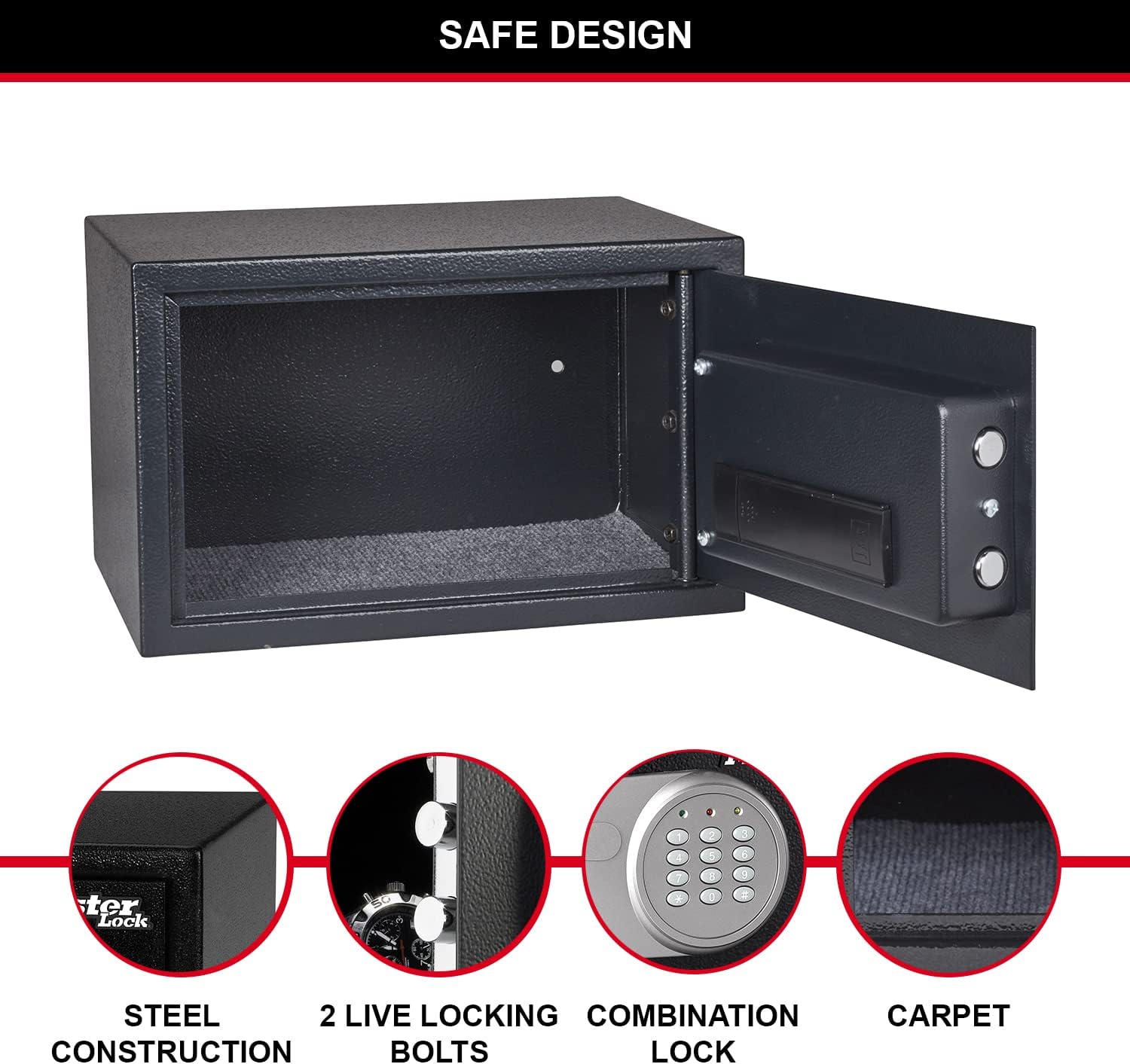
Figure 1: Inside of the safe door, highlighting the battery compartment and live-locking bolts.
2. การตั้งค่าชุดค่าผสมส่วนตัวของคุณ
Upon first use, or after battery replacement, you will need to set your personal combination. The factory default code is typically 1-2-3-4, but it is highly recommended to change it immediately.
- เมื่อเปิดประตูตู้นิรภัยแล้ว ให้มองหาปุ่มรีเซ็ตสีแดงที่อยู่ด้านในประตู ใกล้กับช่องใส่แบตเตอรี่
- Press the red reset button. The yellow light on the keypad will illuminate.
- Enter your new 3 to 8 digit combination on the keypad.
- Press the "A" or "B" button (or "#" or "*" depending on model) to confirm. The yellow light will turn off, indicating the new code is set.
- Test your new combination with the door open to ensure it works correctly before closing the safe.
3. Securing the Safe (Optional)
For maximum security, the safe can be bolted to a floor or wall using the included bolt-down kit. This prevents unauthorized removal of the safe.
- Choose a suitable location for the safe, such as inside a wardrobe or cabinet.
- ทำเครื่องหมายจุดเจาะโดยใช้รูที่เจาะไว้ล่วงหน้าบริเวณด้านล่างหรือด้านหลังของตู้เซฟ
- Drill pilot holes into the mounting surface using an appropriate drill bit.
- Align the safe with the drilled holes and secure it using the provided bolts and washers.

รูปที่ 2: อดีตample of safe placement within a cabinet for secure storage.
คำแนะนำการใช้งาน
1. Opening the Safe with Digital Combination
- Enter your personal 3 to 8 digit combination on the keypad.
- Press the "A" or "B" button (or "#" or "*" depending on model) to confirm.
- If the code is correct, the green light will illuminate. Within 5 seconds, turn the knob clockwise to open the safe door.
- If an incorrect code is entered, the yellow light will flash. After three incorrect attempts, the safe will enter a lockout period.

รูปที่ 3 : ด้านหน้า view of the safe with the digital combination lock.
2. Opening the Safe with Override Key
The override key provides emergency access to the safe, useful if batteries are depleted or the combination is forgotten.
- หาช่องกุญแจ ซึ่งโดยปกติจะซ่อนอยู่หลังฝาครอบเล็กๆ บนแผงปุ่มกด
- Insert one of the provided override keys into the keyhole.
- Turn the key clockwise while simultaneously turning the knob clockwise to open the safe door.
- เมื่อเปิดตู้เซฟแล้ว ให้ถอดกุญแจออก
3. การปิดและล็อคตู้นิรภัย
To lock the safe, simply close the door and turn the knob counter-clockwise until the bolts engage. The electronic lock will automatically secure the safe.
การซ่อมบำรุง
1. การเปลี่ยนแบตเตอรี่
When the batteries are low, the red light on the keypad may flash or the safe may not respond to combination entries. Replace all 4 AA batteries as described in the "Battery Installation" section under Setup.
2. การทำความสะอาด
เช็ดภายนอกตู้เซฟด้วยผ้านุ่มๆamp cloth. Do not use abrasive cleaners or solvents. Keep the keypad and internal components dry.
การแก้ไขปัญหา
| ปัญหา | สาเหตุที่เป็นไปได้ | สารละลาย |
|---|---|---|
| ตู้เซฟไม่สามารถเปิดด้วยรหัสได้ | Incorrect combination entered; low batteries. | Re-enter combination carefully. Replace batteries. Use override key. |
| Keypad lights do not illuminate. | แบตเตอรี่เสียหรือติดตั้งไม่ถูกต้อง | ใส่แบตเตอรี่ AA ทั้ง 4 ก้อนลงไป โดยตรวจสอบให้แน่ใจว่าขั้วถูกต้อง |
| ประตูเซฟปิดไม่สนิท | Obstruction in the door frame; bolts not fully retracted. | Check for obstructions. Ensure the knob is fully turned to retract bolts before closing. |
| Forgotten combination. | Combination lost or forgotten. | Use the override key to open the safe, then reset the combination. |
ข้อมูลจำเพาะ
| คุณสมบัติ | รายละเอียด |
|---|---|
| หมายเลขรุ่น | X055มล. |
| ขนาดภายนอก (สูง x กว้าง x ลึก) | 13.78" H x 8.66" W x 10.63" D (22 x 35 x 27 cm) |
| ขนาดภายใน (สูง x กว้าง x ลึก) | สูง 21.6 ซม. x กว้าง 34.6 ซม. x ลึก 22 ซม |
| ความจุ | 16 ลิตร |
| น้ำหนัก | 14.11 ปอนด์ (6400 กรัม) |
| ประเภทล็อค | Digital Combination with Key Override |
| วัสดุ | เหล็กอัลลอยด์ |
| แหล่งพลังงาน | ใช้พลังงานจากแบตเตอรี่ (ต้องใช้แบตเตอรี่ AA 4 ก้อน ไม่รวม) |
| คุณสมบัติพิเศษ | Pry-resistant door, two live-locking bolts, carpeted floor, bolt-down hardware included. |

Figure 4: Detailed dimensions of the safe.
การรับประกันและการสนับสนุน
This Master Lock product is covered by a 1-year spare part availability duration in the EU. For specific warranty details, technical support, or to inquire about replacement parts, please refer to the official Master Lock webหรือติดต่อฝ่ายบริการลูกค้าโดยตรง เก็บใบเสร็จรับเงินไว้เพื่อใช้ในการเคลมประกัน
หากต้องการความช่วยเหลือเพิ่มเติม โปรดไปที่ ร้าน Master Lock บน Amazon.


