การแนะนำ
The myTouchSmart Plug-In Indoor/Outdoor Digital Timer is designed to simplify the automation of your lighting and appliances. This weather-resistant timer features two grounded outlets, offering versatile control for landscape, patio, and seasonal lighting. It provides both customizable "My On/Off Time" settings and convenient daily preset options, along with a 24-hour countdown feature. The large LCD screen and blue LED indicators ensure easy programming and monitoring of active programs. Compatible with various light sources including CFL, LED, incandescent, and halogen, this UL listed product is built for convenience and energy efficiency.
คุณสมบัติผลิตภัณฑ์
- Easy-to-set digital timer with two grounded outlets for landscape, patio, and seasonal lights and appliances.
- Features simple daily preset options, fully customizable "My On/Off Time" settings, and a custom, up to 24-hour countdown feature.
- Weather resistant for both outdoor and indoor use. Includes an attached bracket for easy mounting and installation.
- Compatible with CFL, LED, incandescent, and halogen light sources.
- Large LCD screen and blue LED indicators to show active programs.
- Electrical Rating: 125V/60Hz, 15A/1875W General purpose/resistive.
- CSA listed for safety.

Figure 1: Control outdoor or indoor lights with the myTouchSmart timer.

Figure 2: The timer is weather resistant and suitable for outdoor use.
คำแนะนำการตั้งค่า
- การเพิ่มพลังเริ่มต้น: Plug the timer into a standard 125V AC outlet. The LCD screen will illuminate. If the screen is blank or not reading, plug it in for at least one hour to charge the internal battery.
- ตั้งเวลาปัจจุบัน:
- กดปุ่ม นาฬิกา ปุ่ม.
- ใช้ ขึ้น (▲) และ ลง (▼) ลูกศรสำหรับปรับเวลา
- กด นาฬิกา again to move to minutes, then use the arrows to adjust.
- กด นาฬิกา ครั้งที่สามเพื่อยืนยันและออกจากเวลาที่ตั้งไว้
- การติดตั้ง: Use the integrated mounting bracket to securely attach the timer near your desired outlet. Ensure the timer is positioned to prevent water accumulation.

Figure 3: Simple setup involves setting the current time and custom ON/OFF times.
Video 1: An instructional video demonstrating how to set the current time and program ON/OFF times on the myTouchSmart timer.
คำแนะนำการใช้งาน
Setting Custom ON/OFF Times ("My On/Off Time")
- ตั้งเวลาเปิด:
- กดปุ่ม ตรงเวลาของฉัน button. The display will show the current ON time setting.
- ใช้ ขึ้น (▲) และ ลง (▼) arrows to adjust the desired ON hour.
- กด ตรงเวลาของฉัน again to move to minutes, then use the arrows to adjust.
- กด ตรงเวลาของฉัน a third time to confirm and save the ON time. The blue LED indicator next to "my on time" will illuminate when active.
- ตั้งเวลาปิด:
- กดปุ่ม เวลาว่างของฉัน button. The display will show the current OFF time setting.
- ใช้ ขึ้น (▲) และ ลง (▼) arrows to adjust the desired OFF hour.
- กด เวลาว่างของฉัน again to move to minutes, then use the arrows to adjust.
- กด เวลาว่างของฉัน a third time to confirm and save the OFF time. The blue LED indicator next to "my off time" will illuminate when active.
การใช้ตารางเวลาที่ตั้งไว้ล่วงหน้า
The timer offers three convenient preset schedules:
- Evening (5pm-12am): กดปุ่ม ตอนเย็น ปุ่ม.
- Morning (5am-8am): กดปุ่ม เช้า ปุ่ม.
- All Night (6pm-6am): กดปุ่ม ตลอดทั้งคืน ปุ่ม.
To activate a preset, simply press the corresponding button. The blue LED indicator next to the selected preset will light up.
24-Hour Countdown
To use the countdown feature:
- กดปุ่ม การนับถอยหลังของฉัน ปุ่ม.
- ใช้ ขึ้น (▲) และ ลง (▼) arrows to set the desired countdown duration (up to 24 hours).
- กด การนับถอยหลังของฉัน again to start the countdown. The timer will turn ON for the set duration and then turn OFF.

Figure 4: Program custom ON/OFF times or select from convenient preset schedules.
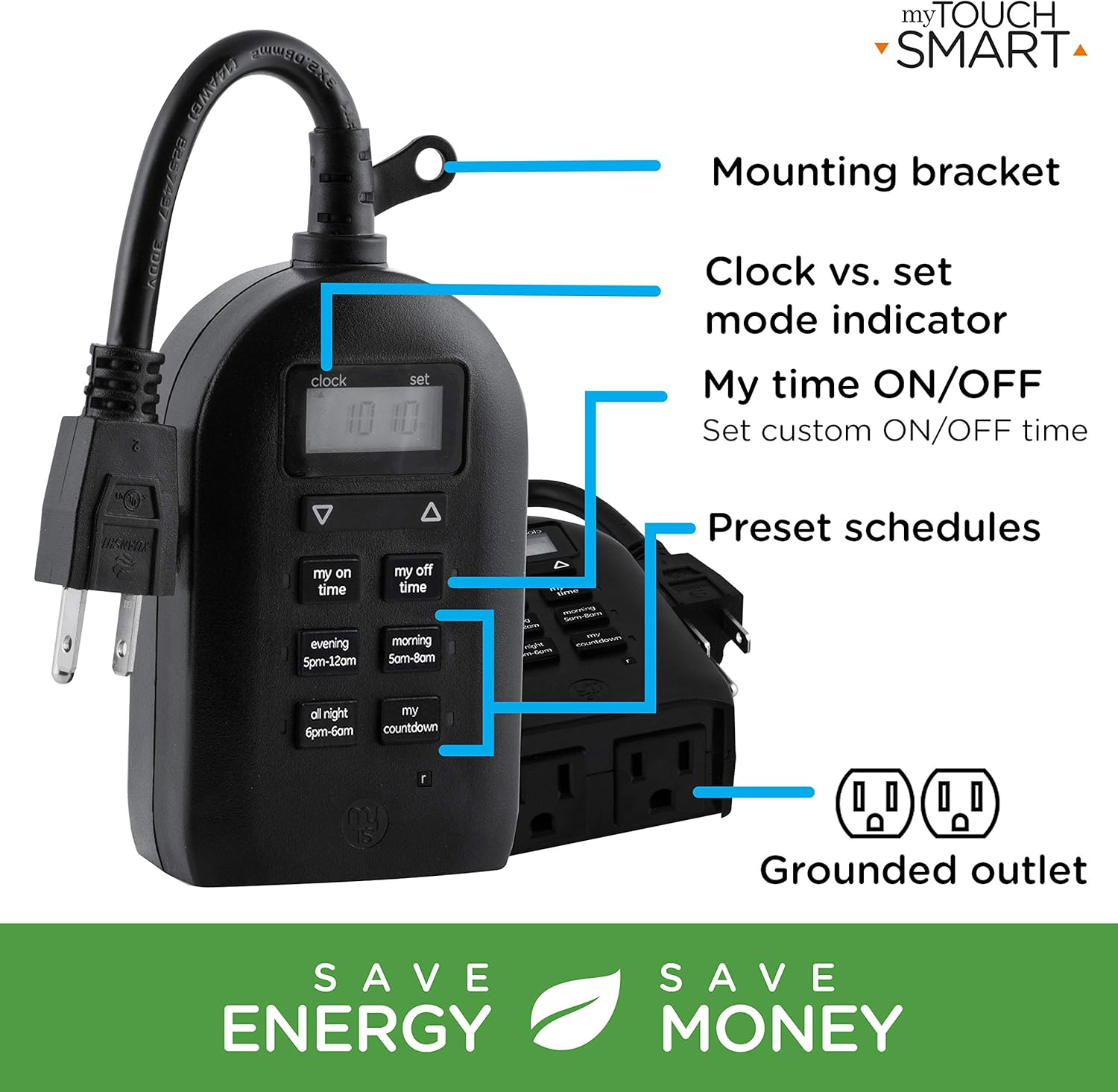
Figure 5: Key features and controls of the myTouchSmart timer.
การซ่อมบำรุง
- การทำความสะอาด: ถอดปลั๊กตัวตั้งเวลาออกจากเต้ารับไฟฟ้าก่อนทำความสะอาด เช็ดภายนอกด้วยผ้าเนื้อนุ่มและแห้งamp ผ้า. อย่าใช้สารเคมีที่รุนแรงหรือน้ำยาทำความสะอาดที่มีฤทธิ์กัดกร่อน
- พื้นที่จัดเก็บ: เมื่อไม่ได้ใช้งานเป็นเวลานาน ควรเก็บนาฬิกาจับเวลาไว้ในที่แห้งและเย็น หลีกเลี่ยงแสงแดดโดยตรงและอุณหภูมิที่สูงหรือต่ำเกินไป
- แบตเตอรี่ภายใน: The timer contains an internal battery to maintain settings during power outages. If the display is dim or blank, plug the timer into an outlet for at least one hour to recharge the battery.
การแก้ไขปัญหา
| ปัญหา | สาเหตุที่เป็นไปได้ | สารละลาย |
|---|---|---|
| หน้าจอแสดงผลของตัวจับเวลาว่างเปล่าหรือมืดสนิท | แบตเตอรี่ภายในเหลือน้อยหรือหมดแล้ว | Plug the timer into a live outlet for at least one hour to charge the internal battery. |
| อุปกรณ์ที่เชื่อมต่อไม่สามารถเปิด/ปิดได้ |
|
|
| ตัวจับเวลาไม่ตอบสนองต่อการกดปุ่ม | ซอฟต์แวร์มีปัญหาชั่วคราวหรือแบตเตอรี่อ่อน | Unplug the timer from the outlet for a few minutes, then plug it back in. Allow the internal battery to charge if the display was dim. |
ข้อมูลจำเพาะ
| คุณสมบัติ | รายละเอียด |
|---|---|
| หมายเลขรุ่น | 26898-P1 |
| ระดับไฟฟ้า | 125V AC, 60Hz, 15A, 1875W (General Purpose/Resistive) |
| ช่องทางการจำหน่าย | เต้ารับสายดิน 2 ช่อง |
| ขนาด | ลึก 3.2 นิ้ว x กว้าง 7 นิ้ว x สูง 7.5 นิ้ว (โดยประมาณ) |
| น้ำหนักสินค้า | 9.92 ออนซ์ |
| ประเภทจอภาพ | จอแอลซีดี |
| ประเภทการติดตั้ง | ติดตั้งปลั๊กอิน |
| การรับรอง | UL Listed, CSA Listed |
| แบตเตอรี่ภายใน | Yes (for settings retention) |

Figure 6: Product dimensions for the myTouchSmart timer.
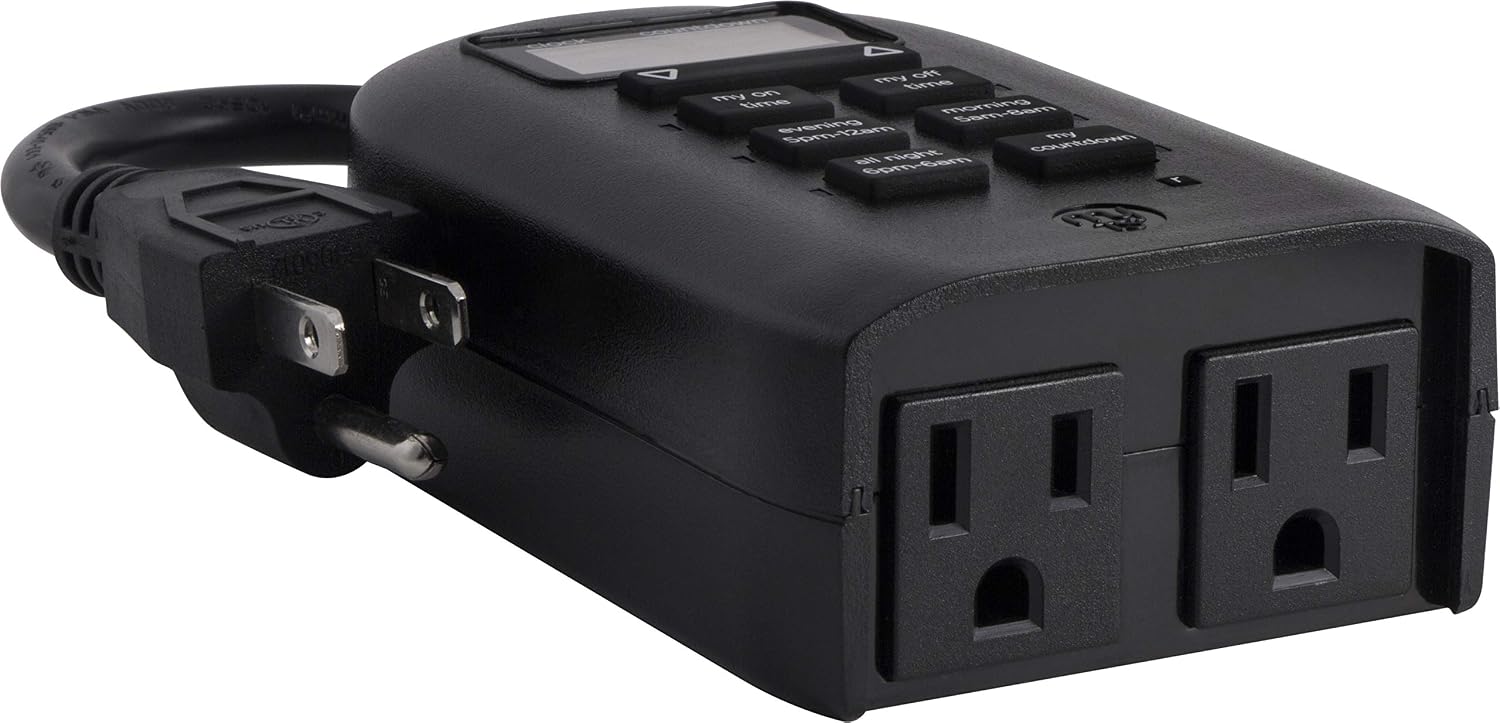
Figure 7: Dual grounded outlets for connecting devices.
การรับประกันและการสนับสนุน
This myTouchSmart timer is backed by a รับประกันจำกัดหนึ่งปี from the date of purchase. For warranty claims or technical support, please refer to the contact information provided with your product packaging or visit the official myTouchSmart webเว็บไซต์.
สำหรับแหล่งข้อมูลเพิ่มเติม คุณสามารถดูได้จากแหล่งข้อมูลอย่างเป็นทางการ คู่มือการใช้งาน (PDF) or คู่มือการติดตั้ง (PDF) มีให้บริการออนไลน์


