1. บทนำ
This manual provides detailed instructions for the safe and effective operation of the Meco 2250-HZ Auto Digital Clamp Meter. This device is designed for measuring various electrical parameters, including AC/DC voltage, AC current, frequency, continuity, and diode testing. Please read this manual thoroughly before use and retain it for future reference.
2. ข้อมูลด้านความปลอดภัย
Always observe standard safety precautions when working with electrical circuits. Failure to do so may result in injury or damage to the meter. This meter is designed with over-voltage protection up to 200V DC and AC Peak. However, exercise caution.
- อย่าพยายามวัดปริมาตรtagกระแสไฟฟ้าหรือค่าอื่นๆ ที่เกินขีดจำกัดสูงสุดที่กำหนดไว้
- Ensure the test leads are in good condition and properly connected before making measurements.
- Do not operate the meter if it appears damaged or if the battery cover is not securely closed.
- Avoid using the meter in wet environments or in the presence of explosive gases or dust.
- Always disconnect power to the circuit before connecting or disconnecting test leads, especially for current measurements.
3. สินค้าหมดview
The Meco 2250-HZ Auto Digital Clamp Meter features a robust design for reliable performance. Familiarize yourself with the components shown below.
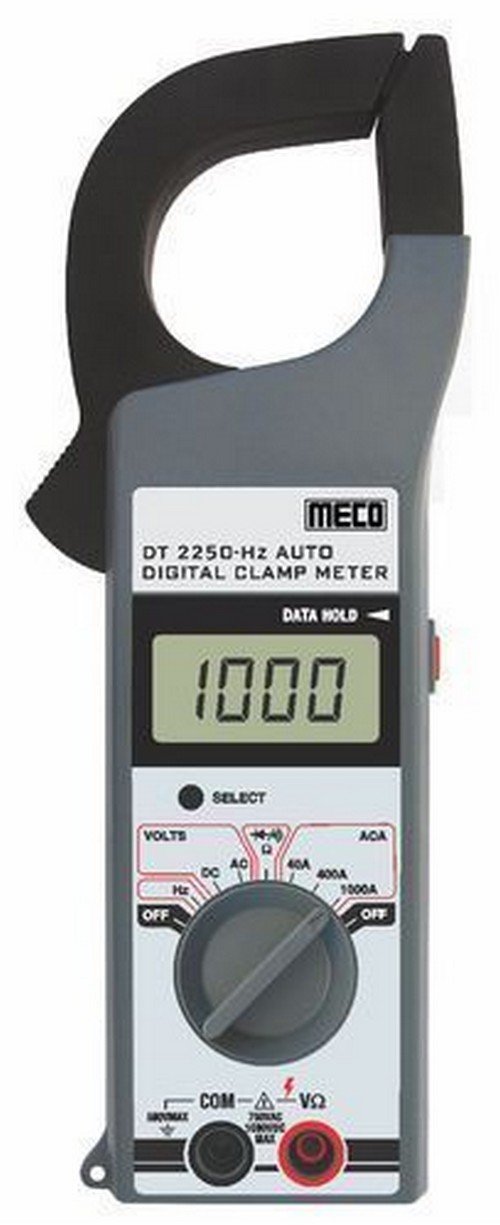
รูปที่ 1: ด้านหน้า view of the Meco 2250-HZ Auto Digital Clamp Meter. This image displays the clamp jaw at the top, the LCD screen showing '1000', the function dial, and the input terminals at the bottom. The 'SELECT' and 'DATA HOLD' buttons are visible next to the display.
ส่วนประกอบหลัก:
- Clamp ขากรรไกร: ใช้สำหรับการวัดกระแสไฟฟ้า AC แบบไม่สัมผัส
- จอแสดงผล LCD: 3¾ digit liquid crystal display with a maximum reading of 3999. Shows measurement values, polarity, overrange indication (OL or -OL), and low battery indication.
- แป้นหมุนเลือกฟังก์ชัน: Rotary switch to select measurement functions (OFF, Volts DC/AC, Hz, ACA 40A/400A/1000A).
- ปุ่มเลือก: Used to switch between DC and AC voltage modes, or other sub-functions within a dial setting.
- ปุ่มพักข้อมูล: ฟังก์ชันนี้จะหยุดการแสดงค่าปัจจุบันบนหน้าจอ กดอีกครั้งเพื่อปล่อย
- Input Terminals (COM, VΩ): สำหรับเชื่อมต่อสายทดสอบสำหรับวัดระดับเสียงtage, resistance, continuity, and diode measurements.
4. การตั้งค่า
4.1 การติดตั้งแบตเตอรี่
The Meco 2250-HZ Auto Digital Clamp Meter requires batteries for operation. Batteries are not included with the product. To install or replace batteries:
- โปรดตรวจสอบให้แน่ใจว่ามิเตอร์ปิดอยู่
- หาช่องใส่แบตเตอรี่ที่ด้านหลังของมิเตอร์
- ใช้ไขควงเปิดฝาช่องใส่แบตเตอรี่
- Insert the required batteries, observing correct polarity (+ and -).
- ใส่ฝาปิดช่องใส่แบตเตอรี่และขันให้แน่นด้วยสกรู
A low battery indication will appear on the display when the battery voltage is low, signaling the need for replacement.
5. คู่มือการใช้งาน
5.1. การดำเนินการทั่วไป
- Turn the function dial to the desired measurement setting.
- Connect test leads to the appropriate input terminals (COM and VΩ) for voltage, resistance, continuity, or diode tests.
- For current measurements, use the clamp jaw around a single conductor.
- กดปุ่ม เลือก button to toggle between AC/DC modes or other sub-functions if available for the selected range.
- กดปุ่ม ข้อมูลถือ กดปุ่มเพื่อหยุดค่าที่แสดงบนหน้าจอ กดอีกครั้งเพื่อปล่อย
5.2 โวลต์ AC/DCtagอีการวัด
- Set the function dial to the "VOLTS" position.
- Connect the black test lead to the COM terminal and the red test lead to the VΩ terminal.
- กดปุ่ม เลือก button to choose between AC or DC voltage measurement. The display will indicate "AC" or "DC".
- ต่อสายทดสอบแบบขนานเข้ากับวงจรหรือชิ้นส่วนที่ต้องการทดสอบ
- อ่านเล่มที่tagค่า e บนจอ LCD
5.3 การวัดกระแสไฟฟ้าสลับ (Clamp)
- Set the function dial to the desired AC current range (40A, 400A, or 1000A).
- เปิด clamp ขากรรไกรโดยการกดไกปืน
- ให้หุ้มตัวนำเพียงตัวเดียวของวงจรไว้ภายในตัวหุ้มamp ขากรรไกร ตรวจสอบให้แน่ใจว่าขากรรไกรปิดสนิทแล้ว
- อ่านค่ากระแสไฟฟ้าสลับ (AC) จากหน้าจอ LCD
5.4 การวัดความถี่ (Hz)
- ตั้งแป้นหมุนฟังก์ชันไปที่ตำแหน่ง "Hz"
- Connect the black test lead to the COM terminal and the red test lead to the VΩ terminal.
- Connect the test leads in parallel to the circuit where frequency needs to be measured.
- Read the frequency value in Hertz (Hz) on the LCD display.
5.5 Audible Continuity Check
- Set the function dial to the continuity/diode symbol (often shared with resistance).
- Connect the black test lead to the COM terminal and the red test lead to the VΩ terminal.
- Touch the test probes across the component or circuit to be tested.
- ถ้ามีความต่อเนื่อง (ความต้านทานต่ำ) มิเตอร์จะส่งเสียงบี๊บดังขึ้น
5.6 การทดสอบไดโอด
- Set the function dial to the continuity/diode symbol.
- Connect the black test lead to the COM terminal and the red test lead to the VΩ terminal.
- Connect the red test lead to the anode of the diode and the black test lead to the cathode. The display will show the forward voltagอีลดลง
- Reverse the test leads. The display should show "OL" (overload) for a good diode.
6. การบำรุงรักษา
6.1 การทำความสะอาด
เช็ดทำความสะอาดมิเตอร์asinจีกับโฆษณาamp ใช้ผ้าและผงซักฟอกอ่อนๆ เช็ดทำความสะอาด ห้ามใช้สารขัดถูหรือสารละลายใดๆ รักษาหน้าจอให้สะอาดและแห้งอยู่เสมอ
6.2 การเปลี่ยนแบตเตอรี่
Refer to Section 4.1 for battery installation and replacement instructions. Replace batteries promptly when the low battery indicator appears to ensure accurate readings.
7 การแก้ไขปัญหา
| ปัญหา | สาเหตุที่เป็นไปได้ | สารละลาย |
|---|---|---|
| มิเตอร์ไม่เปิดใช้งาน | แบตเตอรี่เสียหรือติดตั้งไม่ถูกต้อง | ตรวจสอบขั้วแบตเตอรี่และเปลี่ยนแบตเตอรี่หากจำเป็น |
| "OL" or "-OL" displayed. | Overrange condition; measurement exceeds meter's range. | Select a higher range or ensure the measured value is within the meter's capabilities. |
| การอ่านที่ไม่ถูกต้อง | Low battery, poor test lead connection, or incorrect function selection. | Replace batteries, ensure secure connections, verify function dial setting. |
| No audible beep during continuity test. | วงจรเปิดหรือความต้านทานสูง | Verify the circuit is closed and resistance is low enough for continuity. |
8. ข้อมูลจำเพาะ
| คุณสมบัติ | รายละเอียด |
|---|---|
| แสดง | 3¾ digit LCD, max reading 3999 |
| ขั้ว | Automatic, negative polarity indication |
| โอเวอร์เรนจ์บ่งชี้ | "OL" or "-OL" displayed |
| การปรับเป็นศูนย์ | อัตโนมัติ |
| อายุการใช้งานแบตเตอรี่ | ทั่วไป 200 ชั่วโมง |
| มากกว่าVoltagการป้องกันอี | 200V DC and AC Peak |
| Audible Continuity Check | ใช่ |
| การทดสอบ Diode | ใช่ |
| การบ่งชี้แบตเตอรี่ต่ำ | ใช่ |
| น้ำหนักสินค้า | 600 กรัม (1.32 ปอนด์) |
| ขนาดสินค้า | 21 x 13 x 6 ซม. |
| วัสดุ | พลาสติก |
| ผู้ผลิต | เมโค อินสตรูเมนต์ |
9. การรับประกันและการสนับสนุน
For warranty information or technical support, please contact the retailer or the manufacturer, Meco Instruments, directly. Keep your purchase receipt as proof of purchase.