1. บทนำ
This manual provides detailed instructions for the setup, operation, and maintenance of your Akuvox SP-R50P IP Phone. The SP-R50P is a high-definition voice IP phone designed for clear communication and efficient call management.
คุณสมบัติที่สำคัญ ได้แก่:
- HD Voice capability for superior audio quality.
- 2.6" 132x64 Graphical LCD with backlight for clear display.
- 31 Keys, including 4 soft keys and 10 programmable keys, for versatile control.
- Multiple connectivity options: 1 RJ9 Handset jack, 1 RJ9 Headset Jack, 2 RJ45 10/100m Ethernet Jacks.
- Power over Ethernet (PoE) support (IEEE 802.3af) for simplified installation.
- Support for 1 SIP account, call waiting, call forward, call transfer, call on hold, mute, auto-answer, redial, DND, local 3-way conference, volume adjustment, selectable ringtones, speed dial, hotline, and more.
2. เนื้อหาในกล่อง
Carefully unpack your Akuvox SP-R50P IP Phone and verify that all items listed below are present and in good condition. If any items are missing or damaged, please contact your reseller immediately.
- Akuvox SP-R50P Base Unit
- โทรศัพท์มือถือ
- Handset Connector Cable
- ขาตั้งโทรศัพท์
- คู่มือเริ่มต้นใช้งานฉบับย่อ (ดูรายละเอียดเพิ่มเติมได้ในคู่มือนี้)
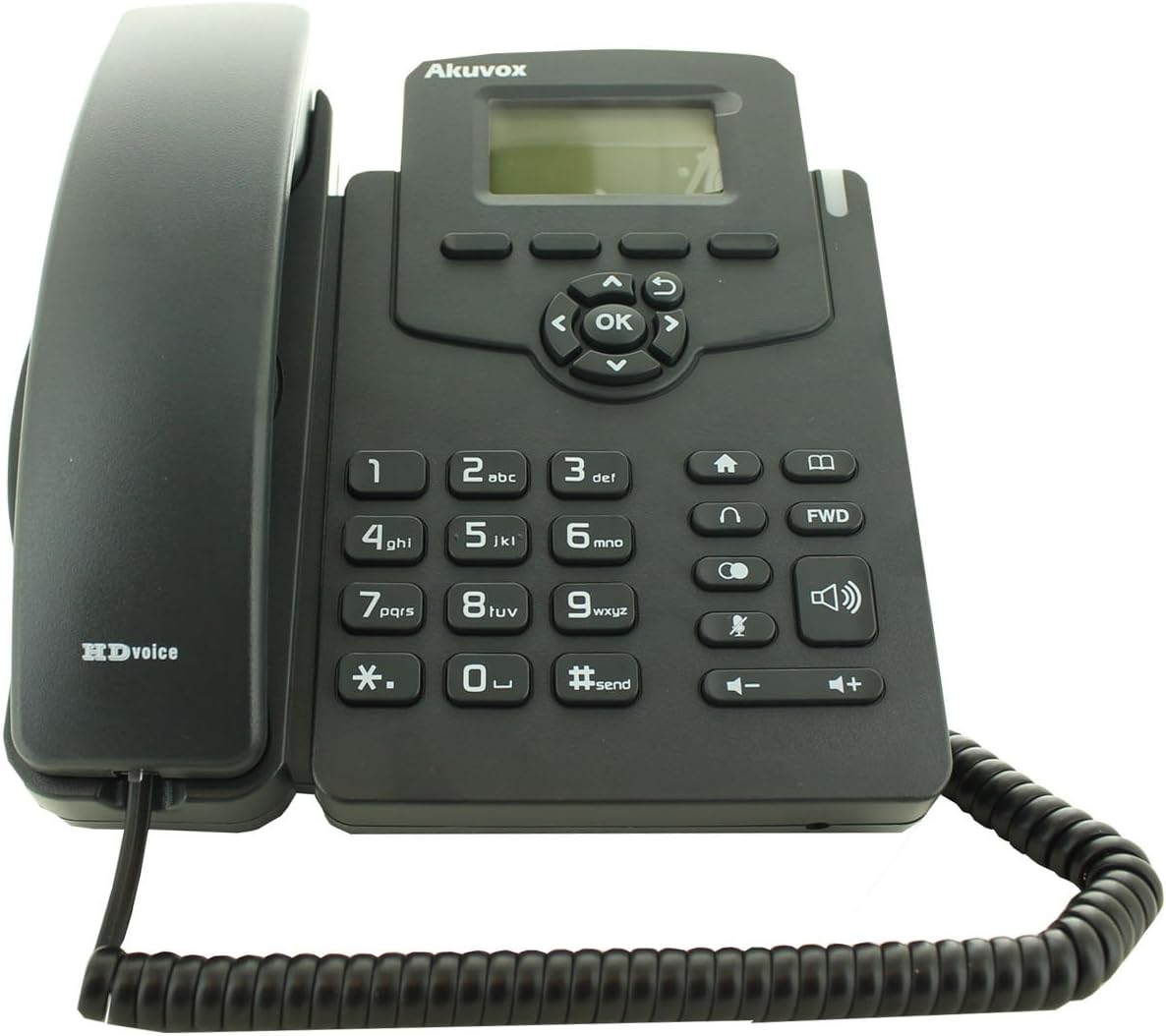
Figure 2.1: Akuvox SP-R50P IP Phone components. The image displays the main phone unit, the handset resting on its cradle, and the coiled handset cable. The phone features a display screen, navigation keys, a numeric keypad, and function buttons.
3. การตั้งค่า
Follow these steps to set up your Akuvox SP-R50P IP Phone for first-time use.
- ติดตั้งขาตั้งโทรศัพท์: Align the tabs on the phone stand with the slots on the back of the phone base unit. Slide the stand into place until it clicks securely.
- เชื่อมต่อโทรศัพท์มือถือ: Plug one end of the coiled handset cable into the handset jack on the side of the phone base unit and the other end into the handset.
- เชื่อมต่อกับเครือข่ายและแหล่งจ่ายไฟ:
- การใช้ PoE (Power over Ethernet): If your network switch supports PoE, connect an Ethernet cable from the LAN port on the back of the phone to a PoE-enabled port on your network switch. The phone will power on automatically.
- Using a Power Adapter (Optional, not included): If PoE is not available, connect a compatible 5V DC power adapter (not included) to the power jack on the back of the phone, then plug the adapter into a power outlet. Connect an Ethernet cable from the LAN port on the back of the phone to your network router or switch.
- การบูตครั้งแรก: The phone will power on and begin its boot-up sequence. The LCD screen will display the Akuvox logo and then proceed to load the operating system. This may take a few moments.
- การกำหนดค่าเครือข่าย: Once booted, the phone will attempt to obtain an IP address via DHCP. If your network requires static IP configuration or specific SIP server settings, these can be configured via the phone's web interface or directly on the phone's menu (refer to Section 4.2 for menu navigation).
4. คู่มือการใช้งาน
This section details the basic and advanced functions of your Akuvox SP-R50P IP Phone.
4.1 ฟังก์ชันการโทรพื้นฐาน
- การโทร:
- ยกหูโทรศัพท์หรือกดปุ่ม ลำโพง ปุ่ม.
- กดหมายเลขโทรศัพท์ที่ต้องการโดยใช้ปุ่มกด
- กดปุ่ม #send button or wait a few seconds for the call to connect automatically.
- รับสาย: เมื่อโทรศัพท์ดัง ให้หยิบหูโทรศัพท์ขึ้นมาหรือกดปุ่ม ลำโพง ปุ่ม.
- การวางสาย: วางหูโทรศัพท์หรือกด ลำโพง ปุ่มอีกครั้ง
- โทรซ้ำ: กดปุ่ม โทรซ้ำ button (often represented by a curved arrow or a dedicated key) to redial the last dialed number.
- ปิดเสียง: ระหว่างการโทร ให้กด ปิดเสียง button (microphone icon) to mute your microphone. Press it again to unmute.
- การปรับระดับเสียง: ใช้ ปริมาณ +/- buttons during a call to adjust the handset, headset, or speaker volume. When idle, use them to adjust the ringer volume.
4.2 คุณสมบัติการโทรขั้นสูง
- พักสาย: ในระหว่างการสนทนา ให้กดปุ่ม ถือ button (often represented by a pause icon or two vertical lines). The call will be placed on hold. Press the ถือ กดปุ่มอีกครั้งหรือปุ่มสายกระพริบเพื่อโทรกลับ
- โอนสาย:
- โอนคนตาบอด: ในระหว่างการสนทนา ให้กดปุ่ม โอนย้าย soft key or button. Dial the number to transfer to, then press the โอนย้าย ซอฟท์คีย์อีกครั้ง
- เข้าร่วมการถ่ายโอน: ในระหว่างการสนทนา ให้กดปุ่ม โอนย้าย soft key or button. Dial the number to transfer to and wait for the party to answer. Announce the call, then press the โอนย้าย กดคีย์ซอฟท์อีกครั้งเพื่อเสร็จสิ้นการถ่ายโอน
- การประชุมสามฝ่าย:
- ในระหว่างการสนทนา ให้กดปุ่ม การประชุม soft key or button. The first call will be placed on hold.
- Dial the number of the third party and wait for them to answer.
- กดปุ่ม การประชุม soft key again to join all three parties in a conference call.
- ห้ามรบกวน (DND): กดปุ่ม งดจัดงาน button (often represented by a crossed-out bell or similar icon) to activate or deactivate Do Not Disturb mode. When active, incoming calls will be redirected or sent to voicemail without ringing your phone.
- โอนสาย: Access the phone's menu (usually via a เมนู or การตั้งค่า soft key) to configure call forwarding options (Always, Busy, No Answer).
- สมุดโทรศัพท์: The phone supports a local phonebook of up to 500 groups. Access it via the สมุดโทรศัพท์ soft key or menu option. You can add, edit, and delete contacts.
- ปุ่มที่ตั้งโปรแกรมได้: The 10 programmable keys can be configured for various functions such as speed dial, busy lamp field (BLF), or line keys. Refer to your system administrator or the phone's web interface for configuration details.
จอแสดงผล LCD ขนาด 4.3 นิ้ว พร้อมระบบนำทาง
The 2.6" graphical LCD displays call information, menu options, and status indicators. Use the navigation cluster (Up, Down, Left, Right arrows, and OK button) to navigate through menus and select options. The soft keys below the display change their function based on the current context.
5. การบำรุงรักษา
Proper care and maintenance will ensure the longevity of your Akuvox SP-R50P IP Phone.
- การทำความสะอาด: ใช้ผ้าแห้งนุ่มเช็ดทำความสะอาดพื้นผิวโทรศัพท์ สำหรับคราบฝังแน่น ให้ใช้ผ้าชุบน้ำหมาดๆ เช็ดเบาๆampen the cloth with water. Do not use harsh chemicals, abrasive cleaners, or solvents, as these can damage the phone's finish and internal components.
- สิ่งแวดล้อม: Keep the phone away from direct sunlight, excessive heat sources, and moisture. Ensure it is placed on a stable, flat surface to prevent accidental falls.
- สาย: Periodically check all connected cables (handset, Ethernet) for any signs of wear or damage. Replace damaged cables immediately.
- การระบายอากาศ : Ensure the ventilation slots on the phone are not blocked to prevent overheating.
6 การแก้ไขปัญหา
If you encounter issues with your Akuvox SP-R50P IP Phone, refer to the following common problems and solutions.
| ปัญหา | สาเหตุที่เป็นไปได้ | สารละลาย |
|---|---|---|
| โทรศัพท์ไม่สามารถเปิดเครื่องได้ | ไม่มีแหล่งจ่ายไฟ; PoE ไม่ทำงานหรือมีปัญหา; อะแดปเตอร์แปลงไฟมีปัญหา |
|
| ไม่มีเสียงโทรออก | Network connection issue; SIP registration failure; handset cable loose. |
|
| ไม่สามารถโทรออกหรือรับสายได้ | SIP registration failure; network firewall blocking VoIP traffic; DND active. |
|
| คุณภาพเสียงไม่ดี (เสียงสะท้อน สัญญาณรบกวน) | Network congestion; faulty cable; microphone/speaker issue. |
|
If the problem persists after trying these solutions, please contact your system administrator or Akuvox technical support.
7. ข้อมูลจำเพาะ
Detailed technical specifications for the Akuvox SP-R50P IP Phone.
| คุณสมบัติ | คำอธิบาย/ค่า |
|---|---|
| หมายเลขรุ่น | SP-R50P |
| ยี่ห้อ | อคูวอกซ์ |
| แสดง | 2.6" 132x64 Graphical LCD with backlight |
| กุญแจ | 31 Keys (4 Soft Keys, 10 Programmable keys) |
| คุณภาพเสียง | เสียง HD |
| บัญชี SIP | 1 Line (Support 1 SIP account) |
| พอร์ตอีเทอร์เน็ต | 2 RJ45 10/100m Ethernet Jacks |
| แจ็คหูฟัง | 1 RJ9 Headset Jack |
| แจ็คมือถือ | 1 RJ9 Handset jack |
| PoE | IEEE 802.3af |
| การประชุมทางโทรศัพท์ | Local 3-Way Conference |
| ความจุสมุดโทรศัพท์ | 500 กลุ่ม |
| บันทึกการโทร | 100 รายการ |
| วัสดุ | พลาสติก |
| สี | สีดำ |
| ขนาดแพ็คเกจ | 20.8 x 19.8 x 9 ซม. |
| น้ำหนัก | 859.99 กรัม |
| วันที่พร้อมใช้งานครั้งแรก | 26 มิ.ย. 2015 |
8. การรับประกันและการสนับสนุน
For warranty information, please refer to the warranty card included with your product or contact your point of purchase. Akuvox provides technical support for its products. For further assistance, please visit the official Akuvox webเว็บไซต์หรือติดต่อฝ่ายบริการลูกค้าของพวกเขา
แนะนำให้เก็บใบเสร็จรับเงินไว้เป็นหลักฐานการซื้อเพื่อใช้ในการเคลมประกัน


