การแนะนำ
ชุดหูฟังและมิกเซอร์ ASTRO Gaming A40 TRAmp หูฟัง Pro TR ออกแบบมาเพื่อมอบประสบการณ์เสียงคุณภาพสูงสำหรับการเล่นเกมบน PlayStation 4 และ PC หูฟัง A40 TR สามารถปรับแต่งได้ตามต้องการ โดยสามารถเปลี่ยนจากหูฟังแบบเปิดด้านหลังเป็นหูฟังแบบปิดด้านหลังพร้อมระบบตัดเสียงรบกวนได้ด้วยชุดอุปกรณ์เสริม (Mod Kits)Amp Pro TR มีส่วนประกอบดิจิทัลทั้งหมดเพื่อให้ได้เสียงและการสื่อสารด้วยเสียงที่คมชัด ปราศจากสัญญาณรบกวน พร้อมการตั้งค่าที่ปรับแต่งได้ผ่านซอฟต์แวร์ ASTRO Command Center

ภาพ: ชุดหูฟังเกมมิ่ง ASTRO A40 TR และอุปกรณ์ผสมเสียงAmp โปร TR, โชว์asinนำส่วนประกอบทั้งสองมารวมกัน ชุดหูฟังเป็นสีดำมีรายละเอียดสีทอง และ MixAmp เป็นอุปกรณ์สีดำขนาดกะทัดรัดที่มีปุ่มหมุนควบคุม
เนื้อหาแพ็คเกจ
ตรวจสอบว่ารายการทั้งหมดที่ระบุไว้ด้านล่างนี้รวมอยู่ในบรรจุภัณฑ์ผลิตภัณฑ์ของคุณแล้ว:
- ชุดหูฟัง ASTRO A40 TR
- ASTRO มิกซ์Amp โปร ทีอาร์
- สายปิดเสียงแบบอินไลน์ A40 TR (2.0 ม.)
- สายเคเบิลใยแก้วนำแสง TOSlink (3.0 เมตร)
- สายไมโคร USB (3.0 เมตร)
- สายเคเบิลแบบเดซี่เชนดิจิทัล (0.5 เมตร)
- ไมโครโฟนแบบถอดเปลี่ยนได้
การตั้งค่า
การเชื่อมต่อกับ PlayStation 4 (PS4)
- เชื่อมต่อ สายเคเบิลใยแก้วนำแสง TOSlink จากมิกซ์Amp เชื่อมต่อพอร์ต OPTICAL ของ Pro TR เข้ากับพอร์ต Optical Out ของ PS4
- เชื่อมต่อ สายเคเบิล Micro-USB จากมิกซ์Amp เสียบพอร์ต USB ของ Pro TR เข้ากับพอร์ต USB ที่ว่างอยู่บน PS4
- เชื่อมต่อ สายปิดเสียงแบบอินไลน์ A40 TR จากชุดหูฟัง A40 TR ของคุณไปยังพอร์ตหูฟังที่ด้านหน้าของ MixAmp โปร ทีอาร์
- บนเครื่อง PS4 ของคุณ ให้ไปที่ การตั้งค่า > เสียงและหน้าจอ > การตั้งค่าเอาต์พุตเสียง.
- ชุด พอร์ตเอาต์พุตหลัก ถึง ดิจิตอลเอาท์ (ออปติคอล).
- เลือก ดอลบี ดิจิตอล (บิตสตรีม) สำหรับรูปแบบไฟล์เสียง
- ไปที่ การตั้งค่า > อุปกรณ์ > อุปกรณ์เสียง.
- ชุด อุปกรณ์อินพุต ถึง ชุดหูฟัง USB (ASTRO Mix)Amp โปร ทีอาร์).
- ชุด อุปกรณ์เอาท์พุต ถึง ชุดหูฟัง USB (ASTRO Mix)Amp โปร ทีอาร์).
- ปรับ การควบคุมระดับเสียง (หูฟัง) สูงสุด
- ชุด เอาท์พุตไปยังหูฟัง ถึง แชทเสียง or เสียงทั้งหมด ตามความต้องการ
การเชื่อมต่อกับพีซี
- เชื่อมต่อ สายเคเบิล Micro-USB จากมิกซ์Amp เชื่อมต่อพอร์ต USB ของ Pro TR เข้ากับพอร์ต USB ที่ว่างอยู่บนพีซีของคุณ
- เชื่อมต่อ สายปิดเสียงแบบอินไลน์ A40 TR จากชุดหูฟัง A40 TR ของคุณไปยังพอร์ตหูฟังที่ด้านหน้าของ MixAmp โปร ทีอาร์
- บนพีซีของคุณ ตรวจสอบให้แน่ใจว่าได้เปิดใช้งาน Mix แล้วAmp Pro TR ถูกเลือกเป็นอุปกรณ์เล่นและบันทึกเสียงเริ่มต้นในตั้งค่าเสียงของคุณแล้ว
- ดาวน์โหลดและติดตั้ง ซอฟต์แวร์ ASTRO Command Center จาก ASTRO Gaming อย่างเป็นทางการ webเว็บไซต์นี้ใช้สำหรับปรับแต่งการตั้งค่า อัปเดตเฟิร์มแวร์ และจัดการค่าที่ตั้งไว้ล่วงหน้าของ EQ
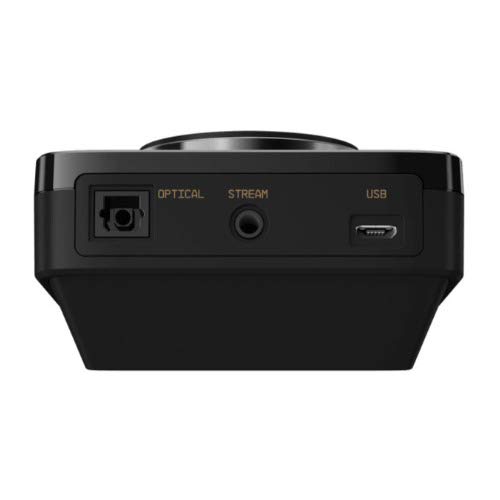
ภาพ: ด้านหลัง view ของ ASTRO MixAmp Pro TR โดดเด่นด้วยพอร์ต Optical, USB, AUX และ Stream สำหรับการเชื่อมต่อที่หลากหลาย
การควบคุมมิกซ์Amp โปร ทีอาร์
มิกซ์Amp Pro TR มอบการควบคุมที่ใช้งานง่ายเพื่อจัดการประสบการณ์ด้านเสียงของคุณ:
- ปุ่มปรับระดับเสียงหลัก: ปุ่มหมุนขนาดใหญ่ทางด้านซ้ายใช้สำหรับควบคุมระดับเสียงโดยรวมของหูฟัง หมุนตามเข็มนาฬิกาเพื่อเพิ่มระดับเสียง หมุนทวนเข็มนาฬิกาเพื่อลดระดับเสียง
- ปุ่มปรับสมดุลเสียงเกม/เสียงพูด: ปุ่มหมุนขนาดเล็กทางด้านขวาช่วยให้คุณปรับสมดุลระหว่างเสียงเกมและเสียงสนทนาได้
- หมุนไปทางด้าน "เกม" เพื่อให้เสียงเกมมีความสำคัญเหนือกว่า
- หมุนไปที่ "เสียง" เพื่อจัดลำดับความสำคัญของการสนทนาด้วยเสียง
- ปุ่มตั้งค่า EQ ล่วงหน้า: ปุ่มนี้อยู่ตรงกลาง ใช้สำหรับสลับไปมาระหว่างค่าที่ตั้งไว้ล่วงหน้าของอีควอไลเซอร์ 4 แบบที่สามารถปรับแต่งได้ ค่าที่ตั้งไว้ล่วงหน้าที่ใช้งานอยู่จะแสดงด้วยไอคอนที่สว่างขึ้น (เช่น ดาว หูฟัง เป็นต้น) สามารถกำหนดค่าค่าที่ตั้งไว้ล่วงหน้าเหล่านี้ได้โดยใช้ซอฟต์แวร์ ASTRO Command Center
- ปุ่ม Dolby: ปุ่มนี้ใช้สำหรับเปิดหรือปิดระบบเสียงรอบทิศทาง Dolby เมื่อเปิดใช้งาน โลโก้ Dolby จะสว่างขึ้น
- ปุ่มปิดเสียงไมโครโฟน: สวิตช์นี้อยู่บนสายเคเบิล A40 TR Inline Mute Cable ใช้สำหรับปิดหรือเปิดเสียงไมโครโฟน เมื่อปิดเสียงแล้ว Mix จะไม่แสดงผลAmpโดยปกติแล้ว ปุ่มปรับระดับเสียงของอุปกรณ์นี้จะเรืองแสงสีแดง
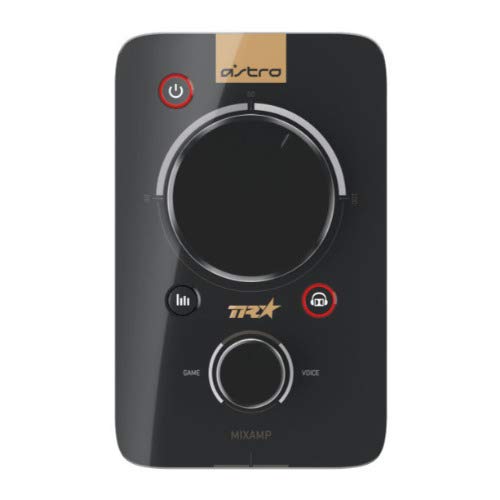
ภาพ: ด้านบน view ของ ASTRO MixAmp Pro TR แสดงให้เห็นปุ่มปรับระดับเสียงหลักขนาดใหญ่ ปุ่มปรับสมดุลเสียงเกม/เสียงพูดขนาดเล็ก และปุ่มตั้งค่า EQ ล่วงหน้า
การซ่อมบำรุง
- การทำความสะอาด: ใช้ผ้าแห้งนุ่มๆ เช็ดทำความสะอาดหูฟังและเครื่องผสมเสียงAmpหลีกเลี่ยงการใช้สารทำความสะอาดที่มีฤทธิ์กัดกร่อนหรือตัวทำละลาย
- พื้นที่จัดเก็บ: เก็บหูฟังและมิกซ์ไว้Amp ในสถานที่แห้งและเย็น ห่างจากแสงแดดโดยตรงและอุณหภูมิที่สูงหรือต่ำมาก
- การดูแลสายเคเบิล: ควรจับสายเคเบิลอย่างระมัดระวังเพื่อป้องกันความเสียหาย หลีกเลี่ยงการดัดงอหรือการดึงอย่างรุนแรง
- ฟองน้ำรองหูฟัง: ควรตรวจสอบแผ่นรองหูฟังเป็นระยะเพื่อดูร่องรอยการสึกหรอ แผ่นรองหูฟังสำรองมีจำหน่ายจาก ASTRO Gaming
การแก้ไขปัญหา
หากคุณพบปัญหาใดๆ กับหูฟังเกมมิ่ง ASTRO Gaming A40 TR หรือ Mix ของคุณAmp สำหรับโปรแกรม Pro TR โปรดลองวิธีแก้ปัญหาต่อไปนี้:
| ปัญหา | สารละลาย |
|---|---|
| ไม่มีเสียงจากหูฟัง |
|
| ไมโครโฟนไม่ทำงาน |
|
| คุณภาพเสียงผิดเพี้ยนหรือไม่ดี |
|
สำหรับรายละเอียดการแก้ไขปัญหาเพิ่มเติม โปรดดูข้อมูลการสนับสนุนอย่างเป็นทางการจาก ASTRO Gaming
ข้อมูลจำเพาะ
- หมายเลขรุ่น: 939-001511
- การตอบสนองความถี่: 20 - 20,000 เฮิรตซ์
- อิมพีแดนซ์ที่กำหนด: 48 โอห์ม
- ความดันแถบคาดศีรษะ: 2.6น.
- ขนาดสินค้า : 9.06 x 13.87 x 4.33 นิ้ว
- น้ำหนักสินค้า: 1.06 ปอนด์
- การเชื่อมต่อ: ออปติคัล USB
- ความเข้ากันได้: เพลย์สเตชั่น 4, พีซี
การรับประกันและการสนับสนุน
สำหรับข้อมูลการรับประกันโดยละเอียดและการสนับสนุนผลิตภัณฑ์ โปรดเยี่ยมชมเว็บไซต์อย่างเป็นทางการของ ASTRO Gaming webโปรดเยี่ยมชมเว็บไซต์หรือดูเอกสารที่แนบมาด้วย:
โปรดตรวจสอบให้แน่ใจว่าคุณได้ลงทะเบียนผลิตภัณฑ์ของคุณกับ ASTRO Gaming แล้ว webเว็บไซต์นี้เป็นแหล่งอัปเดตข้อมูลล่าสุดและรับการสนับสนุน


