1. บทนำ
ขอบคุณสำหรับการซื้อasing the eKids Li-B17 Millennium Falcon Bluetooth Speaker. This portable wireless speaker allows you to stream audio from your Bluetooth-enabled devices and enjoy hands-free calling. Its unique design, inspired by the iconic Millennium Falcon, includes light effects and plays the Star Wars theme. Please read this manual carefully to ensure proper use and maintenance of your speaker.
2. ข้อมูลด้านความปลอดภัย
- คำแนะนำด้านอายุ: เหมาะสำหรับเด็กอายุ 3 ปีขึ้นไป
- อย่าวางอุปกรณ์ไว้ในที่ที่มีอุณหภูมิสูงหรือต่ำเกินไป โดนแสงแดดโดยตรง หรืออยู่ในที่ชื้น
- อย่าพยายามถอดประกอบหรือดัดแปลงตัวเครื่อง การทำเช่นนี้จะทำให้การรับประกันเป็นโมฆะ
- ใช้เฉพาะสายชาร์จที่ให้มาหรือที่เทียบเท่าที่ได้รับการรับรองเท่านั้น
- เก็บเครื่องให้ห่างจากสนามแม่เหล็กแรงสูง
3. เนื้อหาบรรจุภัณฑ์
ตรวจสอบให้แน่ใจว่ามีรายการทั้งหมดอยู่ในบรรจุภัณฑ์:
- eKids Li-B17 Millennium Falcon Bluetooth Speaker
- สายชาร์จ USB

รูปที่ 1: eKids Li-B17 Millennium Falcon Bluetooth Speaker on its clear stand, showcasing its detailed design and illuminated blue engine lights.
4. คุณสมบัติของผลิตภัณฑ์
- Bluetooth Wireless Audio: สตรีมเพลงแบบไร้สายจากอุปกรณ์ที่รองรับ
- ฟังก์ชั่นแฮนด์ฟรี: Answer and end calls directly from the speaker.
- เอฟเฟกต์แสง: Integrated lights illuminate during operation.
- แบตเตอรี่แบบชาร์จไฟได้: Built-in lithium battery provides up to 6 hours of playback.
- Star Wars Theme: Plays the iconic Star Wars main theme.
- อินพุต AUX: Connect non-Bluetooth devices via the auxiliary port.

รูปที่ 2: The eKids Li-B17 Millennium Falcon Bluetooth Speaker with text indicating powerful sound performance and illuminated engine lights, alongside a smartphone displaying music playback.
5. การตั้งค่า
5.1 การชาร์จลำโพง
- Connect the small end of the included USB charging cable to the USB charging port on the speaker.
- ต่อปลายสายชาร์จ USB ด้านที่ใหญ่กว่าเข้ากับพอร์ต USB ที่มีไฟเลี้ยง (เช่น คอมพิวเตอร์ อะแดปเตอร์ USB ติดผนัง)
- ไฟแสดงสถานะการชาร์จจะสว่างขึ้น เมื่อชาร์จเต็มแล้ว ไฟอาจเปลี่ยนสีหรือดับลง
- การชาร์จเต็มหนึ่งครั้งสามารถใช้งานได้ประมาณ 6 ชั่วโมง
5.2 การเปิด/ปิดเครื่อง
Locate the 3-position switch on the side of the speaker (refer to Figure 3).
- สู่พลัง ON in Bluetooth mode, slide the switch to the สัญลักษณ์บลูทูธ ตำแหน่ง.
- สู่พลัง ON in AUX mode, slide the switch to the อ๊อกซ์ ตำแหน่ง.
- สู่พลัง ปิดเลื่อนสวิตช์ไปที่ ปิด ตำแหน่ง(กลาง)
5.3 การจับคู่บลูทูธ
- Ensure the speaker is charged and powered ON in Bluetooth mode. The speaker will automatically enter pairing mode if no previously paired device is found.
- บนอุปกรณ์ที่รองรับ Bluetooth ของคุณ (สมาร์ทโฟน แท็บเล็ต ฯลฯ) ให้เปิดใช้งาน Bluetooth และค้นหาอุปกรณ์ที่มีอยู่
- เลือก "eKids Li-B17"(หรือชื่อที่คล้ายกัน) จากรายการอุปกรณ์"
- Once paired, the speaker will indicate a successful connection (e.g., a tone or voice prompt).
- To pair a new device or re-enter pairing mode, press and hold the Bluetooth button on the top of the speaker.
5.4 การเชื่อมต่อ AUX
For devices without Bluetooth, you can use the AUX input:
- Slide the 3-position switch to the อ๊อกซ์ ตำแหน่ง.
- Connect one end of a 3.5mm audio cable (not included) to your audio device's headphone jack.
- Connect the other end of the 3.5mm audio cable to the AUX port on the speaker (refer to Figure 3).
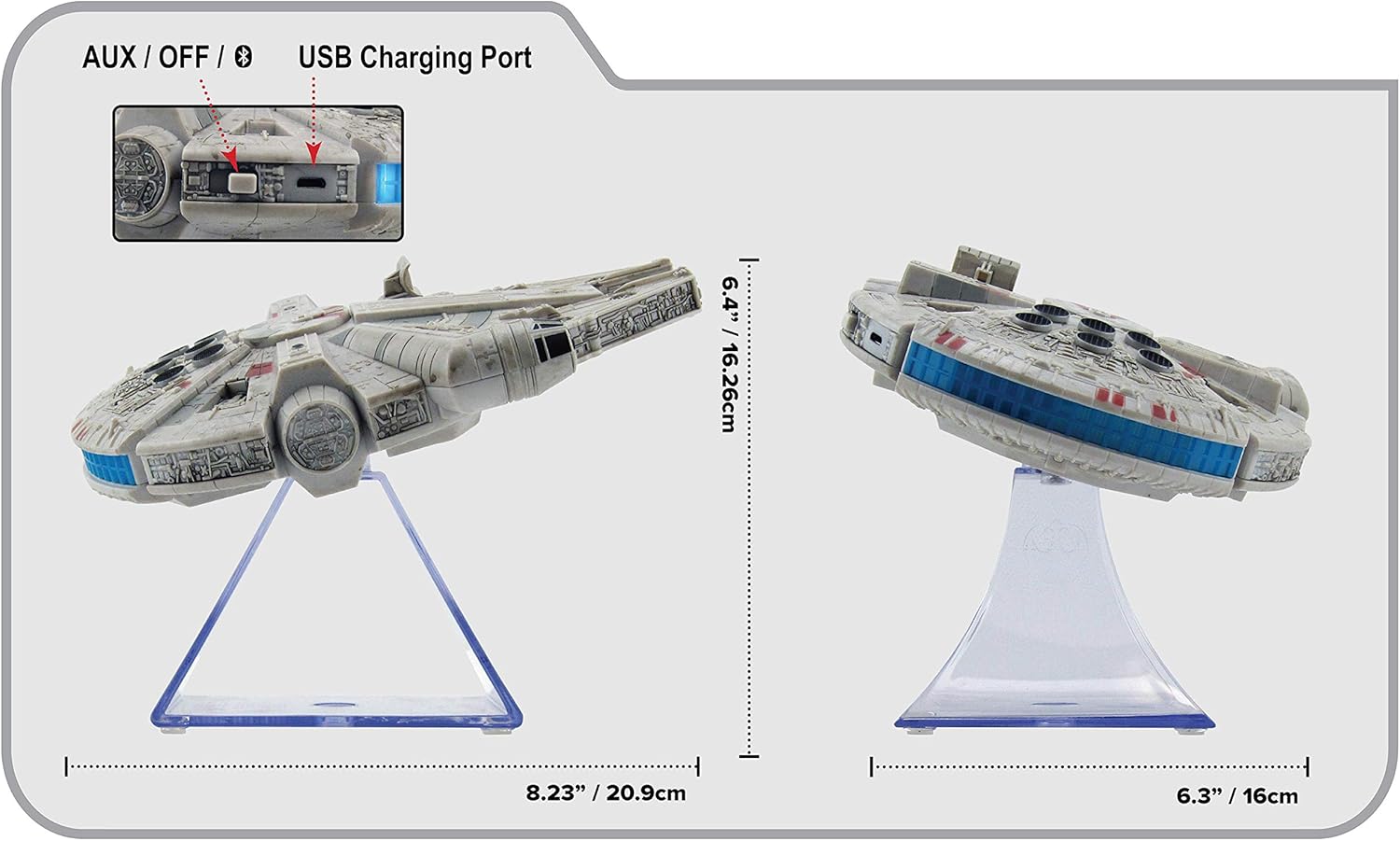
รูปที่ 3: ด้านข้าง view of the eKids Li-B17 Millennium Falcon Bluetooth Speaker, highlighting the AUX/OFF/Bluetooth switch, USB charging port, and product dimensions.

รูปที่ 4: Image illustrating the eKids Li-B17 Millennium Falcon Bluetooth Speaker's compatibility with multiple devices including mobile phones, tablets, notebooks, smartwatches, game devices, and PCs.
6. คู่มือการใช้งาน
6.1 การเล่นเสียง
- Once connected via Bluetooth or AUX, start playing audio from your source device.
- Adjust the volume using the controls on your connected device. The speaker itself does not have volume controls.
6.2 การโทรแบบแฮนด์ฟรี
เมื่อเชื่อมต่อกับสมาร์ทโฟนผ่านบลูทูธ:
- รับสาย: Press the designated call button on the speaker (often integrated with the Bluetooth button or a separate small button near the main blaster area).
- การวางสาย: Press the call button again.
- การโทร: Initiate the call from your smartphone; audio will route through the speaker.
6.3 เอฟเฟกต์แสง
The speaker features integrated blue engine lights that illuminate when the speaker is powered on and in use, enhancing the visual experience.
6.4 Star Wars Theme Playback
Press the large button located on the top of the speaker (the top blaster area) to play the Star Wars main theme.
7. การบำรุงรักษา
- Clean the speaker with a soft, dry cloth. Do not use liquid cleaners or abrasive materials.
- เก็บลำโพงไว้ในที่เย็นและแห้งเมื่อไม่ได้ใช้งาน
- ควรหลีกเลี่ยงการทำลำโพงตกหรือการกระแทกอย่างแรง
8 การแก้ไขปัญหา
| ปัญหา | สาเหตุที่เป็นไปได้ | สารละลาย |
|---|---|---|
| ลําโพงไม่เปิดขึ้น | แบตเตอรี่หมด | ชาร์จลำโพงโดยใช้สาย USB ที่ให้มา |
| ไม่สามารถจับคู่ผ่านบลูทูธได้ | ลำโพงไม่ได้อยู่ในโหมดจับคู่หรือบลูทูธของอุปกรณ์ปิดอยู่ | Ensure speaker is in Bluetooth mode and press the Bluetooth button to enter pairing. Turn Bluetooth on your device and search again. |
| ไม่มีเสียงจากลำโพง | Volume too low, incorrect input mode, or device not playing. | Increase volume on your device. Ensure speaker is in correct mode (Bluetooth/AUX). Check if your device is playing audio. |
| คุณภาพเสียงไม่ดี | อุปกรณ์อยู่ห่างจากลำโพงมากเกินไป มีสัญญาณรบกวน หรือแบตเตอรี่อ่อน | Move device closer to speaker (within 30 feet). Avoid obstacles. Charge the speaker. |
9. ข้อมูลจำเพาะ
| คุณสมบัติ | ข้อมูลจำเพาะ |
|---|---|
| หมายเลขรุ่น | Li-B17 |
| เทคโนโลยีการเชื่อมต่อ | บลูทูธ |
| ช่วงสาย | สูงถึง 30 ฟุต (ประมาณ 9 เมตร) |
| แหล่งพลังงาน | Lithium-Polymer Battery (rechargeable) |
| อายุการใช้งานแบตเตอรี่ | นานถึง 6 ชั่วโมง |
| กำลังขับสูงสุดของลำโพง | 25 วัตต์ |
| โหมดเอาต์พุตเสียง | สเตอริโอ |
| วัสดุ | พลาสติก |
| ประเภทการติดตั้ง | โต๊ะวางของ |
| ขนาด (กว้าง x ยาว x สูง) | 18.29 x 26.42 x 24.13 ซม. (7.2 x 10.4 x 9.5 นิ้ว) |
| ส่วนประกอบที่รวมอยู่ | Millennium Falcon Bluetooth Speaker, USB Charging Cable |
10. การรับประกันและการสนับสนุน
ผลิตภัณฑ์นี้มาพร้อมกับ การรับประกันแบบจำกัด. For specific details regarding warranty coverage, duration, and how to obtain service, please refer to the warranty card included with your purchase or contact eKids customer support.
For technical support or further inquiries, please visit the official eKids webเว็บไซต์หรือติดต่อฝ่ายบริการลูกค้าของพวกเขา


