1. บทนำ
The Alpine IVA-W520E is a full-featured 2DIN DVD player solution designed for in-car entertainment and media. It integrates advanced video and audio technologies, including a 7-inch LED touchscreen and a Burr-Brown 24-bit DAC, to deliver high-quality sound and clear images. This manual provides essential information for the proper installation, operation, and maintenance of your IVA-W520E unit.
2. ข้อมูลด้านความปลอดภัย
Please read all safety instructions carefully before installing or operating the unit. Failure to follow these instructions may result in injury or damage to the unit or vehicle.
- แนะนำการติดตั้งอย่างมืออาชีพ: Due to the complexity of car audio-visual systems, professional installation is highly recommended to ensure proper wiring and functionality.
- แหล่งพลังงาน: Connect the unit only to a 12V DC negative ground power supply.
- หลีกเลี่ยงสิ่งรบกวน: Do not operate the unit's controls or view video content while driving, as this can lead to accidents. Always pull over to a safe location before making adjustments.
- การระบายอากาศ : ตรวจสอบให้แน่ใจว่ามีการระบายอากาศรอบ ๆ เครื่องอย่างเพียงพอเพื่อป้องกันความร้อนสูงเกินไป อย่าปิดกั้นช่องระบายอากาศ
- ความชื้นและของเหลว: Keep the unit away from moisture and liquids. Do not expose it to rain or water.
- การทำความสะอาด: ใช้ผ้านุ่มและแห้งทำความสะอาด หลีกเลี่ยงน้ำยาทำความสะอาดหรือตัวทำละลายที่มีฤทธิ์กัดกร่อน
3. เนื้อหาบรรจุภัณฑ์
ตรวจสอบว่ามีรายการทั้งหมดอยู่ในแพ็คเกจก่อนดำเนินการติดตั้ง:
- Alpine IVA-W520E Head Unit
- ชุดสายไฟ/ชุดลำโพง
- ฮาร์ดแวร์สำหรับติดตั้ง (สกรู, ขายึด)
- แหวนรอง
- คู่มือการใช้งาน (เอกสารนี้)
- ข้อมูลการรับประกัน
4. การตั้งค่าและการติดตั้ง
4.1. แนวทางการติดตั้ง
Proper installation is crucial for optimal performance and safety. It is highly recommended to have the unit installed by a qualified professional.
- ถอดแบตเตอรี่: ก่อนเริ่มงานเกี่ยวกับระบบไฟฟ้าใดๆ ให้ถอดขั้วลบของแบตเตอรี่รถยนต์ออกก่อน เพื่อป้องกันการลัดวงจร
- การติดตั้ง: Securely mount the unit in the vehicle's double-DIN opening using the provided mounting brackets and screws. Ensure it is stable and does not obstruct any vehicle controls.
- การเดินสายไฟ: Connect the power harness, speaker wires, and other input/output cables according to the wiring diagram provided in the separate installation guide. Pay close attention to ground connections.
- Antenna and External Devices: Connect the radio antenna and any external devices such as a reverse camera or external ampลิตเตอร์
4.2. การตั้งค่าเริ่มต้น
After installation, reconnect the battery and power on the unit for the first time.
- เลือกภาษา: ทำตามคำแนะนำบนหน้าจอเพื่อเลือกภาษาที่คุณต้องการ
- เวลาและวันที่: Set the correct time and date for accurate display.
- การตั้งค่าเสียง: Adjust basic audio settings such as volume, balance, and fader.
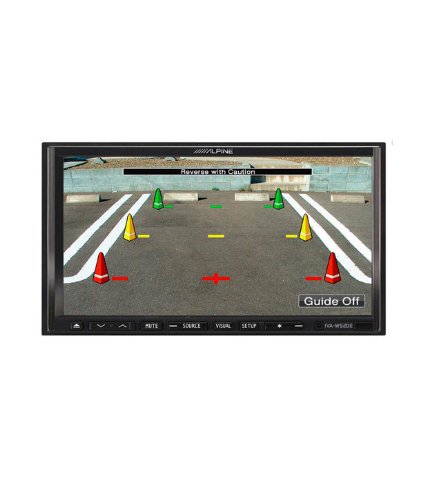
รูปที่ 4.1: อดีตample of the IVA-W520E displaying a reverse camera feed, showing parking guidelines. This feature aids in safe vehicle maneuvering.
5. การใช้งานเครื่อง
5.1. Touchscreen and Button Controls
The IVA-W520E features a responsive 7-inch LED touchscreen for primary control, supplemented by physical buttons for quick access to common functions.
- หน้าจอสัมผัส: Navigate menus, select sources, and control playback by touching the screen.
- การควบคุมระดับเสียง: Use the dedicated volume buttons or on-screen controls to adjust audio levels.
- ปุ่มต้นทาง: Press to cycle through available audio/video sources (Radio, DVD, USB, iPod, AUX, Bluetooth).
- ปุ่มปิดเสียง: Temporarily mutes the audio output.
- ปุ่มตั้งค่า: เข้าถึงเมนูการตั้งค่าระบบ
5.2. การเล่นเสียง
The unit supports various audio formats and sources, enhanced by its Burr-Brown 24-bit DAC for superior sound quality.
- ยูเอสบีเสียง: เชื่อมต่ออุปกรณ์ USB ที่มีเสียง files. The unit will display track information and allow navigation through folders.
- iPod/iPhone Connectivity: Connect your iPod or iPhone for direct audio playback and control.
- การเล่นดีวีดี/ซีดี: Insert a DVD or CD into the disc slot for audio or video playback.
- เครื่องรับวิทยุ: Access AM/FM radio stations.
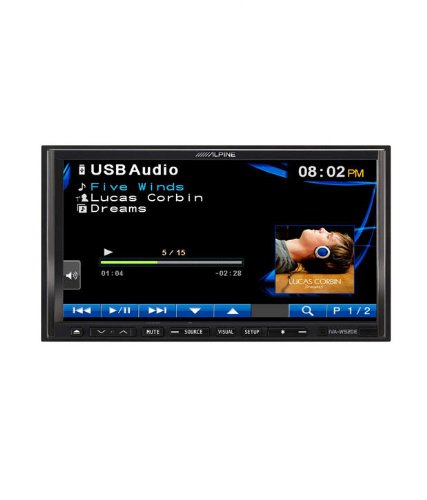
Figure 5.1: The IVA-W520E displaying the USB Audio interface, showing current track, artist, and playback controls. This allows for easy navigation of digital music files.
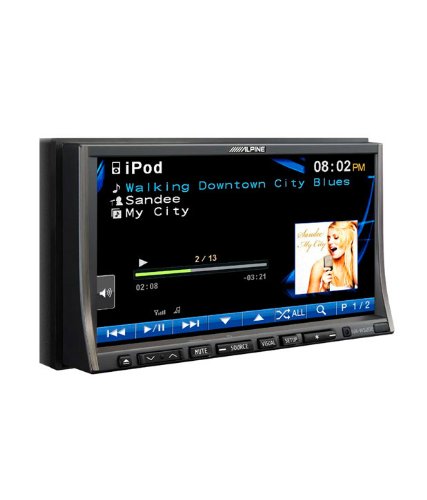
Figure 5.2: The IVA-W520E displaying the iPod interface, showing a list of songs and album art. This demonstrates seamless integration with Apple devices for music playback.
5.3. การเล่นวิดีโอ
The 7-inch LED screen provides enhanced image quality with higher resolution, better contrast, and improved color reproduction compared to standard LCD screens.
- DVD Video: Insert a video DVD for playback. Ensure the parking brake safety wire is correctly connected for video to display while the vehicle is stationary.
- อินพุตวิดีโอภายนอก: The unit supports external video sources, such as a reverse camera or other video devices.
5.4. การเชื่อมต่อบลูทูธ
The IVA-W520E is upgradable for Bluetooth hands-free system functionality, allowing for safe and convenient communication while driving.
- การจับคู่: Refer to the separate Bluetooth module manual (if applicable) for pairing instructions with your mobile phone.
- การโทรแบบแฮนด์ฟรี: Make and receive calls directly through the unit.
- การสตรีมเสียง: สตรีมเสียงจากอุปกรณ์ที่รองรับบลูทูธของคุณ
5.5. Navigation System (Upgradable)
The unit is designed to be upgradable with a navigation system. Consult your Alpine dealer for compatible navigation modules and installation.
6. การบำรุงรักษา
Regular maintenance helps ensure the longevity and optimal performance of your Alpine IVA-W520E.
- การทำความสะอาดหน้าจอ: เช็ดหน้าจอสัมผัสเบาๆ ด้วยผ้าเนื้อนุ่มที่ไม่เป็นขุย สำหรับคราบสกปรกที่เช็ดออกยาก ให้เช็ดเบาๆ อีกครั้งampen the cloth with water or a screen-specific cleaner. Do not spray cleaner directly onto the screen.
- ช่องใส่แผ่นดิสก์: Keep the disc slot free of dust and debris. Avoid inserting bent, scratched, or irregular discs.
- การทำความสะอาดทั่วไป: Use a soft, dry cloth to wipe the unit's exterior. Avoid harsh chemicals or abrasive materials.
7 การแก้ไขปัญหา
If you encounter issues with your IVA-W520E, refer to the following common problems and solutions:
| ปัญหา | สาเหตุที่เป็นไปได้ | สารละลาย |
|---|---|---|
| ไม่มีไฟฟ้า | ฟิวส์ขาด, การเดินสายไฟไม่ถูกต้อง, การเชื่อมต่อหลวม | Check vehicle fuses and unit's fuse. Verify power and ground wiring connections. Ensure battery is connected. |
| ไม่มีเสียง | Volume too low, mute activated, speaker wiring issue, incorrect source selected. | เพิ่มระดับเสียง ปิดเสียง ตรวจสอบการเชื่อมต่อลำโพง เลือกแหล่งเสียงที่ถูกต้อง |
| ดิสก์ผิดพลาด | ดิสก์สกปรก มีรอยขีดข่วน หรือเข้ากันไม่ได้ | Clean the disc. Try a different, known-good disc. Ensure disc format is supported. |
| วิดีโอไม่แสดง (ขณะขับรถ) | Parking brake safety wire not connected or incorrectly connected. | This is a safety feature. Video playback is disabled while the vehicle is in motion. Ensure the parking brake wire is correctly connected to the vehicle's parking brake circuit. |
| ปัญหาการจับคู่บลูทูธ | Bluetooth module not connected, phone not in pairing mode, interference. | Ensure optional Bluetooth module is correctly installed. Put phone in pairing mode. Move closer to the unit. |
If the problem persists after trying these solutions, please contact your authorized Alpine dealer or customer support.
8. ข้อมูลจำเพาะ
Key technical specifications for the Alpine IVA-W520E:
- แบบอย่าง: IVA-W520E
- ขนาดจอแสดงผล: 7 นิ้ว (18 ซม.)
- ประเภทจอภาพ: LED LCD Touchscreen
- ปณิธาน: 480 x 272 พิกเซล
- เสียง DAC: Burr-Brown 24-bit
- อุปกรณ์ที่รองรับ: Smartphone (via USB/iPod, Bluetooth upgradable)
- คุณสมบัติพิเศษ: Touchscreen, Bluetooth (upgradable)
- โหมดเอาต์พุตเสียง: ลำโพง
- ผู้ผลิต: อัลไพน์
- มีจำหน่ายครั้งแรก: 20 สิงหาคม 2015
9. การรับประกันและการสนับสนุน
For detailed warranty information, please refer to the warranty card included with your product package or visit the official Alpine webไซต์ โปรดเก็บใบเสร็จรับเงินไว้เป็นหลักฐานการซื้อ
For technical support, service, or inquiries about compatible accessories and upgrades (such as navigation modules or Bluetooth kits), please contact your authorized Alpine dealer or visit the Alpine customer support portal online.
เจ้าหน้าที่อัลไพน์ Webเว็บไซต์: www.alpine.com


