1. สินค้าหมดview
The AGPtek A3 LED Artcraft Tracing Light Pad is an ultra-thin, portable, and dimmable light pad designed for various creative and professional applications. It provides a perfectly even illuminated surface, making it ideal for tasks requiring precise tracing and viewการไอเอ็นจี
2. สิ่งที่รวมอยู่
- 1x LED Tracing Light Pad
- อะแดปเตอร์ USB 1x
- สาย USB 1x
- 1x คู่มือผู้ใช้
3. การตั้งค่า
- Connect the provided USB cable to the micro-USB port on the side of the LED Tracing Light Pad.
- Connect the other end of the USB cable to a power source. This can be:
- The included USB adapter, plugged into a wall outlet.
- A computer's USB port.
- A power bank.
- Ensure the connection is secure. The light pad is now ready for operation.

Figure 1: Connecting the light pad to a USB power source.

Figure 2: The included USB adapter and cable.
4. คู่มือการใช้งาน
- เปิด/ปิดเครื่อง: Gently touch the power button icon on the light pad to turn it on or off.
- ปรับความสว่าง: To adjust the brightness, touch and hold the power button. The brightness will cycle through three adjustable levels (low, medium, high). Release your finger when the desired brightness is reached. The light pad features a memory function that will recall your last brightness setting when powered on again.
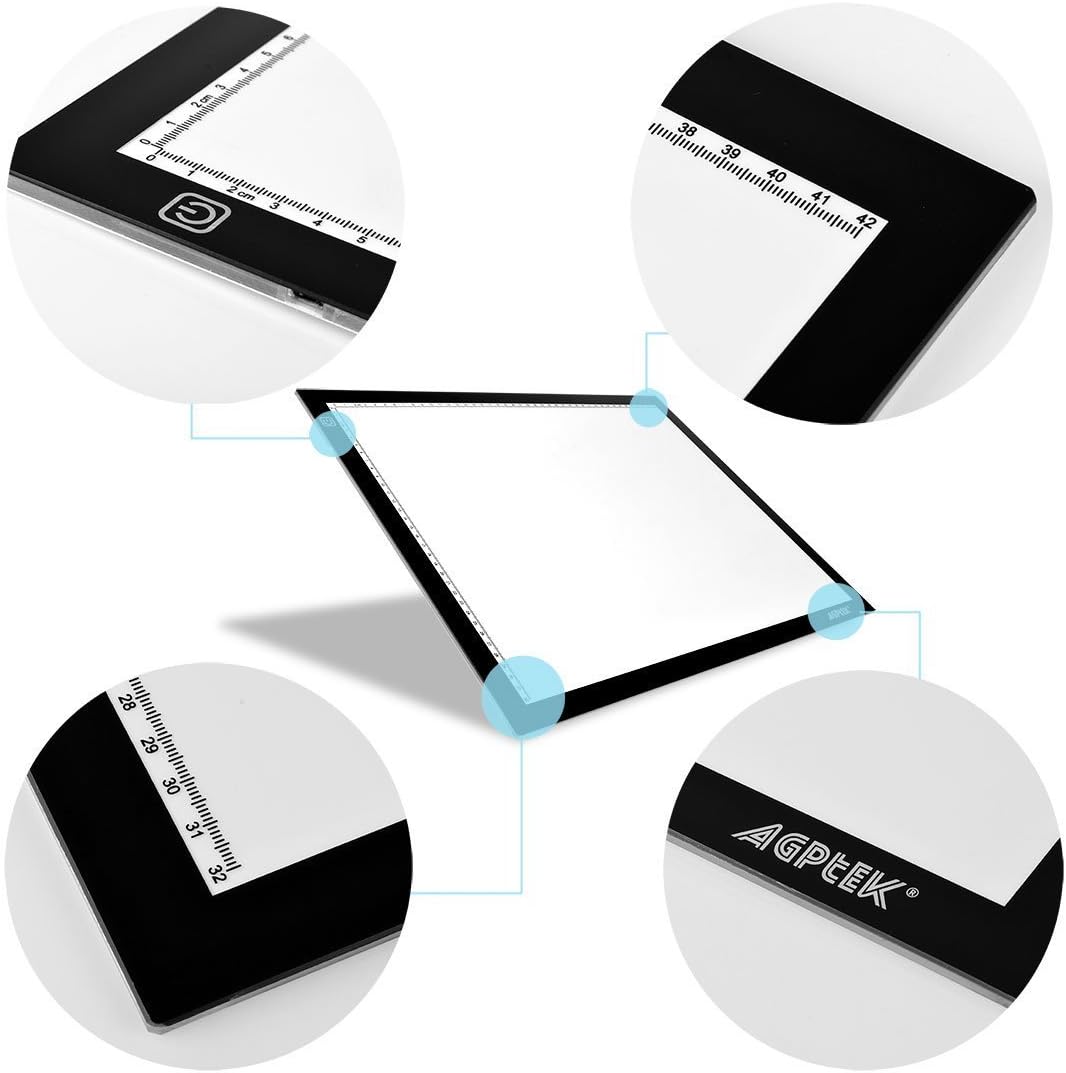
Figure 3: Location of the touch-sensitive power button.
5. คุณสมบัติ
- Ultra-Thin & Portable Design: With a thickness of only 0.24 inches and a weight of 1.4 lbs, the light pad is highly portable and easy to store or carry.
- ความสว่างที่ปรับได้ 3 ระดับ: Easily switch between three brightness settings to suit your needs and the opacity of your materials.
- Tough Sensor Switch: The intuitive touch sensor allows for simple power control and brightness adjustment.
- ใช้พลังงานจาก USB: Conveniently powered via USB, allowing connection to various devices such as computers, USB wall adapters, or power banks.
- Integrated Rulers: The light pad features integrated centimeter rulers along its edges for precise measurements during your work.

Figure 4: The ultra-thin design of the light pad.

รูปที่ 5: รายละเอียด view of the integrated rulers.
6. การสมัคร
The AGPtek A3 LED Artcraft Tracing Light Pad is versatile and suitable for a wide range of activities, including but not limited to:
- การพิมพ์ลายฉลุ
- แอนิเมชั่น 2D
- การประดิษฐ์ตัวอักษร
- การปั้มนูน
- การทำสมุดภาพ
- การถ่ายโอนรอยสัก
- การร่างและการวาดภาพ
- Sewing projects
- กระจกสี
- งานควิลท์
- เอกซเรย์ Viewกำลังทำ

Figure 6: The light pad in use for tracing designs.

Figure 7: The light pad facilitating detailed drawing.
Video 1: Demonstration of the Artcraft Tracing Light Pad's features and use.
7. การบำรุงรักษา
- Clean the surface of the light pad with a soft, dry cloth. Avoid abrasive cleaners or solvents.
- ห้ามจุ่มอุปกรณ์ลงในน้ำหรือสัมผัสกับความชื้นมากเกินไป
- Store the light pad in a safe place to prevent scratches or damage to the surface.
8 การแก้ไขปัญหา
- Light Pad does not turn on: Ensure the USB cable is securely connected to both the light pad and a functioning power source. Try a different USB port or power adapter if necessary.
- ความสว่างไม่สม่ำเสมอ: Ensure the touch sensor is clean and free from obstructions. Try adjusting the brightness again by touching and holding the power button.
9. ข้อมูลจำเพาะ
| ข้อมูลจำเพาะ | รายละเอียด |
|---|---|
| ยี่ห้อ | AGPTEK |
| ชื่อรุ่น | A3 Light Box, AGPtek LED Artcraft Tracing Light Pad |
| สี | สีดำ/สีขาว |
| วัสดุ | กระจก |
| ความหนาของรายการ | 0.24 นิ้ว |
| ขนาดสินค้า | 20.8 x 15.7 x 1.9 นิ้ว |
| น้ำหนักสินค้า | 3.14 ปอนด์ (1426 กรัม) |
| แหล่งพลังงาน | ขับเคลื่อนด้วย USB |
| ประเภทแหล่งกำเนิดแสง | ไดโอดเปล่งแสง (LED) |
| ความสว่าง | 3 nits (3-level adjustable) |
| ยูพีซี | 713382799096 |
10. การรับประกันและการสนับสนุน
For any questions, technical support, or warranty inquiries regarding your AGPtek A3 LED Artcraft Tracing Light Pad, please refer to the contact information provided in your product packaging or visit the official AGPTEK webเว็บไซต์.


